Add existing WinXp to Win 7 for dual boot

MacksPower

New member
Local time
5:40 PM
Messages
6
What is the easiest way to backup an existing WinXp on an old hard drive and restore it to a new hard drive that has Win 7 on it in order to dual boot them?

I bought a new hard drive and Win 7 for my laptop but I want to add my existing WinXp from the old hd and dual boot them.
 

My Computer My Computer

At a glance

Windows 7 Ultimate x64t74004gb7950 gtx
Computer Manufacturer/Model Number
Dell M1710
OS
Windows 7 Ultimate x64
CPU
t7400
Memory
4gb
Graphics Card(s)
7950 gtx
Hard Drives
Momentous XT 500gb

My Computer My Computer

At a glance

ME/XP/Vista/Win7
OS
ME/XP/Vista/Win7
Yes I ran it on this computer with the old drive. Do you think I could copy xp to the new drive with driveimage xml then use EasyBCD to set the boot options in Win 7.
 

My Computer My Computer

At a glance

Windows 7 Ultimate x64t74004gb7950 gtx
Computer Manufacturer/Model Number
Dell M1710
OS
Windows 7 Ultimate x64
CPU
t7400
Memory
4gb
Graphics Card(s)
7950 gtx
Hard Drives
Momentous XT 500gb
Hi there
depending on what you need the XP system to do why not run it as a Virtual machine.

It could probably run everything you require. I wouldn't suggest using XP Mode but a full blown VM machine run under the free vmware product vmplayer. Download from the vmware site.

You can create the XP vm very simply from your running XP machine by using the vmware converter (also free). You don't have to worry about the hardware either - the Virtual BIOS takes care of that. The only hardware drivers you need are for scanners / usb printers etc which normally run just fine on the VM.

A BIG problem for running a REAL XP on modern MB's is that most disks these days are SATA or SCSI so the initial XP system will probably come up with a message "No Hard Disks found" when you try and install the XP system. You will either need an IDE drive (slow disks BTW are a KILLER in ANY SYSTEM and usually present more of a problem than even a small amount of RAM or an older CPU) or a "floppy image" of the SATA drivers - and then since the XP install will only read external supplied drivers from a REAL floppy you are "screwed".

You can "Slipstream" the SATA drivers in to the XP system before installing it using nLite but ask yourself if its worth the hassle of doing this when a simple XP Virtual Machine will do all you want anyway.

I don't reccommend using XP mode since you have to have W7 PROFESSIONAL at least -- vmware vmplayer will even work on W7 basic edition !!!!.

Another advantage with the vm is that you only need to have it running when you want to run an application on it -- you don't need to re-boot the host machine.

You can also "Clone" the VM very simply if you want to test things.

Cheers
jimbo
 

My Computer My Computer

At a glance

Linux CENTOS 7 / various Windows OS'es and se...Intel i7 Intel i58GB, 16GBOn Motherboard
Computer type
PC/Desktop
Computer Manufacturer/Model Number
Custom built, several laptops HP/ASUS
OS
Linux CENTOS 7 / various Windows OS'es and servers
CPU
Intel i7 Intel i5
Memory
8GB, 16GB
Graphics Card(s)
On Motherboard
Sound Card
Realtek HD audio
Monitor(s) Displays
Apple Cinema display, Samsung LCD
Screen Resolution
1920 X 1080
Hard Drives
4 X 1TB SATA
Mouse
Toshiba wireless laser
Internet Speed
> 20MB up
If I copy over my existing XP from my old drive, that I took out of my current computer, with DriveImage XML onto a new partition on the new drive it would not work?

I shouldn't need to add in drivers for the new hard drive since the old Windows XP was installed on this computer right?

I could run it as a VM but I have it set up pretty good so I will probably use it quite a bit, for a while anyway, and I was going to copy over my other content to use in Win 7.
 

My Computer My Computer

At a glance

Windows 7 Ultimate x64t74004gb7950 gtx
Computer Manufacturer/Model Number
Dell M1710
OS
Windows 7 Ultimate x64
CPU
t7400
Memory
4gb
Graphics Card(s)
7950 gtx
Hard Drives
Momentous XT 500gb
If I copy over my existing XP from my old drive, that I took out of my current computer, with DriveImage XML onto a new partition on the new drive it would not work?

I shouldn't need to add in drivers for the new hard drive since the old Windows XP was installed on this computer right?

I could run it as a VM but I have it set up pretty good so I will probably use it quite a bit, for a while anyway, and I was going to copy over my other content to use in Win 7.

It may work on Partition 1, but not on Partition 2.
Best to do a clean install.
 

My Computer My Computer

At a glance

ME/XP/Vista/Win7
OS
ME/XP/Vista/Win7
Actually the one I want to clone is on drive F, I had one on C a long time ago but it wouldn't boot so I just installed it again on F. Since that is the case would I be able to create a F drive on Win 7 then clone it on that partition? Will Win Xp see the hidden Win 7 partition or would that even matter?
 

My Computer My Computer

At a glance

Windows 7 Ultimate x64t74004gb7950 gtx
Computer Manufacturer/Model Number
Dell M1710
OS
Windows 7 Ultimate x64
CPU
t7400
Memory
4gb
Graphics Card(s)
7950 gtx
Hard Drives
Momentous XT 500gb
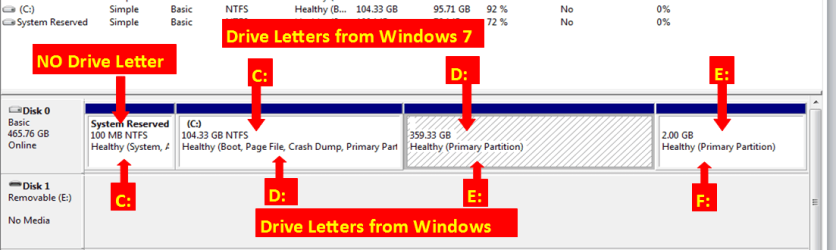
If you make a partition F: in Windows 7, this Partition will G: in Win XP.
 

My Computer My Computer

At a glance

ME/XP/Vista/Win7
OS
ME/XP/Vista/Win7
So if I do: 1st partition hidden Win7, 2nd partition Win 7, 3rd partition D:, 4th partition E:, Then restore F to the Win7 E: partition, Win Xp should boot up and cal it F?
 

My Computer My Computer

At a glance

Windows 7 Ultimate x64t74004gb7950 gtx
Computer Manufacturer/Model Number
Dell M1710
OS
Windows 7 Ultimate x64
CPU
t7400
Memory
4gb
Graphics Card(s)
7950 gtx
Hard Drives
Momentous XT 500gb
Drive Letters.

Drive Letters.PNG
 

My Computer My Computer

At a glance

ME/XP/Vista/Win7
OS
ME/XP/Vista/Win7
I got it to work. I used DriveImage XML from within Win 7 to restore the os files, then I used Win 7's regedit to load the Win Xp hive in order to clear the MountedDevice key in the Win Xp registry and then ran Easybcd 2.1 to add Win Xp to the boot options and it worked.
 

My Computer My Computer

At a glance

Windows 7 Ultimate x64t74004gb7950 gtx
Computer Manufacturer/Model Number
Dell M1710
OS
Windows 7 Ultimate x64
CPU
t7400
Memory
4gb
Graphics Card(s)
7950 gtx
Hard Drives
Momentous XT 500gb
Well done.:thumbsup:
 

My Computer My Computer

At a glance

ME/XP/Vista/Win7
OS
ME/XP/Vista/Win7
Back
Top