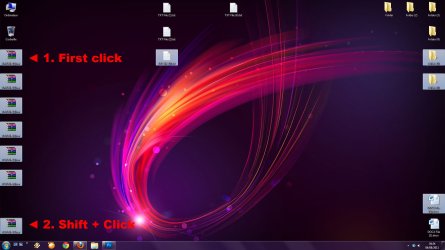
Multiple file selection on desktop (act like icon and not like a list)

Tempo

New member
Local time
7:38 PM
Messages
2
Hi there,
my problem is pretty simple, when i select a groupe of file with shift on my desktop,
the selection act like a folder with icon display setting (well it's what the desktop folder is i agree :D). It select them from left to right and line to line.

But i want the old selection style back (xp), like a folder with list display setting, so i can select a column of files on the left of my screen without taking those that are on the top right with the selection. :confused:

Thanks for help.
 

My Computer My Computer

At a glance

Windows 7 Ultimate x64
OS
Windows 7 Ultimate x64

My Computer My Computer

At a glance

64-bit Windows 11 Pro for WorkstationsIntel i7-8700K OC'd to 5 GHz64 GB (4x16GB) G.SKILL TridentZ RGB DDR4 3600...ASUS ROG-STRIX-GTX1080TI-O11G-GAMING
Computer type
PC/Desktop
Computer Manufacturer/Model Number
Self built custom
OS
64-bit Windows 11 Pro for Workstations
CPU
Intel i7-8700K OC'd to 5 GHz
Motherboard
ASUS ROG Maximus XI Formula Z390
Memory
64 GB (4x16GB) G.SKILL TridentZ RGB DDR4 3600 MHz
Graphics Card(s)
ASUS ROG-STRIX-GTX1080TI-O11G-GAMING
Sound Card
Integrated
Monitor(s) Displays
2 x Samsung Odyssey G7 27"
Screen Resolution
2560x1440
Hard Drives
1TB Samsung 990 PRO M.2,
4TB Samsung 990 PRO PRO M.2,
TerraMaster F8 SSD Plus NAS
PSU
Seasonic Prime Titanium 850W
Case
Thermaltake Core P3
Cooling
Corsair Hydro H115i
Keyboard
Logitech wireless K800
Mouse
Logitech MX Master 4
Internet Speed
2 Gb/s Download and 100 Mb/s Upload
Antivirus
Malwarebyte Anti-Malware Premium
Browser
Google Chrome
Other Info
Logitech Z625 speaker system,
Logitech BRIO 4K Pro webcam,
HP Color LaserJet Pro MFP M477fdn,
APC SMART-UPS RT 1000 XL - SURT1000XLI,
Galaxy S23 Plus phone
i'm mostly looking for a hack i just took a little screen to explain it better

Cap.jpg

When i shift click from "RAR 1" to "RAR 7" it also take the "TXT 3" "Folder 5/6" "DOCX 1" with it for example. And this is NOT what i want.

I want that it work like under Win XP again, because this is how i use my desktop... using it as the download folder and keeping some important files in corners.
And of course i don't wanna change the way i use it, the computer should adapt to the user needs and not the reverse :)

Is there a way to find the original behavior back again? I dunno... a registry hack, a deeply hidden .ini to edit... ?

Again, thanks for help.
 

My Computer My Computer

At a glance

Windows 7 Ultimate x64
OS
Windows 7 Ultimate x64
It appears Win 7 Desktop selection is left to right, top to bottom.

Why not just click and drag if you want to select files adjacent to one another?

ScreenShot00741.jpg
 

My Computer My Computer

At a glance

Windows 7 Ultimate x64 SP1Core2 Duo4 GBGM965 on-board
Computer Manufacturer/Model Number
Toshiba L355D
OS
Windows 7 Ultimate x64 SP1
CPU
Core2 Duo
Motherboard
Intel
Memory
4 GB
Graphics Card(s)
GM965 on-board
Sound Card
RealTek on-board
Monitor(s) Displays
19"+17"(laptop)
Screen Resolution
1440x900 (x 2)
Hard Drives
500GB Ext. 200GB Internal
PSU
N/A
Case
N/A
Cooling
N/A
Back
Top