Solved Logical drive does not give the option to extend volume

yeabuddy

New member
Member
Local time
4:49 PM
Messages
65
I don't get the option to extend my logical partition for some reason im trying to create a fifth partition so i took some GBs from my c partition which is unallocated spaced and want to add it to my logical drive to make another partition but the extend volume option is greyout im confused how can i do this?

Thansk for any help in advanced
 

My Computer My Computer

At a glance

windows7 sp1 home premium 64bit
OS
windows7 sp1 home premium 64bit
Hello .


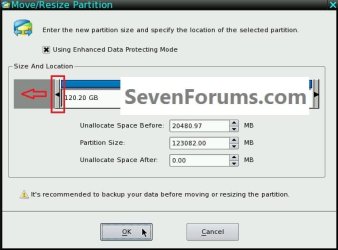
You can use the Partition Wizard boot CD to Move/Resize the left side of the Extended into the unallocated space, this snip below will give you an idea of the process and be sure to post back with any further questions you may have and to keep us informed.

As good and reliable a program as Partition Wizard is, I would not trust the installed version for the operation you need, use the boot CD as suggested and be sure to post back with any further questions you may have and to keep us informed.

click to enlarge
ResizeToLeft.jpg
First download the Partition Wizard Bootable Disk (PWBD) ISO file to the desktop, be sure to get the PWBD and not the installed version; scroll down to see the download link for the Bootable CD ISO file at this link below.
Then use ImgBurn to burn the ISO to a CD, at no greater than 4x speed with a verify; it was designed for use and works best from a CD rather than a DVD; then boot the created CD to make the changes, it doesn't take any input from the user to setup, just relax and let it load.
 

My Computer My Computer

At a glance

W 7 64-bit UltimateIntel Q9550 Yorkfield8GB Dominator 8500C5DATI : XFX 5870
Computer Manufacturer/Model Number
* BFK Customs *
OS
W 7 64-bit Ultimate
CPU
Intel Q9550 Yorkfield
Motherboard
ASUS P5Q Pro
Memory
8GB Dominator 8500C5D
Graphics Card(s)
ATI : XFX 5870
Sound Card
Realtek HD Audio 7-1
Monitor(s) Displays
1x 47" LCD HDMI & 3x 26" LCD HDMI
Screen Resolution
1920x1080P & 1920x1200
Hard Drives
1x 80GB Intel X25-M G2 SSD : 1x 500GB & 1x 640GB WD Caviar Black(s)
PSU
Corsair 620HX
Case
Cooler Master RC-690
Cooling
Tuniq Tower 120, 2x 140mm and 3x 120mm case fans
Keyboard
Microsoft 500
Mouse
Razer Diamondback 3G
Internet Speed
14 Mb/s
Other Info
1x Koutech 3Gb/s SATA HDD Hot Swap Rack
Hi bare foot kid
i went ahead and just backed up my files tha i had in my logical drive and then deleted it .Once i did tha it automatically turn in to one with the other unallocated spaced and then i made two partitions from tha one thanks for your suggestion though im about to do a fresh install on my other machine and i might tried your suggestion just to see if it works .
 

My Computer My Computer

At a glance

windows7 sp1 home premium 64bit
OS
windows7 sp1 home premium 64bit

My Computer My Computer

At a glance

W 7 64-bit UltimateIntel Q9550 Yorkfield8GB Dominator 8500C5DATI : XFX 5870
Computer Manufacturer/Model Number
* BFK Customs *
OS
W 7 64-bit Ultimate
CPU
Intel Q9550 Yorkfield
Motherboard
ASUS P5Q Pro
Memory
8GB Dominator 8500C5D
Graphics Card(s)
ATI : XFX 5870
Sound Card
Realtek HD Audio 7-1
Monitor(s) Displays
1x 47" LCD HDMI & 3x 26" LCD HDMI
Screen Resolution
1920x1080P & 1920x1200
Hard Drives
1x 80GB Intel X25-M G2 SSD : 1x 500GB & 1x 640GB WD Caviar Black(s)
PSU
Corsair 620HX
Case
Cooler Master RC-690
Cooling
Tuniq Tower 120, 2x 140mm and 3x 120mm case fans
Keyboard
Microsoft 500
Mouse
Razer Diamondback 3G
Internet Speed
14 Mb/s
Other Info
1x Koutech 3Gb/s SATA HDD Hot Swap Rack
Just wanted to say I did a Google search for how to extend a logical partition and Bare Foot Kid's answer and links were still totally valid and worked perfectly for me today. thanks so much. Only difference was that I put the ISO on a USB and made it a bootable Linux usb device.
 

My Computer My Computer

At a glance

Windows 8.1 x648GB DDR3NVIDIA GTX 660M
Computer type
Laptop
Computer Manufacturer/Model Number
Asus
OS
Windows 8.1 x64
Memory
8GB DDR3
Graphics Card(s)
NVIDIA GTX 660M
Hard Drives
1TB Seagate
Antivirus
Microsoft
Browser
IE11 & Chrome
Hello tommyriley, welcome to Seven Forums, glad I could be a help!
 

My Computer My Computer

At a glance

W 7 64-bit UltimateIntel Q9550 Yorkfield8GB Dominator 8500C5DATI : XFX 5870
Computer Manufacturer/Model Number
* BFK Customs *
OS
W 7 64-bit Ultimate
CPU
Intel Q9550 Yorkfield
Motherboard
ASUS P5Q Pro
Memory
8GB Dominator 8500C5D
Graphics Card(s)
ATI : XFX 5870
Sound Card
Realtek HD Audio 7-1
Monitor(s) Displays
1x 47" LCD HDMI & 3x 26" LCD HDMI
Screen Resolution
1920x1080P & 1920x1200
Hard Drives
1x 80GB Intel X25-M G2 SSD : 1x 500GB & 1x 640GB WD Caviar Black(s)
PSU
Corsair 620HX
Case
Cooler Master RC-690
Cooling
Tuniq Tower 120, 2x 140mm and 3x 120mm case fans
Keyboard
Microsoft 500
Mouse
Razer Diamondback 3G
Internet Speed
14 Mb/s
Other Info
1x Koutech 3Gb/s SATA HDD Hot Swap Rack
Back
Top