browsers won't give me option to locate file to upload

antihero

New member
Hi there!

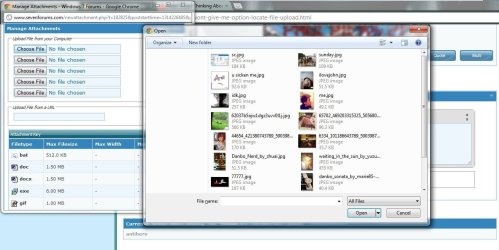
For some reason my browser won't give me the option to locate where the file is to upload. Here is the screen shot...hope someone out there can help me. Thanks alot!
sc.jpg
 

My Computer

Computer Manufacturer/Model Number
Asus g73jh laptop
OS
MS Windows 7 Home Premium 64-bit SP1
CPU
Intel Core i7 740QM @ 1.73GHz
Motherboard
ASUSTeK Computer Inc. G73Jh (Socket 989)
Memory
6.00 GB Dual-Channel DDR3 @ 661MHz (9-9-9-24)
Graphics Card(s)
ATI Mobility Radeon HD 5870 (ASUStek Computer Inc)
Sound Card
Realtek High Definition Audio
Monitor(s) Displays
Generic PnP Monitor (1600x900@60Hz)
Screen Resolution
1600x900
Hard Drives
5GB Seagate ST9640320AS (SATA)
Not sure I quite understand?

From your screenshot it just looks like you need to click the picture you want and then hit open?
 

My Computer

OS
Windows 7 Professional 64 bit
srry...

say if my file is somewhere else rather than in this folder....I lost the option to choose the location where my file is...the address bar is missing
 

My Computer

Computer Manufacturer/Model Number
Asus g73jh laptop
OS
MS Windows 7 Home Premium 64-bit SP1
CPU
Intel Core i7 740QM @ 1.73GHz
Motherboard
ASUSTeK Computer Inc. G73Jh (Socket 989)
Memory
6.00 GB Dual-Channel DDR3 @ 661MHz (9-9-9-24)
Graphics Card(s)
ATI Mobility Radeon HD 5870 (ASUStek Computer Inc)
Sound Card
Realtek High Definition Audio
Monitor(s) Displays
Generic PnP Monitor (1600x900@60Hz)
Screen Resolution
1600x900
Hard Drives
5GB Seagate ST9640320AS (SATA)
silly question but have you tried a restart of the browser. then trying again
 

My Computer

Computer Manufacturer/Model Number
Hewlett packard/p6512uk
OS
Microsoft Windows 7 Home Premium 64-bit 7600
CPU
IIx4 amd athelon 635 processor
Motherboard
FOXCONN 2AA9
Memory
2x2gb
Graphics Card(s)
ati radeon HD 5450
Sound Card
(1) Realtek High Definition Audio (2) AMD High Definition
Monitor(s) Displays
samsung lcd tv 32"
Screen Resolution
1360x 768
Hard Drives
(1) WDC WD10 01FAES-60Z2A0 SATA Disk Device (2) Maxtor OneTouch USB Device (3) ST310003 33AS USB Device (4) WD My Book 1111 USB Device
PSU
?
Cooling
air!
Keyboard
wireless hp
Mouse
wireless Hp,optical
Internet Speed
1.10mb/s
Antivirus
MSE
Browser
Firefox
yea...its really silly....but really annoying...I tried to restart my computer....and using different browsers...still, the address bar won't show up
 

My Computer

Computer Manufacturer/Model Number
Asus g73jh laptop
OS
MS Windows 7 Home Premium 64-bit SP1
CPU
Intel Core i7 740QM @ 1.73GHz
Motherboard
ASUSTeK Computer Inc. G73Jh (Socket 989)
Memory
6.00 GB Dual-Channel DDR3 @ 661MHz (9-9-9-24)
Graphics Card(s)
ATI Mobility Radeon HD 5870 (ASUStek Computer Inc)
Sound Card
Realtek High Definition Audio
Monitor(s) Displays
Generic PnP Monitor (1600x900@60Hz)
Screen Resolution
1600x900
Hard Drives
5GB Seagate ST9640320AS (SATA)
Think I got it ,when you have the window open goto "organise" then "layout" then make sure "navigation pane" is ticked
 

My Computer

OS
Windows 7 Professional 64 bit
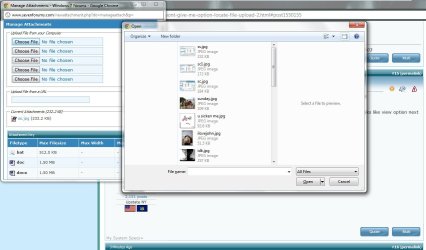
this is what happened when navigation pane is on....still not working :(sc1.jpg
 

My Computer

Computer Manufacturer/Model Number
Asus g73jh laptop
OS
MS Windows 7 Home Premium 64-bit SP1
CPU
Intel Core i7 740QM @ 1.73GHz
Motherboard
ASUSTeK Computer Inc. G73Jh (Socket 989)
Memory
6.00 GB Dual-Channel DDR3 @ 661MHz (9-9-9-24)
Graphics Card(s)
ATI Mobility Radeon HD 5870 (ASUStek Computer Inc)
Sound Card
Realtek High Definition Audio
Monitor(s) Displays
Generic PnP Monitor (1600x900@60Hz)
Screen Resolution
1600x900
Hard Drives
5GB Seagate ST9640320AS (SATA)
How about if your right click on the blank bit on the left , is "show all folders" ticked?
 

My Computer

OS
Windows 7 Professional 64 bit
theres no responds when I right click
 

My Computer

Computer Manufacturer/Model Number
Asus g73jh laptop
OS
MS Windows 7 Home Premium 64-bit SP1
CPU
Intel Core i7 740QM @ 1.73GHz
Motherboard
ASUSTeK Computer Inc. G73Jh (Socket 989)
Memory
6.00 GB Dual-Channel DDR3 @ 661MHz (9-9-9-24)
Graphics Card(s)
ATI Mobility Radeon HD 5870 (ASUStek Computer Inc)
Sound Card
Realtek High Definition Audio
Monitor(s) Displays
Generic PnP Monitor (1600x900@60Hz)
Screen Resolution
1600x900
Hard Drives
5GB Seagate ST9640320AS (SATA)
Dam man I am stumped, I tried everything to replicate the problem you are having but I am getting nowhere.

How long has it been happening for? Or has it always been like this?
 

My Computer

OS
Windows 7 Professional 64 bit
sigh....thanks for your concern tho....

I think it just happened recently, when I try to upload some school work on the email...its really annoying I can't choose the location
 

My Computer

Computer Manufacturer/Model Number
Asus g73jh laptop
OS
MS Windows 7 Home Premium 64-bit SP1
CPU
Intel Core i7 740QM @ 1.73GHz
Motherboard
ASUSTeK Computer Inc. G73Jh (Socket 989)
Memory
6.00 GB Dual-Channel DDR3 @ 661MHz (9-9-9-24)
Graphics Card(s)
ATI Mobility Radeon HD 5870 (ASUStek Computer Inc)
Sound Card
Realtek High Definition Audio
Monitor(s) Displays
Generic PnP Monitor (1600x900@60Hz)
Screen Resolution
1600x900
Hard Drives
5GB Seagate ST9640320AS (SATA)
I think it just happened recently...

sigh...thanks for your concern tho
 

My Computer

Computer Manufacturer/Model Number
Asus g73jh laptop
OS
MS Windows 7 Home Premium 64-bit SP1
CPU
Intel Core i7 740QM @ 1.73GHz
Motherboard
ASUSTeK Computer Inc. G73Jh (Socket 989)
Memory
6.00 GB Dual-Channel DDR3 @ 661MHz (9-9-9-24)
Graphics Card(s)
ATI Mobility Radeon HD 5870 (ASUStek Computer Inc)
Sound Card
Realtek High Definition Audio
Monitor(s) Displays
Generic PnP Monitor (1600x900@60Hz)
Screen Resolution
1600x900
Hard Drives
5GB Seagate ST9640320AS (SATA)
Antihero,

I need your help. I need for you to fluff out your system specs and here is how you do it:

UPDATE YOUR SEVENFORUMS SYSTEM SPECS


User CP (3rd item in the top menu bar) |
in left-hand column, under Your Profile, Edit System Spec |


Use Speccy - System Information - Free Download
and/or SIW to gather info for filling in the blanks.

Do me a favor. Please add the word laptop or desktop to the “system manufacturer” block.

Provide full windows version info, such as provided by Speccy:
MS Windows 7 Ultimate 64-bit SP1

Use the “Other Info” block for Optical Reader, Mouse, touchpad, wifi adapter, speakers, monitor

Scroll down and click on the SAVE CHANGES button.


=================================================
================================================


Now after doing that.


I'm having trouble understand when, where, what, and how of your problem.


Is this a file on your disk that you can't open?


Is this an email that you can't open?


Are you speaking of the Windows Explorer?


Are yo speaking of the Internet Explorer.


The Window Explorer is a file-management program.


The Internet Explorer is a program for exploring the Internet. Such programs are called browsers.


If this is all 'old hat' to you, that is excellent. But since I'm not familiar with your experiences then this info will help us to understand what target we need to try to hit.
 

My Computer

Computer Manufacturer/Model Number
Toshiba Satellite S875D-S7239 laptop
OS
MS Windows 7 Ultimate SP1 64-bit
CPU
AMD A10-4600M
Motherboard
AMD Pumori (Socket FT1)
Memory
6.00 GB Dual-Channel DDR3 @ 798MHz (11-11-12-28)
Graphics Card(s)
AMD Radeon HD 7660G
Sound Card
High Definition Audio Device
Monitor(s) Displays
Generic PnP Monitor (1600x900@60Hz)
Screen Resolution
1600x900@60Hz
Hard Drives
SSD 119GB Corsair CSSD-V128GB2 ATA Device
Keyboard
Standard PS/2 Keyboard
Mouse
HP Wireless Optical Mobile Mouse Model FHA-3410
Internet Speed
What the local pub, local coffee shop offers.
Other Info
Optical Drive:MATSHITA BD-CMB UJ160B ATA Device


Also have an Asus ha1002xp netbook with Win 7 Ultimate installed.
Can you show what the upload box looks like when using Internet Explorer? I notice when I use IE to do an upload, I get an actual Windows Explorer browse dialog box. In your screenshot, I notice you don't actually have an Explorer window, but Chrome is *hosting* an explorer dialog box. Not quite the same...
 

My Computer

Computer type
PC/Desktop
Computer Manufacturer/Model Number
Custom
OS
Windows 10 Pro x64
CPU
Intel Core i7 4790K @ 4.5GHz
Motherboard
Asus Maximus Hero VII
Memory
32GB DDR3
Graphics Card(s)
Nvidia GeForce GTX970
Sound Card
Realtek HD Audio
Screen Resolution
1920x1200
Hard Drives
1x Samsung 250GB SSD
4x WD RE 2TB (RAIDZ)
PSU
Corsair AX760i
Case
Fractal Design Define R4
Cooling
Noctua NH-D15
The Firefox logo is in the upper left corner when uploading a file as well but uses Windows Explorer.

I don't use Chrome, antihero. What do you get if you click on the down arrow or what looks like view option next to the help/question mark?

picture.php
 

My Computer

OS
Windows 7 & Windows Vista Ultimate
Antihero,

I need your help. I need for you to fluff out your system specs and here is how you do it:

UPDATE YOUR SEVENFORUMS SYSTEM SPECS


User CP (3rd item in the top menu bar) |
in left-hand column, under Your Profile, Edit System Spec |


Use Speccy - System Information - Free Download
and/or SIW to gather info for filling in the blanks.

Do me a favor. Please add the word laptop or desktop to the “system manufacturer” block.

Provide full windows version info, such as provided by Speccy:
MS Windows 7 Ultimate 64-bit SP1

Use the “Other Info” block for Optical Reader, Mouse, touchpad, wifi adapter, speakers, monitor

Scroll down and click on the SAVE CHANGES button.


=================================================
================================================


Now after doing that.


I'm having trouble understand when, where, what, and how of your problem.


Is this a file on your disk that you can't open?


Is this an email that you can't open?


Are you speaking of the Windows Explorer?


Are yo speaking of the Internet Explorer.


The Window Explorer is a file-management program.


The Internet Explorer is a program for exploring the Internet. Such programs are called browsers.


If this is all 'old hat' to you, that is excellent. But since I'm not familiar with your experiences then this info will help us to understand what target we need to try to hit.

I updated my system specs...feel free to take a look.

I'm talking about Internet explorer, there is no address bar for me to locate the file where I want to upload to any website or email.
 

My Computer

Computer Manufacturer/Model Number
Asus g73jh laptop
OS
MS Windows 7 Home Premium 64-bit SP1
CPU
Intel Core i7 740QM @ 1.73GHz
Motherboard
ASUSTeK Computer Inc. G73Jh (Socket 989)
Memory
6.00 GB Dual-Channel DDR3 @ 661MHz (9-9-9-24)
Graphics Card(s)
ATI Mobility Radeon HD 5870 (ASUStek Computer Inc)
Sound Card
Realtek High Definition Audio
Monitor(s) Displays
Generic PnP Monitor (1600x900@60Hz)
Screen Resolution
1600x900
Hard Drives
5GB Seagate ST9640320AS (SATA)
Can you show what the upload box looks like when using Internet Explorer? I notice when I use IE to do an upload, I get an actual Windows Explorer browse dialog box. In your screenshot, I notice you don't actually have an Explorer window, but Chrome is *hosting* an explorer dialog box. Not quite the same...

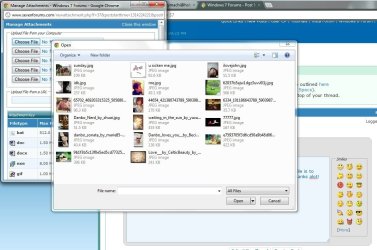
here is the screen shot when I using the IE...still no address bar for me to locate filess.jpg
 

My Computer

Computer Manufacturer/Model Number
Asus g73jh laptop
OS
MS Windows 7 Home Premium 64-bit SP1
CPU
Intel Core i7 740QM @ 1.73GHz
Motherboard
ASUSTeK Computer Inc. G73Jh (Socket 989)
Memory
6.00 GB Dual-Channel DDR3 @ 661MHz (9-9-9-24)
Graphics Card(s)
ATI Mobility Radeon HD 5870 (ASUStek Computer Inc)
Sound Card
Realtek High Definition Audio
Monitor(s) Displays
Generic PnP Monitor (1600x900@60Hz)
Screen Resolution
1600x900
Hard Drives
5GB Seagate ST9640320AS (SATA)
The Firefox logo is in the upper left corner when uploading a file as well but uses Windows Explorer.

I don't use Chrome, antihero. What do you get if you click on the down arrow or what looks like view option next to the help/question mark?

picture.php

i get this when I clicked it....it just preview of the file
ss1.jpg
 

My Computer

Computer Manufacturer/Model Number
Asus g73jh laptop
OS
MS Windows 7 Home Premium 64-bit SP1
CPU
Intel Core i7 740QM @ 1.73GHz
Motherboard
ASUSTeK Computer Inc. G73Jh (Socket 989)
Memory
6.00 GB Dual-Channel DDR3 @ 661MHz (9-9-9-24)
Graphics Card(s)
ATI Mobility Radeon HD 5870 (ASUStek Computer Inc)
Sound Card
Realtek High Definition Audio
Monitor(s) Displays
Generic PnP Monitor (1600x900@60Hz)
Screen Resolution
1600x900
Hard Drives
5GB Seagate ST9640320AS (SATA)
Antihero, would it be possible for you to download Process Monitor, open the "Manage Attachments" window in Chrome (or IE), then *run* Process Monitor to start logging, then click one of the "Browse" buttons in the "Manage Attachments" window to reproduce the issue? Once you get your Explorer upload window with no address bar, go back to the Process Monitor window, click Save As from the File menu, and save the file as a .PML file. Zip it up, upload it (somewhere else, of course ;)), and link that file here. The lot of us will see if we can find anything different on your system from our own that could potentially be causing it.
 

My Computer

Computer type
PC/Desktop
Computer Manufacturer/Model Number
Custom
OS
Windows 10 Pro x64
CPU
Intel Core i7 4790K @ 4.5GHz
Motherboard
Asus Maximus Hero VII
Memory
32GB DDR3
Graphics Card(s)
Nvidia GeForce GTX970
Sound Card
Realtek HD Audio
Screen Resolution
1920x1200
Hard Drives
1x Samsung 250GB SSD
4x WD RE 2TB (RAIDZ)
PSU
Corsair AX760i
Case
Fractal Design Define R4
Cooling
Noctua NH-D15
Back
Top