Recent Items - Change Maximum Number to Display in Start Menu

How to Change the Maximum Number of Recent Items to Display in Start Menu

   Information
This will show you how to set the maximum number of recent documents shortcuts to display in the Recent Items Start Menu button for all or specific users in Vista and Windows 7.

By default, Recent Items displays shortcuts up to the 10 most recently opened documents and files.

You must be logged in as an administrator to be able to do the steps in this tutorial.

   Note
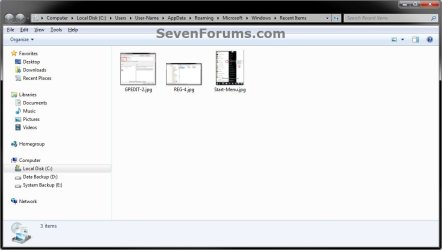
The hidden system folder Recent Items is located at:

C:\Users\(User Name)\AppData\Roaming\Microsoft\Windows\Recent Items

OR

%AppData%\Microsoft\Windows\Recent Items


If you go to the Recent Items folder location above and you have a yellow folder named Recent instead of one named Recent Items with a icon, then right click on the Recent folder and click Delete. Type shell:recent in the white line (Start Search) area of the Start Menu and press Enter. Logoff and logon, or restart the computer, to rebuild the folder back to the default Recent Items. Recent Items will not function correctly if is not set as the default Recent Items folder.

If this did not fix the Recent Items folder, then see the post at this link to make sure that the registry locations at the link have the correct locations entered for them.


EXAMPLE: Recent Items in Start Menu
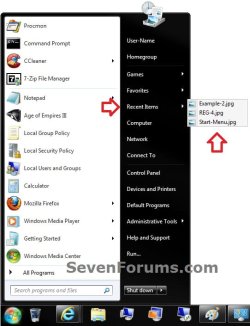
Example-1.jpg

Example-2.jpg


OPTION ONE

Manually in Registry Editor


1. Open the Start Menu, then type regedit in the search line and press enter.

2. If prompted by UAC, then click on Yes (Windows 7) or Continue (Vista).

3. In regedit, navigate to: (see screenshot below)
HKEY_CURRENT_USER\Software\Microsoft\Windows\CurrentVersion\Policies\Explorer
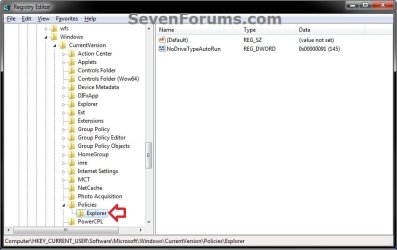
REG-1.jpg
4. Do either step 5 or 6 below for what you would like to do.

5. To Change the Maximum Number of Recent Itemsfor Only Current User
A) In the right pane of Explorer, right click on a empty space, click on New and DWORD (32-bit), type MaxRecentDocs, and press Enter. (see screenshot below)
NOTE: If you already have MaxRecentDocs and just wanted to change the maximum number, then skip this step and continue on to step 5B instead.
REG-2.jpg
B) In the right pane, double click on MaxRecentDocs. (see screenshot above)

C) Select (dot) Decimal, type in the maximum number of recent items you want to display, and click on OK. (see screenshot below)
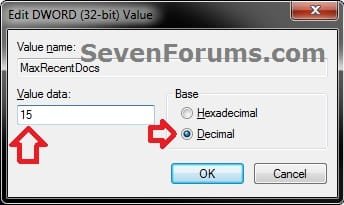
REG-3.jpg
D) Go to step 7.
6. To Restore Default Maximum Number of Recent Items for Only Current User
NOTE: This is the default setting.
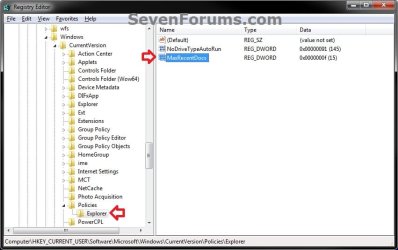
A) In the right pane of Explorer, right click on MaxRecentDocs and click on Delete. (see screenshot below)
REG-4.jpg
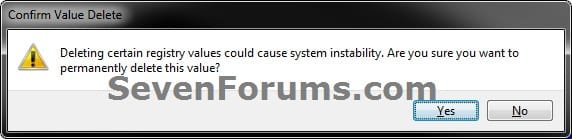
B) Click on Yes to approve deletion. (see screenshot below)
REG-5.jpg
C) Continue on to step 7.
7. Close regedit.

8. Log off and log on, or restart the computer to apply.


OPTION TWO

Through the Local Group Policy Editor


1. Open the all users, specific users or groups, or all users except administrators Local Group Policy Editor for how you want this policy applied.

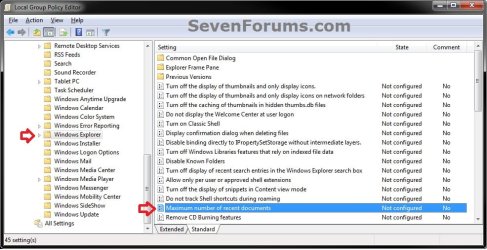
2. In the left pane, click on the arrow to expand User Configuration, Administrative Templates, Windows Components, then click on Windows Explorer. (see screenshot below)
GPEDIT-1.jpg
3. In the right pane, right click on Maximum number of recent documents and click on Edit. (see screenshot above)

4. To Restore Default Maximum Number of Recent Items
NOTE: This is the default setting.
A) Select (dot) Not Configured or Disabled. (see screenshot below step 6)

B) Go to step 6.
5. To Change the Maximum Number of Recent Items
A) Select (dot) Enabled, then under Options type in the maximum number of recent items you want to display. (see screenshot below step 6)
NOTE: This will also clear the recent items list to start over.
6. Click on OK. (see screenshot below)
GPEDIT-2.jpg
7. Close the Local Group Policy Editor.
That's it,
Shawn


Last edited:
The "simple" method of changing the recent item max count doesn't seem to work: Start > Properties > Start Menu > Customize > jump list size. So I finally took the time to look up a different solution and found this page. I noticed from the Registry that I do not already have an Explorer key under Policies. Not wanting to mess that up I continued reading.

The solution using the Local Group Policy Editor does work. But one should note that when the Max number of recent documents is changed via the LGPE, the entire list or recent items is deleted and we start from scratch. I have no problem with that - other people might. I don't think we can copy/restore the recent items links. They're not "normal" shortcuts though I wish they were.

Perhaps someone will post a follow-up here about preserving that list?

HTH
 

My Computer

OS
Windows 7 Professional
Hello Tony, and welcome to Seven Forums.

For how many items display in Jump Lists, you would want to use the settings in the tutorial below instead.
http://www.sevenforums.com/tutorials/4820-jump-lists-change-number-recent-items-display.html
You could make backup of the contents in the folder below to preserve the Recent Items list in the Start Menu button. To restore them, you would just need to reopen them again from the backup.
%AppData%\Microsoft\Windows\Recent Items
Hope this helps, :)
Shawn
 

My Computer

Computer type
PC/Desktop
Computer Manufacturer/Model Number
Self built custom
OS
64-bit Windows 11 Pro for Workstations
CPU
Intel i7-8700K OC'd to 5 GHz
Motherboard
ASUS ROG Maximus XI Formula Z390
Memory
64 GB (4x16GB) G.SKILL TridentZ RGB DDR4 3600 MHz
Graphics Card(s)
ASUS ROG-STRIX-GTX1080TI-O11G-GAMING
Sound Card
Integrated
Monitor(s) Displays
2 x Samsung Odyssey G7 27"
Screen Resolution
2560x1440
Hard Drives
1TB Samsung 990 PRO M.2,
4TB Samsung 990 PRO PRO M.2,
TerraMaster F8 SSD Plus NAS
PSU
Seasonic Prime Titanium 850W
Case
Thermaltake Core P3
Cooling
Corsair Hydro H115i
Keyboard
Logitech wireless K800
Mouse
Logitech MX Master 4
Internet Speed
2 Gb/s Download and 100 Mb/s Upload
Antivirus
Malwarebyte Anti-Malware Premium
Browser
Google Chrome
Other Info
Logitech Z625 speaker system,
Logitech BRIO 4K Pro webcam,
HP Color LaserJet Pro MFP M477fdn,
APC SMART-UPS RT 1000 XL - SURT1000XLI,
Galaxy S23 Plus phone
Howdy Brink,

This kind tutorial of yours is very nice as always and all works fine technically but I'm surprised to fail increasing a number of Recent Items of Start Menu over 27.

Maybe there is some hidden Max value, huh? Otherwise it seems quite odd when I can set any value more that 27 in Group Policy, which is well auto corresponding to that registry DWORD, however actual visible number of Recent Items in Win7 Start Menu always remains 27 and 57 of shortcuts in Recent Items folder accordingly. When the values in Group Policy were set like 77, 97, 107...

Any good guess?:p

Appreciate!:D

P.S. Funny. The number of shortcuts for FILES in Recent Items folder is literarily 27, the remaining 30 of 57 total are shortcuts for FOLDERS.:o
 

My Computer

Computer type
Laptop
Computer Manufacturer/Model Number
Dell Laptop & Asus Desktop
OS
Windows 7 Ultimate x64 SP1u OEM Dell & OEM Asus
CPU
Intel Core 2 T9500 2.60GHz & Core 2 Duo E7500 @ 2.93GHz
Motherboard
DELL PRECISION M4300 & ASUS P5Q-EM
Memory
DDR2 - 2x4GB Hyundai SODIMM 800Mhz & 2x2GB GeIL DIMM 1066MHz
Graphics Card(s)
nVIDIA Quadro FX360M & Mobo Integrated Intel4500
Sound Card
Mobos' Integrated SigmaTel & RealTek ALC1200 8Ch HD Audio
Monitor(s) Displays
Samsung 15.4" LCD & Samsung SyncMaster 245B+ Monitor
Screen Resolution
1920x1200 both
Hard Drives
SSDs Kingston, HDDs WDC & HGST - many
PSU
DELL & Some PSU of 450W
Case
DELL & IRBIS
Cooling
Dell & Cooler Master
Keyboard
Dell & Logitech
Mouse
Logitech & Genuis
Internet Speed
100Mbps
Antivirus
N360 + MalwareBytes on both
Browser
IE11 + latest Chrome on both
Hello laidbacktokyo,

If I remember correctly, I think that's all the context menu will show, but if you open the folder, it will have the rest of them.
 

My Computer

Computer type
PC/Desktop
Computer Manufacturer/Model Number
Self built custom
OS
64-bit Windows 11 Pro for Workstations
CPU
Intel i7-8700K OC'd to 5 GHz
Motherboard
ASUS ROG Maximus XI Formula Z390
Memory
64 GB (4x16GB) G.SKILL TridentZ RGB DDR4 3600 MHz
Graphics Card(s)
ASUS ROG-STRIX-GTX1080TI-O11G-GAMING
Sound Card
Integrated
Monitor(s) Displays
2 x Samsung Odyssey G7 27"
Screen Resolution
2560x1440
Hard Drives
1TB Samsung 990 PRO M.2,
4TB Samsung 990 PRO PRO M.2,
TerraMaster F8 SSD Plus NAS
PSU
Seasonic Prime Titanium 850W
Case
Thermaltake Core P3
Cooling
Corsair Hydro H115i
Keyboard
Logitech wireless K800
Mouse
Logitech MX Master 4
Internet Speed
2 Gb/s Download and 100 Mb/s Upload
Antivirus
Malwarebyte Anti-Malware Premium
Browser
Google Chrome
Other Info
Logitech Z625 speaker system,
Logitech BRIO 4K Pro webcam,
HP Color LaserJet Pro MFP M477fdn,
APC SMART-UPS RT 1000 XL - SURT1000XLI,
Galaxy S23 Plus phone
THANX

Hello laidbacktokyo,

If I remember correctly, I think that's all the context menu will show, but if you open the folder, it will have the rest of them.

Howdy Shawn,

It's nice to hearing from you. Sorry for a some kind of odd custom of mine to contact you here maybe once in a couple of years with some stupid questions about Win7 Recent Items issues...:p

Anyhow, these Recent Items settings as kindly explained by you looks simple and clear, although as usual with M$ products are quite odd actually..

Well... finally I already got an acceptable for me result by playing with these damn settings... but in a very strange way...

I've set a crazy number in Policy Editor as 777, which is well reflected to a key value in Win7 registry... and got some 60 items in context menu of Start Menu > Recent Items, and some 90 of shortcuts total for both file & folders in Recent folder accordingly...

However it should be mentioned that there is some hidden custom of Win7 itself in adding file shortcuts to Recent Items context menu... when it's impossible to add all 60 of one type of file extension like JPG or PDF or TXT or etc... So it works but very much illogical :(

Anyhow, my question is closed.

Thanks again.

Wish you well.:)
 

My Computer

Computer type
Laptop
Computer Manufacturer/Model Number
Dell Laptop & Asus Desktop
OS
Windows 7 Ultimate x64 SP1u OEM Dell & OEM Asus
CPU
Intel Core 2 T9500 2.60GHz & Core 2 Duo E7500 @ 2.93GHz
Motherboard
DELL PRECISION M4300 & ASUS P5Q-EM
Memory
DDR2 - 2x4GB Hyundai SODIMM 800Mhz & 2x2GB GeIL DIMM 1066MHz
Graphics Card(s)
nVIDIA Quadro FX360M & Mobo Integrated Intel4500
Sound Card
Mobos' Integrated SigmaTel & RealTek ALC1200 8Ch HD Audio
Monitor(s) Displays
Samsung 15.4" LCD & Samsung SyncMaster 245B+ Monitor
Screen Resolution
1920x1200 both
Hard Drives
SSDs Kingston, HDDs WDC & HGST - many
PSU
DELL & Some PSU of 450W
Case
DELL & IRBIS
Cooling
Dell & Cooler Master
Keyboard
Dell & Logitech
Mouse
Logitech & Genuis
Internet Speed
100Mbps
Antivirus
N360 + MalwareBytes on both
Browser
IE11 + latest Chrome on both
Glad to hear you got it sorted. Odd that you had to set it like that to get 60 though.
 

My Computer

Computer type
PC/Desktop
Computer Manufacturer/Model Number
Self built custom
OS
64-bit Windows 11 Pro for Workstations
CPU
Intel i7-8700K OC'd to 5 GHz
Motherboard
ASUS ROG Maximus XI Formula Z390
Memory
64 GB (4x16GB) G.SKILL TridentZ RGB DDR4 3600 MHz
Graphics Card(s)
ASUS ROG-STRIX-GTX1080TI-O11G-GAMING
Sound Card
Integrated
Monitor(s) Displays
2 x Samsung Odyssey G7 27"
Screen Resolution
2560x1440
Hard Drives
1TB Samsung 990 PRO M.2,
4TB Samsung 990 PRO PRO M.2,
TerraMaster F8 SSD Plus NAS
PSU
Seasonic Prime Titanium 850W
Case
Thermaltake Core P3
Cooling
Corsair Hydro H115i
Keyboard
Logitech wireless K800
Mouse
Logitech MX Master 4
Internet Speed
2 Gb/s Download and 100 Mb/s Upload
Antivirus
Malwarebyte Anti-Malware Premium
Browser
Google Chrome
Other Info
Logitech Z625 speaker system,
Logitech BRIO 4K Pro webcam,
HP Color LaserJet Pro MFP M477fdn,
APC SMART-UPS RT 1000 XL - SURT1000XLI,
Galaxy S23 Plus phone
Not Working

I added MaxRecentDocs to registry and put in 500. The Recent Docs folder is still limited to 149.
The group policy editor does not have "Windows Explorer" listed.
 

My Computer

Computer type
PC/Desktop
Computer Manufacturer/Model Number
Lenovo
OS
W7 64
Hello Tom, and welcome to Seven Forums. :)

Just to verify, this will only affect "Recent Items" from the Start menu like in the example screenshot at the top of the tutorial.

Did you look under User Configuration, Administrative Templates, Windows Components in Local Group Policy?
 

My Computer

Computer type
PC/Desktop
Computer Manufacturer/Model Number
Self built custom
OS
64-bit Windows 11 Pro for Workstations
CPU
Intel i7-8700K OC'd to 5 GHz
Motherboard
ASUS ROG Maximus XI Formula Z390
Memory
64 GB (4x16GB) G.SKILL TridentZ RGB DDR4 3600 MHz
Graphics Card(s)
ASUS ROG-STRIX-GTX1080TI-O11G-GAMING
Sound Card
Integrated
Monitor(s) Displays
2 x Samsung Odyssey G7 27"
Screen Resolution
2560x1440
Hard Drives
1TB Samsung 990 PRO M.2,
4TB Samsung 990 PRO PRO M.2,
TerraMaster F8 SSD Plus NAS
PSU
Seasonic Prime Titanium 850W
Case
Thermaltake Core P3
Cooling
Corsair Hydro H115i
Keyboard
Logitech wireless K800
Mouse
Logitech MX Master 4
Internet Speed
2 Gb/s Download and 100 Mb/s Upload
Antivirus
Malwarebyte Anti-Malware Premium
Browser
Google Chrome
Other Info
Logitech Z625 speaker system,
Logitech BRIO 4K Pro webcam,
HP Color LaserJet Pro MFP M477fdn,
APC SMART-UPS RT 1000 XL - SURT1000XLI,
Galaxy S23 Plus phone
I see that now and did find it under admin templates.
Any idea how to increase the number in the recent items folder? It is stuck at 149.
 

My Computer

Computer type
PC/Desktop
Computer Manufacturer/Model Number
Lenovo
OS
W7 64
That sounds like it could be the limit. I never had that many to be able to confirm a limit.
 

My Computer

Computer type
PC/Desktop
Computer Manufacturer/Model Number
Self built custom
OS
64-bit Windows 11 Pro for Workstations
CPU
Intel i7-8700K OC'd to 5 GHz
Motherboard
ASUS ROG Maximus XI Formula Z390
Memory
64 GB (4x16GB) G.SKILL TridentZ RGB DDR4 3600 MHz
Graphics Card(s)
ASUS ROG-STRIX-GTX1080TI-O11G-GAMING
Sound Card
Integrated
Monitor(s) Displays
2 x Samsung Odyssey G7 27"
Screen Resolution
2560x1440
Hard Drives
1TB Samsung 990 PRO M.2,
4TB Samsung 990 PRO PRO M.2,
TerraMaster F8 SSD Plus NAS
PSU
Seasonic Prime Titanium 850W
Case
Thermaltake Core P3
Cooling
Corsair Hydro H115i
Keyboard
Logitech wireless K800
Mouse
Logitech MX Master 4
Internet Speed
2 Gb/s Download and 100 Mb/s Upload
Antivirus
Malwarebyte Anti-Malware Premium
Browser
Google Chrome
Other Info
Logitech Z625 speaker system,
Logitech BRIO 4K Pro webcam,
HP Color LaserJet Pro MFP M477fdn,
APC SMART-UPS RT 1000 XL - SURT1000XLI,
Galaxy S23 Plus phone
This is a limit. I watched as I opened a new file and it briefly want to 150, then one was deleted, I assume the oldest.
Now . . . Where in Windows is that #??? In their infinite wisdom, could Microsoft have hard coded it to the system?
 

My Computer

Computer type
PC/Desktop
Computer Manufacturer/Model Number
Lenovo
OS
W7 64
This is a limit. I watched as I opened a new file and it briefly want to 150, then one was deleted, I assume the oldest.
Now . . . Where in Windows is that #??? In their infinite wisdom, could Microsoft have hard coded it to the system?

howdy,

yep, unfortunately this is z absolutely odd setting of win7.

1. as u can read my earlier discussion with Brink up thru this thread, I've tried to set this limit to a crazy # of 777 on 3 win7x64sp1 PCs around me - and got z very odd & uncertain results:

1st PC with win7sp1x64 directly upgraded from win7x64 returns me 107 items in C:\Users\(User Name)\Recent (77 file name shortcuts + 30 folder/drive shortcuts) but less number in popup list (around 60+)

2 other laptops with a clean install of win7sp1x64 both give me only 77 items incl. folders/drives in C:\Users\(User Name)\Recent and also less number in popup list (around 60+)

p.s. and now when nothing is clear I guess I can imagine that win7 can't read z set limit of 777 while it's too big but read 2 first digits of 77 instead. funny.

2. however, z surely oddest part of this feature is that u never able 2 get neither in popup list nor in Recent folder more than 10 shortcuts of one file type - PDF for instance.... if u open=add 11th pdf file while 10 ones already listed in popup menu then z 1 oldest shortcut disappears.

p.p.s. anyhow thanks 4 ur idea of 149 limit! I've already set this limit on 1 laptop to give it a try. but nothing changed so far.
 

My Computer

Computer type
Laptop
Computer Manufacturer/Model Number
Dell Laptop & Asus Desktop
OS
Windows 7 Ultimate x64 SP1u OEM Dell & OEM Asus
CPU
Intel Core 2 T9500 2.60GHz & Core 2 Duo E7500 @ 2.93GHz
Motherboard
DELL PRECISION M4300 & ASUS P5Q-EM
Memory
DDR2 - 2x4GB Hyundai SODIMM 800Mhz & 2x2GB GeIL DIMM 1066MHz
Graphics Card(s)
nVIDIA Quadro FX360M & Mobo Integrated Intel4500
Sound Card
Mobos' Integrated SigmaTel & RealTek ALC1200 8Ch HD Audio
Monitor(s) Displays
Samsung 15.4" LCD & Samsung SyncMaster 245B+ Monitor
Screen Resolution
1920x1200 both
Hard Drives
SSDs Kingston, HDDs WDC & HGST - many
PSU
DELL & Some PSU of 450W
Case
DELL & IRBIS
Cooling
Dell & Cooler Master
Keyboard
Dell & Logitech
Mouse
Logitech & Genuis
Internet Speed
100Mbps
Antivirus
N360 + MalwareBytes on both
Browser
IE11 + latest Chrome on both
Back
Top