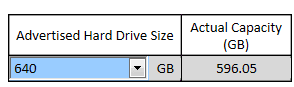
I lost 40 gb from HDD with ASUS Recovery System!!

JS2011

New member
Local time
11:12 PM
Messages
6
I bought Asus k53sc three days ago and after deleting some bloatwares I had some problems and I recovered my system Using Asus Recovery System F9 ,but it did not work and windows entered in restart cycle....after that I downloaded windows 7 home premium 64bit but I discovered that I had lost 40 gb from my HDD ..I went to disk management and there was 3 partitions "recovery" =25 gb wich I was unable to delete or extend and "OS"=250 GB I lost here 40 giga.. and D about 325 gb...Is there any way to restore this missing space?? plz help me :cry:
 

My Computer My Computer

At a glance

win 7 home premium 64bit
OS
win 7 home premium 64bit
Open a Command Prompt and and run a CHKDSK /R when prompted to restart computer say Y and reboot..This will check you disk for problems and bad sectors and hopefully fix them. Also if you could go into Disk Management and post a screen shot of your current drive partition setup that would help, you may just have some unallocated space.
 

My Computer My Computer

At a glance

Windows 7 Ultimate x64I76 x 1.5V DDR3 DIMM sockets supporting up to 2...GeForce GTX 580
Computer Manufacturer/Model Number
Alienware
OS
Windows 7 Ultimate x64
CPU
I7
Motherboard
GA-X58-USB3
Memory
6 x 1.5V DDR3 DIMM sockets supporting up to 24 GB of system
Graphics Card(s)
GeForce GTX 580
Sound Card
Realtek ALC892 codec 2/4/5.1/7.1-channel
Monitor(s) Displays
NEC Display Solutions E321 Black 32"
Screen Resolution
1366 x 768
Hard Drives
OCZ Colossus LT Series OCZSSD2-1CLSLT1T 3.5" 1TB SATA II MLC Internal Solid State Drive
PSU
XFX Black Edition XPS-850W-BES 850W ATX12V
Case
Antec
Cooling
Zalman
Keyboard
Microsoft
Mouse
Microsoft
Open a Command Prompt and and run a CHKDSK /R when prompted to restart computer say Y and reboot..This will check you disk for problems and bad sectors and hopefully fix them. Also if you could go into Disk Management and post a screen shot of your current drive partition setup that would help, you may just have some unallocated space.
I did disk check as you said ,but unfortunatily it did not work ..here are some screen shots...
 

Attachments

  • info.jpg
    info.jpg
    72.4 KB · Views: 22
  • disk managment.jpg
    disk managment.jpg
    68.9 KB · Views: 19
  • 20110830003.jpg
    20110830003.jpg
    773.3 KB · Views: 10

My Computer My Computer

At a glance

win 7 home premium 64bit
OS
win 7 home premium 64bit
25+250+321=596
 

My Computer My Computer

At a glance

ME/XP/Vista/Win7
OS
ME/XP/Vista/Win7
ok .. but asus k53sc HDD Suppose to be 640 gb ..
 

My Computer My Computer

At a glance

win 7 home premium 64bit
OS
win 7 home premium 64bit
:D ahh ..Sorry,I did not know that .
Thank u very much theog
 

My Computer My Computer

At a glance

win 7 home premium 64bit
OS
win 7 home premium 64bit
Back
Top