Solved iTunes music in WMP - How to Remove

MissSherlock

New member
Member
VIP
Local time
5:24 AM
Messages
131
Hi Folks,

I installed my Windows 7 earlier this year.

Windows 7 and iTunes/WMP are not communicating properly. Currently, I have thousands of music files from iTunes in my WMP. How do I get rid of them! :banghead: Removing them manually is not an option. Too much work! My iTunes Media folder is My Documents.

Can I uninstall Windows Media Player and start all over again? Other options welcome.

Thanks, MS
 

My Computer My Computer

At a glance

Windows 7 Home Premium 64bitIntel Core i7-3770, CPU @ 3.4 GHz16 GB RM (4 cores)NVIDIA GeForce GT 630,
Computer type
PC/Desktop
Computer Manufacturer/Model Number
Asus CM-6870
OS
Windows 7 Home Premium 64bit
CPU
Intel Core i7-3770, CPU @ 3.4 GHz
Motherboard
Asus
Memory
16 GB RM (4 cores)
Graphics Card(s)
NVIDIA GeForce GT 630,
Sound Card
Realtek HD Audio standard
Monitor(s) Displays
Asus VE248Q
Screen Resolution
1920 x 1080
Hard Drives
2 TB
PSU
300W
Case
Asus
Cooling
Smart Cooling System and Q-Fan
Keyboard
Microsoft Wireless
Mouse
Microsoft Laser 3500 Wireless
Internet Speed
25 mbps or greater
Antivirus
Bitdefender Total Security 2018
Browser
Firefox/Chrome/IE
Other Info
Firewall - Bitdefender 2018
Printer: HP Officejet Pro 8600 Plus (wireless)
If you're using the Libraries feature in Windows 7, you're using the same thing as your WMP music library, because WMP directly reads the contents of your Libraries to add music, pictures and video.

If you don't use WMP, there's no reason to "uninstall" it (not that it's possible anyway, at least not in a traditional sense of uninstalling software). Simply don't use it, if iTunes is your preferred alternative.
 

My Computer My Computer

At a glance

Windows 7 Home Premium x64Intel Core i5 2500K8GB DDR3nVidia GeForce GTX650 Ti BOOST
Computer type
Laptop
Computer Manufacturer/Model Number
Custom
OS
Windows 7 Home Premium x64
CPU
Intel Core i5 2500K
Motherboard
MSI MS-7750
Memory
8GB DDR3
Graphics Card(s)
nVidia GeForce GTX650 Ti BOOST
Sound Card
Realtek
Monitor(s) Displays
21' Philips
Screen Resolution
Full HD
Hard Drives
1TB
PSU
500W
Why don't you just not use WMP? You can't stop it from detecting audio files in your libraries.
 

My Computer My Computer

At a glance

Windows 7 Home Premium 64-Biti5-4590Corsair DDR3 8GBGeForce GTX 970
Computer type
PC/Desktop
Computer Manufacturer/Model Number
Custom build
OS
Windows 7 Home Premium 64-Bit
CPU
i5-4590
Motherboard
GIGABYTE H97M-HD3
Memory
Corsair DDR3 8GB
Graphics Card(s)
GeForce GTX 970
Monitor(s) Displays
LG Electronics W1942 - 19 inches
Screen Resolution
1440x900
Hard Drives
Corsair Neutron SSD 119GB, Toshiba External 931GB
PSU
Corsair CX600
Keyboard
Logitech K360 Wireless
Mouse
Logitech Wireless Mouse M325
Browser
Firefox
iTunes Music in WMP

Good Morning,

I've used both iTunes and WMP for many years with XP & XP Media Centre.

My iTunes Media Folder is not in My Music folder. It's in My Documents. Therefore, my iTunes music should not be in my WMP.

The current version of WMP has lost the functionality of the advanced monitoring of folders (this appears to a problem with several things in Win7):

WMP_Library_2.jpg


My WMP is set-up to look for music files in only My Music and Public Music.

I've updated iTunes a few times since I installed Win7. It may have located the library back into My Music?! However, when I check my iTunes Media folder, it is located in My Documents.

In the meantime, I'm stuck with a huge amount iTunes music in my WMP. What about if I were to delete the My Music Folder and start all over again? Or do I have to re-installed WMP?


Thanks, MS
 

My Computer My Computer

At a glance

Windows 7 Home Premium 64bitIntel Core i7-3770, CPU @ 3.4 GHz16 GB RM (4 cores)NVIDIA GeForce GT 630,
Computer type
PC/Desktop
Computer Manufacturer/Model Number
Asus CM-6870
OS
Windows 7 Home Premium 64bit
CPU
Intel Core i7-3770, CPU @ 3.4 GHz
Motherboard
Asus
Memory
16 GB RM (4 cores)
Graphics Card(s)
NVIDIA GeForce GT 630,
Sound Card
Realtek HD Audio standard
Monitor(s) Displays
Asus VE248Q
Screen Resolution
1920 x 1080
Hard Drives
2 TB
PSU
300W
Case
Asus
Cooling
Smart Cooling System and Q-Fan
Keyboard
Microsoft Wireless
Mouse
Microsoft Laser 3500 Wireless
Internet Speed
25 mbps or greater
Antivirus
Bitdefender Total Security 2018
Browser
Firefox/Chrome/IE
Other Info
Firewall - Bitdefender 2018
Printer: HP Officejet Pro 8600 Plus (wireless)
What is the full iTunes path its looking in?
by default, Itunes should be:

Documents Settings/Users/Music which is the same folder (My Music) WMP looks in by default.
I think its actually a subfolder (itunes media) in the music folder, but WMP will still grab it.

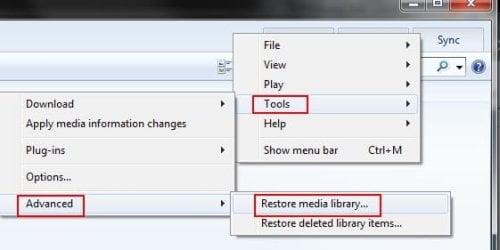
To clear out WMP, Right click the empty space at the top (left of the Burn,Play,Sync Tabs) and delete the library.
wmp.jpg

Sadly, anything you add to the Windows library WMP will add to its own as well. If you want to keep those librarys intact:

to prevent WMP from adding iTunes Media, you can move the iTunes directory.
For example, make a new folder at C:/Itunes Music, and put your itunes media in it.
Open iTunes and tell it where to look for and save music, at this new location.

WMP will still add from the My Music Folder, but will not add iTunes media.
By the same token, iTunes Media will only be accessible through iTunes itself, not through Win7 libraries.


The other alternative is to highlight all iTunes Media in WMP and choose "Delete from libary only"

That or, as suggested, do not use WMP at all.
 

My Computer My Computer

At a glance

Windows 7 Home Premium 64bitIntel Core i7 2700k8GB Mushkin Redline Ridgebacks @1866EVGA GTX570 SC
Computer Manufacturer/Model Number
Custom (Self Build)
OS
Windows 7 Home Premium 64bit
CPU
Intel Core i7 2700k
Motherboard
eVGA P67 SLI
Memory
8GB Mushkin Redline Ridgebacks @1866
Graphics Card(s)
EVGA GTX570 SC
Sound Card
XiFi Titanium HD
Monitor(s) Displays
LG W2453V
Screen Resolution
1920x1080
Hard Drives
Intel 320 80GB -- Intel X25-V 40GB --WD Black 1TB x2 -- WD Blue 640GB
PSU
Seasonic x750
Case
Corsair 600T SE White
Cooling
eVGA Superclocked CPU Cooler
Keyboard
Saitek Cyborg
Antivirus
Kaspersky
Browser
IE
Other Info
LG BD/DVD
WMP

Hi wishmaster:

Thanks for your help. iTunes is not the problem. It's the so-called updated version on WMP that is missing several key file management items.

The other alternative is to highlight all iTunes Media in WMP and choose "Delete from libary only

How you do this?

How do I identify all my iTunes music vs WMP music. It's all jumbled together. I thought about removing all the music from WMP. Then just putting back what should be there.

I can't find the spot to 'check all' and then tell WMP to remove from the library (everything).

Normally, if you remove something from the library it shouldn't be there. Not the case ... it's still there.

Out of frustration I'm looking at removing it and then re-installing.

Thanks, MS
 

My Computer My Computer

At a glance

Windows 7 Home Premium 64bitIntel Core i7-3770, CPU @ 3.4 GHz16 GB RM (4 cores)NVIDIA GeForce GT 630,
Computer type
PC/Desktop
Computer Manufacturer/Model Number
Asus CM-6870
OS
Windows 7 Home Premium 64bit
CPU
Intel Core i7-3770, CPU @ 3.4 GHz
Motherboard
Asus
Memory
16 GB RM (4 cores)
Graphics Card(s)
NVIDIA GeForce GT 630,
Sound Card
Realtek HD Audio standard
Monitor(s) Displays
Asus VE248Q
Screen Resolution
1920 x 1080
Hard Drives
2 TB
PSU
300W
Case
Asus
Cooling
Smart Cooling System and Q-Fan
Keyboard
Microsoft Wireless
Mouse
Microsoft Laser 3500 Wireless
Internet Speed
25 mbps or greater
Antivirus
Bitdefender Total Security 2018
Browser
Firefox/Chrome/IE
Other Info
Firewall - Bitdefender 2018
Printer: HP Officejet Pro 8600 Plus (wireless)
not sure if this will help,in wmp click organize /manage library /music.
this will show which folders are being monitored by wmp. you can add or remove from there.
 

My Computer My Computer

At a glance

Microsoft Windows 7 Home Premium 64-bit 7600IIx4 amd athelon 635 processor2x2gbati radeon HD 5450
Computer Manufacturer/Model Number
Hewlett packard/p6512uk
OS
Microsoft Windows 7 Home Premium 64-bit 7600
CPU
IIx4 amd athelon 635 processor
Motherboard
FOXCONN 2AA9
Memory
2x2gb
Graphics Card(s)
ati radeon HD 5450
Sound Card
(1) Realtek High Definition Audio (2) AMD High Definition
Monitor(s) Displays
samsung lcd tv 32"
Screen Resolution
1360x 768
Hard Drives
(1) WDC WD10 01FAES-60Z2A0 SATA Disk Device (2) Maxtor OneTouch USB Device (3) ST310003 33AS USB Device (4) WD My Book 1111 USB Device
PSU
?
Cooling
air!
Keyboard
wireless hp
Mouse
wireless Hp,optical
Internet Speed
1.10mb/s
Antivirus
MSE
Browser
Firefox
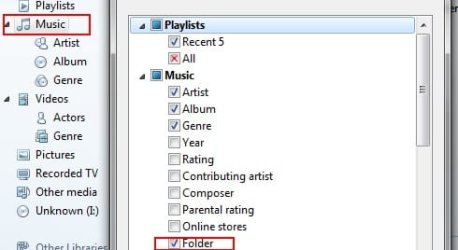
Along with what Boohbah has suggested, you can also add a Folder view to the WMP library. (In case the particular folder is nested inside of MyMusic)


Right Click the Music Library, Customize navigation Pane, and Select Folder.
Untitled.jpg

Then, browse by folder and "Delete From Library Only", those inside the itunes folder.
 

My Computer My Computer

At a glance

Windows 7 Home Premium 64bitIntel Core i7 2700k8GB Mushkin Redline Ridgebacks @1866EVGA GTX570 SC
Computer Manufacturer/Model Number
Custom (Self Build)
OS
Windows 7 Home Premium 64bit
CPU
Intel Core i7 2700k
Motherboard
eVGA P67 SLI
Memory
8GB Mushkin Redline Ridgebacks @1866
Graphics Card(s)
EVGA GTX570 SC
Sound Card
XiFi Titanium HD
Monitor(s) Displays
LG W2453V
Screen Resolution
1920x1080
Hard Drives
Intel 320 80GB -- Intel X25-V 40GB --WD Black 1TB x2 -- WD Blue 640GB
PSU
Seasonic x750
Case
Corsair 600T SE White
Cooling
eVGA Superclocked CPU Cooler
Keyboard
Saitek Cyborg
Antivirus
Kaspersky
Browser
IE
Other Info
LG BD/DVD
WMP

Hello wishmaster and boohbah:

Thank you so much for tip on adding the folder option to my library.


What I ended up doing is transferring my entire My Music folder to my external drive. Then I went back into WMP and highlighted all of the files and deleted the entire mess including the iTunes stuff.


Now I'm adding back all of my music into the Music Library bit by bit. This will also allow me to find any music files I have that are not properly identified with ID tags. A lot of my music in WMP are from old records.

Thanks again for your help, MS

P.S. Love your avatar Wishmaster.
 

My Computer My Computer

At a glance

Windows 7 Home Premium 64bitIntel Core i7-3770, CPU @ 3.4 GHz16 GB RM (4 cores)NVIDIA GeForce GT 630,
Computer type
PC/Desktop
Computer Manufacturer/Model Number
Asus CM-6870
OS
Windows 7 Home Premium 64bit
CPU
Intel Core i7-3770, CPU @ 3.4 GHz
Motherboard
Asus
Memory
16 GB RM (4 cores)
Graphics Card(s)
NVIDIA GeForce GT 630,
Sound Card
Realtek HD Audio standard
Monitor(s) Displays
Asus VE248Q
Screen Resolution
1920 x 1080
Hard Drives
2 TB
PSU
300W
Case
Asus
Cooling
Smart Cooling System and Q-Fan
Keyboard
Microsoft Wireless
Mouse
Microsoft Laser 3500 Wireless
Internet Speed
25 mbps or greater
Antivirus
Bitdefender Total Security 2018
Browser
Firefox/Chrome/IE
Other Info
Firewall - Bitdefender 2018
Printer: HP Officejet Pro 8600 Plus (wireless)
Good for you. a good sort out and restock the shelves so to speak. :D
 

My Computer My Computer

At a glance

Microsoft Windows 7 Home Premium 64-bit 7600IIx4 amd athelon 635 processor2x2gbati radeon HD 5450
Computer Manufacturer/Model Number
Hewlett packard/p6512uk
OS
Microsoft Windows 7 Home Premium 64-bit 7600
CPU
IIx4 amd athelon 635 processor
Motherboard
FOXCONN 2AA9
Memory
2x2gb
Graphics Card(s)
ati radeon HD 5450
Sound Card
(1) Realtek High Definition Audio (2) AMD High Definition
Monitor(s) Displays
samsung lcd tv 32"
Screen Resolution
1360x 768
Hard Drives
(1) WDC WD10 01FAES-60Z2A0 SATA Disk Device (2) Maxtor OneTouch USB Device (3) ST310003 33AS USB Device (4) WD My Book 1111 USB Device
PSU
?
Cooling
air!
Keyboard
wireless hp
Mouse
wireless Hp,optical
Internet Speed
1.10mb/s
Antivirus
MSE
Browser
Firefox
Back
Top