IE9 opening 2 home pages when 1 web page is already open

AjayK47

New member
Member
Local time
8:32 PM
Messages
68
When I have a single web page window open in IE9 and then want to open another IE9 session it opens 2 home page windows instead of 1. This happens regardless of whether I right click on the IE9 pinned icon in the task bar or click on the IE9 icon on the desktop.

I have tried using the reset option under the advanced tab of internet options but it makes no difference.

I have also uninstalled IE9 and reverted back to IE8 (where the problem does not exist) but was then unable to reinstall IE9 as it errored everytime I tried during the install process. I have now backed up my system to the previous day so I have IE9 back again but still with the problem.

Any help appreciated.
 

My Computer My Computer

At a glance

Windows 7 Pro 64 bitIntel Pentium D 3.00Ghz8 Gb
Computer type
PC/Desktop
Computer Manufacturer/Model Number
Dell Dimension 9200 x 2
OS
Windows 7 Pro 64 bit
CPU
Intel Pentium D 3.00Ghz
Motherboard
Dell ?
Memory
8 Gb
Hello AjayK47

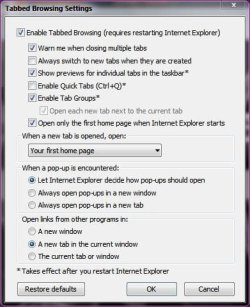
How many homepages do you have listed in internet options and what are your tabbed browser settings.
Capture.JPG Capture 2.JPG

Danny
 

My Computer My Computer

At a glance

Windows 7 Home Premium x64 SP1intel(R)core(TM)2 duo CPU T6600 @ 2.20GHz3 gb ddr3ati radeon hd4570/512mb
Computer Manufacturer/Model Number
acer aspire 5935g
OS
Windows 7 Home Premium x64 SP1
CPU
intel(R)core(TM)2 duo CPU T6600 @ 2.20GHz
Motherboard
intel gm45/gm47 revision 07
Memory
3 gb ddr3
Graphics Card(s)
ati radeon hd4570/512mb
Monitor(s) Displays
lop156wh2-tle1 15.3 flat
Screen Resolution
1366x768
Hard Drives
OCZ-Agility3 60gig ssd
320gig external hdd
500gig external hdd
Mouse
Optical
Internet Speed
30Mbps Down/30Mbps Up
There is just one home page listed in internet options.

In the tabbed browsing settings it is exactly the same as your screen print except I also have "Always switch to new tabs when they are created" ticked and "When a new tab is opened open" is set to "The new tab page"

I have even tried switching tabbed browsing completely off and I still get two IE9 home pages open (as separate windows) when an existing IE9 window is open. It does not happen the first time an IE9 session is started, only when one IE9 window is already running.
 

My Computer My Computer

At a glance

Windows 7 Pro 64 bitIntel Pentium D 3.00Ghz8 Gb
Computer type
PC/Desktop
Computer Manufacturer/Model Number
Dell Dimension 9200 x 2
OS
Windows 7 Pro 64 bit
CPU
Intel Pentium D 3.00Ghz
Motherboard
Dell ?
Memory
8 Gb
Very strange I would usually suggest you try to uninstall and reinstall it but I see you had problem before with that. How are you opening a new session when one is already opened from the task bar or from programs. I don't
use IE9 much but haven't come across this issue before

Danny
 

My Computer My Computer

At a glance

Windows 7 Home Premium x64 SP1intel(R)core(TM)2 duo CPU T6600 @ 2.20GHz3 gb ddr3ati radeon hd4570/512mb
Computer Manufacturer/Model Number
acer aspire 5935g
OS
Windows 7 Home Premium x64 SP1
CPU
intel(R)core(TM)2 duo CPU T6600 @ 2.20GHz
Motherboard
intel gm45/gm47 revision 07
Memory
3 gb ddr3
Graphics Card(s)
ati radeon hd4570/512mb
Monitor(s) Displays
lop156wh2-tle1 15.3 flat
Screen Resolution
1366x768
Hard Drives
OCZ-Agility3 60gig ssd
320gig external hdd
500gig external hdd
Mouse
Optical
Internet Speed
30Mbps Down/30Mbps Up
I either right click on the IE9 icon in the task bar and select Internet Explorer or go to the desktop and double click on the IE9 icon. Either way it then opens two windows both containing my home page.

I might try and uninstall IE9 again and hope that I don't get the same problem reinstalling. If I do I will just have to restore from my Norton Ghost system image again.
 

My Computer My Computer

At a glance

Windows 7 Pro 64 bitIntel Pentium D 3.00Ghz8 Gb
Computer type
PC/Desktop
Computer Manufacturer/Model Number
Dell Dimension 9200 x 2
OS
Windows 7 Pro 64 bit
CPU
Intel Pentium D 3.00Ghz
Motherboard
Dell ?
Memory
8 Gb
Uninstalled IE9 again and reverted successfully to IE8 where the problem does not occur. Then attempted to reinstall IE9 but as before the install failed part way through. Have restored from Norton Ghost.

I am completely baffled. Is there anyway of totally removing all versions of Internet Explorer and starting afresh?

Thank you
 

My Computer My Computer

At a glance

Windows 7 Pro 64 bitIntel Pentium D 3.00Ghz8 Gb
Computer type
PC/Desktop
Computer Manufacturer/Model Number
Dell Dimension 9200 x 2
OS
Windows 7 Pro 64 bit
CPU
Intel Pentium D 3.00Ghz
Motherboard
Dell ?
Memory
8 Gb
How are you installing IE9. Have a look through this thread,http://www.sevenforums.com/browsers-mail/150887-ie-9-will-not-finish-installing-win-7-64-bit.html not identical to your issues but it contains the links to the standalone IE9 installers which may be worth a try.Is your pc up to date, run windows update to be sure.
Run SFC /SCANNOW just to be sure there are no errors - http://www.sevenforums.com/tutorials/1538-sfc-scannow-command-system-file-checker.html.
Then try the standalone installers.

Danny

Edit - Not sure how old those links are for the offline installer. I would get them from here - http://www.microsoft.com/download/en/details.aspx?id=23332
 

My Computer My Computer

At a glance

Windows 7 Home Premium x64 SP1intel(R)core(TM)2 duo CPU T6600 @ 2.20GHz3 gb ddr3ati radeon hd4570/512mb
Computer Manufacturer/Model Number
acer aspire 5935g
OS
Windows 7 Home Premium x64 SP1
CPU
intel(R)core(TM)2 duo CPU T6600 @ 2.20GHz
Motherboard
intel gm45/gm47 revision 07
Memory
3 gb ddr3
Graphics Card(s)
ati radeon hd4570/512mb
Monitor(s) Displays
lop156wh2-tle1 15.3 flat
Screen Resolution
1366x768
Hard Drives
OCZ-Agility3 60gig ssd
320gig external hdd
500gig external hdd
Mouse
Optical
Internet Speed
30Mbps Down/30Mbps Up
Thanks - Yes I did also try the standalone install of IE9 for WIN7 32 bit in my case but still it failed.

I'm a little apprehensive about using SFC /scannow in case it changes something else but will investigate.

Is there no way to completely remove all versions of IE and then reinstall the whole thing? Naturally having another browser on my system first.
 

My Computer My Computer

At a glance

Windows 7 Pro 64 bitIntel Pentium D 3.00Ghz8 Gb
Computer type
PC/Desktop
Computer Manufacturer/Model Number
Dell Dimension 9200 x 2
OS
Windows 7 Pro 64 bit
CPU
Intel Pentium D 3.00Ghz
Motherboard
Dell ?
Memory
8 Gb
The sfc /scannow is unlikely to cause you any issues compared to the issues it may be able to fix. You cannot uninstall IE8 to start from scratch, you can only disable it.

What stage are you at now.Its obvious your ghost image you mentioned already contains whatever issues are preventing the install. Do you have an image prior to that you could use.

I would get yourself back into the position where you have IE8 back. Run sfc /scannow to fix any errors, double check your pc is up to date in windows update then try again with the offline installer.

Danny
 

My Computer My Computer

At a glance

Windows 7 Home Premium x64 SP1intel(R)core(TM)2 duo CPU T6600 @ 2.20GHz3 gb ddr3ati radeon hd4570/512mb
Computer Manufacturer/Model Number
acer aspire 5935g
OS
Windows 7 Home Premium x64 SP1
CPU
intel(R)core(TM)2 duo CPU T6600 @ 2.20GHz
Motherboard
intel gm45/gm47 revision 07
Memory
3 gb ddr3
Graphics Card(s)
ati radeon hd4570/512mb
Monitor(s) Displays
lop156wh2-tle1 15.3 flat
Screen Resolution
1366x768
Hard Drives
OCZ-Agility3 60gig ssd
320gig external hdd
500gig external hdd
Mouse
Optical
Internet Speed
30Mbps Down/30Mbps Up
Ok - With the system with IE9 installed but with the error occuring have run sfc /scannow - no problems found.
Uninstalled IE9 and reverted to IE8
Ran sfc /scannow - no problems found
Installed windows updates except IE9
Ran sfc /scannow - no problems found
Attempted to install IE9 from standalone - Failed to install
Reverted back to ghost image
Unfortunately I do not have a ghost image that goes back to before the problem started

The only thing I can think of doing is reinstalling whole operating system but I would like to avoid that if possible for what I guess is only a minor inconvenience.

Any further suggestions appreciated.
 

My Computer My Computer

At a glance

Windows 7 Pro 64 bitIntel Pentium D 3.00Ghz8 Gb
Computer type
PC/Desktop
Computer Manufacturer/Model Number
Dell Dimension 9200 x 2
OS
Windows 7 Pro 64 bit
CPU
Intel Pentium D 3.00Ghz
Motherboard
Dell ?
Memory
8 Gb
What error code if any are you receiving when IE9 fails to install

Danny

EDIT-I've asked for some help with this for you now as I'm out of ideas.Someone with a bit more experience with updates and IE9 will be along shortly
 

My Computer My Computer

At a glance

Windows 7 Home Premium x64 SP1intel(R)core(TM)2 duo CPU T6600 @ 2.20GHz3 gb ddr3ati radeon hd4570/512mb
Computer Manufacturer/Model Number
acer aspire 5935g
OS
Windows 7 Home Premium x64 SP1
CPU
intel(R)core(TM)2 duo CPU T6600 @ 2.20GHz
Motherboard
intel gm45/gm47 revision 07
Memory
3 gb ddr3
Graphics Card(s)
ati radeon hd4570/512mb
Monitor(s) Displays
lop156wh2-tle1 15.3 flat
Screen Resolution
1366x768
Hard Drives
OCZ-Agility3 60gig ssd
320gig external hdd
500gig external hdd
Mouse
Optical
Internet Speed
30Mbps Down/30Mbps Up
Hello!

Please copy the C:\Windows\Logs\CBS folder to your Desktop, copy the C:\Windows\WindowsUpdate.log file into your new CBS folder on your Desktop, right click on it > Send to > Compressed (zipped) folder, and upload the new file which is created on your Desktop here.

Thanks a lot!

Richard
 

My Computer My Computer

At a glance

Vista Home Premium x86 SP2Intel Core 2 Quad Q9300 2.50GHz4 gb (DDR2 800) 400MHzATI Radeon HD 3870 (512 MBytes)
Computer Manufacturer/Model Number
Dell XPS 420
OS
Vista Home Premium x86 SP2
CPU
Intel Core 2 Quad Q9300 2.50GHz
Motherboard
Stock Dell 0TP406
Memory
4 gb (DDR2 800) 400MHz
Graphics Card(s)
ATI Radeon HD 3870 (512 MBytes)
Monitor(s) Displays
1 x Dell 2007FP and 1 x (old) Sonic flat screen
Screen Resolution
1600 x 1200 and 1280 x 1204
Hard Drives
1 x 640Gb (SATA 300) Western Digital: WDC WD6400AAKS-75A7B0 1 x 1Tb (SATA 600) Western Digital: Caviar Black, SATA 6GB/S, 64Mb cache, 8ms Western Digital: WDC WD1002FAEX-00Z3A0 ATA Device
Case
Dell XPS 420
Cooling
Stock Fan
Keyboard
Dell Bluetooth
Mouse
Advent Optical ADE-WG01 (colour change light up)
Internet Speed
Varies from 10kb/s to 170kb/s. So unreliable it is not funny
Other Info
ASUS USB 3.0 5Gbps/SATA 6Gbps - PCI-Express Combo Controller Card (U3S6)

My Computer My Computer

At a glance

Windows 7 64b UltimateI7-2600 3.40GHz - testing various OC levels..2x 4Gb DDR3/1333GTX570 - testing OC levels
Computer Manufacturer/Model Number
custom build
OS
Windows 7 64b Ultimate
CPU
I7-2600 3.40GHz - testing various OC levels..
Motherboard
ASUS Sabretooth
Memory
2x 4Gb DDR3/1333
Graphics Card(s)
GTX570 - testing OC levels
Sound Card
motherboard 7.1 DIG.
Monitor(s) Displays
2x Ilyama 24" E2409HDS-B1 2ms/DVI
Screen Resolution
1920 x 1080
Hard Drives
120 GB Intel Elmcrest SSD
1 TB SATAII 7200RPM/32MB
External 2TB USB3
PSU
Corsair Pro HX850W
Cooling
Coolermaster Hyper V8
Keyboard
Logitech G110
Mouse
Logitech G700
Internet Speed
25Mb
Other Info
CPU: 7,7 RAM: 7,7 GTX: 7,9 GTX 3D : 7,9 SSD 7,6
Overall 7,6 ...... now to speed up the SSD... ;)

Also use a Dell XPS M1710 on Vista 32b
Asus LT on Vista 32
3 older machines still doing fine on Linux/ubuntu but not used much anymore...
Hello!

Please copy the C:\Windows\Logs\CBS folder to your Desktop, copy the C:\Windows\WindowsUpdate.log file into your new CBS folder on your Desktop, right click on it > Send to > Compressed (zipped) folder, and upload the new file which is created on your Desktop here.

Thanks a lot!

Richard

Uploaded logs as requested - Thank you
 

My Computer My Computer

At a glance

Windows 7 Pro 64 bitIntel Pentium D 3.00Ghz8 Gb
Computer type
PC/Desktop
Computer Manufacturer/Model Number
Dell Dimension 9200 x 2
OS
Windows 7 Pro 64 bit
CPU
Intel Pentium D 3.00Ghz
Motherboard
Dell ?
Memory
8 Gb

My Computer My Computer

At a glance

Windows 7 Ultimate X64 SP1Intel i5-2550K, Differing ~4.4-4.8GHz No buil...16GB G.Skill Sniper 1866MHz @ 2133MHz 2x8GBASUS GTX650TIB-DC2OC-2GD5, (650TI Boost)
Computer type
PC/Desktop
Computer Manufacturer/Model Number
Home Built Desktop By DataTech
OS
Windows 7 Ultimate X64 SP1
CPU
Intel i5-2550K, Differing ~4.4-4.8GHz No built in GPU
Motherboard
ASUS P8Z68-V PRO/GEN3
Memory
16GB G.Skill Sniper 1866MHz @ 2133MHz 2x8GB
Graphics Card(s)
ASUS GTX650TIB-DC2OC-2GD5, (650TI Boost)
Sound Card
Onboard Realtek 5-1
Monitor(s) Displays
Samsung P2570HD
Screen Resolution
1920x1080
Hard Drives
Samsung 840 Pro 256GB SSD for OS, 500GB Seagate Constellation (Enterprise drive) for Data
PSU
Corsair HX650W
Case
Inwin Dragon Rider
Cooling
Hyper 212 EVO w/two Noctua fans, push-pull, @1300 RPM
Keyboard
E-Z Eyes, bright yellow keys with large characters
Mouse
steelseries SENSEI Laser Pro Gaming
Internet Speed
48-51Mbs Mbs down, 11 Mbs up Xfinity Cable
Antivirus
Norton Internet Security 2013
Browser
IE 10, Opera, Pale Moon if needed
Other Info
4 case fans, LG BluRay-RE, ASUS DVD-RW, Mr. Fusion power supply, 1.21 gigawatts.
What is the extra page which opens when you start a new session of IE9?

Two things to try
1. http://www.sevenforums.com/tutorials/818-disk-cleanup-open-use.html#post5564
You may have several files left over from failed updates and installs.

2. Rather than a clean install you could try an in place upgrade, Repair Install. http://www.sevenforums.com/tutorials/3413-repair-install.html#post31238

It's my home page that opens twice when another IE9 window is already open. This is the same regardless of if I left click on the IE9 icon on the task bar and select Internet Explorer or go to the desktop and double click on the IE9 icon.
 

My Computer My Computer

At a glance

Windows 7 Pro 64 bitIntel Pentium D 3.00Ghz8 Gb
Computer type
PC/Desktop
Computer Manufacturer/Model Number
Dell Dimension 9200 x 2
OS
Windows 7 Pro 64 bit
CPU
Intel Pentium D 3.00Ghz
Motherboard
Dell ?
Memory
8 Gb

My Computer My Computer

At a glance

Win 7 Pro 64-bitIntel i5 2.4 Ghz8GB DDR3Intel HD 3000
Computer type
Laptop
Computer Manufacturer/Model Number
Sony Vaio VPCEB47GM Laptop
OS
Win 7 Pro 64-bit
CPU
Intel i5 2.4 Ghz
Memory
8GB DDR3
Graphics Card(s)
Intel HD 3000
Sound Card
IDT High Definition
Monitor(s) Displays
15.6 WGXA Anti-Glare LED
Screen Resolution
1280x800
Hard Drives
640Gb 7200rpm
Antivirus
MSE
Browser
Opera (primary) with IE9 backup
Sorry for coming in late to the party. Have you met all the prerequisites for installing IE9?

Prerequisites for installing Internet Explorer 9

And here are some additional troubleshooting steps.

Troubleshoot problems when you cannot install Internet Explorer 9

Thank you - Yes I have checked all the prerequisites. The only thing I can think of is if when I uninstall IE9 it is not actually removing everything thus causing the reinstall to fail. Is there a better way to uninstall IE9 other than the usual.
 

My Computer My Computer

At a glance

Windows 7 Pro 64 bitIntel Pentium D 3.00Ghz8 Gb
Computer type
PC/Desktop
Computer Manufacturer/Model Number
Dell Dimension 9200 x 2
OS
Windows 7 Pro 64 bit
CPU
Intel Pentium D 3.00Ghz
Motherboard
Dell ?
Memory
8 Gb
Whew! This is certainly turning into a head-banger. :banghead:

First, my usual disclaimer: I'm not an expert at anything. :)
But you might see if this rather long Microsoft Answers Forum thread (about 8 pages long) helps. Particularly doing the normal uninstall from Safe Mode (First Method) and using an elevated command prompt to enter a string of commands manually (Third Method.) I seem to recall that the elevated command prompt method had to be done twice with a reboot after each one.

Methods to Uninstall / Remove IE9 - Microsoft Answers

Before doing any of the suggested methods I'd recommend creating a new restore point just in case. If none of the methods works you might see if the free Microsoft telephone support is still available. You used to be able to reach Microsoft for free in the Colonies at the following telephone number: (800) 642-7676. Perhaps you can find something similar for Microsoft UK:

http://support.microsoft.com/?ln=en-gb

One final thought is to remove IE9 as best you can and consider a Repair Install. A repair install should preserve your user accounts, data, programs, and system drivers while (hopefully) getting your operating system back to the way it should be. And that should let you successfully install IE9 once the prerequisites are met. (He says optimistically.)
 

My Computer My Computer

At a glance

Win 7 Pro 64-bitIntel i5 2.4 Ghz8GB DDR3Intel HD 3000
Computer type
Laptop
Computer Manufacturer/Model Number
Sony Vaio VPCEB47GM Laptop
OS
Win 7 Pro 64-bit
CPU
Intel i5 2.4 Ghz
Memory
8GB DDR3
Graphics Card(s)
Intel HD 3000
Sound Card
IDT High Definition
Monitor(s) Displays
15.6 WGXA Anti-Glare LED
Screen Resolution
1280x800
Hard Drives
640Gb 7200rpm
Antivirus
MSE
Browser
Opera (primary) with IE9 backup
One final thought is to remove IE9 as best you can and consider a Repair Install. A repair install should preserve your user accounts, data, programs, and system drivers while (hopefully) getting your operating system back to the way it should be. And that should let you successfully install IE9 once the prerequisites are met. (He says optimistically.)

Does a Repair Install retain all MS Updates or do they all have to be downloaded again?
 

My Computer My Computer

At a glance

Windows 7 Pro 64 bitIntel Pentium D 3.00Ghz8 Gb
Computer type
PC/Desktop
Computer Manufacturer/Model Number
Dell Dimension 9200 x 2
OS
Windows 7 Pro 64 bit
CPU
Intel Pentium D 3.00Ghz
Motherboard
Dell ?
Memory
8 Gb
Back
Top