
Can't move folders with files, but can move files

chrispy

New member
I am attempting to move folders and files around, doing a little organization on my HDD. However if I attempt to move the loaded folder I get the error message " The action can't be completed because the folder or a file in it is open in another program." However I have no other programs open, thinking it was some hidden process, I killed a bunch of processes in Task Manager, one's I didn't recognize, or I knew were safe to kill.

Not sure if this may be an issue, but my mobo recently went belly up and I had to replace it (with the same type DP67DB for DP67DB) but everything else remained as is- this is the first time I am messing with the files on the "new" machine. Is it possibly an ownership issue, and if so how do I resolve this?
 

My Computer

Computer Manufacturer/Model Number
hp media center m7470n
OS
win 7 64 bit
CPU
AMD Athlon 64 Dual Core 4200_ 2.2Ghz
Memory
4.0 GB
Graphics Card(s)
Ati Radeon HD 4350
Monitor(s) Displays
Viewsonic 22", Mitsubishi 46" HDTV
Hard Drives
internal 300gb, external lacie big disk quadra, external maxtor
First perform a system file check.

Read this tutorial, word for word, and the carry out precisely as written.

SFC /SCANNOW Command - System File Checker
How to Repair Windows 7 System Files with System File Checker
 

My Computer

Computer Manufacturer/Model Number
Toshiba Satellite S875D-S7239 laptop
OS
MS Windows 7 Ultimate SP1 64-bit
CPU
AMD A10-4600M
Motherboard
AMD Pumori (Socket FT1)
Memory
6.00 GB Dual-Channel DDR3 @ 798MHz (11-11-12-28)
Graphics Card(s)
AMD Radeon HD 7660G
Sound Card
High Definition Audio Device
Monitor(s) Displays
Generic PnP Monitor (1600x900@60Hz)
Screen Resolution
1600x900@60Hz
Hard Drives
SSD 119GB Corsair CSSD-V128GB2 ATA Device
Keyboard
Standard PS/2 Keyboard
Mouse
HP Wireless Optical Mobile Mouse Model FHA-3410
Internet Speed
What the local pub, local coffee shop offers.
Other Info
Optical Drive:MATSHITA BD-CMB UJ160B ATA Device


Also have an Asus ha1002xp netbook with Win 7 Ultimate installed.
Okay did the system scan - didn't find anything. I would paste in the text but can't figure out how to copy it... but the final message was "Windows Resource Protection did not find any integrity violations."

I don't know if it matters but the files are on another strictly storage volume, they are not on the os drive.

Any other ideas?
 

My Computer

Computer Manufacturer/Model Number
hp media center m7470n
OS
win 7 64 bit
CPU
AMD Athlon 64 Dual Core 4200_ 2.2Ghz
Memory
4.0 GB
Graphics Card(s)
Ati Radeon HD 4350
Monitor(s) Displays
Viewsonic 22", Mitsubishi 46" HDTV
Hard Drives
internal 300gb, external lacie big disk quadra, external maxtor
Can you move the folders after starting your pc ? (without doing anything else first)
 

My Computer

Computer Manufacturer/Model Number
Look in my Signature.
OS
Win7 H.Prem. 32bit+SP1
Are they perhaps in the process of being indexed?
Are they folders in WMP?

Just some thoughts.
 

My Computer

Computer type
Laptop
Computer Manufacturer/Model Number
Hewlett-Packard/G62-107SA Notebook
OS
Microsoft Windows 7 Home Premium 64-bit Service Pack 1
CPU
Intel(R) Core(TM) i3 CPU M 330 @ 2.13GHz
Motherboard
Hewlett-Packard 1425
Memory
8 GB DDR3
Graphics Card(s)
Intel(R) HD Graphics
Sound Card
Realtek High Definition Audio
Monitor(s) Displays
Builtin
Screen Resolution
1366 x 768 x 32 bits (4294967296 colors) @ 60 Hz
Hard Drives
250 GB SATA Hard Disk Drive 7200 rpm
2TB Seagate GoFlex USB 2 Drive
1TB Iomega Prestige USB 2 Drive
1.5TB Iomega Prestige USB 2 Drive (Samsung)
2TB WD MyBook Live NAS.
Mouse
Logitech Anywhere MX
Internet Speed
152 Mbs download 10 Mbs upload
Antivirus
Norton 360
Browser
Chrome
Sometimes I hate Microsoft... They must have been getting indexed... I can move them now!!! Is there anyway to find out what is being indexed at this moment, so I don't freak out again / or to stop it from indexing temporarily so I can get some work done?
 

My Computer

Computer Manufacturer/Model Number
hp media center m7470n
OS
win 7 64 bit
CPU
AMD Athlon 64 Dual Core 4200_ 2.2Ghz
Memory
4.0 GB
Graphics Card(s)
Ati Radeon HD 4350
Monitor(s) Displays
Viewsonic 22", Mitsubishi 46" HDTV
Hard Drives
internal 300gb, external lacie big disk quadra, external maxtor
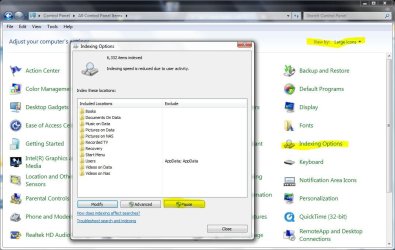
Yes Chrispy. It's quite staightforward. Go into Control Panel. Select view by large icons. Go into Indexing Options and press the pause button.

Capture.JPG
 

My Computer

Computer type
Laptop
Computer Manufacturer/Model Number
Hewlett-Packard/G62-107SA Notebook
OS
Microsoft Windows 7 Home Premium 64-bit Service Pack 1
CPU
Intel(R) Core(TM) i3 CPU M 330 @ 2.13GHz
Motherboard
Hewlett-Packard 1425
Memory
8 GB DDR3
Graphics Card(s)
Intel(R) HD Graphics
Sound Card
Realtek High Definition Audio
Monitor(s) Displays
Builtin
Screen Resolution
1366 x 768 x 32 bits (4294967296 colors) @ 60 Hz
Hard Drives
250 GB SATA Hard Disk Drive 7200 rpm
2TB Seagate GoFlex USB 2 Drive
1TB Iomega Prestige USB 2 Drive
1.5TB Iomega Prestige USB 2 Drive (Samsung)
2TB WD MyBook Live NAS.
Mouse
Logitech Anywhere MX
Internet Speed
152 Mbs download 10 Mbs upload
Antivirus
Norton 360
Browser
Chrome
Use the free program Unlocker 1.9.1 for unlocking folders and files locked by processes or programs.

This program adds a context menu called "Unlocker" to the right click menu. Before deleting or moving any folders or files, right click on the object and select Unlocker. This will display any processes which are presently accessing the object. This program also gives an option to kill the process so that the object (file or folder) can be moved or deleted. System integrity is not affected by killing the processes with this program.

A very useful utility for file management, and is available for both x86 and x64 platforms.
 

My Computer

Computer Manufacturer/Model Number
Toshiba Satellite P775-S7232
OS
MS Windows 7 Ultimate 64-bit SP1
CPU
i5-2410M 2.3GHz (2.9GHz Turbo-Boost) Sandy Bridge 32nm
Motherboard
Toshiba PHRAA ver. PSBY1U-00F003
Memory
4GB+4GB Samsung DDR3 PC3-10700 (1333 MHz)
Graphics Card(s)
Video Intel(R) HD Graphics Family, 1696MB available memory
Sound Card
Realtek High Definition Audio version=6.0.1.6323
Monitor(s) Displays
17.3 " Trubrite TFT LCD, LED Backlit
Screen Resolution
1600x900 32 bit, Native support for 720P content
Hard Drives
TOSHIBA MK6476GSXN
580.614 [GB] partitioned C: 80GB and D: 500GB with hidden recovery partitons.

Spare bay for 2nd HDD but no SATA connector :-(
PSU
Toshiba AC/DC Adapter
Case
Notebook
Cooling
Built-in Fan
Keyboard
Premium Raised Tile keyboard
Mouse
Logitech M215 wireless mouse
Internet Speed
Not fast enough
Other Info
Built-in Harman Kardon speakers with Dolby Advanced Audio, Waves MaxxAudio® 3. HDMI, 1xUSB3+3xUSB2 ports, WebCam, Battery life 4hrs 11mins, 4GB Readyboost SDHC card, WD My Book Essential Ext HDDs 2 TB, 2x1TB, My Passport SE 1TB and WDTV 1st Gen for Multimedia playing on a Sony Wega 32" LCD.
Recent addition to my toys are Asus Transformer Pad TF300T with 32GB onboard sd card + 32GB microsd card.
Back
Top