
Solved Windows 7 failing to boot after restoring peripherals

Caramelo

New member
Member
Local time
11:38 AM
Messages
81
I disconnected all drives except the os hd and the dvd drive and all usb devices in order to boot to the start/repair disc. I successfully fixed the mbr and was able to boot into win 7.

However when I reconnected the other hds and usb devices, windows boot hangs at the "starting windows" stage. Upon rebooting a start repair program ran and show 7 errors.

Problem signature 01 6.1.7600.16385
Problem signature 02 6.1.7600.16385
Problem signature 03 unknown
Problem signature 04 43
Problem signature 05 AutoFailover
Problem signature 06 1
Problem signature 07 BadDriver
OS version 6.1.7600.2.0.0.256.1
Locale ID: 1033

It's all Greek to me. I'm unsure of how to proceed other than to restore the peripherals one at a time and see if the pc boots. I would like to correct the problems or at least find what they are.
 

My Computer My Computer

At a glance

Windows Home Premium 64- bit(6.1,Build 7600) SP1AMD PhenomIIx4 945 3.0Ghz8GB (Mushkin DDR3 2gb x 4)ASUS VH232H (1920x1080@60Hz) 2048MB ATI AMD R...
Computer type
PC/Desktop
Computer Manufacturer/Model Number
Home built
OS
Windows Home Premium 64- bit(6.1,Build 7600) SP1
CPU
AMD PhenomIIx4 945 3.0Ghz
Motherboard
MS-7577
Memory
8GB (Mushkin DDR3 2gb x 4)
Graphics Card(s)
ASUS VH232H (1920x1080@60Hz) 2048MB ATI AMD Radeon HD 7800 S
Sound Card
On board
Monitor(s) Displays
Asus 22"
Screen Resolution
1920x1080
Hard Drives
2 WD 500gb SATA
1 WD 200gb ATA
1 WD 120gb ATA
PSU
Corsair TX 850w
Case
Antec tower
Cooling
Multiple fan.
Keyboard
Logitech USB
Mouse
Logitech G9 laser mouse
Internet Speed
Cable
Antivirus
AVG free
Browser
Firefox, Chrome, IE
Other Info
CH Joystick, Nostromo N50 game pad, USB headset, Canon Printer
You need to run the repair at least three times.
 

My Computer My Computer

At a glance

Windows 7 Ultimate SP1 64-BitIntel Core i7 870 @ 2.93GHz8Gb Dual-Channel DDR3 @ 664MHznVidia GeForce GTX 460 1024MB dedicated RAM
Computer Manufacturer/Model Number
HP Pavilion Elite 495UK
OS
Windows 7 Ultimate SP1 64-Bit
CPU
Intel Core i7 870 @ 2.93GHz
Motherboard
MSI 2A9C (CPU1)
Memory
8Gb Dual-Channel DDR3 @ 664MHz
Graphics Card(s)
nVidia GeForce GTX 460 1024MB dedicated RAM
Sound Card
Realtek HD Audio
Monitor(s) Displays
HP2310i
Screen Resolution
1920 x 1080
Hard Drives
1x1954GB Hitachi HDS22020ALA 330 (RAID), 1x1954GB Hitachi External for backup and storage
PSU
460W
Case
HP Elite
Cooling
Air cooled
Keyboard
Logitech K750 solar-powered keyboard
Mouse
Logitech Wireless M180 mouse
Internet Speed
2Mb
Other Info
Pure Avanti Flow Internet Radio with iPod Dock, 64Gb iPod, HP USB Speakers, Sony MDR-V500 Headphones, Sony Vaio F-Series Laptop
Looks like the Hd Drive are in the wrong order. Did refit a IDE HD Drive.
 

My Computer My Computer

At a glance

ME/XP/Vista/Win7
OS
ME/XP/Vista/Win7
Is this your drive layout now.

DM002.PNG
 

My Computer My Computer

At a glance

ME/XP/Vista/Win7
OS
ME/XP/Vista/Win7
I reran the start/repair 3 times with no errors logged.

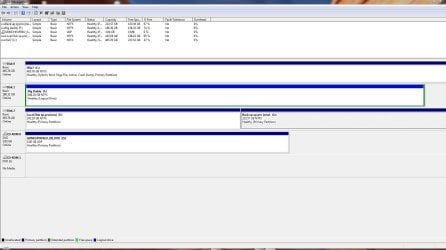
My present disk arrangement is;
Present.disk.management.JPG

Disk 1 is an IDE drive.

The only active drive is C, the windows 7 one.

I have been successful booting with all the hard drives attached. Perhaps the problem is with some of the usb gear.
 
Last edited:

My Computer My Computer

At a glance

Windows Home Premium 64- bit(6.1,Build 7600) SP1AMD PhenomIIx4 945 3.0Ghz8GB (Mushkin DDR3 2gb x 4)ASUS VH232H (1920x1080@60Hz) 2048MB ATI AMD R...
Computer type
PC/Desktop
Computer Manufacturer/Model Number
Home built
OS
Windows Home Premium 64- bit(6.1,Build 7600) SP1
CPU
AMD PhenomIIx4 945 3.0Ghz
Motherboard
MS-7577
Memory
8GB (Mushkin DDR3 2gb x 4)
Graphics Card(s)
ASUS VH232H (1920x1080@60Hz) 2048MB ATI AMD Radeon HD 7800 S
Sound Card
On board
Monitor(s) Displays
Asus 22"
Screen Resolution
1920x1080
Hard Drives
2 WD 500gb SATA
1 WD 200gb ATA
1 WD 120gb ATA
PSU
Corsair TX 850w
Case
Antec tower
Cooling
Multiple fan.
Keyboard
Logitech USB
Mouse
Logitech G9 laser mouse
Internet Speed
Cable
Antivirus
AVG free
Browser
Firefox, Chrome, IE
Other Info
CH Joystick, Nostromo N50 game pad, USB headset, Canon Printer
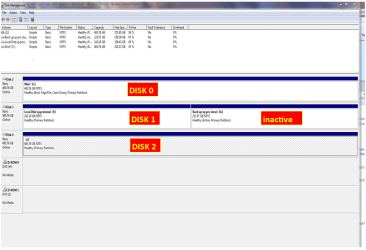
May have been the HD drive order change or the replacement Hd Drive.
 

My Computer My Computer

At a glance

ME/XP/Vista/Win7
OS
ME/XP/Vista/Win7
Disconnect the disk labeled Disk #2 in your disk management snapshot.

Problem gone?
 

My Computer My Computer

At a glance

MS Windows 7 Ultimate SP1 64-bitAMD A10-4600M6.00 GB Dual-Channel DDR3 @ 798MHz (11-11-12-28)AMD Radeon HD 7660G
Computer Manufacturer/Model Number
Toshiba Satellite S875D-S7239 laptop
OS
MS Windows 7 Ultimate SP1 64-bit
CPU
AMD A10-4600M
Motherboard
AMD Pumori (Socket FT1)
Memory
6.00 GB Dual-Channel DDR3 @ 798MHz (11-11-12-28)
Graphics Card(s)
AMD Radeon HD 7660G
Sound Card
High Definition Audio Device
Monitor(s) Displays
Generic PnP Monitor (1600x900@60Hz)
Screen Resolution
1600x900@60Hz
Hard Drives
SSD 119GB Corsair CSSD-V128GB2 ATA Device
Keyboard
Standard PS/2 Keyboard
Mouse
HP Wireless Optical Mobile Mouse Model FHA-3410
Internet Speed
What the local pub, local coffee shop offers.
Other Info
Optical Drive:MATSHITA BD-CMB UJ160B ATA Device


Also have an Asus ha1002xp netbook with Win 7 Ultimate installed.
I've reconnected all devices except my scanner. I'm able to boot ok still.
One mystery is this error from the event log:

The following boot-start or system-start driver(s) failed to load:
mbmiodrvr

Log Name: System
Source: Service Control Manager
Date: 9/13/2011 12:04:40 PM
Event ID: 7026
Task Category: None
Level: Error
Keywords: Classic
User: N/A
Computer: Dad-PC
Description:
The following boot-start or system-start driver(s) failed to load:
mbmiodrvr
Event Xml:
<Event xmlns="Error">
<System>
<Provider Name="Service Control Manager" Guid="{555908d1-a6d7-4695-8e1e-26931d2012f4}" EventSourceName="Service Control Manager" />
<EventID Qualifiers="49152">7026</EventID>
<Version>0</Version>
<Level>2</Level>
<Task>0</Task>
<Opcode>0</Opcode>
<Keywords>0x8080000000000000</Keywords>
<TimeCreated SystemTime="2011-09-13T16:04:40.826868000Z" />
<EventRecordID>311703</EventRecordID>
<Correlation />
<Execution ProcessID="616" ThreadID="620" />
<Channel>System</Channel>
<Computer>Dad-PC</Computer>
<Security />
</System>
<EventData>
<Data Name="param1">
mbmiodrvr</Data>
</EventData>
</Event>
 

My Computer My Computer

At a glance

Windows Home Premium 64- bit(6.1,Build 7600) SP1AMD PhenomIIx4 945 3.0Ghz8GB (Mushkin DDR3 2gb x 4)ASUS VH232H (1920x1080@60Hz) 2048MB ATI AMD R...
Computer type
PC/Desktop
Computer Manufacturer/Model Number
Home built
OS
Windows Home Premium 64- bit(6.1,Build 7600) SP1
CPU
AMD PhenomIIx4 945 3.0Ghz
Motherboard
MS-7577
Memory
8GB (Mushkin DDR3 2gb x 4)
Graphics Card(s)
ASUS VH232H (1920x1080@60Hz) 2048MB ATI AMD Radeon HD 7800 S
Sound Card
On board
Monitor(s) Displays
Asus 22"
Screen Resolution
1920x1080
Hard Drives
2 WD 500gb SATA
1 WD 200gb ATA
1 WD 120gb ATA
PSU
Corsair TX 850w
Case
Antec tower
Cooling
Multiple fan.
Keyboard
Logitech USB
Mouse
Logitech G9 laser mouse
Internet Speed
Cable
Antivirus
AVG free
Browser
Firefox, Chrome, IE
Other Info
CH Joystick, Nostromo N50 game pad, USB headset, Canon Printer
Disconnect the disk labeled Disk #2 in your disk management snapshot.

Problem gone?

Disk 2 is still connected and apparently no causing boot problems.

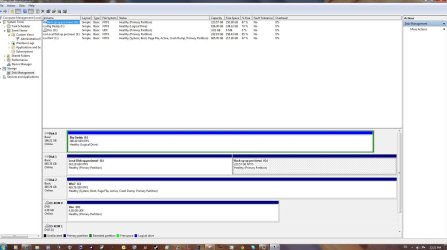
The amd bios keeps changing the order of the hds no matter what setting I give.dm.latest.JPG

There's the latest, with C, the win7 listed as drive 2. It seems the bios has a mind of it's own and puts them where it will.
 

My Computer My Computer

At a glance

Windows Home Premium 64- bit(6.1,Build 7600) SP1AMD PhenomIIx4 945 3.0Ghz8GB (Mushkin DDR3 2gb x 4)ASUS VH232H (1920x1080@60Hz) 2048MB ATI AMD R...
Computer type
PC/Desktop
Computer Manufacturer/Model Number
Home built
OS
Windows Home Premium 64- bit(6.1,Build 7600) SP1
CPU
AMD PhenomIIx4 945 3.0Ghz
Motherboard
MS-7577
Memory
8GB (Mushkin DDR3 2gb x 4)
Graphics Card(s)
ASUS VH232H (1920x1080@60Hz) 2048MB ATI AMD Radeon HD 7800 S
Sound Card
On board
Monitor(s) Displays
Asus 22"
Screen Resolution
1920x1080
Hard Drives
2 WD 500gb SATA
1 WD 200gb ATA
1 WD 120gb ATA
PSU
Corsair TX 850w
Case
Antec tower
Cooling
Multiple fan.
Keyboard
Logitech USB
Mouse
Logitech G9 laser mouse
Internet Speed
Cable
Antivirus
AVG free
Browser
Firefox, Chrome, IE
Other Info
CH Joystick, Nostromo N50 game pad, USB headset, Canon Printer
Did you run Disk Check?

IDE Hd Drive, always boot first.
 

My Computer My Computer

At a glance

ME/XP/Vista/Win7
OS
ME/XP/Vista/Win7
I haven't run any dsk chks on the hds in the pc now. That's a boot up check right?
 

My Computer My Computer

At a glance

Windows Home Premium 64- bit(6.1,Build 7600) SP1AMD PhenomIIx4 945 3.0Ghz8GB (Mushkin DDR3 2gb x 4)ASUS VH232H (1920x1080@60Hz) 2048MB ATI AMD R...
Computer type
PC/Desktop
Computer Manufacturer/Model Number
Home built
OS
Windows Home Premium 64- bit(6.1,Build 7600) SP1
CPU
AMD PhenomIIx4 945 3.0Ghz
Motherboard
MS-7577
Memory
8GB (Mushkin DDR3 2gb x 4)
Graphics Card(s)
ASUS VH232H (1920x1080@60Hz) 2048MB ATI AMD Radeon HD 7800 S
Sound Card
On board
Monitor(s) Displays
Asus 22"
Screen Resolution
1920x1080
Hard Drives
2 WD 500gb SATA
1 WD 200gb ATA
1 WD 120gb ATA
PSU
Corsair TX 850w
Case
Antec tower
Cooling
Multiple fan.
Keyboard
Logitech USB
Mouse
Logitech G9 laser mouse
Internet Speed
Cable
Antivirus
AVG free
Browser
Firefox, Chrome, IE
Other Info
CH Joystick, Nostromo N50 game pad, USB headset, Canon Printer
You're probably right. I put them in from my old pc. I should copy the data and get rid of them.
 

My Computer My Computer

At a glance

Windows Home Premium 64- bit(6.1,Build 7600) SP1AMD PhenomIIx4 945 3.0Ghz8GB (Mushkin DDR3 2gb x 4)ASUS VH232H (1920x1080@60Hz) 2048MB ATI AMD R...
Computer type
PC/Desktop
Computer Manufacturer/Model Number
Home built
OS
Windows Home Premium 64- bit(6.1,Build 7600) SP1
CPU
AMD PhenomIIx4 945 3.0Ghz
Motherboard
MS-7577
Memory
8GB (Mushkin DDR3 2gb x 4)
Graphics Card(s)
ASUS VH232H (1920x1080@60Hz) 2048MB ATI AMD Radeon HD 7800 S
Sound Card
On board
Monitor(s) Displays
Asus 22"
Screen Resolution
1920x1080
Hard Drives
2 WD 500gb SATA
1 WD 200gb ATA
1 WD 120gb ATA
PSU
Corsair TX 850w
Case
Antec tower
Cooling
Multiple fan.
Keyboard
Logitech USB
Mouse
Logitech G9 laser mouse
Internet Speed
Cable
Antivirus
AVG free
Browser
Firefox, Chrome, IE
Other Info
CH Joystick, Nostromo N50 game pad, USB headset, Canon Printer
I've kind of tracked this down to having 5 usb devices plugged into a usb hub. If I limit the hub to 4 usb devices, I don't get the boot problem.

The hub is self powered, so it doesn't depend on the pc usb port for power. I guess the pc usb port for the hub just doesn't like 5 devices being attached to it.
 

My Computer My Computer

At a glance

Windows Home Premium 64- bit(6.1,Build 7600) SP1AMD PhenomIIx4 945 3.0Ghz8GB (Mushkin DDR3 2gb x 4)ASUS VH232H (1920x1080@60Hz) 2048MB ATI AMD R...
Computer type
PC/Desktop
Computer Manufacturer/Model Number
Home built
OS
Windows Home Premium 64- bit(6.1,Build 7600) SP1
CPU
AMD PhenomIIx4 945 3.0Ghz
Motherboard
MS-7577
Memory
8GB (Mushkin DDR3 2gb x 4)
Graphics Card(s)
ASUS VH232H (1920x1080@60Hz) 2048MB ATI AMD Radeon HD 7800 S
Sound Card
On board
Monitor(s) Displays
Asus 22"
Screen Resolution
1920x1080
Hard Drives
2 WD 500gb SATA
1 WD 200gb ATA
1 WD 120gb ATA
PSU
Corsair TX 850w
Case
Antec tower
Cooling
Multiple fan.
Keyboard
Logitech USB
Mouse
Logitech G9 laser mouse
Internet Speed
Cable
Antivirus
AVG free
Browser
Firefox, Chrome, IE
Other Info
CH Joystick, Nostromo N50 game pad, USB headset, Canon Printer
Carmelo,

Glad to hear that you solved the problem.

And many thanks for getting back to us and telling us what the source of the problem was.
 

My Computer My Computer

At a glance

MS Windows 7 Ultimate SP1 64-bitAMD A10-4600M6.00 GB Dual-Channel DDR3 @ 798MHz (11-11-12-28)AMD Radeon HD 7660G
Computer Manufacturer/Model Number
Toshiba Satellite S875D-S7239 laptop
OS
MS Windows 7 Ultimate SP1 64-bit
CPU
AMD A10-4600M
Motherboard
AMD Pumori (Socket FT1)
Memory
6.00 GB Dual-Channel DDR3 @ 798MHz (11-11-12-28)
Graphics Card(s)
AMD Radeon HD 7660G
Sound Card
High Definition Audio Device
Monitor(s) Displays
Generic PnP Monitor (1600x900@60Hz)
Screen Resolution
1600x900@60Hz
Hard Drives
SSD 119GB Corsair CSSD-V128GB2 ATA Device
Keyboard
Standard PS/2 Keyboard
Mouse
HP Wireless Optical Mobile Mouse Model FHA-3410
Internet Speed
What the local pub, local coffee shop offers.
Other Info
Optical Drive:MATSHITA BD-CMB UJ160B ATA Device


Also have an Asus ha1002xp netbook with Win 7 Ultimate installed.
Back
Top