Internet explorer crashes when downloading

braaflat

New member
I just recently upgraded to windows 7 and since doing that I haven't been able to download anything except the windows updates. When I try to download anything from ie it seems to work fine until the download gets to 99 percent and then ie crashes and needs to restart. I don't have any other browser on my computer and when I try to download a different one ie closes. Any suggestions?
 

My Computer

Computer Manufacturer/Model Number
Dell Inspiron 530
OS
Windows 7
CPU
Intel Core 2 Quad CPU
Memory
4 gb of ram
I just recently upgraded to windows 7 and since doing that I haven't been able to download anything except the windows updates. When I try to download anything from ie it seems to work fine until the download gets to 99 percent and then ie crashes and needs to restart. I don't have any other browser on my computer and when I try to download a different one ie closes. Any suggestions?


ok have you tried another browser like firefox to see if its ie? we ccould also use some specs abt what build and if itss 32 or 64, and your netowrk setup

thanks

Ken
 

My Computer

Computer Manufacturer/Model Number
HP Pavillion dv-7 1005 Tx
OS
Win 8 Release candidate 8400
CPU
[email protected]
Memory
4 gigs
Graphics Card(s)
Nvidia 9600M
Sound Card
HD built-in
Monitor(s) Displays
17" Wxga
Screen Resolution
1440x900
Cooling
none
Internet Speed
45Mb down 5Mb up
I haven't tried any other browsers. I don't have them on my computer and when I try to download them I get the message internet explorer has stopped working and all of my windows close, just as the download is at 99 percent. I am running an intel core 2 quad cpu at 2.4 Ghz with a 32 bit operating system.
 

My Computer

Computer Manufacturer/Model Number
Dell Inspiron 530
OS
Windows 7
CPU
Intel Core 2 Quad CPU
Memory
4 gb of ram
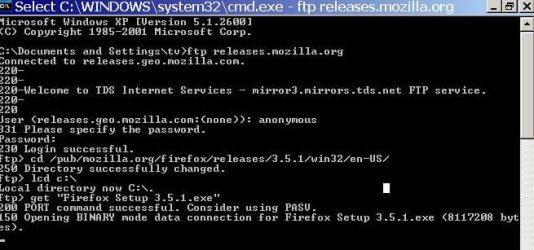
ok you can try getting firefox from their FTP site using the ftp command in command prompt, have a look at this screenshot:
ftpfirefox.JPG
these are the steps:
1. open a command prompt
2. type "ftp releases.mozilla.org"
3. when asked for user type "anonymous"
4. for password leave empty and hit enter
5. once logged in type "cd /pub/mozilla.org/firefox/releases/3.5.1/win32/en-US"
6. change local destination directory, type "lcd c:\" this will make the destination directory c:\
7. now type---> get "Firefox Setup 3.5.1.exe" , don't forget the double quotes or the download will not work because the file name has spaces in it.
8. wait for the file to finish downloading, it's 8MB, there is no indicator but when it finish it will say completed.
9. once completed goto destination directory, in our example it's c:\, find the "Firefox Setup 3.5.1.exe" file and run it to install
hope this helps!

EDIT: Corrected the directory it's en-us not en_US!
 
Last edited:

My Computer

Computer Manufacturer/Model Number
home made
OS
Windows 7 7264x64(main), 7260x86(secendary), XP SP3 Triple Boot
CPU
Intel Core 2 Duo E7400 2.8Mhz
Motherboard
Intel G33 express chipset
Memory
2GB DD2 667
Graphics Card(s)
Intel(R) 82G33 Graphics and Memory Controller Hub
Sound Card
Realtek Built into the G31
Monitor(s) Displays
19"
Screen Resolution
1280x1024
Hard Drives
320GB SATA (Main), 160GB IDE (Backup)
Case
Gigabyte SETTO
Keyboard
Genius
Mouse
Logitech
Internet Speed
1MB Download, 128k Upload
I just created a small batch file that will do the above automatically, it is attached as .txt thought so you have to rename it to .bat or .cmd. this script only works for firefox version 3.5.1 though. if you want you can edit it to download another version or browser or just ask me and I'll do it for you :)

also I posted the code here too it is below, so if you want you can just copy and paste this code into notepad then save it anywhere with the .bat or .cmd extension (make sure to select all file types when saving to make sure it won't be saved as .txt instead by default). this script simply creates a file called ftpcommands.txt in your user profile directory, and uses it to tell ftp command line program how to download firefox, then runs the firefox setup. the size of download is just 8 MB, and if you got a decent connection it should only take a few minutes..
Code:
@echo off
echo user>> %USERPROFILE%\ftpcommands.txt
echo anonymous>> %USERPROFILE%\ftpcommands.txt
echo guest>> %USERPROFILE%\ftpcommands.txt
echo lcd %USERPROFILE%>> %USERPROFILE%\ftpcommands.txt
echo cd /pub/mozilla.org/firefox/releases/3.5.1/win32/en-US>> %USERPROFILE%\ftpcommands.txt
echo bin %USERPROFILE%>> %USERPROFILE%\ftpcommands.txt
echo get "Firefox Setup 3.5.1.exe">> %USERPROFILE%\ftpcommands.txt
echo quit>> %USERPROFILE%\ftpcommands.txt
ftp -v -n -s:ftpcommands.txt releases.mozilla.org
del %USERPROFILE%\ftpcommands.txt
cd %USERPFOFILE%
"Firefox Setup 3.5.1"
this should help the users who are worried they won't get a browser with Windows 7 E Edition! let me know if you have any issues or if you want one for chrome/safari/IE :)
 

Attachments

My Computer

Computer Manufacturer/Model Number
home made
OS
Windows 7 7264x64(main), 7260x86(secendary), XP SP3 Triple Boot
CPU
Intel Core 2 Duo E7400 2.8Mhz
Motherboard
Intel G33 express chipset
Memory
2GB DD2 667
Graphics Card(s)
Intel(R) 82G33 Graphics and Memory Controller Hub
Sound Card
Realtek Built into the G31
Monitor(s) Displays
19"
Screen Resolution
1280x1024
Hard Drives
320GB SATA (Main), 160GB IDE (Backup)
Case
Gigabyte SETTO
Keyboard
Genius
Mouse
Logitech
Internet Speed
1MB Download, 128k Upload
Back
Top