I'm stuck on how to do dual monitors.

Jerbuta

New member
I'm new to this whole kind of thing and I wanted to know how I can get dual monitors, I have one 1600x900 and 1400x90. Here are my pc specs:
CPU: AMD Athlon(tm) II X2 220 Processor
RAM: 4GB
Grahpics Card: GeForce 6150SE nForce 430
OS: Windows 7 Home Premium Edition Service Pack 1 (build 7601), 64-bit
Sound card: Yes
And my whole pc is called the Acer Aspire X1420
So how can I set up dual monitors and will my pc be able to run it?
 

My Computer

Computer Manufacturer/Model Number
Acer Aspire
OS
Windows 7 Home Premium 32bit
CPU
AMD Athlon(tm) II X2 220 Processor
Memory
4GB
Graphics Card(s)
GeForce 6150SE nForce 430
Sound Card
Realtek High Definition Audio
Screen Resolution
1600x900
Hard Drives
2 500GB HDD
Keyboard
Acer
Mouse
Acer
Internet Speed
2.8MB/s

My Computer

Computer Manufacturer/Model Number
HP Pavilion Elite 495UK
OS
Windows 7 Ultimate SP1 64-Bit
CPU
Intel Core i7 870 @ 2.93GHz
Motherboard
MSI 2A9C (CPU1)
Memory
8Gb Dual-Channel DDR3 @ 664MHz
Graphics Card(s)
nVidia GeForce GTX 460 1024MB dedicated RAM
Sound Card
Realtek HD Audio
Monitor(s) Displays
HP2310i
Screen Resolution
1920 x 1080
Hard Drives
1x1954GB Hitachi HDS22020ALA 330 (RAID), 1x1954GB Hitachi External for backup and storage
PSU
460W
Case
HP Elite
Cooling
Air cooled
Keyboard
Logitech K750 solar-powered keyboard
Mouse
Logitech Wireless M180 mouse
Internet Speed
2Mb
Other Info
Pure Avanti Flow Internet Radio with iPod Dock, 64Gb iPod, HP USB Speakers, Sony MDR-V500 Headphones, Sony Vaio F-Series Laptop
Looks like the graphics are integrated on the motherboard so you won't be able to run 2 monitors unless you buy a dedicated graphics card.

Having said that, it appears your pc only has a 220watt power supply and I am struggling to find a graphics card that will run off that.

Your motherboard does have a 16x PCI-e slot though so all new cards will fit it, its just finding a low power one or possibly upgrading the power supply as well.

Hope that helps a little.

Paul.
 

My Computer

OS
Windows 7 Professional 64 bit
According to the specs for that model Acer it looks like Paul is correct,

Acer Support: Specifications

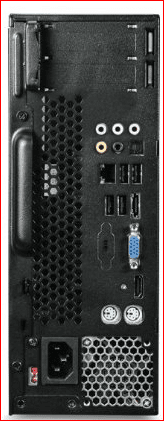
Also came across a picture of the back of it,

x1420.PNG

with what appears to be a HDMI port between the VGA and keyboard ports. If yours is like that and Acer configured it so that both can be used, you should be able to connect one monitor via VGA and the second using a DVI to HDMI adapter or cable. If it won't work with both then you're stuck looking at a video card to get dual monitors to work.
 

My Computer

Computer type
PC/Desktop
Computer Manufacturer/Model Number
Me
OS
Win 7 Ultimate x64
CPU
FX-8350 @ 4.6 GHz so far
Motherboard
Asus M5A97 EVO
Memory
ADATA XPG V1 Series Black 8GB DDR3 1600
Graphics Card(s)
Sapphire R9 270x Dual-X
Sound Card
Xonar DGX w/ Corsair Vengence 1300
Monitor(s) Displays
Acer S232HL Abid
Screen Resolution
1920x1080
Hard Drives
120 GB OCZ Vertex 3
500 GB Seagate 7200.12
PSU
Antec Earthwatts 650W Green
Case
Antec Three Hundred
Cooling
Cooler Master 212 EVO
Keyboard
Logitech G510
Mouse
Logitech G500s
Internet Speed
35000/3000
Back
Top