Monitor keeps going to sleep unexpectidly, and does not turn on.......

Warlockz

Колдун
Power User
Local time
6:31 AM
Messages
122
Ok so I have an HP 2159m 21" HDMI Monitor that keeps going to sleep unexpectedly, and does not turn on back on with mouse or keyboard movements, the only way I get it back on is to pull the cord from the back of my machine because the power button does not shut down the machine when this happens it is like frozen, I know it is not my settings because I have my power settings set to never go to sleep or turn of the monitor, and this happens when I am in the middle of doing something on my machine, I know it is not my Graffix card because I Installed a new one because I thought it may be the issue.

I have a Fan on the outside with the case side off blowing cool air on my hardware because if the case cover is on it shuts down within so many minutes sometimes of turning my machine on, my CPU seems to be working fine as with my HD, could this be my Motherboard or is their something I am missing? why doesn't the machine itself shut down if it is getting to hot? is it problems with my motherboard? grr this started happening like 2 months ago and I dont have the $ to go and buy another motherboard at the moment even thought hey are so cheap ;(

anybody had these issues in the past any suggestion is wanted?
 

My Computer My Computer

At a glance

7 Home Premium x64 SP1FX 4100 Black Edition 3.6GHz Quad-Core Socket...Kingston HyperX blu 8GB DDR3-1333ATI Radeon HD 4650 1GB DDR2 HDMI
Computer Manufacturer/Model Number
Custom Machine.
OS
7 Home Premium x64 SP1
CPU
FX 4100 Black Edition 3.6GHz Quad-Core Socket AM3+
Motherboard
ASUS M5A78L-M LX PLUS (AM3R2)
Memory
Kingston HyperX blu 8GB DDR3-1333
Graphics Card(s)
ATI Radeon HD 4650 1GB DDR2 HDMI
Sound Card
Realtek ALC887 8-channel high definition audio
Monitor(s) Displays
HP 2159m 21.5-inch 1080p HDMI LCD Monitor
Screen Resolution
1920x1080
PSU
Cooler Master eXtreme Power Plus 500 Watt
Case
Thermaltake V3 Black Edition ATX Mid Tower
Cooling
CoolerMaster Hyper 212 Plus
Graphics card or CPU are getting too hot.
At least that is what it appears to be from your description.

Let me see if I can find some monitoring tools if no one else posts them first.
I'm using what came with my ASUS hardware so they won't work with your moboard.

I'll get back to you in a few minutes if no one else does first.

This gives you CPU and GPU temps plus a lot of other info.
SIV - System Information Viewer

You will see this towards top left of column. Left picture below
CurrentReleaseDownloads First one down siv.zip is what you need. It is not a big download.
After download extract files.
Inside folder you will see a blue magician figure next to SIV64X.exe click that to open.
Then you will see right pic below hopefully with temperatures as mine does. I circled the CPU and the GPU which is the bottom temp.
Hope that helps and works.
Post temps when you get them.

Mike
 

Attachments

  • SIV web page.PNG
    SIV web page.PNG
    69.4 KB · Views: 86
  • SIVSS64.PNG
    SIVSS64.PNG
    34.1 KB · Views: 95
Last edited:

My Computer My Computer

At a glance

Windows7 Pro 64bit SP-1; Windows XP Pro 32bitIntel Core i7-870 Lynnfield 2.93GHz LGA 1156 ...8GB@1400MHz Crucial Ballistix DDR3-1600 4x2GBASUS ENGTX460 DirectCU/2DI/1GD5 1GB 256-bit G...
Computer Manufacturer/Model Number
Hopalong/ Godzilla
OS
Windows7 Pro 64bit SP-1; Windows XP Pro 32bit
CPU
Intel Core i7-870 Lynnfield 2.93GHz LGA 1156 95W Quad-Core
Motherboard
ASUS P7P55D-E PRO
Memory
8GB@1400MHz Crucial Ballistix DDR3-1600 4x2GB
Graphics Card(s)
ASUS ENGTX460 DirectCU/2DI/1GD5 1GB 256-bit GDDR5
Sound Card
VIA Onboard
Monitor(s) Displays
Asus VS248H-P 24"; Samsung SyncMaster 941BW 19"ws
Screen Resolution
1920x1080; 1440x900
Hard Drives
Samsung 830 120GB SSD
Intel 320 120GB SSD
Western Digital Caviar Black WD7501AALS 750GB 7200 RPM SATA 3.0Gb/s
Western Digital Caviar Black WD6401AALS 640GB 7200 RPM SATA 3.0Gb/s
PSU
COOLER MASTER Silent Pro RS850-AMBAJ3-US 850W Modular
Case
COOLER MASTER HAF 932 RC-932-KKN5-GP Black
Cooling
Scythe "Mugen-2 Rev.B" (2 ScytheKaze-Jyuni PWM fans)
Keyboard
Logitech K-320
Mouse
Kensington
Antivirus
Avast Inernet Suite
Browser
IE 9 ; Chrome
Thank you so much, all of my system specs are in my system specs, but I think you already know this...
 

My Computer My Computer

At a glance

7 Home Premium x64 SP1FX 4100 Black Edition 3.6GHz Quad-Core Socket...Kingston HyperX blu 8GB DDR3-1333ATI Radeon HD 4650 1GB DDR2 HDMI
Computer Manufacturer/Model Number
Custom Machine.
OS
7 Home Premium x64 SP1
CPU
FX 4100 Black Edition 3.6GHz Quad-Core Socket AM3+
Motherboard
ASUS M5A78L-M LX PLUS (AM3R2)
Memory
Kingston HyperX blu 8GB DDR3-1333
Graphics Card(s)
ATI Radeon HD 4650 1GB DDR2 HDMI
Sound Card
Realtek ALC887 8-channel high definition audio
Monitor(s) Displays
HP 2159m 21.5-inch 1080p HDMI LCD Monitor
Screen Resolution
1920x1080
PSU
Cooler Master eXtreme Power Plus 500 Watt
Case
Thermaltake V3 Black Edition ATX Mid Tower
Cooling
CoolerMaster Hyper 212 Plus
Added all the info to my first post. :D
 

My Computer My Computer

At a glance

Windows7 Pro 64bit SP-1; Windows XP Pro 32bitIntel Core i7-870 Lynnfield 2.93GHz LGA 1156 ...8GB@1400MHz Crucial Ballistix DDR3-1600 4x2GBASUS ENGTX460 DirectCU/2DI/1GD5 1GB 256-bit G...
Computer Manufacturer/Model Number
Hopalong/ Godzilla
OS
Windows7 Pro 64bit SP-1; Windows XP Pro 32bit
CPU
Intel Core i7-870 Lynnfield 2.93GHz LGA 1156 95W Quad-Core
Motherboard
ASUS P7P55D-E PRO
Memory
8GB@1400MHz Crucial Ballistix DDR3-1600 4x2GB
Graphics Card(s)
ASUS ENGTX460 DirectCU/2DI/1GD5 1GB 256-bit GDDR5
Sound Card
VIA Onboard
Monitor(s) Displays
Asus VS248H-P 24"; Samsung SyncMaster 941BW 19"ws
Screen Resolution
1920x1080; 1440x900
Hard Drives
Samsung 830 120GB SSD
Intel 320 120GB SSD
Western Digital Caviar Black WD7501AALS 750GB 7200 RPM SATA 3.0Gb/s
Western Digital Caviar Black WD6401AALS 640GB 7200 RPM SATA 3.0Gb/s
PSU
COOLER MASTER Silent Pro RS850-AMBAJ3-US 850W Modular
Case
COOLER MASTER HAF 932 RC-932-KKN5-GP Black
Cooling
Scythe "Mugen-2 Rev.B" (2 ScytheKaze-Jyuni PWM fans)
Keyboard
Logitech K-320
Mouse
Kensington
Antivirus
Avast Inernet Suite
Browser
IE 9 ; Chrome
Thanks for the cool tools, I have been using CoreTemp to monitor my CPU with the gadget and it is always usually around 45-55 C.

I took off my Heatsink and sucked all the dust incrusted in the crevices then I re set the heatsink now it looks as though their is a 10 degree difference, Ill have to get a better Heatsink and some thermal paste ASAP.
 

My Computer My Computer

At a glance

7 Home Premium x64 SP1FX 4100 Black Edition 3.6GHz Quad-Core Socket...Kingston HyperX blu 8GB DDR3-1333ATI Radeon HD 4650 1GB DDR2 HDMI
Computer Manufacturer/Model Number
Custom Machine.
OS
7 Home Premium x64 SP1
CPU
FX 4100 Black Edition 3.6GHz Quad-Core Socket AM3+
Motherboard
ASUS M5A78L-M LX PLUS (AM3R2)
Memory
Kingston HyperX blu 8GB DDR3-1333
Graphics Card(s)
ATI Radeon HD 4650 1GB DDR2 HDMI
Sound Card
Realtek ALC887 8-channel high definition audio
Monitor(s) Displays
HP 2159m 21.5-inch 1080p HDMI LCD Monitor
Screen Resolution
1920x1080
PSU
Cooler Master eXtreme Power Plus 500 Watt
Case
Thermaltake V3 Black Edition ATX Mid Tower
Cooling
CoolerMaster Hyper 212 Plus
That will do it. Dust!!!!

Get a can of compressed air if available.
If you have a separate video card blow/clean it out also. No need to remove the heatsink just blow out the dust.

I didn't know you had a temp monitor installed already.
SIV gives you the video card temps also.
I saw your specs I just wanted the temps from a reliable Win7 compatible software.
I knew SIV should work for you.

High temps may not be all the problem but is the first place I would check and monitor.
 

My Computer My Computer

At a glance

Windows7 Pro 64bit SP-1; Windows XP Pro 32bitIntel Core i7-870 Lynnfield 2.93GHz LGA 1156 ...8GB@1400MHz Crucial Ballistix DDR3-1600 4x2GBASUS ENGTX460 DirectCU/2DI/1GD5 1GB 256-bit G...
Computer Manufacturer/Model Number
Hopalong/ Godzilla
OS
Windows7 Pro 64bit SP-1; Windows XP Pro 32bit
CPU
Intel Core i7-870 Lynnfield 2.93GHz LGA 1156 95W Quad-Core
Motherboard
ASUS P7P55D-E PRO
Memory
8GB@1400MHz Crucial Ballistix DDR3-1600 4x2GB
Graphics Card(s)
ASUS ENGTX460 DirectCU/2DI/1GD5 1GB 256-bit GDDR5
Sound Card
VIA Onboard
Monitor(s) Displays
Asus VS248H-P 24"; Samsung SyncMaster 941BW 19"ws
Screen Resolution
1920x1080; 1440x900
Hard Drives
Samsung 830 120GB SSD
Intel 320 120GB SSD
Western Digital Caviar Black WD7501AALS 750GB 7200 RPM SATA 3.0Gb/s
Western Digital Caviar Black WD6401AALS 640GB 7200 RPM SATA 3.0Gb/s
PSU
COOLER MASTER Silent Pro RS850-AMBAJ3-US 850W Modular
Case
COOLER MASTER HAF 932 RC-932-KKN5-GP Black
Cooling
Scythe "Mugen-2 Rev.B" (2 ScytheKaze-Jyuni PWM fans)
Keyboard
Logitech K-320
Mouse
Kensington
Antivirus
Avast Inernet Suite
Browser
IE 9 ; Chrome
Friend having the same problem. Let is know if cleaning your machine does the trick, Warlockz!
 

My Computer My Computer

At a glance

Windows 7 Pro 32bit / Windows 7 ProfessionalIntel Core i7-620M Duel Core 2.66GHz / Intel ...4.0 GB / 8.0 GB1.0 GB NVIDIA Quadro FX 2800M / Intel HD Grap...
Computer type
PC/Desktop
Computer Manufacturer/Model Number
Dell Precision M6500 / Dell Insprion 3847
OS
Windows 7 Pro 32bit / Windows 7 Professional
CPU
Intel Core i7-620M Duel Core 2.66GHz / Intel Core i5-4460
Memory
4.0 GB / 8.0 GB
Graphics Card(s)
1.0 GB NVIDIA Quadro FX 2800M / Intel HD Graphics
Screen Resolution
1440x900 / 1920x1080
Well if the monitor switches off unexpected ly i would look into the pwer plan and suggest monitor never turns off

or even rest because with Hdmi it breaks a connection real easy if the monitor gets shut down

I would suggest changing power settings and monitor set to never sleep or standby they should lick the issue But looking at what you already posted i would look into the changing ports of the hdmi

see if the other port does the same /or the card could be malfuctioning
 

My Computer My Computer

At a glance

Windows 10 Home Premium 64bit sp1Intel I7-6700K @ 4.6 Ghz 1.344 volts everyday OC32GB G-Skill TridentZ 3200mhz 16-18-18-38 DDR4Sli Gigabyte Windforce GTX 980 G1
Computer type
PC/Desktop
Computer Manufacturer/Model Number
CoreI7-6700K MrFingerIII Special Builds
OS
Windows 10 Home Premium 64bit sp1
CPU
Intel I7-6700K @ 4.6 Ghz 1.344 volts everyday OC
Motherboard
Asrock Fatality K6 Z170 Socket 1151
Memory
32GB G-Skill TridentZ 3200mhz 16-18-18-38 DDR4
Graphics Card(s)
Sli Gigabyte Windforce GTX 980 G1
Sound Card
AC97 Creative Rage Tactic 3D Headphones Bluetooth
Monitor(s) Displays
27" Asus ROG Swift PG278Q G-Sync 48" Vizio Smart HD TV
Screen Resolution
2560x1440p 27"- 48" Currently Gaming at 2560x1440p Res 2K
Hard Drives
250GB Samsung Evo840SSD Seagate baracuda 500 GB WD Mybook 500Gb 1TB Seagate Barracuda
PSU
HX1050w Corsair Silver 80plus certified crosfire/sli
Case
Enthod Pro Full Tower
Cooling
Corsair H110i GT 280 mm High Performance WaterBlock
Keyboard
Logitech wireless keyboard
Mouse
Logitech wireless mouse
Internet Speed
Cox Cable 100+ mb
Antivirus
WebRoot Spysweeper with Antivirus
Browser
IE-10, Chrome, Opera
Other Info
My Other Rig is a AMD FX8320E @4.6Ghz 16GB Ballistic Sport Ram
Mobo Asrock Fatality 990FX 120GB OCZ SSD 1TB Seagate Barracuda Corsair H75 Cooling PSU Corsair CX750
GPU GTX Gigabyte 970G1
Cleaning didnt really do much, I may need to put new thermal paste under my heatsink, awhile back I got a better processor from a friend and tried it out, but it didnt work, so I replaced the old one, maybe I screwed it up somehow, but i was very careful. in time i will see, as long as I have the fan on high it seems to do ok. but a fan on high is kinda annoying....Ill try a new heatsink and fan, with new thermal paste when I get the chance to run down to microcenter.
 

My Computer My Computer

At a glance

7 Home Premium x64 SP1FX 4100 Black Edition 3.6GHz Quad-Core Socket...Kingston HyperX blu 8GB DDR3-1333ATI Radeon HD 4650 1GB DDR2 HDMI
Computer Manufacturer/Model Number
Custom Machine.
OS
7 Home Premium x64 SP1
CPU
FX 4100 Black Edition 3.6GHz Quad-Core Socket AM3+
Motherboard
ASUS M5A78L-M LX PLUS (AM3R2)
Memory
Kingston HyperX blu 8GB DDR3-1333
Graphics Card(s)
ATI Radeon HD 4650 1GB DDR2 HDMI
Sound Card
Realtek ALC887 8-channel high definition audio
Monitor(s) Displays
HP 2159m 21.5-inch 1080p HDMI LCD Monitor
Screen Resolution
1920x1080
PSU
Cooler Master eXtreme Power Plus 500 Watt
Case
Thermaltake V3 Black Edition ATX Mid Tower
Cooling
CoolerMaster Hyper 212 Plus
I feel this is a motherboard issue. Happens to a user at my work place. But first do a system diagnostic test and see if there are any hardware issues.
 

My Computer My Computer

At a glance

Windows 7 Ultimate 64BitGenuineIntel Intel(R) Core(TM) DuoCore T2400 ...2.00 GBMobile Intel(R) 945 Express Chipset
Computer Manufacturer/Model Number
Lenovo ThinkPad T60
OS
Windows 7 Ultimate 64Bit
CPU
GenuineIntel Intel(R) Core(TM) DuoCore T2400 @ 1.83GHz
Motherboard
Intel(R) 82801G (ICH7 Family)
Memory
2.00 GB
Graphics Card(s)
Mobile Intel(R) 945 Express Chipset
Sound Card
SoundMAX Integrated Digital HD Audio
Monitor(s) Displays
ThinkPad Display
Screen Resolution
1400x1050
Hard Drives
100Gb SATA
Keyboard
Standard Keyboard
Mouse
HID-compliant Mouse
Internet Speed
Cable Broadband - 54Mbps
Other Info
Intel(R) PRO/1000 PL Network Connection
11a/b/g Wireless LAN Mini PCI Express Adapter
Can I just make a quick comment?

the only way I get it back on is to pull the cord from the back of my machine because the power button does not shut down the machine when this happens it is like frozen

Please don't do that. No matter how much your PC is frozen, you can force it to shut off by holding the power button down for 4-5 seconds. But repeatedly disconnecting the power supply from AC could cause undue wear and carries a slight risk of surges.
 

My Computer My Computer

At a glance

Windows 7 Professional SP1 32-bitIntel Core 2 Duo E6600 2.4GHz4GB DDR2-667 (4x1GB in dual-channel config)nVidia GeForce 9800 GT
Computer type
PC/Desktop
Computer Manufacturer/Model Number
Custom-built
OS
Windows 7 Professional SP1 32-bit
CPU
Intel Core 2 Duo E6600 2.4GHz
Motherboard
Asus PL5D2
Memory
4GB DDR2-667 (4x1GB in dual-channel config)
Graphics Card(s)
nVidia GeForce 9800 GT
Sound Card
Creative X-Fi XtremeMusic
Monitor(s) Displays
Acer P236H
Screen Resolution
1920x1200 (DVI)
Hard Drives
OCZ SSD Vertex Plus 60GB SATA (Firmware 3.55), 64MB cache
Hitachi HD321KJ SATA, 320GB, 7200rpm, 16MB cache
PSU
Antec TruePower 2.0
Case
Cooler Master Centurion
Cooling
Too many fans
Keyboard
Standard
Mouse
Microsoft wireless optical mouse
Internet Speed
AT&T U-verse (18mbit/sec)
Antivirus
Microsoft Security Essentials
Browser
Firefox
Other Info
Other devices:
Compaq CQ-60 laptop
Google Nexus 7 (2012) tablet
Nvidia SHIELD tablet (US/LTE)
Hardkernel ODROID-XU single-board computer (Samsung Exynos 5420)
It has happened 2 more times GRRR

I feel this is a motherboard issue. Happens to a user at my work place. But first do a system diagnostic test and see if there are any hardware issues.

Exactly, I have the same suspicions, I just hope its not at the moment! I guess I can get a New one for like $75 bucks, but that is $75 I do not have at the moment...


Please don't do that. No matter how much your PC is frozen, you can force it to shut off by holding the power button down for 4-5 seconds. But repeatedly disconnecting the power supply from AC could cause undue wear and carries a slight risk of surges.

Tried that but it will not shut down when I hold the button down. I wouldn't just pull the cord for nothing. would it be safer to hit the switch on my power supply?
 

My Computer My Computer

At a glance

7 Home Premium x64 SP1FX 4100 Black Edition 3.6GHz Quad-Core Socket...Kingston HyperX blu 8GB DDR3-1333ATI Radeon HD 4650 1GB DDR2 HDMI
Computer Manufacturer/Model Number
Custom Machine.
OS
7 Home Premium x64 SP1
CPU
FX 4100 Black Edition 3.6GHz Quad-Core Socket AM3+
Motherboard
ASUS M5A78L-M LX PLUS (AM3R2)
Memory
Kingston HyperX blu 8GB DDR3-1333
Graphics Card(s)
ATI Radeon HD 4650 1GB DDR2 HDMI
Sound Card
Realtek ALC887 8-channel high definition audio
Monitor(s) Displays
HP 2159m 21.5-inch 1080p HDMI LCD Monitor
Screen Resolution
1920x1080
PSU
Cooler Master eXtreme Power Plus 500 Watt
Case
Thermaltake V3 Black Edition ATX Mid Tower
Cooling
CoolerMaster Hyper 212 Plus
My guess is hitting the power supply is the better option.

Wish cleaning the dust out of the machine would have fixed you up.

R-
 

My Computer My Computer

At a glance

Windows 7 Pro 32bit / Windows 7 ProfessionalIntel Core i7-620M Duel Core 2.66GHz / Intel ...4.0 GB / 8.0 GB1.0 GB NVIDIA Quadro FX 2800M / Intel HD Grap...
Computer type
PC/Desktop
Computer Manufacturer/Model Number
Dell Precision M6500 / Dell Insprion 3847
OS
Windows 7 Pro 32bit / Windows 7 Professional
CPU
Intel Core i7-620M Duel Core 2.66GHz / Intel Core i5-4460
Memory
4.0 GB / 8.0 GB
Graphics Card(s)
1.0 GB NVIDIA Quadro FX 2800M / Intel HD Graphics
Screen Resolution
1440x900 / 1920x1080
Cleaning didnt really do much, I may need to put new thermal paste under my heatsink, awhile back I got a better processor from a friend and tried it out, but it didnt work, so I replaced the old one, maybe I screwed it up somehow, but i was very careful. in time i will see, as long as I have the fan on high it seems to do ok. but a fan on high is kinda annoying....Ill try a new heatsink and fan, with new thermal paste when I get the chance to run down to microcenter.
If you put it back without new thermal paste, your CPU is overheating and will evetually toast itself to death. This can happen REAL quick. Take the trip get some new paste and cleaner and get some on the heatsink ASAP. Cleaning all of the old paste first is VERY important.
 

My Computer My Computer

At a glance

Windows 7 Ultimate X64 SP1Intel i5-2550K, Differing ~4.4-4.8GHz No buil...16GB G.Skill Sniper 1866MHz @ 2133MHz 2x8GBASUS GTX650TIB-DC2OC-2GD5, (650TI Boost)
Computer type
PC/Desktop
Computer Manufacturer/Model Number
Home Built Desktop By DataTech
OS
Windows 7 Ultimate X64 SP1
CPU
Intel i5-2550K, Differing ~4.4-4.8GHz No built in GPU
Motherboard
ASUS P8Z68-V PRO/GEN3
Memory
16GB G.Skill Sniper 1866MHz @ 2133MHz 2x8GB
Graphics Card(s)
ASUS GTX650TIB-DC2OC-2GD5, (650TI Boost)
Sound Card
Onboard Realtek 5-1
Monitor(s) Displays
Samsung P2570HD
Screen Resolution
1920x1080
Hard Drives
Samsung 840 Pro 256GB SSD for OS, 500GB Seagate Constellation (Enterprise drive) for Data
PSU
Corsair HX650W
Case
Inwin Dragon Rider
Cooling
Hyper 212 EVO w/two Noctua fans, push-pull, @1300 RPM
Keyboard
E-Z Eyes, bright yellow keys with large characters
Mouse
steelseries SENSEI Laser Pro Gaming
Internet Speed
48-51Mbs Mbs down, 11 Mbs up Xfinity Cable
Antivirus
Norton Internet Security 2013
Browser
IE 10, Opera, Pale Moon if needed
Other Info
4 case fans, LG BluRay-RE, ASUS DVD-RW, Mr. Fusion power supply, 1.21 gigawatts.
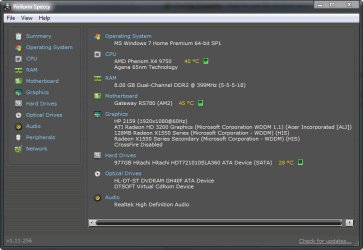
I guess Its not doing to bad at the moment on Heat because I have my Cool Operator JR Fan blasting on it from the side with the cover off, check out my Speccy screen-shot below, you can also put Speccy in your PortableApps, apps folder! but I am defiantly going to get some new Thermal Paste on Friday! I should put my better Graffix card back in sense I know the GPU wasn't the issue, ill wait until friday...........

2011-10-12_221233.jpg
 

My Computer My Computer

At a glance

7 Home Premium x64 SP1FX 4100 Black Edition 3.6GHz Quad-Core Socket...Kingston HyperX blu 8GB DDR3-1333ATI Radeon HD 4650 1GB DDR2 HDMI
Computer Manufacturer/Model Number
Custom Machine.
OS
7 Home Premium x64 SP1
CPU
FX 4100 Black Edition 3.6GHz Quad-Core Socket AM3+
Motherboard
ASUS M5A78L-M LX PLUS (AM3R2)
Memory
Kingston HyperX blu 8GB DDR3-1333
Graphics Card(s)
ATI Radeon HD 4650 1GB DDR2 HDMI
Sound Card
Realtek ALC887 8-channel high definition audio
Monitor(s) Displays
HP 2159m 21.5-inch 1080p HDMI LCD Monitor
Screen Resolution
1920x1080
PSU
Cooler Master eXtreme Power Plus 500 Watt
Case
Thermaltake V3 Black Edition ATX Mid Tower
Cooling
CoolerMaster Hyper 212 Plus
Back
Top