Reuse old XP PC HD as USB drive. Choose to boot from it on new PC?

bill2reg

New member
Member
Local time
7:03 PM
Messages
69
My old XP PC power supply died. I want to take the HD out (from which it booted into XP) and put it in a USB external case. If I then plug this into my Windows7 PC, can I choose to boot from the USB drive, so that I can have an XP computer when I need it? This would be a real help to me since I have some old software that will not run on Windows7, and I really need to use this old software.
 

My Computer My Computer

At a glance

Windows Home Premium 64bitIntel Core i7 970 @ 3.2 GHz12 GBAMD
Computer type
PC/Desktop
Computer Manufacturer/Model Number
HP Pavilion Elite HPE 490E
OS
Windows Home Premium 64bit
CPU
Intel Core i7 970 @ 3.2 GHz
Memory
12 GB
Graphics Card(s)
AMD
No it would not not work that way..
You can install windows XP on the same hard disk on which windows 7 is but in a different partition.
If you do it this way then when you would turn on the system you would get an option to choose in which os to boot.
Moreover if you have some software's that would not work in windows 7 you can try the "Windows compatibility mode" and it might make the software's work in windows 7.
 

My Computer My Computer

At a glance

Windows 7 Ultimate 32 bitAMD Phenom ii X4 960T Black Edition4Gb DDR 3ATI Radeon HD6870 (Sapphire)
Computer Manufacturer/Model Number
Assembled
OS
Windows 7 Ultimate 32 bit
CPU
AMD Phenom ii X4 960T Black Edition
Motherboard
Asus M4
Memory
4Gb DDR 3
Graphics Card(s)
ATI Radeon HD6870 (Sapphire)
Monitor(s) Displays
23Inch AOC LED monitor
Hard Drives
WD 1 TB
PSU
Coolermaster 460W
What about using Windows Virtual PC. I haven't use it yet under Windows 7, but I tried it on XP.
 

My Computer My Computer

At a glance

Windows 7 Professional Academic edition, 32 bit
OS
Windows 7 Professional Academic edition, 32 bit
I have tried compatibility mode but it will not run at all. Another thing I tried was to install an XP virtual machine, however I don't have the original XP install CD(s), only the upgrade from Windows ME, and it tells me it's not a valid registration code, so XP won't continue to install on the virtual machine.

If I install the old HD as a second internal drive, would the new PC have the option to boot from that at startup?
 

My Computer My Computer

At a glance

Windows Home Premium 64bitIntel Core i7 970 @ 3.2 GHz12 GBAMD
Computer type
PC/Desktop
Computer Manufacturer/Model Number
HP Pavilion Elite HPE 490E
OS
Windows Home Premium 64bit
CPU
Intel Core i7 970 @ 3.2 GHz
Memory
12 GB
Graphics Card(s)
AMD
If you have Windows 7 Professional or higher, both XP Mode and a complete virtual machine containing XP with SP3 are a free download from Microsoft.
Otherwise, if you do have a valid XP key, you could try to find .iso images of XP online and use them to install it.
 

My Computer My Computer

At a glance

Windows 7 Professional SP1 32-bitIntel Core 2 Duo E6600 2.4GHz4GB DDR2-667 (4x1GB in dual-channel config)nVidia GeForce 9800 GT
Computer type
PC/Desktop
Computer Manufacturer/Model Number
Custom-built
OS
Windows 7 Professional SP1 32-bit
CPU
Intel Core 2 Duo E6600 2.4GHz
Motherboard
Asus PL5D2
Memory
4GB DDR2-667 (4x1GB in dual-channel config)
Graphics Card(s)
nVidia GeForce 9800 GT
Sound Card
Creative X-Fi XtremeMusic
Monitor(s) Displays
Acer P236H
Screen Resolution
1920x1200 (DVI)
Hard Drives
OCZ SSD Vertex Plus 60GB SATA (Firmware 3.55), 64MB cache
Hitachi HD321KJ SATA, 320GB, 7200rpm, 16MB cache
PSU
Antec TruePower 2.0
Case
Cooler Master Centurion
Cooling
Too many fans
Keyboard
Standard
Mouse
Microsoft wireless optical mouse
Internet Speed
AT&T U-verse (18mbit/sec)
Antivirus
Microsoft Security Essentials
Browser
Firefox
Other Info
Other devices:
Compaq CQ-60 laptop
Google Nexus 7 (2012) tablet
Nvidia SHIELD tablet (US/LTE)
Hardkernel ODROID-XU single-board computer (Samsung Exynos 5420)
Using the old HD as a second internal drive may work provided everytime you want to use the old one, you have to change the old one as your primary boot and the Win7 disk as a secondary drive in the BIOS. This is of course if your BIOS is capable to do that, or else you may need to open everytime the case and physically change the dip switch settings on the 2 drives.
 

My Computer My Computer

At a glance

Windows 7 Professional Academic edition, 32 bit
OS
Windows 7 Professional Academic edition, 32 bit
Corazon, I have Windows 7 Home Premium 64 bit only. The old HD is in my old PC right now. It originally shipped with Windows ME, but it was ready to upgrade to XP as soon as it came out. I got the XP CD's at that time and installed XP as an upgrade from ME, but it seems that it didn't ship with a valid key. When I got XP installed on a virtual machine, I couldn't get it to start until I provided a key and that's when it said it wasn't a valid key for XP. I don't know what all that is about, and I don't have any original ME cd's because that was pre-installed when I bought the old PC.
 

My Computer My Computer

At a glance

Windows Home Premium 64bitIntel Core i7 970 @ 3.2 GHz12 GBAMD
Computer type
PC/Desktop
Computer Manufacturer/Model Number
HP Pavilion Elite HPE 490E
OS
Windows Home Premium 64bit
CPU
Intel Core i7 970 @ 3.2 GHz
Memory
12 GB
Graphics Card(s)
AMD
Shouldn't you be able to do a clean install with the XP upgrade disc as long as you feed it the ME key? (I'm actually asking, I don't remember if Microsoft allowed it back then.)
 

My Computer My Computer

At a glance

Windows 7 Professional SP1 32-bitIntel Core 2 Duo E6600 2.4GHz4GB DDR2-667 (4x1GB in dual-channel config)nVidia GeForce 9800 GT
Computer type
PC/Desktop
Computer Manufacturer/Model Number
Custom-built
OS
Windows 7 Professional SP1 32-bit
CPU
Intel Core 2 Duo E6600 2.4GHz
Motherboard
Asus PL5D2
Memory
4GB DDR2-667 (4x1GB in dual-channel config)
Graphics Card(s)
nVidia GeForce 9800 GT
Sound Card
Creative X-Fi XtremeMusic
Monitor(s) Displays
Acer P236H
Screen Resolution
1920x1200 (DVI)
Hard Drives
OCZ SSD Vertex Plus 60GB SATA (Firmware 3.55), 64MB cache
Hitachi HD321KJ SATA, 320GB, 7200rpm, 16MB cache
PSU
Antec TruePower 2.0
Case
Cooler Master Centurion
Cooling
Too many fans
Keyboard
Standard
Mouse
Microsoft wireless optical mouse
Internet Speed
AT&T U-verse (18mbit/sec)
Antivirus
Microsoft Security Essentials
Browser
Firefox
Other Info
Other devices:
Compaq CQ-60 laptop
Google Nexus 7 (2012) tablet
Nvidia SHIELD tablet (US/LTE)
Hardkernel ODROID-XU single-board computer (Samsung Exynos 5420)
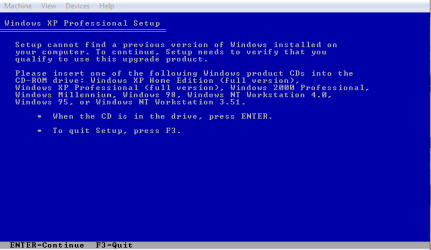
You will need to insert your Windows Millennium CD.

XP 001.PNG
 

My Computer My Computer

At a glance

ME/XP/Vista/Win7
OS
ME/XP/Vista/Win7
Corazon and Theog,
I don't have a CD or a key for ME because it came pre-installed on my old PC. The XP upgrade CD package has a key, but the install procedure won't accept it. It says it's not a valid key and so I can't get past that point in the installation.
 

My Computer My Computer

At a glance

Windows Home Premium 64bitIntel Core i7 970 @ 3.2 GHz12 GBAMD
Computer type
PC/Desktop
Computer Manufacturer/Model Number
HP Pavilion Elite HPE 490E
OS
Windows Home Premium 64bit
CPU
Intel Core i7 970 @ 3.2 GHz
Memory
12 GB
Graphics Card(s)
AMD
If you want to try this old XP HDD on different computers, then it makes sense to put in a USB case. If you wish to use it in only one system (a desktop!) then it is better to install it inside the desktop.

One problem with the old XP HDD on new computer is that the motherboard and the devices connected to it are different. The XP may fail to boot. You may try to boot it in Safe mode and let it install the generic microsoft drivers first and then install manually other non generic device drivers. You may download the XP drivers from the manufacturer's website.

If the XP HDD works on your new computer, you can get some help from this forum tutorials or internet to add an entry in the Windows 7's boot manager so that the system becomes a dual boot system.

Did you try to mount the XP HDD in the Virtual PC as the First HDD (without a virtual HDD) and try to boot? It may work! Then you don't have to install XP.
 

My Computer My Computer

At a glance

MS Windows 7 Ultimate 64-bit SP1i5-2410M 2.3GHz (2.9GHz Turbo-Boost) Sandy Br...4GB+4GB Samsung DDR3 PC3-10700 (1333 MHz)Video Intel(R) HD Graphics Family, 1696MB ava...
Computer Manufacturer/Model Number
Toshiba Satellite P775-S7232
OS
MS Windows 7 Ultimate 64-bit SP1
CPU
i5-2410M 2.3GHz (2.9GHz Turbo-Boost) Sandy Bridge 32nm
Motherboard
Toshiba PHRAA ver. PSBY1U-00F003
Memory
4GB+4GB Samsung DDR3 PC3-10700 (1333 MHz)
Graphics Card(s)
Video Intel(R) HD Graphics Family, 1696MB available memory
Sound Card
Realtek High Definition Audio version=6.0.1.6323
Monitor(s) Displays
17.3 " Trubrite TFT LCD, LED Backlit
Screen Resolution
1600x900 32 bit, Native support for 720P content
Hard Drives
TOSHIBA MK6476GSXN
580.614 [GB] partitioned C: 80GB and D: 500GB with hidden recovery partitons.

Spare bay for 2nd HDD but no SATA connector :-(
PSU
Toshiba AC/DC Adapter
Case
Notebook
Cooling
Built-in Fan
Keyboard
Premium Raised Tile keyboard
Mouse
Logitech M215 wireless mouse
Internet Speed
Not fast enough
Other Info
Built-in Harman Kardon speakers with Dolby Advanced Audio, Waves MaxxAudio® 3. HDMI, 1xUSB3+3xUSB2 ports, WebCam, Battery life 4hrs 11mins, 4GB Readyboost SDHC card, WD My Book Essential Ext HDDs 2 TB, 2x1TB, My Passport SE 1TB and WDTV 1st Gen for Multimedia playing on a Sony Wega 32" LCD.
Recent addition to my toys are Asus Transformer Pad TF300T with 32GB onboard sd card + 32GB microsd card.
Rraod,

I haven't removed the old HDD from the old PC yet. And I suppose I will still need to get a USB enclosure for it, and then plug it into the new Windows 7 PC, since that is where the virtual machine is located.
 

My Computer My Computer

At a glance

Windows Home Premium 64bitIntel Core i7 970 @ 3.2 GHz12 GBAMD
Computer type
PC/Desktop
Computer Manufacturer/Model Number
HP Pavilion Elite HPE 490E
OS
Windows Home Premium 64bit
CPU
Intel Core i7 970 @ 3.2 GHz
Memory
12 GB
Graphics Card(s)
AMD
TheoG, as I mentioned before I don't have any ME CD's because that was pre-installed on the old PC. The only CD's I have are the ones that I used to install the XP as an upgrade from ME on that same old PC. That's why I don't have a product key for ME, but only for the XP upgrade, and the XP install on the virtual machine won't accept that product key. But I don't even know if I will be able to print from the software I need, because it will ONLY print to a parallel printer, and my new system doesn't even have a parallel port to connect to. Looks like I may have to completely rewrite the software in a Windows7 compatible format.
 

My Computer My Computer

At a glance

Windows Home Premium 64bitIntel Core i7 970 @ 3.2 GHz12 GBAMD
Computer type
PC/Desktop
Computer Manufacturer/Model Number
HP Pavilion Elite HPE 490E
OS
Windows Home Premium 64bit
CPU
Intel Core i7 970 @ 3.2 GHz
Memory
12 GB
Graphics Card(s)
AMD
TheoG, I don't have any ME CD(s). It came pre-installed on the old CD. I did buy the XP upgrade, so I have those CDs, but the product key is invalid on the XP install on the VM.
 

My Computer My Computer

At a glance

Windows Home Premium 64bitIntel Core i7 970 @ 3.2 GHz12 GBAMD
Computer type
PC/Desktop
Computer Manufacturer/Model Number
HP Pavilion Elite HPE 490E
OS
Windows Home Premium 64bit
CPU
Intel Core i7 970 @ 3.2 GHz
Memory
12 GB
Graphics Card(s)
AMD
Back
Top