
Lenovo Y570 SSD & HDD concerns

Bushwookie

New member
Local time
9:35 AM
Messages
5
Location
On the Internet
Hello all,

I recently bought one of these Y570's and I am more than impressed with the performance it provides. However, I am confused because Lenovo says that the SSD is integrated somehow into the mechanical HDD. I don't really know how this is possible. I would like to eventually reformat this because of the bloatware it came with. However I am unsure which part of the HDD has the OS on it.

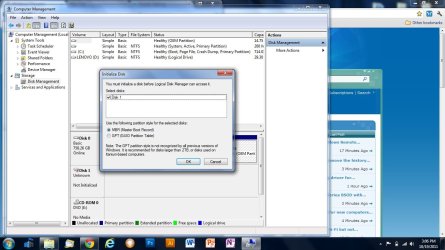
When I enter the computer management to see the partitions, I receive this message and this error.
initialize disk.jpg

"The driver cannot find the sector requested" - which makes me feel that my HDD is already failing? Someone please tell me this isn't true.

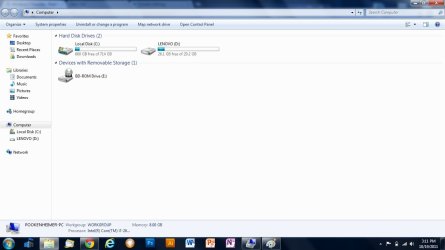
I then look at "My Computer" in which it shows two drives. 1st is the C drive which has windows on it, but the smaller drive has some of the apps that came with this computer as well as the drivers. This leads me to believe that it may be the SSD but the advertisement said the SSD was 64GB's.
Hdds.jpg

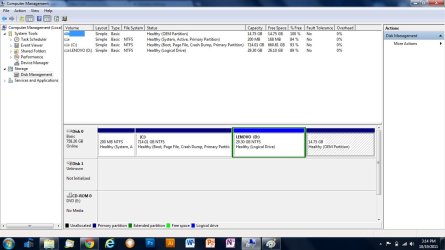
I have also attached an image of my disk partitions for anyone who may decide to help.
pcmngmt.jpg

Thank you for taking the time to read this.

~ wookie
 

My Computer My Computer

At a glance

Windows 7 Ultimate 64-bit
OS
Windows 7 Ultimate 64-bit
SSD drive

There is such a drive. Supposedly it is very fast with out the cost associated with a pure SSD drives.

The C: drive listed is the OS. I suppose the Lenovo labeled drive would contain utilities and the 14gb labeled OEM partition is very likely partition that contains image of your running OS. You do not really need to keep it but then if you do not, you should use some other means to backup your OS.
 

My Computer My Computer

At a glance

Windows 7
OS
Windows 7
Thank you for the response!

Any idea what the Disk 1 that is not initialized is? It shows no space on it but it is showing up under my computer management screen....
 

My Computer My Computer

At a glance

Windows 7 Ultimate 64-bit
OS
Windows 7 Ultimate 64-bit
You only have one disk! What you see is single drive divided in to partitions. The first partition that you are probably talking about, the one with 200mb is part of your Windows 7 on partition shown as C: It contains the boot record for your Windows 7 OS. Do not fool with it or you will not be able to boot to your windows.
 

My Computer My Computer

At a glance

Windows 7
OS
Windows 7
I'm aware of that and I appreciate your concern, however the disk with the partitions is named Disk 0. The Disk I am referring to is the Disk 1 which says it is "Unknown". Any idea what that one is?
 

My Computer My Computer

At a glance

Windows 7 Ultimate 64-bit
OS
Windows 7 Ultimate 64-bit
I did not notice it the first time but now that I looked closely, I see it. Since you have Lenovo, my guess is that it is a onboard memory that is used as similarly as pagefile to buffer the data to/from hard drive. I have Lenovo X61 and I have such drive on my PC. But it should be shown as such. It may be that the drivers for it are not installed. Go to Lenovo and download the drivers.
 

My Computer My Computer

At a glance

Windows 7
OS
Windows 7
Thank you but I do not even know what driver I should install for this :cry:
 

My Computer My Computer

At a glance

Windows 7 Ultimate 64-bit
OS
Windows 7 Ultimate 64-bit
Use the program "SystemUpdate" from lenovo. It should have come with your Lenovo pre-installed. It will scan your system for missing or updated drivers for Lenovo.
 

My Computer My Computer

At a glance

Windows 7
OS
Windows 7
Its a hybrid drive, the ssd part of the drive stores windows boot options and start up things, giving you the advantage of an ssd but the cost of a normal drive.
Formatting it will be fine, it will just take a few boots until the drive is fully up to speed again.

Sent from my BlackBerry 9900 using Tapatalk
 

My Computer My Computer

At a glance

Windows 7 Ultimate x64, & Mac OS X 10.9.2Intel Core i5 2500kCorsair Vengence 8gb 1866mhzNvidia GTX 770 OC
Computer type
PC/Desktop
Computer Manufacturer/Model Number
Built by badgers!!!
OS
Windows 7 Ultimate x64, & Mac OS X 10.9.2
CPU
Intel Core i5 2500k
Motherboard
Asus P8z68 LE
Memory
Corsair Vengence 8gb 1866mhz
Graphics Card(s)
Nvidia GTX 770 OC
Monitor(s) Displays
2x ASUS LED 22" IPS
Screen Resolution
3840x1080
Hard Drives
240GB Crucial M500 SSD
120gb Corsair Force 3 SSD
1TB Western Digital
PSU
Corsair HX650w Modular
Case
Corsair Air 540
Cooling
Corsair H60 Push/Pull
Keyboard
Corsair K70/ Logitech G27 wheel
Mouse
Saitek R.A.T 9
Internet Speed
Too slow!
Other Info
AMD fusion E350N Home server-Windows Home Server 2011 (also made by badgers!)
2011 Macbook 2.4ghz Core2Duo, 4gb ddr3, 120gb Ocz Vertex SSD
It is NOT a hybrid drive

I am 99.9999% sure that it is not a hybrid drive. And to make it 100% shure, I am going to open the base of my Y570 over the weekend to see the mSATA Toshiba drive in the PCIe slot.

BIOS Boot menu shows
Internal HDD TOSHIBA THNSNB064GMCG
SATA HDD WDC WD7500BPVT-24HXZT3

BIOS Information shows
Hard Disk 1: TOSHIBA THNSNB064GMCG
Hard Disk 2: WD7500BPVT-24HXZT3

Device Manager -> Disk Drives
Shows the above two drives separate.

Lenovo's spec sheet says ... 64GB mSATA Solid State Drive (SSD), via PCIe Mini Card slot.

What is very confusing is, from 'Disk Management' if you right click on Disk 0 and go to properties then it shows a TOSHIBA disk. And right click to see properties on Disk 1 says it is WDC drive.

Anyone, please do post your experience when trying to install W7 from scratch on this machine. I have not tried this yet.
 

My Computer My Computer

At a glance

Windows 7
OS
Windows 7
What http://www.lenovoblogs.com/ says

Lenovo Blogs talks about RapidDrive technology.

Inside the Box » Lenovo RapidDrive Technology

Here is copy and paste of some text from the blog.

When you buy a Lenovo Y560 or Y460, you will have the option to configure it with RapidDrive. Your machine will have your standard hard disk drive plus a 32GB or 64GB SSD installed in the internal PCI-E slot. The breakthrough is not combining the two in one system. Anyone can do that. The breakthrough is using a Lenovo patent-pending technology that connects both the SSD and HDD simultaneously as one big, contiguous drive. Unlike my setup above, this storage is dynamically pooled and managed. The end user does not need to do anything. The system manages the SSD depending on usage. Programs, documents, and other files are dynamically moved on and off of the SSD so that you can always get the fastest speed possible. This also means that the system will not return an error if the SSD is already at full capacity. The program/file will automatically be installed on the HDD and moved to the SSD later in the background if the algorithm determines that is optimal.

That explains why we see confusing 'Disk Management' info. On Lenovo's web site, under Y570 Support, you can download 'RapidDrive' software. This will be useful for those who want to install new OS from scratch.

But if I am doing a new install, I probably will not join the two disks using RapidDrive. I will manage that on my own. I do not know how taking a backup image of your OS will work if you have RapidDrive installed.
 

My Computer My Computer

At a glance

Windows 7
OS
Windows 7
Wow, great information here! I'm glad I am not the only one who has been pondering this situation of a fresh install! :party:
 

My Computer My Computer

At a glance

Windows 7 Ultimate 64-bit
OS
Windows 7 Ultimate 64-bit
Urgent: Failed to resintall os on y570 -- help

I recently bought Y570 and am trying to reinstall Windows 7 Ultimate x64. Since I want to put my OS onto the SSD I decided to repartition all the disks.(Only one disk is detected) I deleted all the partitions and recreated them and when I click to install the OS on one of the partitions I created, the setup reports that it cannot locate an exisiting partition. Do you guys have any idea what I can do?
 

My Computer My Computer

At a glance

Windows 7 Ultimate x64
OS
Windows 7 Ultimate x64
How to install windows 7 on LENOVO Y570 even if you deleted all partit

How to install windows 7 on LENOVO Y570 even if you deleted all partitions and rapiddrive driver from yours notebook !!!


1) You need to fiend some LIVE CD or LIVE DVD with Paragon Hard Drive Manager.
( Like Win7PE_v5.5f_xalex -- LiveCD Windows'7 v5.5 by xalex (11.01.2011) v5.5 [ )
2) Boot from this disk
3) Start Paragon HDM and you will see all HDD and SSD and theirs partitions
a) Find yours SSD
b) Click right mouse and choices to delete all partitions and all data from this SSD
c) After is done you can reboot with Windows install disc and to install yours windows like in a first time
 

My Computer My Computer

At a glance

Windows 7 Ultimate x64
OS
Windows 7 Ultimate x64
Back
Top