Physical Memory (RAM) Keeps Spiking & Slows my performence way down

Fattieman

New member
Physical Memory (RAM) Keeps Spiking & Slows my performence way down

Hello, I am new here, but have heard that the reputation of these forums is superb.

Anyways, as the title says, my Windows 7 PC has been really sluggish lately, and I have pinpointed it to be its excessive RAM/CPU usage. I have 4gb of RAM and a Intel Core i5 processor.

It has been fine up till now, I bought it June 2010, and only use it to browse, iTunes, Steam, and the occasional music torrent download.

I do virus scans on a regular basis, I try to do it at least once a week if I remember.

Anyways, below is some pictures of the issues. It can be really sluggish when I'm running only Firefox, or even nothing at all!

It might be a dust issue, but I could not get it to open due to the lack of guides of my model on the internet, and the fact that some screws got stripped. In spite of this, I tried spraying air dust on the outside of the PC's grills, some dust came off, but it didn't solve the issue.

I tried doing a msconfig, disabling "Load Startup Items" on the General tab, and clicking "Hide All Microsoft Services" and "Disabling all" under the Services tab. I restarted it, and noticed that the RAM usage was good at first, around "0.95gb", but eventually spiked back to around "3.5gb".

Please, if you have ANY suggestions, they will be welcome. I even got desperate and sent it to Staples Easy Tech Repair, but that didn't help any.

Thank You
 

Attachments

  • bullshit.jpg
    bullshit.jpg
    404.1 KB · Views: 37
  • bullshit2.jpg
    bullshit2.jpg
    207.4 KB · Views: 25
  • bullshit3.jpg
    bullshit3.jpg
    145.6 KB · Views: 28

My Computer

Computer type
Laptop
Computer Manufacturer/Model Number
Samsung R580
OS
Windows 7 Home Premium 64bit
CPU
Intel Core i5 CPU M 430 @ 2.27Ghz 2.27Ghz
Motherboard
Samsung R580/R590
Memory
8GB 1600 Mhz Samsung
Graphics Card(s)
Nvidia GeFORCE 310m
Sound Card
Nvidia High Definition Audio
Monitor(s) Displays
Laptop Screen
Screen Resolution
1366 x 768
Hard Drives
500GB Samsung 840 EVO SSD
PSU
Standard
Case
Samsung R580
Cooling
Standard
Keyboard
Laptop keyboard
Mouse
Logitech M505
Antivirus
Kapersky Internet Security
Browser
FireFox
Hi Fattieman and welcome to Seven Forums. When you open Task Manager click the Resource Manager button. In the next window click the memory tab to see what is using your memory.
 

My Computer

Computer type
PC/Desktop
Computer Manufacturer/Model Number
Home Built Desktop By DataTech
OS
Windows 7 Ultimate X64 SP1
CPU
Intel i5-2550K, Differing ~4.4-4.8GHz No built in GPU
Motherboard
ASUS P8Z68-V PRO/GEN3
Memory
16GB G.Skill Sniper 1866MHz @ 2133MHz 2x8GB
Graphics Card(s)
ASUS GTX650TIB-DC2OC-2GD5, (650TI Boost)
Sound Card
Onboard Realtek 5-1
Monitor(s) Displays
Samsung P2570HD
Screen Resolution
1920x1080
Hard Drives
Samsung 840 Pro 256GB SSD for OS, 500GB Seagate Constellation (Enterprise drive) for Data
PSU
Corsair HX650W
Case
Inwin Dragon Rider
Cooling
Hyper 212 EVO w/two Noctua fans, push-pull, @1300 RPM
Keyboard
E-Z Eyes, bright yellow keys with large characters
Mouse
steelseries SENSEI Laser Pro Gaming
Internet Speed
48-51Mbs Mbs down, 11 Mbs up Xfinity Cable
Antivirus
Norton Internet Security 2013
Browser
IE 10, Opera, Pale Moon if needed
Other Info
4 case fans, LG BluRay-RE, ASUS DVD-RW, Mr. Fusion power supply, 1.21 gigawatts.
Ok, I posted an image below that shows it. I'm not a huge techie, so I'm not sure what all those .exe's are for


EDIT: I ended the wmp.....exe, it cleared up A LOT of memory usage, but I don't know if that is the main culprit.
 

Attachments

  • bullshit4.jpg
    bullshit4.jpg
    195.3 KB · Views: 73

My Computer

Computer type
Laptop
Computer Manufacturer/Model Number
Samsung R580
OS
Windows 7 Home Premium 64bit
CPU
Intel Core i5 CPU M 430 @ 2.27Ghz 2.27Ghz
Motherboard
Samsung R580/R590
Memory
8GB 1600 Mhz Samsung
Graphics Card(s)
Nvidia GeFORCE 310m
Sound Card
Nvidia High Definition Audio
Monitor(s) Displays
Laptop Screen
Screen Resolution
1366 x 768
Hard Drives
500GB Samsung 840 EVO SSD
PSU
Standard
Case
Samsung R580
Cooling
Standard
Keyboard
Laptop keyboard
Mouse
Logitech M505
Antivirus
Kapersky Internet Security
Browser
FireFox
From the snip nothing looks out of place. you do have a wmpnetwk.exe running which I believe shares WMP over your network. If you're not using it you can disable it in WMP preferences.

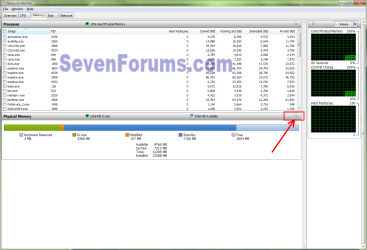
If you click the Down arrow on the physical memory line you can see a graphical representation of RAM usage.

resmon.png
 

My Computer

Computer type
PC/Desktop
Computer Manufacturer/Model Number
Home Built Desktop By DataTech
OS
Windows 7 Ultimate X64 SP1
CPU
Intel i5-2550K, Differing ~4.4-4.8GHz No built in GPU
Motherboard
ASUS P8Z68-V PRO/GEN3
Memory
16GB G.Skill Sniper 1866MHz @ 2133MHz 2x8GB
Graphics Card(s)
ASUS GTX650TIB-DC2OC-2GD5, (650TI Boost)
Sound Card
Onboard Realtek 5-1
Monitor(s) Displays
Samsung P2570HD
Screen Resolution
1920x1080
Hard Drives
Samsung 840 Pro 256GB SSD for OS, 500GB Seagate Constellation (Enterprise drive) for Data
PSU
Corsair HX650W
Case
Inwin Dragon Rider
Cooling
Hyper 212 EVO w/two Noctua fans, push-pull, @1300 RPM
Keyboard
E-Z Eyes, bright yellow keys with large characters
Mouse
steelseries SENSEI Laser Pro Gaming
Internet Speed
48-51Mbs Mbs down, 11 Mbs up Xfinity Cable
Antivirus
Norton Internet Security 2013
Browser
IE 10, Opera, Pale Moon if needed
Other Info
4 case fans, LG BluRay-RE, ASUS DVD-RW, Mr. Fusion power supply, 1.21 gigawatts.
Thanks for the tip. I disabled "wmpnetwk.exe" under Control Panel, Administrative Services, because every time I ended the process from Resource Monitor, it would return eventually to eat up my RAM.

So far, just by ending this process, my RAM usage is normal, its currently at 1.15GB w/ 5% of the CPU active (all I'm running is Task Manager & Firefox).

I believe this may have been the culprit, but if something else comes up, I will know where to turn.

Thanks a lot!
 

My Computer

Computer type
Laptop
Computer Manufacturer/Model Number
Samsung R580
OS
Windows 7 Home Premium 64bit
CPU
Intel Core i5 CPU M 430 @ 2.27Ghz 2.27Ghz
Motherboard
Samsung R580/R590
Memory
8GB 1600 Mhz Samsung
Graphics Card(s)
Nvidia GeFORCE 310m
Sound Card
Nvidia High Definition Audio
Monitor(s) Displays
Laptop Screen
Screen Resolution
1366 x 768
Hard Drives
500GB Samsung 840 EVO SSD
PSU
Standard
Case
Samsung R580
Cooling
Standard
Keyboard
Laptop keyboard
Mouse
Logitech M505
Antivirus
Kapersky Internet Security
Browser
FireFox
You're welcome. :)
 

My Computer

Computer type
PC/Desktop
Computer Manufacturer/Model Number
Home Built Desktop By DataTech
OS
Windows 7 Ultimate X64 SP1
CPU
Intel i5-2550K, Differing ~4.4-4.8GHz No built in GPU
Motherboard
ASUS P8Z68-V PRO/GEN3
Memory
16GB G.Skill Sniper 1866MHz @ 2133MHz 2x8GB
Graphics Card(s)
ASUS GTX650TIB-DC2OC-2GD5, (650TI Boost)
Sound Card
Onboard Realtek 5-1
Monitor(s) Displays
Samsung P2570HD
Screen Resolution
1920x1080
Hard Drives
Samsung 840 Pro 256GB SSD for OS, 500GB Seagate Constellation (Enterprise drive) for Data
PSU
Corsair HX650W
Case
Inwin Dragon Rider
Cooling
Hyper 212 EVO w/two Noctua fans, push-pull, @1300 RPM
Keyboard
E-Z Eyes, bright yellow keys with large characters
Mouse
steelseries SENSEI Laser Pro Gaming
Internet Speed
48-51Mbs Mbs down, 11 Mbs up Xfinity Cable
Antivirus
Norton Internet Security 2013
Browser
IE 10, Opera, Pale Moon if needed
Other Info
4 case fans, LG BluRay-RE, ASUS DVD-RW, Mr. Fusion power supply, 1.21 gigawatts.
Back
Top