Solved Dual monitor not recognized

Runnyeye

New member
Local time
3:15 AM
Messages
10
Location
Netherlands
Hello everyone,

I used to have 2 monitors connected to my pc, both working fine.
Now i got 2 new monitors (LG Flatron E2240) and i tried connecting them the same way as i had my previous monitors connected.
What i see is that both new monitors have a VGA-output. So i put a connector on them so i can connect them to the DVI-slots on my videocard (Radeon HD 6800).

Now i just cant seem to get a second monitor to work. It stays black, receives no signal and both windows 7 as CCC (AMD Engine Control Center latest version) do not recognize a second monitor.

Both monitors work fine if i connect them as a single monitor to my pc. Using the second slot on my videocard just doesnt seem to work.

I did install the drivers that came with the monitor, no effect.
Tried to use different resolutions on both monitors, no effect.
Tried looking for answers, but found nothing, so here i am ;-)

Hope anyone can help me and ofcourse willing to give extra info on this if needed.

Thanks allready!!!
 

My Computer My Computer

At a glance

Windows 7 Ultimate 64-bit (6.1, Build 7601)AMD Phenom(tm) II X6 1055T Processor (6 CPUs)...Kingston ValueRAM KVR1333D3N9K2/4GXFX HD 6870 1024 MB DDR5
OS
Windows 7 Ultimate 64-bit (6.1, Build 7601)
CPU
AMD Phenom(tm) II X6 1055T Processor (6 CPUs), ~2.8GHz
Motherboard
Asrock 870 Extreme3 | 870
Memory
Kingston ValueRAM KVR1333D3N9K2/4G
Graphics Card(s)
XFX HD 6870 1024 MB DDR5
Monitor(s) Displays
LG Flatron E2240
Screen Resolution
1920 x 1080(p) (60.000Hz)
Hard Drives
SAMSUNG HD103UJ ATA Device
Keyboard
Logitech G15 Gaming Keyboard
This the monitor.

E2240T | LG LED, Sincerely yours! | LG ELECTRONICS Nederland

It has both a VGA and a DVI port on it and you need to use the DVI connection on at least one of them. The reason that only one will work using the VGA connection is that the only one of the DVI ports on the video card supports a VGA connection via a VGA-DVI adapter.
 

My Computer My Computer

At a glance

Win 7 Ultimate x64FX-8350 @ 4.6 GHz so farADATA XPG V1 Series Black 8GB DDR3 1600Sapphire R9 270x Dual-X
Computer type
PC/Desktop
Computer Manufacturer/Model Number
Me
OS
Win 7 Ultimate x64
CPU
FX-8350 @ 4.6 GHz so far
Motherboard
Asus M5A97 EVO
Memory
ADATA XPG V1 Series Black 8GB DDR3 1600
Graphics Card(s)
Sapphire R9 270x Dual-X
Sound Card
Xonar DGX w/ Corsair Vengence 1300
Monitor(s) Displays
Acer S232HL Abid
Screen Resolution
1920x1080
Hard Drives
120 GB OCZ Vertex 3
500 GB Seagate 7200.12
PSU
Antec Earthwatts 650W Green
Case
Antec Three Hundred
Cooling
Cooler Master 212 EVO
Keyboard
Logitech G510
Mouse
Logitech G500s
Internet Speed
35000/3000

My Computer My Computer

At a glance

Windows 7 Ultimate 64-bit (6.1, Build 7601)AMD Phenom(tm) II X6 1055T Processor (6 CPUs)...Kingston ValueRAM KVR1333D3N9K2/4GXFX HD 6870 1024 MB DDR5
OS
Windows 7 Ultimate 64-bit (6.1, Build 7601)
CPU
AMD Phenom(tm) II X6 1055T Processor (6 CPUs), ~2.8GHz
Motherboard
Asrock 870 Extreme3 | 870
Memory
Kingston ValueRAM KVR1333D3N9K2/4G
Graphics Card(s)
XFX HD 6870 1024 MB DDR5
Monitor(s) Displays
LG Flatron E2240
Screen Resolution
1920 x 1080(p) (60.000Hz)
Hard Drives
SAMSUNG HD103UJ ATA Device
Keyboard
Logitech G15 Gaming Keyboard
Only way you're going to get them to both work is to buy a DVI to VGA converter, an adapter just won't work. Either that or return the monitors if you can and get a pair that does have a DVI port on them.

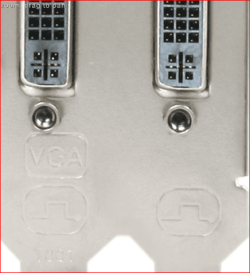
As I said above your video card has two DVI ports on it, but only one of them will output/work with a VGA adapter, the other is DVI only. No idea if yours is marked as such (it should say in the manual, but sadly doesn't in a lot of cases) but a few of the card manufacturers mark the back panel bracket like this,

backplate.PNG

to show which of the two supports VGA. You cannot get a VGA connection to work from the one not marked as such without using a converter as something has to change the signal from digital to analogue, and a regular VGA to DVI adapter just won't work.
 

My Computer My Computer

At a glance

Win 7 Ultimate x64FX-8350 @ 4.6 GHz so farADATA XPG V1 Series Black 8GB DDR3 1600Sapphire R9 270x Dual-X
Computer type
PC/Desktop
Computer Manufacturer/Model Number
Me
OS
Win 7 Ultimate x64
CPU
FX-8350 @ 4.6 GHz so far
Motherboard
Asus M5A97 EVO
Memory
ADATA XPG V1 Series Black 8GB DDR3 1600
Graphics Card(s)
Sapphire R9 270x Dual-X
Sound Card
Xonar DGX w/ Corsair Vengence 1300
Monitor(s) Displays
Acer S232HL Abid
Screen Resolution
1920x1080
Hard Drives
120 GB OCZ Vertex 3
500 GB Seagate 7200.12
PSU
Antec Earthwatts 650W Green
Case
Antec Three Hundred
Cooling
Cooler Master 212 EVO
Keyboard
Logitech G510
Mouse
Logitech G500s
Internet Speed
35000/3000

My Computer My Computer

At a glance

Windows 7 HP / Ultimate x64Core i5 / X4 955 BE4GB DDR3 1333Mhz / 8GB DDR3 1600MhzHD5470 / HD5670
Computer Manufacturer/Model Number
Dell / Custom
OS
Windows 7 HP / Ultimate x64
CPU
Core i5 / X4 955 BE
Motherboard
OEM / Gigabyte 880GM-USB3
Memory
4GB DDR3 1333Mhz / 8GB DDR3 1600Mhz
Graphics Card(s)
HD5470 / HD5670
Sound Card
Onboard
Monitor(s) Displays
FullHD 15" / Dell 22" WS
Screen Resolution
1920x1080 / 1680x1050
Hard Drives
320GB / 1.5TB
PSU
CM
Case
CM
Cooling
CM, Antec
Keyboard
Logitech
Mouse
Logitech
Yes, now i get it.

Thank you a lot for your answer Stormy13 (and ofcourse ReviverSoft) :D

Cheers,
Runnyeye
 

My Computer My Computer

At a glance

Windows 7 Ultimate 64-bit (6.1, Build 7601)AMD Phenom(tm) II X6 1055T Processor (6 CPUs)...Kingston ValueRAM KVR1333D3N9K2/4GXFX HD 6870 1024 MB DDR5
OS
Windows 7 Ultimate 64-bit (6.1, Build 7601)
CPU
AMD Phenom(tm) II X6 1055T Processor (6 CPUs), ~2.8GHz
Motherboard
Asrock 870 Extreme3 | 870
Memory
Kingston ValueRAM KVR1333D3N9K2/4G
Graphics Card(s)
XFX HD 6870 1024 MB DDR5
Monitor(s) Displays
LG Flatron E2240
Screen Resolution
1920 x 1080(p) (60.000Hz)
Hard Drives
SAMSUNG HD103UJ ATA Device
Keyboard
Logitech G15 Gaming Keyboard
Really surprised your two monitors are "only" VGA - I though all production had moved-on....

Recently bought a second monitor s/h just in case my LCD blew and then tried use as dual-monitor. I thought it was VGA-only ( and that's why it was £25).... but on being informed it was "dual input" I looked under the sprung-loaded stand-thingy - and it does have DVI, so it's become a better product overnight!

I only used it for Video-Editing, but it's rubbish since the timeline is broken . . . . spread over two screens with a bit of duplication - not really a good answer, IMHO.
Still, it's a better "back-up" as DVI, compared with VGA.
 

My Computer My Computer

At a glance

Windows7 home premium 32-bitAMD Althonx2-240, dual-core 2.8GHz4G (2x 2Gb)500Mb, three o/p VGA and 2xdigital
Computer Manufacturer/Model Number
Dealer made PC
OS
Windows7 home premium 32-bit
CPU
AMD Althonx2-240, dual-core 2.8GHz
Motherboard
ASUS M4N78
Memory
4G (2x 2Gb)
Graphics Card(s)
500Mb, three o/p VGA and 2xdigital
Sound Card
on MBO
Monitor(s) Displays
19" LCD Widescreen format
Screen Resolution
1440 x 900
Hard Drives
All SATA: C;(and small restoration as D) 500G total with about 32G unused , 1x 500G (about 30Gb unused this holds old video/photo/audio files)
and 1x 2Tb holds new Program files, but NOT faulty program.... which was installed on C:
PSU
I think 600 W, it's over spec'd for the demand, IMHO
Case
Desktop -one of thiose highly-punched case to keep cool
Cooling
8" slow fan, internal drive fans, PSU and CPU, low room temp
Keyboard
UK layout wired. mini-DIN PS2 connector on MBO
Mouse
USB-wired,
Internet Speed
cable, 2Mb
Other Info
This prog has been OK for nearly 1yr . . . . DVD Architect Studio v5.0 will give very similar Fault-Code( See postings). nearly 1 month later, without any video-processing, if I fiddle with the "Playlist" - this is part of the User-design and not anything "rogue" - but it suggests (to me?) that it's not any video-content (IE screen play action, or audio files) that are to blame.
Back
Top