
External Hard Drive Showing Blank When Full

BigTymer

New member
Local time
4:53 PM
Messages
5
I own two Western Digital hard drives which I store all my important data on. One is a WD MyBook 1TB and the other is a WD Passport 500gb. I use these drives in conjunction with a WDTV Live unit to watch and listen to my media.

I keep having errors with Windows 7 and the permissions and recognization of these two drives. I thought I had figured this out before but forgot how to fix it and I am asking for help.

My 1tb drive shows as a BLANK drive and I know that it is full. It shows as an active drive in disk management and I've renamed it to different drive letter. It is recognizing the drive but not the data on the drive.

I believe I read before that it has something to do with windows 7 and the WDTV live changing the permissions and remapping the drive.

I spent the last few hours trying to figure this out. HOping someone on here could help me out.
 

My Computer My Computer

At a glance

Windows 7 Home 64 bitIntel Core 2 Duo
Computer Manufacturer/Model Number
Toshiba Satelite L505
OS
Windows 7 Home 64 bit
CPU
Intel Core 2 Duo
Windows Explorer (in the Computer section) shows that the drive is empty (i.e. 1 TB is available for files)?
 

My Computer My Computer

At a glance

W7 Ultimate SP1, LM19.2 MATE, W10 Home 1703, ...AMD Phenom II x6 1100T, 3.3 GHz12GB DDR3 1333 G-Skill (4GB x 2), G-Skill (2G...NVIDIA GeForce GTX 660
Computer type
PC/Desktop
Computer Manufacturer/Model Number
n/a
OS
W7 Ultimate SP1, LM19.2 MATE, W10 Home 1703, W10 Pro 1703 VM, #All 64 bit
CPU
AMD Phenom II x6 1100T, 3.3 GHz
Motherboard
ASUS M4A88T-M/USB3 (AM3)
Memory
12GB DDR3 1333 G-Skill (4GB x 2), G-Skill (2GB x 2)
Graphics Card(s)
NVIDIA GeForce GTX 660
Sound Card
Realtek?
Monitor(s) Displays
Samsung S23B350
Screen Resolution
1920x1080
Hard Drives
WD Green 2TB (SATA), WD Green 3TB (SATA), WD Blue 4TB (SATA), WD Blue 6TB (SATA)
PSU
Cooler Master
Case
Antec GX300 Tower
Cooling
3x Antec TRICOOL 120mm Fans
Mouse
Wired Optical
Internet Speed
DSL
Antivirus
Avast
Browser
Pale Moon (64 bit)
Other Info
2018-12-27 Upgraded HDDs
2015-12-10 Upgraded case, graphics card, storage
2015-08-15 Upgraded motherboard & RAM
2015-07-15 Upgraded LM17.1 to LM17.2
The Drive itself is named Blank (B:), and it happens to have nothing on it but WD Smartware.
 

My Computer My Computer

At a glance

Windows 7 Home 64 bitIntel Core 2 Duo
Computer Manufacturer/Model Number
Toshiba Satelite L505
OS
Windows 7 Home 64 bit
CPU
Intel Core 2 Duo
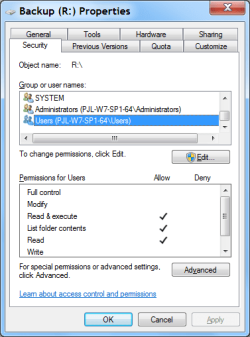
List folder contents?

Try this:

  • Right click on the drive.
  • Select "Properties".
  • Go to the "Security" tab.
  • Check that "Users" (or your user account) has "List folder contents" selected.
Security Tab (Drive).png

Another possibility is that they have been marked as "Hidden".

Try this:

  • Open the "Start Menu"
  • Type "folder" in the search box.
  • Choose "Show hidden files and folders" from the list (if it appears).
  • Check that "Show hidden files, folders and drives" is selected.
  • You could also turn off "Hide protected operating system files (Recommended)".
Windows Explorer Folder Option.png
 

My Computer My Computer

At a glance

W7 Ultimate SP1, LM19.2 MATE, W10 Home 1703, ...AMD Phenom II x6 1100T, 3.3 GHz12GB DDR3 1333 G-Skill (4GB x 2), G-Skill (2G...NVIDIA GeForce GTX 660
Computer type
PC/Desktop
Computer Manufacturer/Model Number
n/a
OS
W7 Ultimate SP1, LM19.2 MATE, W10 Home 1703, W10 Pro 1703 VM, #All 64 bit
CPU
AMD Phenom II x6 1100T, 3.3 GHz
Motherboard
ASUS M4A88T-M/USB3 (AM3)
Memory
12GB DDR3 1333 G-Skill (4GB x 2), G-Skill (2GB x 2)
Graphics Card(s)
NVIDIA GeForce GTX 660
Sound Card
Realtek?
Monitor(s) Displays
Samsung S23B350
Screen Resolution
1920x1080
Hard Drives
WD Green 2TB (SATA), WD Green 3TB (SATA), WD Blue 4TB (SATA), WD Blue 6TB (SATA)
PSU
Cooler Master
Case
Antec GX300 Tower
Cooling
3x Antec TRICOOL 120mm Fans
Mouse
Wired Optical
Internet Speed
DSL
Antivirus
Avast
Browser
Pale Moon (64 bit)
Other Info
2018-12-27 Upgraded HDDs
2015-12-10 Upgraded case, graphics card, storage
2015-08-15 Upgraded motherboard & RAM
2015-07-15 Upgraded LM17.1 to LM17.2
If it is an empty or non OS drive, it should not be Active.
 

My Computer My Computer

At a glance

Windows 7 Ultimate X64 SP1Intel i5-2550K, Differing ~4.4-4.8GHz No buil...16GB G.Skill Sniper 1866MHz @ 2133MHz 2x8GBASUS GTX650TIB-DC2OC-2GD5, (650TI Boost)
Computer type
PC/Desktop
Computer Manufacturer/Model Number
Home Built Desktop By DataTech
OS
Windows 7 Ultimate X64 SP1
CPU
Intel i5-2550K, Differing ~4.4-4.8GHz No built in GPU
Motherboard
ASUS P8Z68-V PRO/GEN3
Memory
16GB G.Skill Sniper 1866MHz @ 2133MHz 2x8GB
Graphics Card(s)
ASUS GTX650TIB-DC2OC-2GD5, (650TI Boost)
Sound Card
Onboard Realtek 5-1
Monitor(s) Displays
Samsung P2570HD
Screen Resolution
1920x1080
Hard Drives
Samsung 840 Pro 256GB SSD for OS, 500GB Seagate Constellation (Enterprise drive) for Data
PSU
Corsair HX650W
Case
Inwin Dragon Rider
Cooling
Hyper 212 EVO w/two Noctua fans, push-pull, @1300 RPM
Keyboard
E-Z Eyes, bright yellow keys with large characters
Mouse
steelseries SENSEI Laser Pro Gaming
Internet Speed
48-51Mbs Mbs down, 11 Mbs up Xfinity Cable
Antivirus
Norton Internet Security 2013
Browser
IE 10, Opera, Pale Moon if needed
Other Info
4 case fans, LG BluRay-RE, ASUS DVD-RW, Mr. Fusion power supply, 1.21 gigawatts.
I have a 1TB and 2TB Western Digital My Book USB drives along with WDTV box for playing the media on a TV. I also use Windows 7 and I have never faced any problems you have just described.

These drives require SES drivers for correct functioning. Do you have SES driver installed on your Window 7? (check in Device Manager). If not you will find these drivers on the WD Smartware software.

I am enclosing my drives permissions and ownership details. You may compare these permissons with your HDDs and if necessary correct them.

WDTV does not change the NTFS file permissions on the HDD. It only creates a database index of media you have on the HDD. You will find the database entries in .wd_tv folder.
 

Attachments

  • WDTV dir.jpg
    WDTV dir.jpg
    25.6 KB · Views: 51
  • WDTV media permissions 1.jpg
    WDTV media permissions 1.jpg
    45.3 KB · Views: 66
  • WDTV media permissions 2.jpg
    WDTV media permissions 2.jpg
    33.7 KB · Views: 40
  • WDTV SES Device.jpg
    WDTV SES Device.jpg
    27.9 KB · Views: 43

My Computer My Computer

At a glance

MS Windows 7 Ultimate 64-bit SP1i5-2410M 2.3GHz (2.9GHz Turbo-Boost) Sandy Br...4GB+4GB Samsung DDR3 PC3-10700 (1333 MHz)Video Intel(R) HD Graphics Family, 1696MB ava...
Computer Manufacturer/Model Number
Toshiba Satellite P775-S7232
OS
MS Windows 7 Ultimate 64-bit SP1
CPU
i5-2410M 2.3GHz (2.9GHz Turbo-Boost) Sandy Bridge 32nm
Motherboard
Toshiba PHRAA ver. PSBY1U-00F003
Memory
4GB+4GB Samsung DDR3 PC3-10700 (1333 MHz)
Graphics Card(s)
Video Intel(R) HD Graphics Family, 1696MB available memory
Sound Card
Realtek High Definition Audio version=6.0.1.6323
Monitor(s) Displays
17.3 " Trubrite TFT LCD, LED Backlit
Screen Resolution
1600x900 32 bit, Native support for 720P content
Hard Drives
TOSHIBA MK6476GSXN
580.614 [GB] partitioned C: 80GB and D: 500GB with hidden recovery partitons.

Spare bay for 2nd HDD but no SATA connector :-(
PSU
Toshiba AC/DC Adapter
Case
Notebook
Cooling
Built-in Fan
Keyboard
Premium Raised Tile keyboard
Mouse
Logitech M215 wireless mouse
Internet Speed
Not fast enough
Other Info
Built-in Harman Kardon speakers with Dolby Advanced Audio, Waves MaxxAudio® 3. HDMI, 1xUSB3+3xUSB2 ports, WebCam, Battery life 4hrs 11mins, 4GB Readyboost SDHC card, WD My Book Essential Ext HDDs 2 TB, 2x1TB, My Passport SE 1TB and WDTV 1st Gen for Multimedia playing on a Sony Wega 32" LCD.
Recent addition to my toys are Asus Transformer Pad TF300T with 32GB onboard sd card + 32GB microsd card.
I appreciate all the suggestions guys but its not working. Here is the funny thing the light on the front of the drive which shows capacity is showing that drive is full. But Windows Explorer shows the drive is empty. Can't seem to figure this out. Drive is no longer active.
 

My Computer My Computer

At a glance

Windows 7 Home 64 bitIntel Core 2 Duo
Computer Manufacturer/Model Number
Toshiba Satelite L505
OS
Windows 7 Home 64 bit
CPU
Intel Core 2 Duo
Back
Top