Solved Underclocking to keep Temperatures down?

DeEmanon

Banned
So i had an idea, to lock two of my three memory blocks, to run on 4GB not 12GB of ram, to keep temperatures down, and manually locking cores, so i do not use 3 cores all the time, to go web browsing and Skype, i could easily fit all that on one core, can i do any of that?
 

My Computer

Computer Manufacturer/Model Number
Self Service
OS
7 Ultimate x64 no sp. also using Ubuntu 10.10 and Mint 9 (GNOME)
CPU
AMD Athlon II X3 445 (3.2GHz) (overclocked to X4)
Motherboard
ASUS M4A77T
Memory
12 GB Patriot 1333 MHz
Graphics Card(s)
AMD Sapphire Radeon HD 6570 2GB(Thats right, 2GB in a 6570:P
Sound Card
Will need to find out.
Monitor(s) Displays
Techinka LCD (tv/hdmi/vga) screen
Screen Resolution
1280x1024 VGA
Hard Drives
2x 500GB Seagate Barra'cuda 7200
PSU
650W WinPower (ATX)
Case
N/A
Cooling
wooh, too many to name, but air cooled
Keyboard
qwerty one ;P
Mouse
Works
Internet Speed
It is what most would call average
Other Info
N/a

My Computer

Computer type
PC/Desktop
Computer Manufacturer/Model Number
Custom Build
OS
Windows 10 Pro x64
CPU
Intel Core i5 4440 @Stock
Motherboard
Gigabyte Z97 D3H
Memory
4 x 4GB HyperX Fury DDR3
Graphics Card(s)
Gigabyte GTX 1050Ti O4G
Sound Card
Integrated
Monitor(s) Displays
Dell P2417H
Screen Resolution
1920 x 1080
Hard Drives
Samsung EVO 850 120GB / Toshiba DT01ACA050 1TB 7200prm 32MB
PSU
Riotoro Onyx 750W
Case
NZXT H500 Black-Red
Cooling
Stock CPU + NZXT 120mm + 2x120mm red fans
Keyboard
Modecom Volcano Lanparty
Mouse
Asus ROG Gladius / DeepCool E-Pad Plus
Internet Speed
DOCSIS 50/3 Mbit
Browser
Google Chrome
Other Info
Asus K55VJ(i5 3210M, GT635M / 2GB, 8GB DDR3, 500GB HDD)
Modern motherboards and CPUs underclock themselves automatically now. a 3.0 gig processor may only be running at 1.2gig for 99% of it's on time. Find some motherboard monitoring software and check it out for yourself :) (See if your system is doing it)

As far as ram goes, I think the only way you can save power is to pull dimms out.

On some graphics cards, having a second monitor plugged in can take an additional 30-40% power. So if you have a second monitor but don't always need it, you can turn it off, that might save some power.
 

My Computer

Computer Manufacturer/Model Number
Scratch built
OS
Windows 7 x64 Ultimate
CPU
i7 960
Motherboard
Asus P6X58D
Memory
12 Gig Corsair Dominator
Graphics Card(s)
Nvidia 480
Sound Card
Maudio Delta 44 + breakout box
Monitor(s) Displays
Dell UltraSharp U2410 24in and Samsung 21 dual monitors
Screen Resolution
1920x1200 and 1280x1024
Hard Drives
Primary: Intel X-25M G2 160G SSD
Secondary: Segate baracuda 1.0 TB
HDs in AHCI mode.
PSU
Corasair TX850
Case
Cooler Master HAF
Cooling
Corsair H50
Keyboard
Logitech G15 + N52 game pad
Mouse
Logitech MX518
Internet Speed
15kbs down 4.5kbps up
Other Info
WEI 7.6
CPU & RAM 7.6
Graphics 7.9
Hard disk 7.7
Modern motherboards and CPUs underclock themselves automatically now. a 3.0 gig processor may only be running at 1.2gig for 99% of it's on time. Find some motherboard monitoring software and check it out for yourself :) (See if your system is doing it)

As far as ram goes, I think the only way you can save power is to pull dimms out.

On some graphics cards, having a second monitor plugged in can take an additional 30-40% power. So if you have a second monitor but don't always need it, you can turn it off, that might save some power.

Can you recommend any software for this?
 

My Computer

Computer Manufacturer/Model Number
Self Service
OS
7 Ultimate x64 no sp. also using Ubuntu 10.10 and Mint 9 (GNOME)
CPU
AMD Athlon II X3 445 (3.2GHz) (overclocked to X4)
Motherboard
ASUS M4A77T
Memory
12 GB Patriot 1333 MHz
Graphics Card(s)
AMD Sapphire Radeon HD 6570 2GB(Thats right, 2GB in a 6570:P
Sound Card
Will need to find out.
Monitor(s) Displays
Techinka LCD (tv/hdmi/vga) screen
Screen Resolution
1280x1024 VGA
Hard Drives
2x 500GB Seagate Barra'cuda 7200
PSU
650W WinPower (ATX)
Case
N/A
Cooling
wooh, too many to name, but air cooled
Keyboard
qwerty one ;P
Mouse
Works
Internet Speed
It is what most would call average
Other Info
N/a
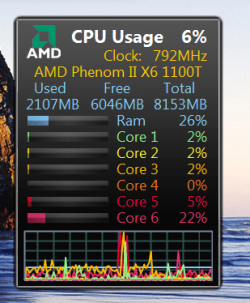
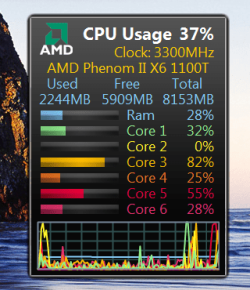
Here is a simple desktop gadget that will show your CPU freq and also usage of each core.

Windows Gadgets - All CPU Meter Version 3.7

As you can see my CPU is running at reduced speed and will go back to max when needed.

Gadget.PNG Gadget 2.PNG


Jim :geek:
 

My Computer

Computer type
PC/Desktop
Computer Manufacturer/Model Number
Home Built
OS
Windows 8.1 Pro w/Media Center 64bit, Windows 7 HP 64bit
CPU
Phenom II X6 1100T
Motherboard
ASUS M5A99X EVO
Memory
Crucial Balistic 8gb DDR3-1866 CL9
Graphics Card(s)
MSI R6850 Cyclone IGD5 PE
Sound Card
On Board
Monitor(s) Displays
ASUS VE258Q 25" LED with DVI-HDMI-DisplayPort
Screen Resolution
1920 x 1080
Hard Drives
Two WD Cavier Black 2TB Sata III, WD My Book Essential 2TB USB 3.0
PSU
Seasonic X650 80 Plus GOLD Modular
Case
Corsair 400R
Cooling
Antec Kuhler H2O 620, Two 120mm and four 140mm
Keyboard
Logitech K120
Mouse
Logitech Marble Mouse USB, Logitech Precision Game Pad
Internet Speed
15MB
Antivirus
Norton IS 2013, Malwarebytes Pro Beta 2
Browser
IE-11, FF-27
Other Info
APC UPS ES 750, Netgear WNR3500L Gigabit & Wireless N Router with SamKnows Test Program, Motorola SB6120 Gigabit Cable Modem. Brother HL-2170W Laser Printer, Epson V300 Scanner
i have rain meter to show me the usage, but it only shows my the ''all together'' percentage, where the average between 3 is found :/
 

My Computer

Computer Manufacturer/Model Number
Self Service
OS
7 Ultimate x64 no sp. also using Ubuntu 10.10 and Mint 9 (GNOME)
CPU
AMD Athlon II X3 445 (3.2GHz) (overclocked to X4)
Motherboard
ASUS M4A77T
Memory
12 GB Patriot 1333 MHz
Graphics Card(s)
AMD Sapphire Radeon HD 6570 2GB(Thats right, 2GB in a 6570:P
Sound Card
Will need to find out.
Monitor(s) Displays
Techinka LCD (tv/hdmi/vga) screen
Screen Resolution
1280x1024 VGA
Hard Drives
2x 500GB Seagate Barra'cuda 7200
PSU
650W WinPower (ATX)
Case
N/A
Cooling
wooh, too many to name, but air cooled
Keyboard
qwerty one ;P
Mouse
Works
Internet Speed
It is what most would call average
Other Info
N/a
Well the important part to look at is the "Clock: 792Mhz"

That is showing that the CPU is being underclocked because it is idle... Fire up a game and it'll jump to 2400 or 3200 or whatever the max speed is.
 

My Computer

Computer Manufacturer/Model Number
Scratch built
OS
Windows 7 x64 Ultimate
CPU
i7 960
Motherboard
Asus P6X58D
Memory
12 Gig Corsair Dominator
Graphics Card(s)
Nvidia 480
Sound Card
Maudio Delta 44 + breakout box
Monitor(s) Displays
Dell UltraSharp U2410 24in and Samsung 21 dual monitors
Screen Resolution
1920x1200 and 1280x1024
Hard Drives
Primary: Intel X-25M G2 160G SSD
Secondary: Segate baracuda 1.0 TB
HDs in AHCI mode.
PSU
Corasair TX850
Case
Cooler Master HAF
Cooling
Corsair H50
Keyboard
Logitech G15 + N52 game pad
Mouse
Logitech MX518
Internet Speed
15kbs down 4.5kbps up
Other Info
WEI 7.6
CPU & RAM 7.6
Graphics 7.9
Hard disk 7.7
Well it hardly suits my theme, but nethertheless. i'll have to live with it... thanks :P
377093_2475933292711_1083837285_32357520_863084487_n.jpg
 

My Computer

Computer Manufacturer/Model Number
Self Service
OS
7 Ultimate x64 no sp. also using Ubuntu 10.10 and Mint 9 (GNOME)
CPU
AMD Athlon II X3 445 (3.2GHz) (overclocked to X4)
Motherboard
ASUS M4A77T
Memory
12 GB Patriot 1333 MHz
Graphics Card(s)
AMD Sapphire Radeon HD 6570 2GB(Thats right, 2GB in a 6570:P
Sound Card
Will need to find out.
Monitor(s) Displays
Techinka LCD (tv/hdmi/vga) screen
Screen Resolution
1280x1024 VGA
Hard Drives
2x 500GB Seagate Barra'cuda 7200
PSU
650W WinPower (ATX)
Case
N/A
Cooling
wooh, too many to name, but air cooled
Keyboard
qwerty one ;P
Mouse
Works
Internet Speed
It is what most would call average
Other Info
N/a
Heh nice! :D

well as soon as your done getting the info out of it you want you can just get rid of it :)
 

My Computer

Computer Manufacturer/Model Number
Scratch built
OS
Windows 7 x64 Ultimate
CPU
i7 960
Motherboard
Asus P6X58D
Memory
12 Gig Corsair Dominator
Graphics Card(s)
Nvidia 480
Sound Card
Maudio Delta 44 + breakout box
Monitor(s) Displays
Dell UltraSharp U2410 24in and Samsung 21 dual monitors
Screen Resolution
1920x1200 and 1280x1024
Hard Drives
Primary: Intel X-25M G2 160G SSD
Secondary: Segate baracuda 1.0 TB
HDs in AHCI mode.
PSU
Corasair TX850
Case
Cooler Master HAF
Cooling
Corsair H50
Keyboard
Logitech G15 + N52 game pad
Mouse
Logitech MX518
Internet Speed
15kbs down 4.5kbps up
Other Info
WEI 7.6
CPU & RAM 7.6
Graphics 7.9
Hard disk 7.7
Under options you can change the color scheme to closer match your desktop.

Jim :geek:
 

My Computer

Computer type
PC/Desktop
Computer Manufacturer/Model Number
Home Built
OS
Windows 8.1 Pro w/Media Center 64bit, Windows 7 HP 64bit
CPU
Phenom II X6 1100T
Motherboard
ASUS M5A99X EVO
Memory
Crucial Balistic 8gb DDR3-1866 CL9
Graphics Card(s)
MSI R6850 Cyclone IGD5 PE
Sound Card
On Board
Monitor(s) Displays
ASUS VE258Q 25" LED with DVI-HDMI-DisplayPort
Screen Resolution
1920 x 1080
Hard Drives
Two WD Cavier Black 2TB Sata III, WD My Book Essential 2TB USB 3.0
PSU
Seasonic X650 80 Plus GOLD Modular
Case
Corsair 400R
Cooling
Antec Kuhler H2O 620, Two 120mm and four 140mm
Keyboard
Logitech K120
Mouse
Logitech Marble Mouse USB, Logitech Precision Game Pad
Internet Speed
15MB
Antivirus
Norton IS 2013, Malwarebytes Pro Beta 2
Browser
IE-11, FF-27
Other Info
APC UPS ES 750, Netgear WNR3500L Gigabit & Wireless N Router with SamKnows Test Program, Motorola SB6120 Gigabit Cable Modem. Brother HL-2170W Laser Printer, Epson V300 Scanner
Back
Top