Solved New Memory New Timings, New Speed, NOT Happening.

mrdemon

New member
So as we all know RAM is getting cheap so I thought I would get myself 8gb of Ram.

This is where the Fun stops.

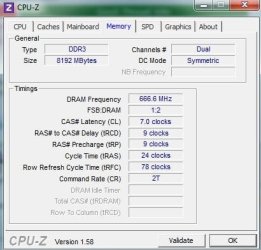
Installed RAM and then found it works. YAY But only at 1333 not the 1600 its ment to be at. So I went into the Bios and Changed too 1600, NOTHING. NO POST.

Had to reset eveything and all.

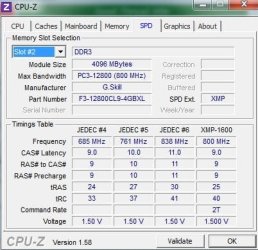
Went back in and done the Timings to the 9,9,9,24 as it said on the pack. NOTHING.

I have been on the G:Skill site and someone gave a this is what you do, So I did it again nothing.

So am I right in saying that I will be overclocking my CPU when I change things like the FSB and Timings?

Bios is this: IMG_0146[1].jpgIMG_0147[1].jpgIMG_0148[1].JPG.

Here is CPU-Z:Capture.JPGCapture2.JPGCapture3.JPGCapture4.JPG

Mother board is Here.
 

My Computer

Computer Manufacturer/Model Number
Home Build.
OS
Windows 7 Home Pre
CPU
Q8200 Intell 2.333
Motherboard
Asus P5Q3 Delux
Memory
DDR3 1333 4gig
Graphics Card(s)
Ati HD4870
Sound Card
Onboard Soundmax. 7.1
Monitor(s) Displays
1, 20" Samsung
Screen Resolution
1600/900
PSU
Good enough
Case
Le Shark
Cooling
FAN FAN FAN FAN, Thermaltake Minitype 90 with speed fan 4.
Keyboard
Standard, Gaming Wolfking
Mouse
Cm-storm-inferno-wired-gaming-mouse
Internet Speed
Sky Crappy upto 20meg I get a whapping 5.8mbs.
more than likely you will have to up your ram voltage to 1.65v in order to get it at 1600.....most are the same way, 1.5v will do fine for 1333 but most of the older ram not being marketed for SandyBridge cpu will need the 1.65V to see 1600, give that a try with the 9-9-9-24 timings and see how it goes ;)
 

My Computer

Computer type
PC/Desktop
OS
Win8.1 Pro x64
CPU
Intel Core i7 2700K
Motherboard
Asus Maximus IV Extreme-Z
Memory
Silicon Power 2400@2133 16gb
Graphics Card(s)
Diamond R9 290X
Sound Card
onboard
Monitor(s) Displays
AOC 23"
Screen Resolution
1920x1080
Hard Drives
2-Intel 520 120Gb RAID0 (OS and Games)
2 OCZ Solid 3 60gb RAID0 (Apps)
2-WD Caviar Black 500Gb (Storage)
PSU
Thermaltake TR2 RX 750W
Case
corsair 750D
Cooling
Corsair H100i
Keyboard
Gigabyte Force K7
Mouse
Cyborg R.A.T. 5
That did not work, It made my Bios become corrupt and It had to restore itself too factory. Also Took a while to get back here too.

Any other idea's.
 

My Computer

Computer Manufacturer/Model Number
Home Build.
OS
Windows 7 Home Pre
CPU
Q8200 Intell 2.333
Motherboard
Asus P5Q3 Delux
Memory
DDR3 1333 4gig
Graphics Card(s)
Ati HD4870
Sound Card
Onboard Soundmax. 7.1
Monitor(s) Displays
1, 20" Samsung
Screen Resolution
1600/900
PSU
Good enough
Case
Le Shark
Cooling
FAN FAN FAN FAN, Thermaltake Minitype 90 with speed fan 4.
Keyboard
Standard, Gaming Wolfking
Mouse
Cm-storm-inferno-wired-gaming-mouse
Internet Speed
Sky Crappy upto 20meg I get a whapping 5.8mbs.
Was looking at your board in the link you posted, it says
It is recommended to install the memory modules from the orange slots for better overclocking capability.
which is what you are trying to do. I'll have to check up on the other settings for that board since it's been a while for me on the 775 boards. I will post back what I find out that may be helpful. Sorry the voltage upping didn't work, and just noticed your cpu-z shows it should only need 1.5v for 1600 also. You could also try it with just 1 stick in and see if you can get it to post at 1600, most places are saying to set XMP if it's available in bios as well.
 

My Computer

Computer type
PC/Desktop
OS
Win8.1 Pro x64
CPU
Intel Core i7 2700K
Motherboard
Asus Maximus IV Extreme-Z
Memory
Silicon Power 2400@2133 16gb
Graphics Card(s)
Diamond R9 290X
Sound Card
onboard
Monitor(s) Displays
AOC 23"
Screen Resolution
1920x1080
Hard Drives
2-Intel 520 120Gb RAID0 (OS and Games)
2 OCZ Solid 3 60gb RAID0 (Apps)
2-WD Caviar Black 500Gb (Storage)
PSU
Thermaltake TR2 RX 750W
Case
corsair 750D
Cooling
Corsair H100i
Keyboard
Gigabyte Force K7
Mouse
Cyborg R.A.T. 5
Hi I tried XMP, did not like that one bit,
And it takes a while for the motherboard to get back to me.

All I want is it to be 1600, As this is what the motherboard said it could do.

Q. Am i right in thinking that its the CPU that gets overclocked too when the speed is set too 1600 as the FSB is like 400 and not the 333.

THE MEM.
IMG_0149[1].jpg
 

My Computer

Computer Manufacturer/Model Number
Home Build.
OS
Windows 7 Home Pre
CPU
Q8200 Intell 2.333
Motherboard
Asus P5Q3 Delux
Memory
DDR3 1333 4gig
Graphics Card(s)
Ati HD4870
Sound Card
Onboard Soundmax. 7.1
Monitor(s) Displays
1, 20" Samsung
Screen Resolution
1600/900
PSU
Good enough
Case
Le Shark
Cooling
FAN FAN FAN FAN, Thermaltake Minitype 90 with speed fan 4.
Keyboard
Standard, Gaming Wolfking
Mouse
Cm-storm-inferno-wired-gaming-mouse
Internet Speed
Sky Crappy upto 20meg I get a whapping 5.8mbs.
You may have to manually set the FSB strap to Northbridge. To get the ram and CPU timing you want.
 

My Computer

Computer type
PC/Desktop
Computer Manufacturer/Model Number
Self Build
OS
Windows 7 Ultimate x64
CPU
Intel Core2 Quad Q8300 2.5Ghz
Motherboard
Asus P5QD Turbo
Memory
Kingston HyperX 4x1GB DDR2 1066Mhz
Graphics Card(s)
Asus/Nvidia 9500GT 1GB
Sound Card
On-Board HD
Monitor(s) Displays
22" Widescreen TFT
Screen Resolution
1920x1080
Hard Drives
2x 320Gb Seagate SATAII RAID 0
2x 80Gb Seagate SATAII RAID 0
1x 1tb hybrid (8gb ssd)
PSU
650w
Case
ATX
Cooling
140mm front, 120mm Rear, 80mm Chipset + stock CPU and GPU
Keyboard
Plastic one
Mouse
Plastic one
Internet Speed
4Mbps
Other Info
Laptop: HP Elitebook 2560p
i5 @2.7Ghz 4GB DDR3
DID this.
From the G.Skill website.
Dear G.Skill,

Thank you for helping me with my Ripjaws. With two sticks of 4GB DDR3-1600 (set to auto in the BIOS), everything runs great. The BIOS for my P5Q3 Deluxe/WiFi-AP @n really gets crazy with the amount of overclocking available to me. I don't know what 1st, 2nd or 3rd memory information means, so I just stuck with what you said, and a little common sense.

Here is what I did to run my Ripjaws at 1600MHz...

I think I set everything correctly. My system does seem to be running the Ripjaws at 1600MHz. And as evidence from the FSB bump from 333 to 400 , my Q9550 rated at 2.83GHz is now zipping along at 3,400MHz with only a ten degree rise (farenheit) in idle temps. My system is stable and there is a noticable performance increase.

After setting the first line in my Ai Tweeker Page in my BIOS from Auto to Manual here is what I changed....

FSB Frequency [400] ...this was a manual data entry which I typed in myself. It was 333.
FSB Strap to North Bridge [400] ...I don't know what this does, but I was able to select this from a drop down menu. I could not select DDR1600 unles I set this to 400.
DRAM Frequency [DDR3 1600 MHz] this was also selectable from a drop down menu.
DRAM Timing Control [Manual] this was set to auto.
CAS# Latency 9 (was set at 5)
DRAM RAS# to CAS# Delay 9 (was set at 5)
DRAM RAS# Precharge 9 (was set at 5)
DRAM RAS# Activate to Precharge 24 (was set at 15)

The last four entries I thought was the most logical place to input the memory specifications of 9-9-9-24. There were about forty other memory and cpu lines that could be fiddled with, which I did not touch. I left all the voltage settings alone, all set to manual. If I am considered an overclocker now, I consider myself a very mild one.

Again, thank you for your time to answer my letter. I am hoping to install another two sticks of your Ripjaws soon. I am very thankful you have a forum to talk about these things. When you work alone, it is nice knowing there is help out there.

Sincerely,

Terry.

I got a mem timing of 1962 and i was WOW BEEP you should not be like that. This causing untold Bois problems and having to Go back to backed up bios 1305. Was on 2105.
 

My Computer

Computer Manufacturer/Model Number
Home Build.
OS
Windows 7 Home Pre
CPU
Q8200 Intell 2.333
Motherboard
Asus P5Q3 Delux
Memory
DDR3 1333 4gig
Graphics Card(s)
Ati HD4870
Sound Card
Onboard Soundmax. 7.1
Monitor(s) Displays
1, 20" Samsung
Screen Resolution
1600/900
PSU
Good enough
Case
Le Shark
Cooling
FAN FAN FAN FAN, Thermaltake Minitype 90 with speed fan 4.
Keyboard
Standard, Gaming Wolfking
Mouse
Cm-storm-inferno-wired-gaming-mouse
Internet Speed
Sky Crappy upto 20meg I get a whapping 5.8mbs.
Since BIOS version 1305 isn't listed on your motherboard site any more, and four of the BIOS updates mention 'Enhance the compatibility with certain memory', you may need to update the BIOS.

If you haven't flashed your BIOS before, let us know, there are chances of a BIOS flash failure that could possibly make your motherboard un-usable.

Have you updated your chipset drivers?

Have you ran memtest86+ on your 1333MHz settings?

What are your DRAM and NB voltages set at in BIOS?


You will need to bump the DRAM and NB voltage to get the RAM to run at 1600MHz, there are no guarantees that it will. More GBs RAM on an older mobo needs tweaking, it may only run at 1333MHz.
Since you have a stable system at your 1333MHz settings, you can always go back to that if you're having issues.

After sorting out the BIOS issue, the next step will be:

Manually set the first four RAM timings to 9-9-9-25 and the 'Command Rate' to 2T.
Set the DRAM voltage to 1.60v.
NB voltage to 1.25v.

See how this runs at 1333MHz, for testing and stability stats.
 
Last edited:

My Computer

Computer type
PC/Desktop
Computer Manufacturer/Model Number
76~2.0
OS
Windows 7 Ult x64 - SP1/ Windows 8 Pro x64
CPU
Intel Core i5-3570K 4.6GHz
Motherboard
Gigabyte GA-Z77X UD3H, f18
Memory
8GB (2X4GB) DDR3 1600 Corsair Vengeance CL8 1.5v
Graphics Card(s)
Sapphire HD 7770 Vapor-X OC 1GB DDR5
Sound Card
Onboard VIA VT2021
Monitor(s) Displays
22" LCD Dell
Screen Resolution
1680x1050
Hard Drives
Samsung 840Pro 128GB SSD,
Seagate Barracuda 500GB SATA2 7200rpm 32MB cache, Seagate Barracuda 1TB SATA2 7200rpm 32MB cache,
PSU
Corsair HX650W
Case
Cooler Master Storm Scout
Cooling
Corsair H80 2x12cm Noctua NF P12 , 2x14cm case fans
Keyboard
Logitech Wave
Mouse
CM Sentinel
Internet Speed
Dismal
Antivirus
Avast
Browser
Opera Next
Other Info
Haswell laptop: HP Envy 17t-j, i7-4700MQ, GeForce 740M 2GB DDR3, 17.3" Full HD 1920x1080, 16GB RAM, Samsung 840 Pro 128GB, 1TB Hitachi 7200 HDD,
Desktop: eSATA ports,
External eSATA Seagate 500GB SATA2 7200rpm,
External WD USB 500GB
Sold the Bloody stuff. LOL
 

My Computer

Computer Manufacturer/Model Number
Home Build.
OS
Windows 7 Home Pre
CPU
Q8200 Intell 2.333
Motherboard
Asus P5Q3 Delux
Memory
DDR3 1333 4gig
Graphics Card(s)
Ati HD4870
Sound Card
Onboard Soundmax. 7.1
Monitor(s) Displays
1, 20" Samsung
Screen Resolution
1600/900
PSU
Good enough
Case
Le Shark
Cooling
FAN FAN FAN FAN, Thermaltake Minitype 90 with speed fan 4.
Keyboard
Standard, Gaming Wolfking
Mouse
Cm-storm-inferno-wired-gaming-mouse
Internet Speed
Sky Crappy upto 20meg I get a whapping 5.8mbs.
Glad you got your system stable.

That's one way to solve the problem.

Did you update your BIOS?
 

My Computer

Computer type
PC/Desktop
Computer Manufacturer/Model Number
76~2.0
OS
Windows 7 Ult x64 - SP1/ Windows 8 Pro x64
CPU
Intel Core i5-3570K 4.6GHz
Motherboard
Gigabyte GA-Z77X UD3H, f18
Memory
8GB (2X4GB) DDR3 1600 Corsair Vengeance CL8 1.5v
Graphics Card(s)
Sapphire HD 7770 Vapor-X OC 1GB DDR5
Sound Card
Onboard VIA VT2021
Monitor(s) Displays
22" LCD Dell
Screen Resolution
1680x1050
Hard Drives
Samsung 840Pro 128GB SSD,
Seagate Barracuda 500GB SATA2 7200rpm 32MB cache, Seagate Barracuda 1TB SATA2 7200rpm 32MB cache,
PSU
Corsair HX650W
Case
Cooler Master Storm Scout
Cooling
Corsair H80 2x12cm Noctua NF P12 , 2x14cm case fans
Keyboard
Logitech Wave
Mouse
CM Sentinel
Internet Speed
Dismal
Antivirus
Avast
Browser
Opera Next
Other Info
Haswell laptop: HP Envy 17t-j, i7-4700MQ, GeForce 740M 2GB DDR3, 17.3" Full HD 1920x1080, 16GB RAM, Samsung 840 Pro 128GB, 1TB Hitachi 7200 HDD,
Desktop: eSATA ports,
External eSATA Seagate 500GB SATA2 7200rpm,
External WD USB 500GB
Back
Top