
Dell Xps 435t (01-2010 built)
Corsair 650W PSU,(installed a year ago)
Windows 7 SP1 Home premium
i7 920 @ 2.7Ghz CPU,
6 Gig DDR3,
Radeon 5770 Video (installed a year ago)
M-Audio- Audiophile 2496 Audio.
Samsung 750 GB SATA2 HDD
Hitachi 1TB SATA2 HDD
Wacom Intuos Tablet
How to apply FW patch to HDD with Win7 OS from DOS
In my efforts to find whats causing “BSOD Kernel 41 error” while in sleep (or at wake) mode as described in this other thread here, I ran a SFC /scannow as indicated in this forum and the util found “some errors that could not be fixed”, I tried to do a second scan (following instructions here)from the root Dir to see if I get better results, but my 'recovery' disc generated an error before loading the 'Recovery options' window, (I will try this again later after creating a second fresh recovery disc).
But over at the Dell upgrade area for my system, I found a Patch (6-16-11) for my Samsung HDD marked “urgent” that states..
“Resolves an issue that cause intermittent boot problems”
and may just be the reason this Sys intermittently crashes when coming out of sleep mode, but I can't figure out how to apply this patch to the OS HDD. This are the instructions Dells offers..
Custom Instructions for F3_Patch.zip:
This firmware download utility runs in DOS.
1. Unzip the file F3_Patch.zip to your bootable USB key
2. Run the F3_Patch.exe file form your bootable key
3. You will notice that the current FW is 1AJ10001, after flash it will become 1AJ10002 (but this can only be done after reboot and re-run step 2)
4. Reboot the system after flashed
5. Please take note the PC will halted sometimes as the BIOS is trying to detect the HDD, force reboot again if you see this situation
6. Once reboot successful, you will be able to go into Windows, Windows will detect your new HDD again
7. Last reboot from the Windows after detection completed, restart and FW is now 002 version
Can someone here help me with how to load this patch to a bootable USB Key/Thumb drive?
Also here is the CBS.Log generated by the HDD scan, in case someone can make sense of this info.
Thanks
View attachment 186327
Corsair 650W PSU,(installed a year ago)
Windows 7 SP1 Home premium
i7 920 @ 2.7Ghz CPU,
6 Gig DDR3,
Radeon 5770 Video (installed a year ago)
M-Audio- Audiophile 2496 Audio.
Samsung 750 GB SATA2 HDD
Hitachi 1TB SATA2 HDD
Wacom Intuos Tablet
How to apply FW patch to HDD with Win7 OS from DOS
In my efforts to find whats causing “BSOD Kernel 41 error” while in sleep (or at wake) mode as described in this other thread here, I ran a SFC /scannow as indicated in this forum and the util found “some errors that could not be fixed”, I tried to do a second scan (following instructions here)from the root Dir to see if I get better results, but my 'recovery' disc generated an error before loading the 'Recovery options' window, (I will try this again later after creating a second fresh recovery disc).
But over at the Dell upgrade area for my system, I found a Patch (6-16-11) for my Samsung HDD marked “urgent” that states..
“Resolves an issue that cause intermittent boot problems”
and may just be the reason this Sys intermittently crashes when coming out of sleep mode, but I can't figure out how to apply this patch to the OS HDD. This are the instructions Dells offers..
Custom Instructions for F3_Patch.zip:
This firmware download utility runs in DOS.
1. Unzip the file F3_Patch.zip to your bootable USB key
2. Run the F3_Patch.exe file form your bootable key
3. You will notice that the current FW is 1AJ10001, after flash it will become 1AJ10002 (but this can only be done after reboot and re-run step 2)
4. Reboot the system after flashed
5. Please take note the PC will halted sometimes as the BIOS is trying to detect the HDD, force reboot again if you see this situation
6. Once reboot successful, you will be able to go into Windows, Windows will detect your new HDD again
7. Last reboot from the Windows after detection completed, restart and FW is now 002 version
Can someone here help me with how to load this patch to a bootable USB Key/Thumb drive?
Also here is the CBS.Log generated by the HDD scan, in case someone can make sense of this info.
Thanks
View attachment 186327
My Computer
At a glance
Windows 7 Home Premium Edition SP1 64 bitIntel i7-920 2.66 GHZ6 Gig DDR3 @ 1066 MHZATi Radeon HD 5770 - 1GB GDDR5
- Computer type
- PC/Desktop
- Computer Manufacturer/Model Number
- Dell Studio XPS 9000
- OS
- Windows 7 Home Premium Edition SP1 64 bit
- CPU
- Intel i7-920 2.66 GHZ
- Motherboard
- Intel
- Memory
- 6 Gig DDR3 @ 1066 MHZ
- Graphics Card(s)
- ATi Radeon HD 5770 - 1GB GDDR5
- Sound Card
- M-Audio AudioPhile 24/96
- Monitor(s) Displays
- Dell_ST2310_Digital
- Screen Resolution
- 1920 x 1080(p) (60.000Hz)
- Hard Drives
- Samsung 250 Gb SDD 850 EVO,
Hitachi 1TB 7200/RPM, External Seagate 1TB 7200 RPM
- PSU
- Corsair 650 Watt
- Mouse
- Logitech Wireless MX Revolution
- Antivirus
- Windows Defender
- Browser
- Firefox


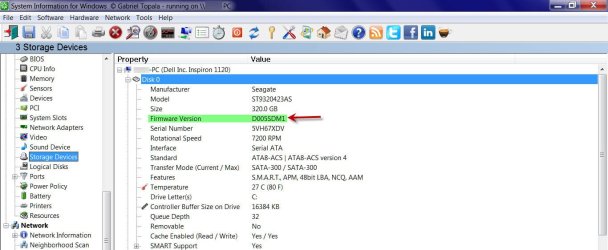
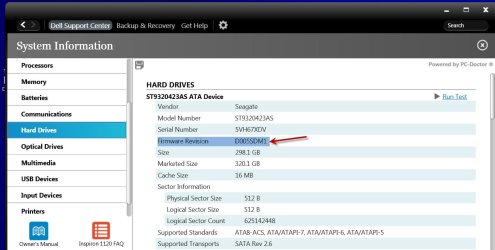
 . Haven't seen it for more than a decade now.
