Install Win 7 Ultimate x86 or x64 with 4GB RAM?

AdrianR

New member
Local time
11:56 AM
Messages
15
Hello. New to these forums, hoping I can get some good advice from you all! :)

I have a Dell M1710 laptop, with 4GB of RAM. Currently I'm using Windows XP, which sees 3.2GB of RAM. I have a choice of installing either the x86 or x64 version of Windows 7 Ultimate.

I'm trying to decide which to install based on the 4GB RAM hardware ceiling that I have (motherboard can only accept two 2gb SIMMs max).

Would I get better performance (less hard drive paging) with the X86 version using 3.2GB of RAM, or the x64 version using 4.0GB RAM? How much overhead does the x64 version of Ultimate have, vs. the x86 version? Is that overhead more than 0.8GB of RAM?

Thank you in advance for your time and advice, it is appreciated.
 

My Computer My Computer

At a glance

Windows XPIntel Core2 T7600 @ 2.33Ghz, 2.33Ghz4.0 GBnVidia GeForce Go 7950 GTX
Computer Manufacturer/Model Number
Dell M1710
OS
Windows XP
CPU
Intel Core2 T7600 @ 2.33Ghz, 2.33Ghz
Motherboard
Intel?
Memory
4.0 GB
Graphics Card(s)
nVidia GeForce Go 7950 GTX
Monitor(s) Displays
17"
Hard Drives
100GB Hitachi HTS721010G9SA00
Hello. New to these forums, hoping I can get some good advice from you all! :)

I have a Dell M1710 laptop, with 4GB of RAM. Currently I'm using Windows XP, which sees 3.2GB of RAM. I have a choice of installing either the x86 or x64 version of Windows 7 Ultimate.

I'm trying to decide which to install based on the 4GB RAM hardware ceiling that I have (motherboard can only accept two 2gb SIMMs max).

Would I get better performance (less hard drive paging) with the X86 version using 3.2GB of RAM, or the x64 version using 4.0GB RAM? How much overhead does the x64 version of Ultimate have, vs. the x86 version? Is that overhead more than 0.8GB of RAM?


Thank you in advance for your time and advice, it is appreciated.

If your capable of running 64 bit then I strongly advise it. You'll see far greater performance for sure.
 

My Computer My Computer

At a glance

Windows 7 Ultimate (x64) SP1Intel 3770k 4.6GHz8GB (2x 4GB) Crucial BallistixSapphire 7950 (1060/1600)
Computer Manufacturer/Model Number
tw33k
OS
Windows 7 Ultimate (x64) SP1
CPU
Intel 3770k 4.6GHz
Motherboard
ASUS Maximus V Formula
Memory
8GB (2x 4GB) Crucial Ballistix
Graphics Card(s)
Sapphire 7950 (1060/1600)
Sound Card
On Board Realtek HD Audio
Monitor(s) Displays
27" Acer B273HU (via HDMI)
Screen Resolution
2048 x 1152
Hard Drives
Crucial M4 128GB
2TB WD Black
1TB Samsung F3 SATA
1TB WD Elite External
2TB WD USB 3.0
PSU
Corsair AX750 Gold
Case
Corsair Obsidian 800DW
Cooling
Corsair H100 (2x AP-121/2x UK-3000 push/pull)
Keyboard
Microsoft Wireless 5000
Mouse
Microsoft Wireless 5000
Internet Speed
5mb/s
Other Info
Logitech z-2300 2.1 speakers
Lamptron FC-5 v2
If your capable of running 64 bit then I strongly advise it. You'll see far greater performance for sure.


Agreed, native 64bit will run smoother and more efficient so to speak on a 64bit processor, and you also mentioned about the 4gb of ram, definitely go 64bit. just make sure there is no drivers issues with your hardware on win7 x64, do a bit of research on your particular laptop model and see what others have to say about win7 64.
 

My Computer My Computer

At a glance

Windows 7 x64 (7600)Intel Core2Quad Q8200 @ 3.2 (457)G.Skill 4GB (2x2GB) PC8500 5-5-5-15 (914)BFG 8800 GT OC
Computer Manufacturer/Model Number
Custom
OS
Windows 7 x64 (7600)
CPU
Intel Core2Quad Q8200 @ 3.2 (457)
Motherboard
Asus P5Q SE Plus
Memory
G.Skill 4GB (2x2GB) PC8500 5-5-5-15 (914)
Graphics Card(s)
BFG 8800 GT OC
Sound Card
Onboard VIA
Monitor(s) Displays
LG 22" L226WTQ-BF 5ms
Screen Resolution
1680x1050
Hard Drives
Maxtor 6L300S0 300GB system drive,
SAMSUNG HD501LJ 500GB secondary
PSU
PC Power & Cooling Turbo-Cool 1kw
Case
Rosewill generic black
Cooling
Thermalright Ultra-120 + ThermalTake SmartFan II @100+ CFM
Keyboard
some old Memorex p/s2 keyboard
Mouse
Razer Copperhead
Other Info
SilenX 120mm rear exhaust, 2x SilenX 80mm Front inlet
Thanks for the replies. The thing I'm thinking about though, is running out of RAM in x64 and having Win 7 swap to hard disk allot, which kills performance.

I had heard that x64 needs more default RAM than x86, and I'm trying to figure out if it needs more than 0.8GB RAM (over x86).

I realize that if I had lots of RAM x64 would definately be the way to go, but since I have a hard cap of 4GB, I don't think that x64 would be the way to go if it uses most of the 4GB just for itself (not leaving any RAM for applications, etc.).

Specifically, how much overhead in RAM usage does x64 have over x86?

Thanks.
 

My Computer My Computer

At a glance

Windows XPIntel Core2 T7600 @ 2.33Ghz, 2.33Ghz4.0 GBnVidia GeForce Go 7950 GTX
Computer Manufacturer/Model Number
Dell M1710
OS
Windows XP
CPU
Intel Core2 T7600 @ 2.33Ghz, 2.33Ghz
Motherboard
Intel?
Memory
4.0 GB
Graphics Card(s)
nVidia GeForce Go 7950 GTX
Monitor(s) Displays
17"
Hard Drives
100GB Hitachi HTS721010G9SA00
64 bit all the way. No question about it
 

My Computer My Computer

At a glance

Windows 8.1 PRO3rd Generation Intel Core i7‐3612QM CPU @ 2.1...8GB DDR3NVIDIA GeForce GT 525M (128 bit), 1GB Grpahics
Computer type
PC/Desktop
Computer Manufacturer/Model Number
DELL VOSTRO 3650
OS
Windows 8.1 PRO
CPU
3rd Generation Intel Core i7‐3612QM CPU @ 2.10GHZ
Memory
8GB DDR3
Graphics Card(s)
NVIDIA GeForce GT 525M (128 bit), 1GB Grpahics
Screen Resolution
1920X1080
Hard Drives
750GB 5400RPM
Doesn't anyone know the overhead in RAM between x64 and x86?
 

My Computer My Computer

At a glance

Windows XPIntel Core2 T7600 @ 2.33Ghz, 2.33Ghz4.0 GBnVidia GeForce Go 7950 GTX
Computer Manufacturer/Model Number
Dell M1710
OS
Windows XP
CPU
Intel Core2 T7600 @ 2.33Ghz, 2.33Ghz
Motherboard
Intel?
Memory
4.0 GB
Graphics Card(s)
nVidia GeForce Go 7950 GTX
Monitor(s) Displays
17"
Hard Drives
100GB Hitachi HTS721010G9SA00
I don't think that the RAM overhead is enough to lose the 800MB that you gained. I've switched to a 64-bit OS on my boxes with 4GB of RAM and I have been extremely happy with the performance and haven't run into any reasons to make me want to go back to 32-bit. My latest box has 8GB of RAM and I'm not moving back obviously on this box.
 

My Computer My Computer

At a glance

Windows 7 Ultimate x64Intel Q9550 2.83Ghz OC'd to 3.40Ghz8GB G.Skill PI DDR2-800, 4-4-4-12 timingsEVGA 1280MB Nvidia GeForce GTX570
Computer Manufacturer/Model Number
Self-Built in July 2009
OS
Windows 7 Ultimate x64
CPU
Intel Q9550 2.83Ghz OC'd to 3.40Ghz
Motherboard
Gigabyte GA-EP45-UD3R rev. 1.1, F12 BIOS
Memory
8GB G.Skill PI DDR2-800, 4-4-4-12 timings
Graphics Card(s)
EVGA 1280MB Nvidia GeForce GTX570
Sound Card
Realtek ALC899A 8 channel onboard audio
Monitor(s) Displays
23" Acer x233H
Screen Resolution
1920x1080
Hard Drives
Intel X25-M 80GB Gen 2 SSD
Western Digital 1TB Caviar Black, 32MB cache. WD1001FALS
PSU
Corsair 620HX modular
Case
Antec P182
Cooling
stock
Keyboard
ABS M1 Mechanical
Mouse
Logitech G9 Laser Mouse
Internet Speed
15/2 cable modem
Other Info
Windows and Linux enthusiast. Logitech G35 Headset.
There is no answer to the question as posed. And the basis of the question is flawed.

There is really no starting point from which to address your concerns. There are volumes upon volumes of science to consider, which all illustrate that 64-bit processing is to 32-bit processing as flying is to driving.

You have to abandon your prior concepts regarding memory usage. After a minimum configuration is obtained for a particular system, to include potential application demand, free RAM is wasted RAM. Free RAM is not a goal to be pursued. A 64-bit system utilizes more RAM due to way it handles addressing. But when it handles it, it is substantially more efficient.

One area of FUD against 64-bit Windows is the backward compatibility support. Borderline nonsense - but you will need to understand more about the science than I am will attempt to illuminate here.

The world is moving forward to 64-bit processing not because it is somehow flawed - rather because the forward progression is what it is. An advance.
 
There is no answer to the question as posed. And the basis of the question is flawed.

There is really no starting point from which to address your concerns. There are volumes upon volumes of science to consider, which all illustrate that 64-bit processing is to 32-bit processing as flying is to driving.

You have to abandon your prior concepts regarding memory usage. After a minimum configuration is obtained for a particular system, to include potential application demand, free RAM is wasted RAM. Free RAM is not a goal to be pursued. A 64-bit system utilizes more RAM due to way it handles addressing. But when it handles it, it is substantially more efficient.

One area of FUD against 64-bit Windows is the backward compatibility support. Borderline nonsense - but you will need to understand more about the science than I am will attempt to illuminate here.

The world is moving forward to 64-bit processing not because it is somehow flawed - rather because the forward progression is what it is. An advance.

I'm not sure if I agree with you assumption that the basis for my question is flawed.

Unless I'm missing something, even Microsoft says you need 2GB minimum RAM for x64 and only 1GB minimum RAM for x86. That means, according to Microsoft, x64 uses (reserves?) 1GB more RAM than x86, right off the bat.

If an OS runs out of RAM (I don't care if its 'free' or previously 'reserved' by the OS for app usage), it starts to page out memory to the hard drive, and swaps back and forth, as apps are brought into the foreground and/or moved into the background. I'm assuming this is still the case with x64 OS; if not, then please let me know.

So, if you need 1GB RAM for x86 and 2GB RAM for x64, and if I have a hard cap of 4GB RAM total on the system I want to run Windows on, in theory I'd rather use x86 and have ~2.5GB of RAM left off for apps, vs. x64 and have allot less RAM left off for applications. If my hardcap max was > 4GB, then yeah, x64 all the way.

I'm trying to make an intelligent decision on how much free RAM I'll have left to run applications, after the OS is done starting up, before the OS starts to page memory to the hard drive. What's the 'sweet' spot in max ram capability where one would be better off using x86 vs x64?

If this question is a "flawed" one to ask, then why the minimum memory discrepancy stated by Microsoft?

For what its worth, I'm not trying to argue. Believe me, I WANT to move to x64, but I won't bother doing it on a PC that can't have enough RAM for the OS to run without performance hits from paging memory to the hard drive. That is what I'm trying to determine, and was hoping those who are knowledgeable here will know the 'overhead' that x64 Windows 7 has (vs. x86).

Thanks.
 

My Computer My Computer

At a glance

Windows XPIntel Core2 T7600 @ 2.33Ghz, 2.33Ghz4.0 GBnVidia GeForce Go 7950 GTX
Computer Manufacturer/Model Number
Dell M1710
OS
Windows XP
CPU
Intel Core2 T7600 @ 2.33Ghz, 2.33Ghz
Motherboard
Intel?
Memory
4.0 GB
Graphics Card(s)
nVidia GeForce Go 7950 GTX
Monitor(s) Displays
17"
Hard Drives
100GB Hitachi HTS721010G9SA00
I don't think that the RAM overhead is enough to lose the 800MB that you gained. I've switched to a 64-bit OS on my boxes with 4GB of RAM and I have been extremely happy with the performance and haven't run into any reasons to make me want to go back to 32-bit. My latest box has 8GB of RAM and I'm not moving back obviously on this box.

Thanks for the reply. Have you noticed if you are seeing page memory paging to the hard drive since using Win 7 x64 than your previous x86 OS?

Wish I could use 8GB RAM, be sweet. Don't know why the M1710 has the 4GB max RAM cap, since its not a very old PC, but meh. /shrug
 

My Computer My Computer

At a glance

Windows XPIntel Core2 T7600 @ 2.33Ghz, 2.33Ghz4.0 GBnVidia GeForce Go 7950 GTX
Computer Manufacturer/Model Number
Dell M1710
OS
Windows XP
CPU
Intel Core2 T7600 @ 2.33Ghz, 2.33Ghz
Motherboard
Intel?
Memory
4.0 GB
Graphics Card(s)
nVidia GeForce Go 7950 GTX
Monitor(s) Displays
17"
Hard Drives
100GB Hitachi HTS721010G9SA00
That's the minimum value as quoted by Microsoft though? Companies are usually very forgiving when stating their minimum values.


My Computer My Computer

At a glance

Windows XPIntel Core2 T7600 @ 2.33Ghz, 2.33Ghz4.0 GBnVidia GeForce Go 7950 GTX
Computer Manufacturer/Model Number
Dell M1710
OS
Windows XP
CPU
Intel Core2 T7600 @ 2.33Ghz, 2.33Ghz
Motherboard
Intel?
Memory
4.0 GB
Graphics Card(s)
nVidia GeForce Go 7950 GTX
Monitor(s) Displays
17"
Hard Drives
100GB Hitachi HTS721010G9SA00
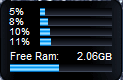
I have posted a screen shot in another topic about what I have running on my system. You can easily verify my system specifications to the left there under my user name. And yet, even with what I currently have running I have over half my RAM available. I have a lot of things running right now, and if I were to kill a good many of my processes down, I can easily achieve 2.5 GB or more free.

TBH, what Antman wrote was not only perfectly logical but astutely correct. You simply do not have enough of a basis in the programming world to understand the differences between 64bit processing and 32bit processing, and if you think you are ever going to run out of RAM with 4 GB installed, then you'll be facing the same problem regardless of whether you are using a 32bit OS or a 64bit OS. W7 is far more advanced than you think it is in terms of the aggressive paging system as well as in terms of making use of other resources available to it to make your application usage, switching and mutli-tasking as seamless as possible.

Check out my screen shots to prove it:

84 processes running - and that is without my Saitek Cyborg Rumble Pad (controller) utility....
W7 RTM resource usage #1.PNG

over 2 GB free...
W7 RTM resource usage #2.PNG

Trust us when we say that going 32bit will hamper your ability to use the OS as it was meant to be used.
 

My Computers My Computers

  • At a glance

    Windows 11 21H2 Current buildAMD Ryzen 9 3950X4 * 32 GB - Corsair Vengeance 3600 MHzEVGA GeForce RTX 3080 Ti XC3 ULTRA GAMING (12...
    Computer type
    PC/Desktop
    Computer Manufacturer/Model Number
    The Beast Model A (homebrew)
    OS
    Windows 11 21H2 Current build
    CPU
    AMD Ryzen 9 3950X
    Motherboard
    MSI MEG X570 GODLIKE
    Memory
    4 * 32 GB - Corsair Vengeance 3600 MHz
    Graphics Card(s)
    EVGA GeForce RTX 3080 Ti XC3 ULTRA GAMING (12G-P5-3955-KR)
    Sound Card
    Realtek® ALC1220 Codec
    Monitor(s) Displays
    2x Eve Spectrum ES07D03 4K Gaming Monitor (Matte) | Eve Spec
    Screen Resolution
    3x 3840 x 2160
    Hard Drives
    3x Samsung 980 Pro NVMe PCIe 4 M.2 2 TB SSD (MZ-V8P2T0B/AM) } 3x Sabrent Rocket NVMe 4.0 1 TB SSD
    PSU
    PC Power & Cooling’s Silencer Series 1050 Watt, 80 Plus Plat
    Case
    Fractal Design Define 7 XL Dark ATX Full Tower Case
    Cooling
    SteelSeries Apex Pro Wired Gaming Keyboard
    Keyboard
    SteelSeries Apex Pro
    Mouse
    Logitech MX Master 3S | MX Master 3 for business
    Internet Speed
    AT&T LightSpeed Gigabit Duplex Ftth
    Antivirus
    Windows Defender + MB 3
    Browser
    Nightly (default) + Firefox (stable),Chrome, Edge
  • At a glance

    ChromeOS Flex Dev Channel (current)Intel(R) Core(TM) i5-6300U CPU @ 2.40GHz, 250...16 GBIntel(R) HD Graphics 520
    Computer type
    PC/Desktop
    System Manufacturer/Model Number
    Dell Latitude E5470
    OS
    ChromeOS Flex Dev Channel (current)
    CPU
    Intel(R) Core(TM) i5-6300U CPU @ 2.40GHz, 2501 Mhz, 2 Core(s), 4 Logical Processor(s)
    Motherboard
    Dell
    Memory
    16 GB
    Graphics Card(s)
    Intel(R) HD Graphics 520
    Sound Card
    Intel(R) HD Graphics 520 + RealTek Audio
    Monitor(s) Displays
    Dell laptop display 15"
    Screen Resolution
    1920 * 1080
    Hard Drives
    Toshiba 128GB M.2 22300 drive
    INTEL Cherryville 520 Series SSDSC2CW180A 180 GB SATA III SSD
    PSU
    Dell
    Case
    Dell
    Cooling
    Dell
    Keyboard
    Dell
    Mouse
    Logitech MX Master 3S (shared w. Sys 1) | Dell TouchPad
    Internet Speed
    AT&T LightSpeed Gigabit Duplex Ftth
I have read and re-read the questions posed by AdrianR. I am attempting to frame a response that matches his frame of reference, and I cannot.

It is as if we are being asked to compare a straight 6 engine with a V8 - which one will consume more or less fuel for the relative work performed. It would come closer to a valid analogy if we were to compare a steam engine to internal combustion.

AdrianR - I apologize that I cannot frame an answer that you can easily digest. I can assure you that your concerns about the page file hindering performance are weighed on the wrong scale.

"Unless I'm missing something, even Microsoft says you need 2GB minimum RAM for x64 and only 1GB minimum RAM for x86. That means, according to Microsoft, x64 uses (reserves?) 1GB more RAM than x86, right off the bat." Yes, you are missing something and I do not know what to say - it just doesn't work that way.

I am not hard-capped at 4GB - but I am virtually capped. I will not put any more money into this machine. My largest consumers of RAM - CS4 and Premier - simply blast through the work I subject them to - and I often run them concurrently.

USB 2.0 throughput is more of a hinderance to my platform performance than my memory capacity.
 
1) Thank you for your post, and your screenpic. That's the kind of hard data I was looking for.

2) My career is as a computer programmer, currently working with Java. In fact, my whole 19 year career has been as a programmer in Java, PowerBuilder, Visual Basic, C++, C, C#, and others. I realize we are strangers, and you don't know me, and these are the Internets, so I have no way of proving this, but I do have an understanding of how operating systems works, how much memory they allocate, and how many applications can run simultaneously before real memory is used up and the OS starts paging out applications memory to/from the hard drive.

What I DIDN'T know, and was asking about, was how x64 works, as all of my knowledge is x86 based. As far as I know, at the end of the day, an app, no matter what kind of OS, needs to run on the RAM chips that are installed on the mother board on the computer, and the OS handles the management of the memory it uses. That the difference has to do with memory address sizes than anything else. If this is wrong, I'd LOVE to learn about it, hence my creating an account and my original post here about that. I came here to hopefully learn, not be talked down to.

I STILL haven 't seen anything by anyone that says that with x64 you don't need to worry about how much RAM is left over for applications. At the end of the day, the OS needs RAM for itself first, then it allocates RAM for apps that are running. I was just trying to figure out how much REALISTIC overhead x64 Windows 7 has vs. Windows 7 x86, in determining if I have enough 'elbow room' on my PC with 4GB worth of RAM to run MULTIPLE LARGE applications simultaneously without paging to the hard drive. From running the Eclipse and NetBeans IDKs to World of Warcraft to Firefox with 15 tabs open, I use my PC, and I use it hard.

Using Microsoft's minimum numbers, is it better to have 3GB of RAM for applications in x86 vs. 2GB of RAM for apps in x64, that's what I was trying to figure out. That's all. Wasn't trying to start a x64 vs x86 fight.

Anyway, I'll stop here, before someone sends the x64 police to my house. :(

I have posted a screen shot in another topic about what I have running on my system. You can easily verify my system specifications to the left there under my user name. And yet, even with what I currently have running I have over half my RAM available. I have a lot of things running right now, and if I were to kill a good many of my processes down, I can easily achieve 2.5 GB or more free.

TBH, what Antman wrote was not only perfectly logical but astutely correct. You simply do not have enough of a basis in the programming world to understand the differences between 64bit processing and 32bit processing, and if you think you are ever going to run out of RAM with 4 GB installed, then you'll be facing the same problem regardless of whether you are using a 32bit OS or a 64bit OS. W7 is far more advanced than you think it is in terms of the aggressive paging system as well as in terms of making use of other resources available to it to make your application usage, switching and mutli-tasking as seamless as possible.

Check out my screen shots to prove it:

84 processes running - and that is without my Saitek Cyborg Rumble Pad (controller) utility....
View attachment 22498

over 2 GB free...
View attachment 22499

Trust us when we say that going 32bit will hamper your ability to use the OS as it was meant to be used.

 

My Computer My Computer

At a glance

Windows XPIntel Core2 T7600 @ 2.33Ghz, 2.33Ghz4.0 GBnVidia GeForce Go 7950 GTX
Computer Manufacturer/Model Number
Dell M1710
OS
Windows XP
CPU
Intel Core2 T7600 @ 2.33Ghz, 2.33Ghz
Motherboard
Intel?
Memory
4.0 GB
Graphics Card(s)
nVidia GeForce Go 7950 GTX
Monitor(s) Displays
17"
Hard Drives
100GB Hitachi HTS721010G9SA00
I have read and re-read the questions posed by AdrianR. I am attempting to frame a response that matches his frame of reference, and I cannot.

It is as if we are being asked to compare a straight 6 engine with a V8 - which one will consume more or less fuel for the relative work performed. It would come closer to a valid analogy if we were to compare a steam engine to internal combustion.

AdrianR - I apologize that I cannot frame an answer that you can easily digest. I can assure you that your concerns about the page file hindering performance are weighed on the wrong scale.

"Unless I'm missing something, even Microsoft says you need 2GB minimum RAM for x64 and only 1GB minimum RAM for x86. That means, according to Microsoft, x64 uses (reserves?) 1GB more RAM than x86, right off the bat." Yes, you are missing something and I do not know what to say - it just doesn't work that way.

I am not hard-capped at 4GB - but I am virtually capped. I will not put any more money into this machine. My largest consumers of RAM - CS4 and Premier - simply blast through the work I subject them to - and I often run them concurrently.

USB 2.0 throughput is more of a hinderance to my platform performance than my memory capacity.

Thank you for replying and trying again to help out, sincerely do appreciate that.

By hard-capped, I meant the maximum amount of RAM that the motherboard of the PC can take. I do understand how OS's can virtualize more than the max hardware RAM by paging to/from the hard drive, but that virtualization takes a performance hit, so I try to NOT page to the hard drive if possible.

You mentioned you run two apps. Maybe that's the crux of the issue. I run a slew of applications simultaneously, both as part of my job as a programmer, as well as just someone who likes to multitask. I already mentioned this in a post I just did, but I run multiple programming IDKs (Eclipse, NetBeans, Visual Studio), large gaming applications (World of Warcraft, Sims 3), Firefox browser with 10+ tabs, email, IM client, plus all of the little apps (like Microsoft Search) that get start automatically.

Because of this, its important for me to know how many apps can be running at the same time before the OS starts virtualizing and pages to the hard drive.

To try and use your car analogy, I'm saying that how much more gas does a V8 use over a V6, because I can only afford to put so much gas in the car before I run out of money, and need to know how far I can travel before the car runs out of gas.

Anyway, I'll just leave it at that. I didn't want my introduction to this community to be one of conflict. I was just trying to find out the memory overhead of x64, as I never believe the amounts stated by the manufacturer, since they usually understate to generate more sales.

Take care.
 

My Computer My Computer

At a glance

Windows XPIntel Core2 T7600 @ 2.33Ghz, 2.33Ghz4.0 GBnVidia GeForce Go 7950 GTX
Computer Manufacturer/Model Number
Dell M1710
OS
Windows XP
CPU
Intel Core2 T7600 @ 2.33Ghz, 2.33Ghz
Motherboard
Intel?
Memory
4.0 GB
Graphics Card(s)
nVidia GeForce Go 7950 GTX
Monitor(s) Displays
17"
Hard Drives
100GB Hitachi HTS721010G9SA00
No conflict detected at this desk - just a high level discussion. Welcome to SF.
 
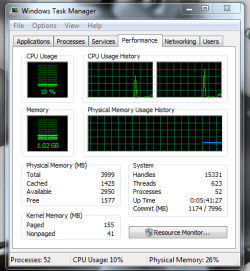
I am running 64 bit with 4 gig's, here is my ram usage.
Capture2.PNG
 

My Computer My Computer

At a glance

Windows 7 Ultimate X64Intel Pentium Dual-Core T4200 @ 2.0 GHz4GB'sMobile Intel 45 Express
Computer Manufacturer/Model Number
HP G60-230US
OS
Windows 7 Ultimate X64
CPU
Intel Pentium Dual-Core T4200 @ 2.0 GHz
Memory
4GB's
Graphics Card(s)
Mobile Intel 45 Express
Sound Card
Conexant High Definition SmartAudio 221
Monitor(s) Displays
16"
Screen Resolution
1366X768
Hard Drives
320GB
Mouse
Logitech M305
Internet Speed
Cable
Now that you have qualified yourself, it will be a lot easier to discuss things.

We realize that no one comes here to be talked down to, but until you establish your credentials, we don't know if we're dealing with a computer illiterate person who does not know device manager from system properties, or if we are dealing with a hardware OEM employee / tier II tech support employee / anything else.

We have no *choice* but to talk down to a person at their level b/c the only common denominator is that everyone will be able to understand it if we use rather simply terms. remember, even though you may be asking he question initially, others will be coming to the forum as well, here to read about various issues and / or to see if there own particular question has been answered or to ask similar, yet not quite identical questions.

That being said, I can install the latest NetBeans Full IDE (although the servers will be turned off as I have no use for them right now) and I always run Fx with multiple tabs open, plus my desktop gadgets, plus Thunderbird, and I can install a game or two as well (although, to be honest, I don't game when I am working and vice verse - I usually reserve my gaming time for a time when I can knowing shut down some of my apps for a smoother game play, as I like to amp games to the max settings whenever possible) and give you a fair run - but I don't know if my machine is comparable to yours, or if it is much more powerful, or much less powerful. These sort of qualitative answers cannot be given simply because W7, but its very nature in terms of the number of lines of code in the OS and the things that it loads, will always be paging. in another thread (the same I alluded to previously) a user with 12 GB of RAM was complaining that he had very little free RAM - I tried to make him understand that since he had so much more RAM than Windows was normally accustomed to it was paging a lot less, and since he had an SSD and had turned off Paging (which the guides say turn off paging for the SSDs only - if your entire system is SSD-based, it's rather pointless to try to do things like game, etc, when it is always going to use an enormous amount of memory and will inevitably page) that his RAM usage was going to sky rocket abnormally.

Similarly, since you only have 4 GB, it is gig to page. There is no doubt about that.

However, the memory management in 7 has come a long way from Vista, and is so far removed from XP and previous OSs that it's like comparing apples to turkeys.

High memory use applications will always, by default, cause a lot more paging. W7 is the most efficient Windows OS when it comes to resource management and paging that I have used - and I used them all except ME, W2.0 and w1.0. This is by far one of the most resource efficient OSs out there.

I cannot say much more - if you have specific queries please feel free to ask.
 

My Computers My Computers

  • At a glance

    Windows 11 21H2 Current buildAMD Ryzen 9 3950X4 * 32 GB - Corsair Vengeance 3600 MHzEVGA GeForce RTX 3080 Ti XC3 ULTRA GAMING (12...
    Computer type
    PC/Desktop
    Computer Manufacturer/Model Number
    The Beast Model A (homebrew)
    OS
    Windows 11 21H2 Current build
    CPU
    AMD Ryzen 9 3950X
    Motherboard
    MSI MEG X570 GODLIKE
    Memory
    4 * 32 GB - Corsair Vengeance 3600 MHz
    Graphics Card(s)
    EVGA GeForce RTX 3080 Ti XC3 ULTRA GAMING (12G-P5-3955-KR)
    Sound Card
    Realtek® ALC1220 Codec
    Monitor(s) Displays
    2x Eve Spectrum ES07D03 4K Gaming Monitor (Matte) | Eve Spec
    Screen Resolution
    3x 3840 x 2160
    Hard Drives
    3x Samsung 980 Pro NVMe PCIe 4 M.2 2 TB SSD (MZ-V8P2T0B/AM) } 3x Sabrent Rocket NVMe 4.0 1 TB SSD
    PSU
    PC Power & Cooling’s Silencer Series 1050 Watt, 80 Plus Plat
    Case
    Fractal Design Define 7 XL Dark ATX Full Tower Case
    Cooling
    SteelSeries Apex Pro Wired Gaming Keyboard
    Keyboard
    SteelSeries Apex Pro
    Mouse
    Logitech MX Master 3S | MX Master 3 for business
    Internet Speed
    AT&T LightSpeed Gigabit Duplex Ftth
    Antivirus
    Windows Defender + MB 3
    Browser
    Nightly (default) + Firefox (stable),Chrome, Edge
  • At a glance

    ChromeOS Flex Dev Channel (current)Intel(R) Core(TM) i5-6300U CPU @ 2.40GHz, 250...16 GBIntel(R) HD Graphics 520
    Computer type
    PC/Desktop
    System Manufacturer/Model Number
    Dell Latitude E5470
    OS
    ChromeOS Flex Dev Channel (current)
    CPU
    Intel(R) Core(TM) i5-6300U CPU @ 2.40GHz, 2501 Mhz, 2 Core(s), 4 Logical Processor(s)
    Motherboard
    Dell
    Memory
    16 GB
    Graphics Card(s)
    Intel(R) HD Graphics 520
    Sound Card
    Intel(R) HD Graphics 520 + RealTek Audio
    Monitor(s) Displays
    Dell laptop display 15"
    Screen Resolution
    1920 * 1080
    Hard Drives
    Toshiba 128GB M.2 22300 drive
    INTEL Cherryville 520 Series SSDSC2CW180A 180 GB SATA III SSD
    PSU
    Dell
    Case
    Dell
    Cooling
    Dell
    Keyboard
    Dell
    Mouse
    Logitech MX Master 3S (shared w. Sys 1) | Dell TouchPad
    Internet Speed
    AT&T LightSpeed Gigabit Duplex Ftth

My Computer My Computer

At a glance

Windows XPIntel Core2 T7600 @ 2.33Ghz, 2.33Ghz4.0 GBnVidia GeForce Go 7950 GTX
Computer Manufacturer/Model Number
Dell M1710
OS
Windows XP
CPU
Intel Core2 T7600 @ 2.33Ghz, 2.33Ghz
Motherboard
Intel?
Memory
4.0 GB
Graphics Card(s)
nVidia GeForce Go 7950 GTX
Monitor(s) Displays
17"
Hard Drives
100GB Hitachi HTS721010G9SA00
Back
Top