Changing the "minimize" "maximize" and "close" buttons of a theme
Ok so I'm using a custom visual style made by another user however I don't really like the buttons used that I mentioned above. The creator states it is acceptable to change the theme to however you like as long as you don't redistribute it anywhere.
Ok so I opened up the .msstyles file (using Restorator) located in the theme folder of this VS. I went into the images directory and located what seems to be the images used for the buttons. Intuitively, it seems like it would make sense to replace those images with different ones (perhaps from another visual style) and it should change them. However, would this actually work? Could the theme get messed up in some other way (like proportions or something if the new button images are smaller)? I don't know of any other way to change them that would be easy.
But I did run into another problem. For some visual styles I can't even locate those buttons in the images directory. Where else would they be?
I have used it before but it made no sense to me. When I opened up the msstyles file in it it was just a bunch of files with no organization at all and I couldn't find anything I needed.
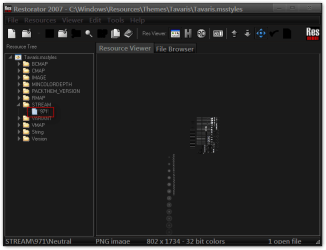
What you're trying to change using Restorator is the Steam image #971 which is very hard to edit.
I have opened up the default Aero theme and a customized theme with Restorator showing the difference of that image after it was edited with Windows Style Builder.
Default Aero theme
custom theme
Here is what Steam image #971 looks like (it is very transparent) I imposed it on top of a gray background that is the default Aero theme the one imposed on a black background is the custom theme from the example above.
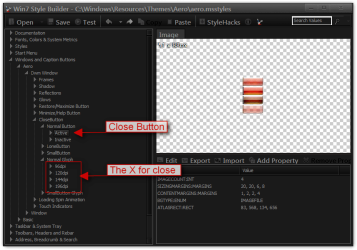
Using Windows Style Builder you can see in this example where the close button is plus X for it with the different DPI settings. Just above that is to minimize, maximize, help, restore buttons. Using the import and export buttons you can swap them out from theme to theme or use the edit button to create your own design. Windows Style Builder breaks down the Steam image #971 so it's a lot easier to edit.
Jerry
My Computer
At a glance
Win 7 Pro x64 / Win 10 ProIntel(R) Core(TM) i7-3630QM CPU @ 2.40GHz12 GB(1) Intel(R) HD Graphics 4000 (2) NVIDIA GeFo...
Computer type
Laptop
Computer Manufacturer/Model Number
Sager NP9170
OS
Win 7 Pro x64 / Win 10 Pro
CPU
Intel(R) Core(TM) i7-3630QM CPU @ 2.40GHz
Motherboard
CLEVO P170EM
Memory
12 GB
Graphics Card(s)
(1) Intel(R) HD Graphics 4000 (2) NVIDIA GeForce GTX 675M
Sound Card
(1) Realtek High Definition Audio (2) Intel(R) Display Aud
Monitor(s) Displays
17.3
Screen Resolution
1920x1080
Hard Drives
(1) Samsung 860 EVO 500GB(OS) (1) Samsung 860 EVO 500GB(Data)
Keyboard
Backlite
Antivirus
MSE, Malwarebytes Pro
Browser
Firefox
Other Info
DESKTOP: Custom-built.
OS: Win 10 Pro x64.
CASE: Rosewill R5.
CPU: Intel I5 4670K CPU @ 3.40GHz.
CPU COOLER: Cool Master Hyper 212 EVO.
MOTHERBOARD: Asus Z87-A.
MEMORY: Kingston HyperX 2x4 GB.
GPU: Nvidia Geforce 650 TI.
PSU: Corsair TX750.
DRIVES: (1) Samsung 840 120 GB SSD (2) Western Digital blue 500 GB 7200 RPM.
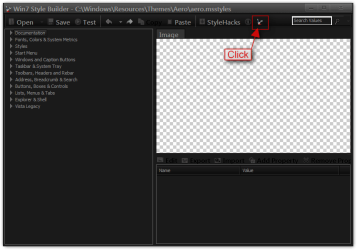
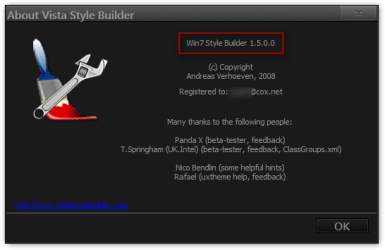
I'm using version 1.5 I think, but it's okay I got it working now (the way it's supposed to look)
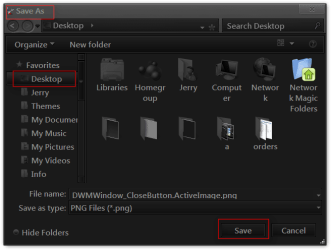
But I'm having trouble doing the exporting part. I have a custom theme right now and I want to switch its current caption buttons with those from another custom theme. If I click export on the "active" close button it asks me to browse to the image file to replace it but how do I find the image file containing the caption buttons to replace it with? If I just replace it with the 971 file obviously that won't work.
Ah I'm so stupid, I was trying to import before I even exported so I didn't have any files to replace them with.
So if I use new caption buttons that are smaller than the original ones could it possibly distort anything related to the theme? Or do I have to change some sort of dimensions somewhere else.
When you import an image that is a different size than the original it will ask you if you want to replace it or resize it and that is your choice just use the test button to see how it looks it looks okay then you can save if not use the back button and go back and try it differently using the test button to see different results
Jerry
My Computer
At a glance
Win 7 Pro x64 / Win 10 ProIntel(R) Core(TM) i7-3630QM CPU @ 2.40GHz12 GB(1) Intel(R) HD Graphics 4000 (2) NVIDIA GeFo...
Computer type
Laptop
Computer Manufacturer/Model Number
Sager NP9170
OS
Win 7 Pro x64 / Win 10 Pro
CPU
Intel(R) Core(TM) i7-3630QM CPU @ 2.40GHz
Motherboard
CLEVO P170EM
Memory
12 GB
Graphics Card(s)
(1) Intel(R) HD Graphics 4000 (2) NVIDIA GeForce GTX 675M
Sound Card
(1) Realtek High Definition Audio (2) Intel(R) Display Aud
Monitor(s) Displays
17.3
Screen Resolution
1920x1080
Hard Drives
(1) Samsung 860 EVO 500GB(OS) (1) Samsung 860 EVO 500GB(Data)
Keyboard
Backlite
Antivirus
MSE, Malwarebytes Pro
Browser
Firefox
Other Info
DESKTOP: Custom-built.
OS: Win 10 Pro x64.
CASE: Rosewill R5.
CPU: Intel I5 4670K CPU @ 3.40GHz.
CPU COOLER: Cool Master Hyper 212 EVO.
MOTHERBOARD: Asus Z87-A.
MEMORY: Kingston HyperX 2x4 GB.
GPU: Nvidia Geforce 650 TI.
PSU: Corsair TX750.
DRIVES: (1) Samsung 840 120 GB SSD (2) Western Digital blue 500 GB 7200 RPM.
Awesome looks like it worked fine. Thanks a lot for the help. I see that you can also change all the fonts here as well but would it be easier just to change them using that method you showed me a while back (using Restorator to replace them)?
Awesome looks like it worked fine. Thanks a lot for the help. I see that you can also change all the fonts here as well but would it be easier just to change them using that method you showed me a while back (using Restorator to replace them)?
Yes it is pretty easy that way than doing it one at a time. There is a couple of places where the font does not change I will look them up and list them and you can add the font property and that changed about 95 to 99% of the fonts. Let me know
Jerry
My Computer
At a glance
Win 7 Pro x64 / Win 10 ProIntel(R) Core(TM) i7-3630QM CPU @ 2.40GHz12 GB(1) Intel(R) HD Graphics 4000 (2) NVIDIA GeFo...
Computer type
Laptop
Computer Manufacturer/Model Number
Sager NP9170
OS
Win 7 Pro x64 / Win 10 Pro
CPU
Intel(R) Core(TM) i7-3630QM CPU @ 2.40GHz
Motherboard
CLEVO P170EM
Memory
12 GB
Graphics Card(s)
(1) Intel(R) HD Graphics 4000 (2) NVIDIA GeForce GTX 675M
Sound Card
(1) Realtek High Definition Audio (2) Intel(R) Display Aud
Monitor(s) Displays
17.3
Screen Resolution
1920x1080
Hard Drives
(1) Samsung 860 EVO 500GB(OS) (1) Samsung 860 EVO 500GB(Data)
Keyboard
Backlite
Antivirus
MSE, Malwarebytes Pro
Browser
Firefox
Other Info
DESKTOP: Custom-built.
OS: Win 10 Pro x64.
CASE: Rosewill R5.
CPU: Intel I5 4670K CPU @ 3.40GHz.
CPU COOLER: Cool Master Hyper 212 EVO.
MOTHERBOARD: Asus Z87-A.
MEMORY: Kingston HyperX 2x4 GB.
GPU: Nvidia Geforce 650 TI.
PSU: Corsair TX750.
DRIVES: (1) Samsung 840 120 GB SSD (2) Western Digital blue 500 GB 7200 RPM.
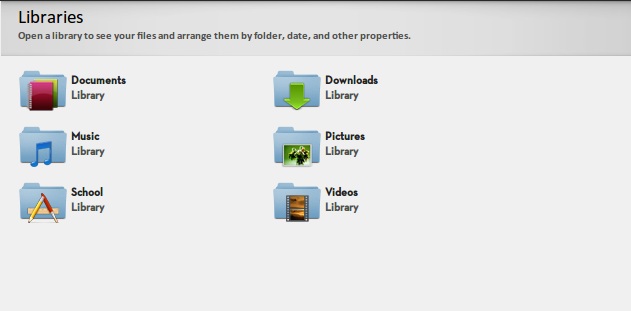
The "libraries" and the font underneath it is different than the actual font I want to use, can't figure out how to change it.
And with Google chrome the font in the address bar is "Arial" or something when I'm typing but when I click enter it goes to the font I want to use. Haven't been able to fix that either.
"Libraries" font cannot be changed that I know of, the font for the text under Libraries is at Styles > TextStyle > BodyText > FONT:FONT
I will download Chrome and see if I can find it.
Jerry
My Computer
At a glance
Win 7 Pro x64 / Win 10 ProIntel(R) Core(TM) i7-3630QM CPU @ 2.40GHz12 GB(1) Intel(R) HD Graphics 4000 (2) NVIDIA GeFo...
Computer type
Laptop
Computer Manufacturer/Model Number
Sager NP9170
OS
Win 7 Pro x64 / Win 10 Pro
CPU
Intel(R) Core(TM) i7-3630QM CPU @ 2.40GHz
Motherboard
CLEVO P170EM
Memory
12 GB
Graphics Card(s)
(1) Intel(R) HD Graphics 4000 (2) NVIDIA GeForce GTX 675M
Sound Card
(1) Realtek High Definition Audio (2) Intel(R) Display Aud
Monitor(s) Displays
17.3
Screen Resolution
1920x1080
Hard Drives
(1) Samsung 860 EVO 500GB(OS) (1) Samsung 860 EVO 500GB(Data)
Keyboard
Backlite
Antivirus
MSE, Malwarebytes Pro
Browser
Firefox
Other Info
DESKTOP: Custom-built.
OS: Win 10 Pro x64.
CASE: Rosewill R5.
CPU: Intel I5 4670K CPU @ 3.40GHz.
CPU COOLER: Cool Master Hyper 212 EVO.
MOTHERBOARD: Asus Z87-A.
MEMORY: Kingston HyperX 2x4 GB.
GPU: Nvidia Geforce 650 TI.
PSU: Corsair TX750.
DRIVES: (1) Samsung 840 120 GB SSD (2) Western Digital blue 500 GB 7200 RPM.
And with Google chrome the font in the address bar is "Arial" or something when I'm typing but when I click enter it goes to the font I want to use. Haven't been able to fix that either.