AMD Radeon HD 6900 does not detect second monitor

xarche

New member
Local time
1:52 PM
Messages
5
Hi!

I've recently discovered the joys of dual monitor at my friend's house and had a spare monitor lying around to try this at home, but the second port on my graphics card doesn't seem to detect anything. Both monitors work on the main (dvi?) plug but neither works on the second one. I've updated my drivers and everything, checked CCC and device manager and nothing. I've tried to google it but I can't figure out what to do. Thanks in advance!
 

My Computer My Computer

At a glance

Windows 7 ProfessionalNVIDIA GeForce GTX 980 Ti
Computer type
PC/Desktop
OS
Windows 7 Professional
Graphics Card(s)
NVIDIA GeForce GTX 980 Ti
xarche, welcome to the Seven Forums.

Both monitors work on the main (dvi?) plug

Are you using DVI cables, or are you using VGA cables with a DVI-VGA adapter on the card? If it is by adapter on the card that would be why the second monitor won't work as only one of the DVI ports on the card is configured to work with a DVI-VGA adapter.
 

My Computer My Computer

At a glance

Win 7 Ultimate x64FX-8350 @ 4.6 GHz so farADATA XPG V1 Series Black 8GB DDR3 1600Sapphire R9 270x Dual-X
Computer type
PC/Desktop
Computer Manufacturer/Model Number
Me
OS
Win 7 Ultimate x64
CPU
FX-8350 @ 4.6 GHz so far
Motherboard
Asus M5A97 EVO
Memory
ADATA XPG V1 Series Black 8GB DDR3 1600
Graphics Card(s)
Sapphire R9 270x Dual-X
Sound Card
Xonar DGX w/ Corsair Vengence 1300
Monitor(s) Displays
Acer S232HL Abid
Screen Resolution
1920x1080
Hard Drives
120 GB OCZ Vertex 3
500 GB Seagate 7200.12
PSU
Antec Earthwatts 650W Green
Case
Antec Three Hundred
Cooling
Cooler Master 212 EVO
Keyboard
Logitech G510
Mouse
Logitech G500s
Internet Speed
35000/3000
Ohh I see. Yeah they are both on the adapter thing. Would I have to get a DVI cable or is that monitor just not going to be compatible at all? Thanks again!
 

My Computer My Computer

At a glance

Windows 7 ProfessionalNVIDIA GeForce GTX 980 Ti
Computer type
PC/Desktop
OS
Windows 7 Professional
Graphics Card(s)
NVIDIA GeForce GTX 980 Ti
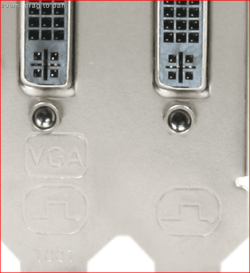
DVI cable, as long as one of the monitors has a DVI port on it. Unfortunately not enough card manufacturers (like most of them) mention it anywhere or at least mark the backplates on the cards like this,

backplate.PNG

to indicate that the card only supports VGA via adapter from one of the DVI ports; one port being DVI-I (analogue and digital), with the other being DVI-D (digital only).
 

My Computer My Computer

At a glance

Win 7 Ultimate x64FX-8350 @ 4.6 GHz so farADATA XPG V1 Series Black 8GB DDR3 1600Sapphire R9 270x Dual-X
Computer type
PC/Desktop
Computer Manufacturer/Model Number
Me
OS
Win 7 Ultimate x64
CPU
FX-8350 @ 4.6 GHz so far
Motherboard
Asus M5A97 EVO
Memory
ADATA XPG V1 Series Black 8GB DDR3 1600
Graphics Card(s)
Sapphire R9 270x Dual-X
Sound Card
Xonar DGX w/ Corsair Vengence 1300
Monitor(s) Displays
Acer S232HL Abid
Screen Resolution
1920x1080
Hard Drives
120 GB OCZ Vertex 3
500 GB Seagate 7200.12
PSU
Antec Earthwatts 650W Green
Case
Antec Three Hundred
Cooling
Cooler Master 212 EVO
Keyboard
Logitech G510
Mouse
Logitech G500s
Internet Speed
35000/3000
I just checked my moniter and one of them does have a DVI port, thank goodness, so I'll get a cable and see if that works. Thank you so much again!
 

My Computer My Computer

At a glance

Windows 7 ProfessionalNVIDIA GeForce GTX 980 Ti
Computer type
PC/Desktop
OS
Windows 7 Professional
Graphics Card(s)
NVIDIA GeForce GTX 980 Ti
Thank you! I have the same problem, and I think this is the solution. This is the only information I've found anywhere that might help.
 

My Computer My Computer

At a glance

Windows 7 Home Premium 64bit.
OS
Windows 7 Home Premium 64bit.
Back
Top