Solved Can't install to my HHD, always defaults to SSD

Western1

New member
Local time
6:40 AM
Messages
10
New Build (my 1st).

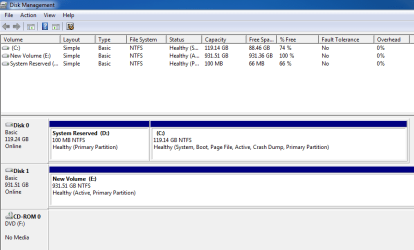
System build went great untill I added my HHD. Win7,updates and anti-virus loaded to SSD (C:) prior to installing the HHD. I got the HHD in, formated and named (E:)

Reboot and got "BOOTMGR Missing", used my OS install CD to repair, but now I have I gues one split drive, C: and Reserve and my HHD.

I will try to use the Snip thing for a photo. This is my 1st time to build a PC and also to use windows above the XP flavor.

My goal was..Use SSD for OS and operating functions, everything else on the HHD. Seemed simple in theory:D Thanks for any help

Capture.PNG
 

My Computer My Computer

At a glance

Win 7 Home Premium 64bit OEMIntell i5 2500kGSkills ripjawsXFX Radeon HD 6970
OS
Win 7 Home Premium 64bit OEM
CPU
Intell i5 2500k
Motherboard
ASUS P8Z68 V PRO /GEN3
Memory
GSkills ripjaws
Graphics Card(s)
XFX Radeon HD 6970
Sound Card
None
Monitor(s) Displays
Dell U2412M
Hard Drives
Crucial M4 SSD

Hitachi 1TB
PSU
Corsair AX850 Gold
Case
Corsair Graphite 600T
Cooling
Hyper 212
disk 0 will always get the bootmgr.
disk 0 is determined by where the hard-drive is physically plugged into the motherboard for the majority of systems.

It's only a 100 megabytes. Which is pretty puny by current standards.
Unless you were planning on doing some drive hot swapping this shouldn't cause you any big issues.

Do not delete the 100mb partition that is basically the windows bootloader.
Removing it will just screw up your boot again.
 

My Computer My Computer

At a glance

Windows 7 x64Intel i7 2600kG.skill Ripjaw 16gigs @ 1866Nvidia gtx580 (evga)
Computer Manufacturer/Model Number
Insane hobo technologies. ;-)
OS
Windows 7 x64
CPU
Intel i7 2600k
Motherboard
Asrock z68 extreme 4 gen 3
Memory
G.skill Ripjaw 16gigs @ 1866
Graphics Card(s)
Nvidia gtx580 (evga)
Sound Card
Integrated HD audio + hdmi
Monitor(s) Displays
24" ASUS widescreen + 42" insignia
Screen Resolution
1080p (1920x1080)
Hard Drives
128 Samsung 830
256 Samsung 840
3 x 1tb storage drive (various)
1 western digital 1tb (eSATA)
1 Seagate 1tb (eSATA)
PSU
1 kilowatt SLI/Crossfire rated Silverstone modular
Case
NZXT Phantom + additional 220 fan
Cooling
Zalmann
Keyboard
Microsoft wireless 3000 (v2)
Mouse
MS - wireless 5000 (bluetrack)
Internet Speed
depends on if you ask me or my provider.
Other Info
The above information is provided as is, and the author assumes no responsibility for issues it may cause with your sanity or fanboyism.
The error means the System drive is not booting.

Set the SSD first to boot in BIOS setup.
 
I have the SSD set P1 in bios, but I will go double check. Not sure what "hot swapping" is.
I do have my Crucial M4 plugged into the SATA 6Dbs #1 and the Hitachi HHD in the SATA Debs #2 if that makes any difference?? I had it the other way around and it didn't seem to make a difference.

When I changed the new HDD to active primary (dumb ) ( That is when I had the BOOTMGR MISSING", after the use of the OS CD, is when the 3rd "drive" of 100gb showed up, but at least now I can boot.

I guess maybe I did not understand that I couldn't separate the 2 drives when I wanted to install a program, operating components on the SSD and all the other junk like games on the HHD. I figured it would be like the last time I added a "slave" drive in 1991, that I could choose what drive to install too, at this rate it seems I will fill the SSD in a week!


Should I update the bios? never have done it before and the "warnings" freak me
 

My Computer My Computer

At a glance

Win 7 Home Premium 64bit OEMIntell i5 2500kGSkills ripjawsXFX Radeon HD 6970
OS
Win 7 Home Premium 64bit OEM
CPU
Intell i5 2500k
Motherboard
ASUS P8Z68 V PRO /GEN3
Memory
GSkills ripjaws
Graphics Card(s)
XFX Radeon HD 6970
Sound Card
None
Monitor(s) Displays
Dell U2412M
Hard Drives
Crucial M4 SSD

Hitachi 1TB
PSU
Corsair AX850 Gold
Case
Corsair Graphite 600T
Cooling
Hyper 212
Thanks Theog!! I looked online last night for 2 hours trying to find out how to do that!!

I was able to install one program last night to my hard drive (E), it so far has been the only program that gave me the option in the install tool. I will give this a try
Thanks!
 

My Computer My Computer

At a glance

Win 7 Home Premium 64bit OEMIntell i5 2500kGSkills ripjawsXFX Radeon HD 6970
OS
Win 7 Home Premium 64bit OEM
CPU
Intell i5 2500k
Motherboard
ASUS P8Z68 V PRO /GEN3
Memory
GSkills ripjaws
Graphics Card(s)
XFX Radeon HD 6970
Sound Card
None
Monitor(s) Displays
Dell U2412M
Hard Drives
Crucial M4 SSD

Hitachi 1TB
PSU
Corsair AX850 Gold
Case
Corsair Graphite 600T
Cooling
Hyper 212
I would not install Programs on the HD but keep them on the SSD where they write registry keys to the OS which integrates them into it, so you want them included in the image.

As you fill up the SSD you can offload User folders to the HD to see how performance compares: User Folders - Change Default Location
 
I have been succeccful on the last couple of try's, If I go into "custom" install, I get the option on where to install to. A bit more trouble, but it works.
Thanks to every one that has helped
 

My Computer My Computer

At a glance

Win 7 Home Premium 64bit OEMIntell i5 2500kGSkills ripjawsXFX Radeon HD 6970
OS
Win 7 Home Premium 64bit OEM
CPU
Intell i5 2500k
Motherboard
ASUS P8Z68 V PRO /GEN3
Memory
GSkills ripjaws
Graphics Card(s)
XFX Radeon HD 6970
Sound Card
None
Monitor(s) Displays
Dell U2412M
Hard Drives
Crucial M4 SSD

Hitachi 1TB
PSU
Corsair AX850 Gold
Case
Corsair Graphite 600T
Cooling
Hyper 212
New Build (my 1st).

System build went great untill I added my HHD. Win7,updates and anti-virus loaded to SSD (C:) prior to installing the HHD. I got the HHD in, formated and named (E:)

Reboot and got "BOOTMGR Missing", used my OS install CD to repair, but now I have I gues one split drive, C: and Reserve and my HHD.

I will try to use the Snip thing for a photo. This is my 1st time to build a PC and also to use windows above the XP flavor.

My goal was..Use SSD for OS and operating functions, everything else on the HHD. Seemed simple in theory:D Thanks for any help

View attachment 187868


Yeah Dont delete the 100mb Disk partition. thats made by windows. and when installing OS in the SSD,disconnect your HDD anter the OS is installed,reconnect your HDD :sleepy:
 

My Computer My Computer

At a glance

Windows 7 Ultimate 32bitIntel Core i3 2100 @ 3.10GhzHynix 4GB DDR3 @ 1333MhzIntel HD2000 (1.5GB Video RAM)
Computer Manufacturer/Model Number
Self Built
OS
Windows 7 Ultimate 32bit
CPU
Intel Core i3 2100 @ 3.10Ghz
Motherboard
Intel DH61WW
Memory
Hynix 4GB DDR3 @ 1333Mhz
Graphics Card(s)
Intel HD2000 (1.5GB Video RAM)
Sound Card
Realtek HD Audio
Monitor(s) Displays
LG Flatron W1943S
Screen Resolution
1360x768
Hard Drives
Seagate 500 GB SATA
PSU
Corsair CX430
Case
Cooler Master Elite 310
Cooling
140mm Rear Chassis fan
Keyboard
iball Flair
Mouse
iball AeroDynamic
Internet Speed
512Kbps
Other Info
Frontech Headphones
Back
Top