
Solved How to Add "Edit" for .PPS and .PPSX files to the Context Menu?

Neophile

New member
Power User
Local time
12:02 PM
Messages
171
How to Add "Edit" for .PPS and .PPSX files to the Context Menu?

I sometimes edit lots of PowerPoint files. The context menu does not include "Edit" for these files, so I have to drag the to an empty PowerPoint program window and this involves other gimmicks. That missing commend is very useful for me.

Up to Office 2007 I found a way to add that command to the PowerPoint.SlideShow.x registry key, from where it was absent. Now, the Edit key is already there, so there is nothing to add, but the command does not appear on the context menu.

I have tried to do it with NirSoft's FileTypesMan, but no way. I also tried to modify the existing edit command, but it never shows up on the menu. After more then a couple of hours trying I gave up and reset the registry to the its original.

It must not be that difficult and I must be missing something. Can someone tell me how to do it, please?
 

My Computer My Computer

At a glance

Windows 7 Ultimate 64-bit SP1AMD Athlon 64 II X3 440Kingston kit 4GB DDR3 1333MHz (KVR1333D3N9K2/4)
Computer type
PC/Desktop
Computer Manufacturer/Model Number
Home assembled
OS
Windows 7 Ultimate 64-bit SP1
CPU
AMD Athlon 64 II X3 440
Motherboard
M4A785TD-V EVO
Memory
Kingston kit 4GB DDR3 1333MHz (KVR1333D3N9K2/4)
Monitor(s) Displays
ASUS AS VH198S
Screen Resolution
1440x900
Hard Drives
Crucial MX300 2.5" SSD SATA,
Western Digital Caviar Black WD1002FAEX SATA-III,
Samsung HD161HJ SATA-II,
Seagate Barracuda ST3120022A ATA,
Western Digital WD800BB ATA.
Case
Standard
Cooling
Standard
Keyboard
Safeway SW-20
Mouse
Logitech Anywhere, Logitech MX Anywhere 2S, Technet M006
Internet Speed
130 Mbs fiber
Antivirus
Avast Premier
Browser
Firefox, Ice Dragon and Opera
Other Info
PCI ATA-133 Adapter,
Parallel Port Card PCI - PU005V2.
PPS and PPSX are powerpoint slideshow files. Doubleclick on them and you can edit. So I don't understand what you want
 

My Computer My Computer

At a glance

Microsoft Windows 7 Home Premium 64-bits 7601...Intel(R) Core(TM) i3 CPU M 370 @ 2.40GHz4,00 GBATI Mobility Radeon HD 5400 Series
Computer type
Laptop
Computer Manufacturer/Model Number
ACER ASPIRE 5742G
OS
Microsoft Windows 7 Home Premium 64-bits 7601 Multiprocessor Free Service Pack 1
CPU
Intel(R) Core(TM) i3 CPU M 370 @ 2.40GHz
Motherboard
Acer Aspire 5742G
Memory
4,00 GB
Graphics Card(s)
ATI Mobility Radeon HD 5400 Series
Sound Card
(1) AMD High Definition Audio Device (2) Realtek High Defi
Screen Resolution
1366 x 768 x 32 bits (4294967296 colors) @ 60 Hz
Hard Drives
WDC WD5000BEVT-22ZAT0
Doubleclicking starts them in slide show, not editing. I only want to do as i said.
 

My Computer My Computer

At a glance

Windows 7 Ultimate 64-bit SP1AMD Athlon 64 II X3 440Kingston kit 4GB DDR3 1333MHz (KVR1333D3N9K2/4)
Computer type
PC/Desktop
Computer Manufacturer/Model Number
Home assembled
OS
Windows 7 Ultimate 64-bit SP1
CPU
AMD Athlon 64 II X3 440
Motherboard
M4A785TD-V EVO
Memory
Kingston kit 4GB DDR3 1333MHz (KVR1333D3N9K2/4)
Monitor(s) Displays
ASUS AS VH198S
Screen Resolution
1440x900
Hard Drives
Crucial MX300 2.5" SSD SATA,
Western Digital Caviar Black WD1002FAEX SATA-III,
Samsung HD161HJ SATA-II,
Seagate Barracuda ST3120022A ATA,
Western Digital WD800BB ATA.
Case
Standard
Cooling
Standard
Keyboard
Safeway SW-20
Mouse
Logitech Anywhere, Logitech MX Anywhere 2S, Technet M006
Internet Speed
130 Mbs fiber
Antivirus
Avast Premier
Browser
Firefox, Ice Dragon and Opera
Other Info
PCI ATA-133 Adapter,
Parallel Port Card PCI - PU005V2.
please run regedit and export key HKEY_CLASSES_ROOT\PowerPoint.SlideShow.14\shell
post the output here
 

My Computer My Computer

At a glance

Microsoft Windows 7 Home Premium 64-bits 7601...Intel(R) Core(TM) i3 CPU M 370 @ 2.40GHz4,00 GBATI Mobility Radeon HD 5400 Series
Computer type
Laptop
Computer Manufacturer/Model Number
ACER ASPIRE 5742G
OS
Microsoft Windows 7 Home Premium 64-bits 7601 Multiprocessor Free Service Pack 1
CPU
Intel(R) Core(TM) i3 CPU M 370 @ 2.40GHz
Motherboard
Acer Aspire 5742G
Memory
4,00 GB
Graphics Card(s)
ATI Mobility Radeon HD 5400 Series
Sound Card
(1) AMD High Definition Audio Device (2) Realtek High Defi
Screen Resolution
1366 x 768 x 32 bits (4294967296 colors) @ 60 Hz
Hard Drives
WDC WD5000BEVT-22ZAT0
Thank you for the answer and sorry for the late reply; couldn't do it before.

Yes, the problem is there, the key you mention for Office 14 does not exist on my registry. I have those for 8 and 12, but not 14. I noticed that similar keys for Office 14 are missing not for PowerPoint alone, but also for other programs like Word, Publisher and Excel (as far as I searched). Has something changed with Office 14 (2010) that I don't know? Where are the keys for this version that appear on the context menu for Show (Open), New and Print? If I know where they are maybe I can try to modify them, or at least try.

The PowerPoint.SlideShow.14 key is not there, but for PowerPoint.SlideShow.8 and PowerPoint.SlideShow.12 they are and with the Edit sub-key. However, Edit does not appear on the context menu for PPS files. I changed them to the ancient values that used to work with 2007, but Edit still doesn't appear. These are the values I used for 8 and 12 and worked:

[HKEY_CLASSES_ROOT\PowerPoint.SlideShow.8\shell\Edit\command]
@="\"C:\\Program Files (x86)\\Microsoft Office\\Office12\\POWERPNT.EXE\" \"%1\""
This used to show Edit on the context menu of earlier versions of Office.

I also tried to add a similar key for 14, but it didn't work either. I don't see where to add a commend or what to modify. Any possibilitry to make Edit appear on the context menu, please?


I have Windows 7 64-bit with Office 2010 32-bit version because with the 64-bit ver. we can't save PST files with the pfbackup.exe add-in.
 
Last edited:

My Computer My Computer

At a glance

Windows 7 Ultimate 64-bit SP1AMD Athlon 64 II X3 440Kingston kit 4GB DDR3 1333MHz (KVR1333D3N9K2/4)
Computer type
PC/Desktop
Computer Manufacturer/Model Number
Home assembled
OS
Windows 7 Ultimate 64-bit SP1
CPU
AMD Athlon 64 II X3 440
Motherboard
M4A785TD-V EVO
Memory
Kingston kit 4GB DDR3 1333MHz (KVR1333D3N9K2/4)
Monitor(s) Displays
ASUS AS VH198S
Screen Resolution
1440x900
Hard Drives
Crucial MX300 2.5" SSD SATA,
Western Digital Caviar Black WD1002FAEX SATA-III,
Samsung HD161HJ SATA-II,
Seagate Barracuda ST3120022A ATA,
Western Digital WD800BB ATA.
Case
Standard
Cooling
Standard
Keyboard
Safeway SW-20
Mouse
Logitech Anywhere, Logitech MX Anywhere 2S, Technet M006
Internet Speed
130 Mbs fiber
Antivirus
Avast Premier
Browser
Firefox, Ice Dragon and Opera
Other Info
PCI ATA-133 Adapter,
Parallel Port Card PCI - PU005V2.
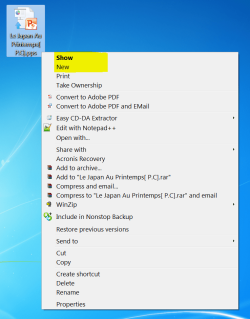
Hi, I am not sure if this answers your question since I don't have Office 2010 installed. I am still using office 2007 and without modifying any registry key, when I right click on the .pps file, I see the first option on the menu is "Show" and the second option is "New". If you double click on the .pps file or If you click on "Show" then yes it'll play the slide show by default but if you click on "New", it'll put the .pps file in powerpoint editor. So check and see if you have that "New" item on the context menu for Office 2010.

Update: Just curious enough so I uninstalled Office 2007 then Installed Office 2010 and sure enough, when right click on .pps file, there is an item right below "Show" called "New" so if you click on "New" it'll put .pps in editor. The only thing happens is when you save it, it'll complaint the file is already existed and ask do you want to overwrite it.

Another option is just change the file extension from .pps to .ppt then double click will also put the file in editor.

Take a look at the attachment:

Capture.PNG

Hope this answer your question.
 
Last edited:

My Computer My Computer

At a glance

win 7 ultimate x64Intel(R) Core(TM) i7-4790K @4.7GHZ16.00 GBNVIDIA GeForce GTX 260
Computer type
PC/Desktop
Computer Manufacturer/Model Number
custom build
OS
win 7 ultimate x64
CPU
Intel(R) Core(TM) i7-4790K @4.7GHZ
Motherboard
Z97A GAMING 7
Memory
16.00 GB
Graphics Card(s)
NVIDIA GeForce GTX 260
Sound Card
X-fi titanium
Monitor(s) Displays
24" Dual HP
Hard Drives
(1) ST5000DM000-1FK178 (2) SAMSUNG MZHPV256HDGL-00000 (3) ST2000DM001-1CH164 (4) Samsung SSD 840 EVO 120GB (5) Samsung SSD 850 EVO 500GB
PSU
850W Antec
Case
1200 Antec
Cooling
Water
Keyboard
Logitech
Mouse
Logitech
Internet Speed
35/12
Antivirus
None
Browser
Firefox
Thank you topgundcp. You are quite right. It’s new for me too after so many years with this stuff. I would have never imagined that change, and as I didn’t need to use the New I would not use the option. For PPT(X) (what they call presentation) it was already like that before when double clicking, but what you discovered for PPS(X) is new.

Thanks to your curiosity I could solve my problem and am very thankful.

Now, this doesn’t regard my problem that you solved, but I am also curious about one point – please tell me if you found this key in your registry: HKEY_CLASSES_ROOT\PowerPoint.SlideShow.14.
 

My Computer My Computer

At a glance

Windows 7 Ultimate 64-bit SP1AMD Athlon 64 II X3 440Kingston kit 4GB DDR3 1333MHz (KVR1333D3N9K2/4)
Computer type
PC/Desktop
Computer Manufacturer/Model Number
Home assembled
OS
Windows 7 Ultimate 64-bit SP1
CPU
AMD Athlon 64 II X3 440
Motherboard
M4A785TD-V EVO
Memory
Kingston kit 4GB DDR3 1333MHz (KVR1333D3N9K2/4)
Monitor(s) Displays
ASUS AS VH198S
Screen Resolution
1440x900
Hard Drives
Crucial MX300 2.5" SSD SATA,
Western Digital Caviar Black WD1002FAEX SATA-III,
Samsung HD161HJ SATA-II,
Seagate Barracuda ST3120022A ATA,
Western Digital WD800BB ATA.
Case
Standard
Cooling
Standard
Keyboard
Safeway SW-20
Mouse
Logitech Anywhere, Logitech MX Anywhere 2S, Technet M006
Internet Speed
130 Mbs fiber
Antivirus
Avast Premier
Browser
Firefox, Ice Dragon and Opera
Other Info
PCI ATA-133 Adapter,
Parallel Port Card PCI - PU005V2.
No, HKEY_CLASSES_ROOT\PowerPoint.SlideShow.14 key does not exist anywhere in my registry.

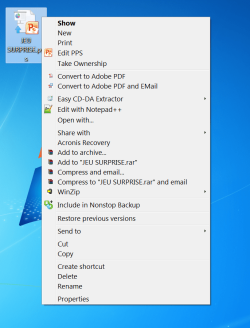
With the use of "New", it actually take a copy of the .pps file and put it in editor mode, that's why when you click on "Save", a dialog pop up and ask you if you want to overwrite it. To actually edit the file, I did a registry tweak to put "Edit PPS" in the context menu, this will edit the actual .pps file so when you click on "Save" it will silently save it. Save you a couple of mouse clicks and this is close to your original question.

Here is the .reg file for it View attachment customEditPPS.reg
and here is the screen shot:
Capture.PNG
 
Last edited:

My Computer My Computer

At a glance

win 7 ultimate x64Intel(R) Core(TM) i7-4790K @4.7GHZ16.00 GBNVIDIA GeForce GTX 260
Computer type
PC/Desktop
Computer Manufacturer/Model Number
custom build
OS
win 7 ultimate x64
CPU
Intel(R) Core(TM) i7-4790K @4.7GHZ
Motherboard
Z97A GAMING 7
Memory
16.00 GB
Graphics Card(s)
NVIDIA GeForce GTX 260
Sound Card
X-fi titanium
Monitor(s) Displays
24" Dual HP
Hard Drives
(1) ST5000DM000-1FK178 (2) SAMSUNG MZHPV256HDGL-00000 (3) ST2000DM001-1CH164 (4) Samsung SSD 840 EVO 120GB (5) Samsung SSD 850 EVO 500GB
PSU
850W Antec
Case
1200 Antec
Cooling
Water
Keyboard
Logitech
Mouse
Logitech
Internet Speed
35/12
Antivirus
None
Browser
Firefox
Many thanks again. That solves it completely. I just had to change the path for Program Files (x86) because my version of Office 2010 is 32-bit and it was automatically installed there.

If your installation did not create a key for PowerPoint.SlideShow.14, but still has one for the ancient versions PowerPoint.SlideShow.8 and PowerPoint.SlideShow.12, just like mine, confirms this has been changed for Office 2010. However, as I said above, changing the shell on their keys does not change their context menus as it used to be and I did for ages. They didn't have an Edit sub-key that I had to add, and they now have it but changes do not produce any effect. I still wonder where the correspondence keys in the registry are now, but anyway, my problem has been completely solved with your kind help and that is all I needed.
 

My Computer My Computer

At a glance

Windows 7 Ultimate 64-bit SP1AMD Athlon 64 II X3 440Kingston kit 4GB DDR3 1333MHz (KVR1333D3N9K2/4)
Computer type
PC/Desktop
Computer Manufacturer/Model Number
Home assembled
OS
Windows 7 Ultimate 64-bit SP1
CPU
AMD Athlon 64 II X3 440
Motherboard
M4A785TD-V EVO
Memory
Kingston kit 4GB DDR3 1333MHz (KVR1333D3N9K2/4)
Monitor(s) Displays
ASUS AS VH198S
Screen Resolution
1440x900
Hard Drives
Crucial MX300 2.5" SSD SATA,
Western Digital Caviar Black WD1002FAEX SATA-III,
Samsung HD161HJ SATA-II,
Seagate Barracuda ST3120022A ATA,
Western Digital WD800BB ATA.
Case
Standard
Cooling
Standard
Keyboard
Safeway SW-20
Mouse
Logitech Anywhere, Logitech MX Anywhere 2S, Technet M006
Internet Speed
130 Mbs fiber
Antivirus
Avast Premier
Browser
Firefox, Ice Dragon and Opera
Other Info
PCI ATA-133 Adapter,
Parallel Port Card PCI - PU005V2.
Back
Top