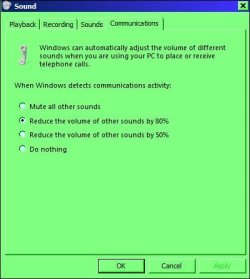
All other sound Stop playing when I talk to someone on Skype

Danielzxzx

New member
Member
VIP
Local time
4:06 PM
Messages
233
I already tried getting an answer from the Skype forums but have never got a response. What is happening is ever since I got a new pair of headphones (stealseries Siberia v2 with soundcard) all other sound like media player stop playing sound whenever there is a skype sound like during a call or when it's ringing. I have tried setting the communications option to 'Do Nothing' but that has not fixed the problem. How do I fix this?
 

My Computer My Computer

At a glance

Windows 7
OS
Windows 7
Hi Daniel, look here.

RR.JPG
 

My Computer My Computer

At a glance

Win7 H.Prem. 32bit+SP1
Computer Manufacturer/Model Number
Look in my Signature.
OS
Win7 H.Prem. 32bit+SP1

Ok I tried that but it did not fix my problem. I can still not hear other sounds when I talk to someone on Skype.

I want to be able to play games or listen to music while talking to someone on SKype but nothing in the communication settings do anything.
 

My Computer My Computer

At a glance

Windows 7
OS
Windows 7
What do you use to play music ? p.s. I don't use Skype.
 

My Computer My Computer

At a glance

Win7 H.Prem. 32bit+SP1
Computer Manufacturer/Model Number
Look in my Signature.
OS
Win7 H.Prem. 32bit+SP1
What do you use to play music ? p.s. I don't use Skype.

It's not just music. Its everything not skype related whenever I'm on a call in Skype. I use VLC player. It is no issue with VLC player though. Youtube videos also have no sound. Skype just prevents any other sound from playing while in a call.
 

My Computer My Computer

At a glance

Windows 7
OS
Windows 7
Ok never mind I found out how to fix it but I still have a question that I will say at the end.

I had the default device and default communication device both on Speakers (USB PnP Sound Device). I switched both the default device and the default communication device to Digital Output (USB PnP Sound Device). That seemed to fix the problem, somehow.

My question is that on the Speakers setting there is a configure button that allowed me to have it on 7.1 surround sound while the Digital Output has the configure grayed out. Since I have to use the Digital Output instead of Speakers, I don't know if having the configure button grayed out means I can't have it on 7.1 Surround sound. I tried using a youtube test but since I'm using headphones that has virtual 7.1 surround sound. It is hard for me to tell if it is using 7.1 surround sound. I have it enabled through my sound cards settings though. Does this mean that even though the configure button for Digital Output in the manage audio device section is grayed out, will I still have surround sound or will I only be able to have surround sound if I use the Speakers option?

 

My Computer My Computer

At a glance

Windows 7
OS
Windows 7
AFAIK, if their are no speakers connected for a particular sound setting, it won't function.
 

My Computer My Computer

At a glance

Win7 H.Prem. 32bit+SP1
Computer Manufacturer/Model Number
Look in my Signature.
OS
Win7 H.Prem. 32bit+SP1
AFAIK, if their are no speakers connected for a particular sound setting, it won't function.

The headphones I'm using aren't suppose to connect to the speakers. They connect to this soundcard that comes with it that connects to a USB port.
 

My Computer My Computer

At a glance

Windows 7
OS
Windows 7
Back
Top