Unable to recognize USB flash drives (All)

BoostAddicted

New member
Unable to recognize one specific USB flash drive

There are a billion threads about this on 7F and I still can't seem to resolve my problem.

The OS was recently installed about 7 days ago or so. I have a Logitech USB unifying receiver installed in the rear of the tower which works just fine for my wireless keyboard and mouse.

However, I am unable to read/write to any USB flash drive. I have downloaded and installed the USB registry editor to ensure my default setting had not changed somehow. This did not allow me to read any USB drive.

I have attached two screenshots. One shows "My Computer" and how the USB device is not listed on the left. On the right, it shows the USB device listed under "Devices and Printers" but does not allow me to do anything other than view its properties. On the bottom right of this screenshot you will see the USB logo where it would typically allow me to eject the drive, but that option is not listed.

The second screenshot is Device Manager and my USB driver list. No problems listed.

Any and all help is appreciated. Thank you.

EDIT: Third screenshot is attached where the USB device shows up in Disk Management as well.
 

Attachments

  • USB SS.jpg
    USB SS.jpg
    226.7 KB · Views: 786
  • Device Manager.jpg
    Device Manager.jpg
    162 KB · Views: 461
  • Disk Management.jpg
    Disk Management.jpg
    215.5 KB · Views: 534
Last edited:

My Computer

OS
Windows 7 Professional 64-bit SP1
CPU
AMD Athlon X4 3.0 GHz
Motherboard
MSi
Memory
8 GB DDR2
Graphics Card(s)
Nvidia GeForce 9800 GTX+
Sound Card
On board HQ
Monitor(s) Displays
Acer 21" @ 16x9
Hard Drives
Sata II 250GB
PSU
650W
Case
Thermaltake
Cooling
6 fans
Keyboard
Logitech K800 laser LED illuminated
Mouse
Logitech Performance MX -Darkfield-
Internet Speed
Currently wireless...2.0 MB/s+
http://www.sevenforums.com/hardware...everytime-connect-new-device.html#post1720164

Frankly, this USB not recognized when inserted problem seems the inverse of not being able to eject a flash drive (just had this a few weeks back and I rarely use USB drives).

Other options: shut down PC and unplug from wall for 2 minutes.

Uninstall each USB device via Device Manager as the USB port is in some unknown/unknowable/inconsistent state.
 

My Computer

Computer type
PC/Desktop
Computer Manufacturer/Model Number
Custom
OS
Windows 7
CPU
AMD Phenom II X2 (dual-core)
Motherboard
GA-MA785GM-US2H
Memory
4G
Graphics Card(s)
integrated ATI HD 4200
Sound Card
integrated
Monitor(s) Displays
Samsung 24"
Screen Resolution
1920x1080
Hard Drives
1 SSD - Samsung 840 - 500 GB - OS and DATA partitions
1 SSD - Intel 320 - 120 GB (used for backups) - Misc/BACKUP
1 SATA HD - WD, 500 GB - BACKUP
PSU
Ultra X4 500W
Case
Ultra X-blaster
Keyboard
Microsoft Digital Media Pro
Mouse
Logitech WIRED!
Internet Speed
15 Mbps FIOS
I have completed your suggestion with the elevated command prompt. However, when I go to check the registry key, I do not have an entry for "NoAutoMount", so therefore it does not have a value. Screenshot attached.

I will power off my PC for about 5 minutes or so (also having it unplugged) and see if that fixes it.
 

Attachments

  • No Automount.jpg
    No Automount.jpg
    234.2 KB · Views: 266

My Computer

OS
Windows 7 Professional 64-bit SP1
CPU
AMD Athlon X4 3.0 GHz
Motherboard
MSi
Memory
8 GB DDR2
Graphics Card(s)
Nvidia GeForce 9800 GTX+
Sound Card
On board HQ
Monitor(s) Displays
Acer 21" @ 16x9
Hard Drives
Sata II 250GB
PSU
650W
Case
Thermaltake
Cooling
6 fans
Keyboard
Logitech K800 laser LED illuminated
Mouse
Logitech Performance MX -Darkfield-
Internet Speed
Currently wireless...2.0 MB/s+
You also have the option to uninstall each USB device via Device Manager (last resort?).
 

My Computer

Computer type
PC/Desktop
Computer Manufacturer/Model Number
Custom
OS
Windows 7
CPU
AMD Phenom II X2 (dual-core)
Motherboard
GA-MA785GM-US2H
Memory
4G
Graphics Card(s)
integrated ATI HD 4200
Sound Card
integrated
Monitor(s) Displays
Samsung 24"
Screen Resolution
1920x1080
Hard Drives
1 SSD - Samsung 840 - 500 GB - OS and DATA partitions
1 SSD - Intel 320 - 120 GB (used for backups) - Misc/BACKUP
1 SATA HD - WD, 500 GB - BACKUP
PSU
Ultra X4 500W
Case
Ultra X-blaster
Keyboard
Microsoft Digital Media Pro
Mouse
Logitech WIRED!
Internet Speed
15 Mbps FIOS
Sure it is not a power problem to the usb ports? If you have a spare mouse or keyboard around unplug the wireless usb, boot up & plug a device into that slot. See what happens.
 

My Computer

Computer Manufacturer/Model Number
Custom
OS
Windows 7 Pro x64 -- PCLinuxOS KDE4 FullMonty 2011
CPU
i7-875k @ Turbo - 7,6,5,5 - 3.6ghz
Motherboard
Asus P7P55D-E Deluxe
Memory
Corsair CMD8GX3M4A1600C8 8gb
Graphics Card(s)
Asus EAH5850 DirectCU/2DIS/1GD5
Sound Card
On Board
Monitor(s) Displays
Samsung SyncMaster T220 - Panasonic VT30a 50"
Screen Resolution
1680x1050 -
Hard Drives
Corsair Force 3 SSD 120GB x 2 ::
WD VelociRaptor 150GB WD1500HLFS x 2
PSU
Corsair HX-850 Power Supply
Case
Coolmaster HAF 932
Cooling
Corsair H50
Keyboard
Logitech Wireless MK700
Mouse
Logitech Wireless MX620
Internet Speed
Good enough for now
Other Info
Voip. Insanely cheap phone calls.
Well crap. I can get my 16GB flash to recognize, but I can't get my 32 GB to recognize (on my PC). :(

What's odd is my audio/video receiver recognizes the 32 GB flash drive and will play the music which is stored on it.
 

My Computer

OS
Windows 7 Professional 64-bit SP1
CPU
AMD Athlon X4 3.0 GHz
Motherboard
MSi
Memory
8 GB DDR2
Graphics Card(s)
Nvidia GeForce 9800 GTX+
Sound Card
On board HQ
Monitor(s) Displays
Acer 21" @ 16x9
Hard Drives
Sata II 250GB
PSU
650W
Case
Thermaltake
Cooling
6 fans
Keyboard
Logitech K800 laser LED illuminated
Mouse
Logitech Performance MX -Darkfield-
Internet Speed
Currently wireless...2.0 MB/s+
not real sure but maybe you just need to update your bios. have you checked to see if there are any updates for your board?

scrooge
 

My Computer

Computer Manufacturer/Model Number
home build
OS
win 7 ( 64 bit)
CPU
Intel Core i7-870 Lynnfield 2.93GHz 8MB L3 Cache LGA 1156 95
Motherboard
ASUS P7P55 LX LGA 1156
Memory
G.SKILL Sniper Series 16GB (4 x 4GB) 240-Pin DDR3 SDRAM
Graphics Card(s)
ATI Radeon HD6800 Series
Sound Card
hdmi
Monitor(s) Displays
42" lg 3d tv
Screen Resolution
1920 x 1080
Hard Drives
1 ssd pci-e revodrive
4 seagate 1.5 tb
PSU
Rosewill BRONZE Series RBR1000-M 1000W Continuous@40°C, 80Pl
Case
CoolMaster 922
Cooling
CORSAIR CWCH60 Hydro Series H60 High Performance Liquid CPU
Keyboard
logtech
Mouse
logitect
Internet Speed
5 mbit
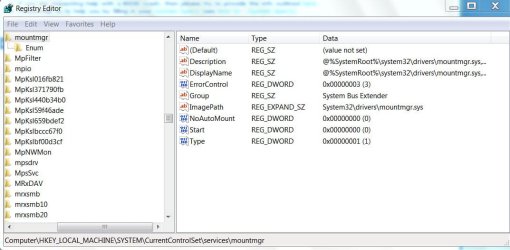
I have completed your suggestion with the elevated command prompt. However, when I go to check the registry key, I do not have an entry for "NoAutoMount", so therefore it does not have a value. Screenshot attached. ....

Create a new DWORD. Right click on mountmgr> New > DWORD(32bit)Value. Type NoAutoMount and give it the value 0. Exit Regedit, reboot and then check whether your USB devices are getting recognised.

Here is the screenshot from my 32bit Windows 7 Ultimate.

NoAutoMount.jpg
 
Last edited:

My Computer

OS
Windows 7 Home Premium 32 bit
Okay, I added the DWORD "NoAutoMount" and gave it a value of 0. This did not solve my problem. I put the flash drive into an iMac and the iMac recognized the device and I was able to view the files on the flash drive. As I said before, my home audio/video receiver recognizes the music on it and will play the music through my speakers.

Here's a screenshot of something odd that I noticed. The SS shows the "USB 2.0 Flash Drive" as a disk drive. To uninstall the USB drive, I had to right click "USB 2.0 Flash Drive" and select "uninstall". Then, when I plugged the USB drive back in the computer, the computer said it installed the driver's successfully.

It still will not recognize on my PC. Other flash drives work in the same port(s)...so I'm stumped. I really need this to work and it is really pissing me off...
 

Attachments

  • 7F SS.jpg
    7F SS.jpg
    184.1 KB · Views: 190
  • 7F SS #2.png
    7F SS #2.png
    173 KB · Views: 90
  • 7F NAM.jpg
    7F NAM.jpg
    169.9 KB · Views: 107

My Computer

OS
Windows 7 Professional 64-bit SP1
CPU
AMD Athlon X4 3.0 GHz
Motherboard
MSi
Memory
8 GB DDR2
Graphics Card(s)
Nvidia GeForce 9800 GTX+
Sound Card
On board HQ
Monitor(s) Displays
Acer 21" @ 16x9
Hard Drives
Sata II 250GB
PSU
650W
Case
Thermaltake
Cooling
6 fans
Keyboard
Logitech K800 laser LED illuminated
Mouse
Logitech Performance MX -Darkfield-
Internet Speed
Currently wireless...2.0 MB/s+
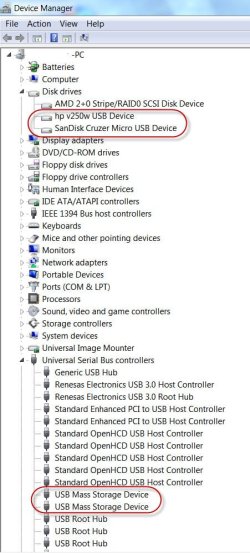
The pen drives will appear under Disk drives in the Device Manager. The only thing odd there is no brand name appears. Compare it with the screenshot below.(hp v250w, SanDisk Cruzer Micro.) I am just wondering whether you have got some cheap, spurious pendrive.

pendrives.jpg

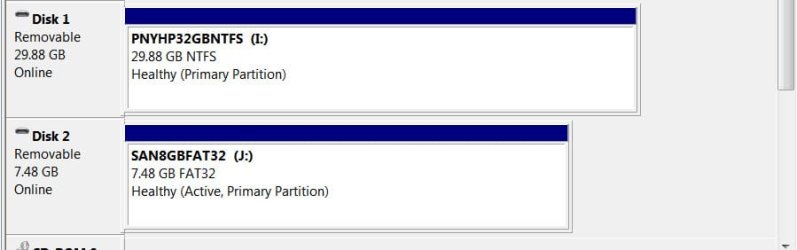
Now taking a relook at the screenshot in your first post, Windows does not seem to recognise any File System on the pendrive and that may be the problem. Compare it with the screenshot below.

usbdrives.jpg

Most probably, you may have to format the drive and then check whether it shows up.

Since you said that you can see the files on a Mac, you may perhaps copy all the files to it and then try to format it in Windows Disk Management.

You may also try to copy the files to your PC, using Recuva Recuva - Undelete, Unerase, File and Disk Recovery - Free Download before formatting it.

Let us know how it goes.
 

My Computer

OS
Windows 7 Home Premium 32 bit
Thank you for the reply.

I can copy all of the files to the iMac and then format the drive and report back.
 

My Computer

OS
Windows 7 Professional 64-bit SP1
CPU
AMD Athlon X4 3.0 GHz
Motherboard
MSi
Memory
8 GB DDR2
Graphics Card(s)
Nvidia GeForce 9800 GTX+
Sound Card
On board HQ
Monitor(s) Displays
Acer 21" @ 16x9
Hard Drives
Sata II 250GB
PSU
650W
Case
Thermaltake
Cooling
6 fans
Keyboard
Logitech K800 laser LED illuminated
Mouse
Logitech Performance MX -Darkfield-
Internet Speed
Currently wireless...2.0 MB/s+
Okay, I tried formatting it and I received an error. Should I just try and format it on the iMAC? I'm really not sure what to do now.

The flash drive is a 32 GB drive from MicroCenter.
 

Attachments

  • DM Error.jpg
    DM Error.jpg
    291 KB · Views: 59

My Computer

OS
Windows 7 Professional 64-bit SP1
CPU
AMD Athlon X4 3.0 GHz
Motherboard
MSi
Memory
8 GB DDR2
Graphics Card(s)
Nvidia GeForce 9800 GTX+
Sound Card
On board HQ
Monitor(s) Displays
Acer 21" @ 16x9
Hard Drives
Sata II 250GB
PSU
650W
Case
Thermaltake
Cooling
6 fans
Keyboard
Logitech K800 laser LED illuminated
Mouse
Logitech Performance MX -Darkfield-
Internet Speed
Currently wireless...2.0 MB/s+
Did this error popup immediately upon attempting to format?

The SYSTEM part of the event viewer log might shed more light as that error message says.

Are you trying to format it as NTFS with "automatic" for cluster-size choice?
 

My Computer

Computer type
PC/Desktop
Computer Manufacturer/Model Number
Custom
OS
Windows 7
CPU
AMD Phenom II X2 (dual-core)
Motherboard
GA-MA785GM-US2H
Memory
4G
Graphics Card(s)
integrated ATI HD 4200
Sound Card
integrated
Monitor(s) Displays
Samsung 24"
Screen Resolution
1920x1080
Hard Drives
1 SSD - Samsung 840 - 500 GB - OS and DATA partitions
1 SSD - Intel 320 - 120 GB (used for backups) - Misc/BACKUP
1 SATA HD - WD, 500 GB - BACKUP
PSU
Ultra X4 500W
Case
Ultra X-blaster
Keyboard
Microsoft Digital Media Pro
Mouse
Logitech WIRED!
Internet Speed
15 Mbps FIOS
I right-clicked the drive and selected format. That's the error message that pops up after the warning that all data on the drive will be erased. I didn't select any options to select cluster size or anything else for that matter. So to answer your question, after I selected to confirm that all data would be lost, yes the error popped up immediately.

EDIT: I'm looking into the SYSTEM portion of the log to see what I can find and I will post it here.

EDIT #2: Another screenshot of the system log. Which one should I be looking at? I can only find one for the virtual drive service. All it says is it stopped.
 

Attachments

  • 7F SS Format error.jpg
    7F SS Format error.jpg
    262.2 KB · Views: 25
  • 7F SS Format error #2.jpg
    7F SS Format error #2.jpg
    267.2 KB · Views: 22
  • 7F SS Format error #3.jpg
    7F SS Format error #3.jpg
    358.4 KB · Views: 22

My Computer

OS
Windows 7 Professional 64-bit SP1
CPU
AMD Athlon X4 3.0 GHz
Motherboard
MSi
Memory
8 GB DDR2
Graphics Card(s)
Nvidia GeForce 9800 GTX+
Sound Card
On board HQ
Monitor(s) Displays
Acer 21" @ 16x9
Hard Drives
Sata II 250GB
PSU
650W
Case
Thermaltake
Cooling
6 fans
Keyboard
Logitech K800 laser LED illuminated
Mouse
Logitech Performance MX -Darkfield-
Internet Speed
Currently wireless...2.0 MB/s+
I would try formatting it with HP USB Drive Storage Format utility. Download from Download HP USB Disk Storage Format Tool 2.2.3 Free - Windows-based Format Utility for HP Drive Key or DiskOnKey USB Device - Softpedia and run it as Administrator. Make sure you plug out all other USB devices so that you make no mistake and format a wrong drive.

EDIT: Micro Center is a web store. They probably source it from a Chinese manufacturer with Micro Center name on it. Check to see whether you can return it to the vendor and get a branded pen drive. Never ever go after cheapies. My honest advice.
 
Last edited:

My Computer

OS
Windows 7 Home Premium 32 bit
There are many physical MicroCenter stores. One happens to be in my area. They sell everything a normal store would sell...RAM of all brands, hard drives, processors, printers, TVs, ready computers, and hell...you can even build your own PC from scratch and buy your own power supply, case, etc. It's a very well known store in several areas. I'm not sure where the flash drive is made per se, but it is MicroCenter branded.

The flash drives carry a lifetime warranty and the orignal receipt is not required. If the drive doesn't work, bring it in, and they replace it. Not too many "shady" companies will do that. I think the drive, at the time I bought it, cost me $59.99. They sell USB 3.0 Drives for $20 less now. ARG...

I'll try your suggestion and see what happens.

EDIT: Tried your suggestion and the flash drive does not appear in the utility. It appears in the screen to the right, but nothing in the tool. Basically...I'm having the same issue.
 

Attachments

  • 7F HPUSB Problem #2.jpg
    7F HPUSB Problem #2.jpg
    263.7 KB · Views: 19
  • 7F HPUSB Problem #1.jpg
    7F HPUSB Problem #1.jpg
    237.4 KB · Views: 26

My Computer

OS
Windows 7 Professional 64-bit SP1
CPU
AMD Athlon X4 3.0 GHz
Motherboard
MSi
Memory
8 GB DDR2
Graphics Card(s)
Nvidia GeForce 9800 GTX+
Sound Card
On board HQ
Monitor(s) Displays
Acer 21" @ 16x9
Hard Drives
Sata II 250GB
PSU
650W
Case
Thermaltake
Cooling
6 fans
Keyboard
Logitech K800 laser LED illuminated
Mouse
Logitech Performance MX -Darkfield-
Internet Speed
Currently wireless...2.0 MB/s+
OK. Did you try the pendrive on another PC and check whether it gets recognised with a drive letter assigned?

The device does appear under Disk drives in Device Manager. Right click and click on Properties. It will either show that the device is working properly or an error code.If there is an error code what is it?

You queried whether you can format it on the Mac. I do not have a Mac. So I do not know.:)
 

My Computer

OS
Windows 7 Home Premium 32 bit
I don't have another PC in the house to test it with. My roommate has her iMac, and that's the only other computer available. When I insert the flash drive into the iMac, it gets a name of "NoName." I'm able to copy and read all of the files on the flash drive. I copied all of the files off of the flash drive onto the iMac. I ejected the flash drive, and then made sure I was able to read the files I copied from the flash drive. Everything went okay up to that point.

I have a couple friends with Windows-based laptops I could try and use. At this point, I'm wondering if I had the USB flash drive installed in my computer during the format and re-installation of Win7. Would this cause a problem?
 
Last edited:

My Computer

OS
Windows 7 Professional 64-bit SP1
CPU
AMD Athlon X4 3.0 GHz
Motherboard
MSi
Memory
8 GB DDR2
Graphics Card(s)
Nvidia GeForce 9800 GTX+
Sound Card
On board HQ
Monitor(s) Displays
Acer 21" @ 16x9
Hard Drives
Sata II 250GB
PSU
650W
Case
Thermaltake
Cooling
6 fans
Keyboard
Logitech K800 laser LED illuminated
Mouse
Logitech Performance MX -Darkfield-
Internet Speed
Currently wireless...2.0 MB/s+
Okay...I've formatted the flash drive on the iMac. I formatted it with FAT32. I am still unable to read the drive on my PC. The iMac, however, recognizes the drive before and after formatting.

Time for a new drive?

EDIT: It's funny, when I click populate to list the drive space (etc.) it closes the window and doesn't display anything. What in the world is going on?
 

Attachments

  • 7F Populate.jpg
    7F Populate.jpg
    336.9 KB · Views: 15
  • 7F Populate #2.jpg
    7F Populate #2.jpg
    333 KB · Views: 15
  • 7F Populate #3.jpg
    7F Populate #3.jpg
    344.5 KB · Views: 19

My Computer

OS
Windows 7 Professional 64-bit SP1
CPU
AMD Athlon X4 3.0 GHz
Motherboard
MSi
Memory
8 GB DDR2
Graphics Card(s)
Nvidia GeForce 9800 GTX+
Sound Card
On board HQ
Monitor(s) Displays
Acer 21" @ 16x9
Hard Drives
Sata II 250GB
PSU
650W
Case
Thermaltake
Cooling
6 fans
Keyboard
Logitech K800 laser LED illuminated
Mouse
Logitech Performance MX -Darkfield-
Internet Speed
Currently wireless...2.0 MB/s+
"NoName" is acceptable since it is really a no name pendrive manufactured by a no name manufacturer. :D

You still haven't answered my query as to what you see in Device Manager> Disk drives > your no name pendrive > Properties > General. I am just curious to know what it says and whether any error code is given.

Since you said you do have a Micro Center brick and mortar shop in your locality, would it be difficult for you to get it tested there and get a replacement if they are willing to given the lifetime warranty?

We will only be going in circles without knowing exactly what is happening or happened.
 

My Computer

OS
Windows 7 Home Premium 32 bit
Back
Top