when I right-clicked on the folder icon in taskbar a popup window showing some options and some of recently opened (I think most visited) folders are shown. But now, as you can see in the image, the folders are not shown anymore
why?
what should I do to bring it back?
My Computer
At a glance
windows 7Intel Core 2 Duo Processor P8700 (2.53 GHz)4 GBNVIDIA GeForce 9300M GS
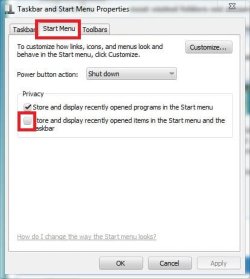
Right click on the taskbar, and select "properties" in the context menu .... the taskbar and start menu properties window will appear. Click on the "start menu tab, and check this box by clicking on it !
If it is already checked, you must have performed a disk cleanup shortly .... a disk cleanup cleans the recent history , and so the top part of the trigger is eventually cleaned up.
My Computer
At a glance
Microsoft Windows 10 Pro Insider Preview 64-bitIntel(R) Core(TM) i3-4130 CPU @ 3.40GHzCorsair Vengence 4GB x2 (8.00GB Dual-Channel ...2047MB GeForce GTS 450 (ZOTAC International)
You're welcome, glad we could help. Thanks to Brink for the added info (He's the professional, I'm just a fellow member ). Enjoy your stay st Seven Forums.
A Guy
My Computer
At a glance
Windows 10 Home x64INTEL Core i5-750 Quad-Core 3.37GHzHyperX Fury Black Series 8GB (2 x 4GB) 1866MhzEVGA GeForce GTX 750 Superclocked 1GB 128-Bit...





 ). Enjoy your stay st Seven Forums.