No Default Operating System in Startup and Recovery dialog Win 7

Toddwmac

New member
Greetings;

Win 7, SP1, multi proc dell, one physical drive 2 partitions, nether marked as active

I'm 2 days into recovering from a Trojan:Dos Alureon virus. Using this Encyclopedia entry: Trojan:DOS/Alureon.A - Learn more about malware - Microsoft Malware Protection Center

All is pretty good but when trying to troubleshoot a (related?) IE hijack issue, and going into safe boot, I found I could not get back to normal boot. It just stayed in Safe. I eventually replaced some boot files from a backup and it got back to normal.

I saw that there was not OS listed in MSConfig and none listed in the Startup and Recovery dialog.

No partitions are marked as active. I've tried to use the disk managment utility in Computer Managment to set the OS partition as active but I get an IO error.

Any suggestions appreciated
Thanks
 

My Computer

OS
Win 7 64

My Computer

Computer type
PC/Desktop
Computer Manufacturer/Model Number
Self Assembled
OS
Microsoft Windows 10 Pro Insider Preview 64-bit
CPU
Intel(R) Core(TM) i3-4130 CPU @ 3.40GHz
Motherboard
Gigabyte Technology Co., Ltd. B85M-D3H
Memory
Corsair Vengence 4GB x2 (8.00GB Dual-Channel DDR3 @ 798MHz)
Graphics Card(s)
2047MB GeForce GTS 450 (ZOTAC International)
Sound Card
Onboard (Realtek High Definition Audio)
Monitor(s) Displays
LG Flatron E2040T
Screen Resolution
1600x900
Hard Drives
Western Digital 1 TB
Seagate 500 GB
PSU
Corsair VS550
Case
Cooler Master K380
Cooling
Cooler Master Seidon 120V Plus
Keyboard
Logitech MK260r
Mouse
Logitech MK260r
Internet Speed
PMPL Broadband
Antivirus
Windows Defender + MBAM
Browser
Firefox
Other Info
Dell Studio 15" Laptop
Download the liveCD & Run, this is a free tool from MS:
http://www.sevenforums.com/tutorials/166445-microsoft-standalone-system-sweeper.html?ltr=M

Than
   Information
Boot up using the Startup Repair CD or Windows 7 DVD. (not the OEM manufacturer's Recovery Disk) If you have a Netbook, you will need a CD/DVD drive.
NOTE: Make sure no USB drives are plugged in.
Do not use a USB Pendrive for Startup Repair.
startup repair disc-create

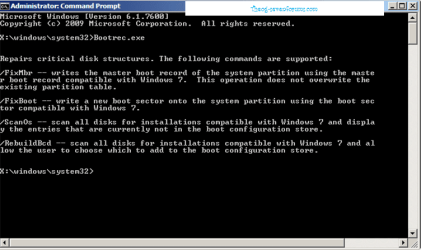
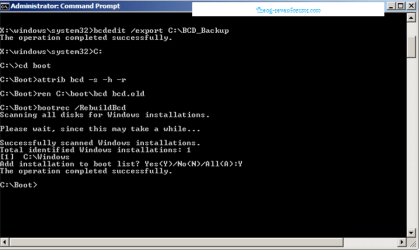
1) Use the Rebuild BCD in this tutorial:
How to use the Bootrec.exe tool in the Windows Recovery Environment to troubleshoot and repair startup issues in Windows

Startup Repair 4.PNG Startup Repair 5.PNG

2) Restore MBR.

Startup Repair 6.PNG
 

My Computer

OS
ME/XP/Vista/Win7
Thanks a lot guys-

I tried the Bootrec tool and it does not see Windows on my C: drive... only on a recovery drive.
I will try the cmd prmpt approach from Arc in a few minutes.

In looking at all the posts on the virus I had, I'm thinking a complete burn down is my best option.

As I'm typing and looking over at Computer Managment console on the bad machine, I see a little 2 MB partition that is marked active. It will not let get any info on it or let me do anyting to it. Looks like more reason to do a complete wipe.

Does the Win 7 install disk (non OEM) has all the tools to do a secure wipe and rebuild of an entire disk (only 1TB)?
 

My Computer

OS
Win 7 64
As I'm typing and looking over at Computer Managment console on the bad machine, I see a little 2 MB partition that is marked active. It will not let get any info on it or let me do anyting to it.
It would be better to understand if you post a full screen snipshot of your disk management window. Generally the active partition is a 100MB NTFS primary partition.


Does the Win 7 install disk (non OEM) has all the tools to do a secure wipe and rebuild of an entire disk (only 1TB)?
Yes ! http://www.sevenforums.com/tutorials/52129-disk-clean-clean-all-diskpart-command.html

For your reinstallation, http://www.sevenforums.com/tutorials/91339-ssd-hdd-optimize-windows-reinstallation.html .
 

My Computer

Computer type
PC/Desktop
Computer Manufacturer/Model Number
Self Assembled
OS
Microsoft Windows 10 Pro Insider Preview 64-bit
CPU
Intel(R) Core(TM) i3-4130 CPU @ 3.40GHz
Motherboard
Gigabyte Technology Co., Ltd. B85M-D3H
Memory
Corsair Vengence 4GB x2 (8.00GB Dual-Channel DDR3 @ 798MHz)
Graphics Card(s)
2047MB GeForce GTS 450 (ZOTAC International)
Sound Card
Onboard (Realtek High Definition Audio)
Monitor(s) Displays
LG Flatron E2040T
Screen Resolution
1600x900
Hard Drives
Western Digital 1 TB
Seagate 500 GB
PSU
Corsair VS550
Case
Cooler Master K380
Cooling
Cooler Master Seidon 120V Plus
Keyboard
Logitech MK260r
Mouse
Logitech MK260r
Internet Speed
PMPL Broadband
Antivirus
Windows Defender + MBAM
Browser
Firefox
Other Info
Dell Studio 15" Laptop
   Information
We always assume you have made your Recovery Disks using the OEM manufacturer's Recovery Media Creator app the first day you had your new PC.
& made the Startup Repair CD.
startup repair disc-create


Did you make the DELL OEM manufacturer's Recovery Disks?
 

My Computer

OS
ME/XP/Vista/Win7
No Oem recovery... it was a vista machine originally

Attached is a snip of the disk window.
 

Attachments

  • Capture.JPG
    Capture.JPG
    90.5 KB · Views: 66

My Computer

OS
Win 7 64
In this situation, I think you are right. You should wipe up your entire disk , and go for a clean install then . The steps you should follow in order to do it are ...

To wipe up the hard disk .. Disk - Clean and Clean All with Diskpart Command

To optimize the disk for reinstall ... SSD / HDD : Optimize for Windows Reinstallation .

For the installation .... http://www.sevenforums.com/tutorials/1649-clean-install-windows-7-a.html .

Before wiping up the disk, better you back up your data externally .
 

My Computer

Computer type
PC/Desktop
Computer Manufacturer/Model Number
Self Assembled
OS
Microsoft Windows 10 Pro Insider Preview 64-bit
CPU
Intel(R) Core(TM) i3-4130 CPU @ 3.40GHz
Motherboard
Gigabyte Technology Co., Ltd. B85M-D3H
Memory
Corsair Vengence 4GB x2 (8.00GB Dual-Channel DDR3 @ 798MHz)
Graphics Card(s)
2047MB GeForce GTS 450 (ZOTAC International)
Sound Card
Onboard (Realtek High Definition Audio)
Monitor(s) Displays
LG Flatron E2040T
Screen Resolution
1600x900
Hard Drives
Western Digital 1 TB
Seagate 500 GB
PSU
Corsair VS550
Case
Cooler Master K380
Cooling
Cooler Master Seidon 120V Plus
Keyboard
Logitech MK260r
Mouse
Logitech MK260r
Internet Speed
PMPL Broadband
Antivirus
Windows Defender + MBAM
Browser
Firefox
Other Info
Dell Studio 15" Laptop
Thanks guys....
I hit the button of no return.... clean all just few minutes ago....
now I'll wait for 3 hours and read some of the words of wisdon here on the forum.

If nothing else, I'll have a nice clean Win 7 machine when I'm done.

Cheers
 

My Computer

OS
Win 7 64

My Computer

Computer type
PC/Desktop
Computer Manufacturer/Model Number
Self Assembled
OS
Microsoft Windows 10 Pro Insider Preview 64-bit
CPU
Intel(R) Core(TM) i3-4130 CPU @ 3.40GHz
Motherboard
Gigabyte Technology Co., Ltd. B85M-D3H
Memory
Corsair Vengence 4GB x2 (8.00GB Dual-Channel DDR3 @ 798MHz)
Graphics Card(s)
2047MB GeForce GTS 450 (ZOTAC International)
Sound Card
Onboard (Realtek High Definition Audio)
Monitor(s) Displays
LG Flatron E2040T
Screen Resolution
1600x900
Hard Drives
Western Digital 1 TB
Seagate 500 GB
PSU
Corsair VS550
Case
Cooler Master K380
Cooling
Cooler Master Seidon 120V Plus
Keyboard
Logitech MK260r
Mouse
Logitech MK260r
Internet Speed
PMPL Broadband
Antivirus
Windows Defender + MBAM
Browser
Firefox
Other Info
Dell Studio 15" Laptop
Me too! :)

One question... in looking at the optimize disk tutorial, I was wondering if in my case I can just use the standard Win 7 install GUI or should I do it in Diskpart before I do the install? I don't have a lot of working knowledge on disks so I suspect the default options are better than my best guess.

I have 1 900G onboard drive

My requirements
I don't need to multi-boot
I don't need to conserve storage space
No bit locker

Something like this feels about right

200G System Reserved Partition (not sure why I need it but it seems like I might)
100G Win 7 system partition (as suggested) Where I would install Windows
600G Data partition

Make sense?
 

My Computer

OS
Win 7 64
200 GB system reserved is not needed at all .... 100 MB is necessary and sufficient for it . Dont need to block so much extra space completely unnecessary .

In the http://www.sevenforums.com/tutorials/1649-clean-install-windows-7-a.html , when you are on step 8, click on "new" to make a new partition , give the size 102500 MB , make a partition . Use the rest for another partition.

Now, when you select the 102500 MB partition for windows installation, accept the formatting of the partition, it will automatically split up the space into two... one is 100 MB system reserved (The primary system and active partition, without any drive letter; containing the MBR) and the rest is as C , of 102400 MB=100 GB .

So, if you think, you may drop the SSD / HDD : Optimize for Windows Reinstallation step .
 

My Computer

Computer type
PC/Desktop
Computer Manufacturer/Model Number
Self Assembled
OS
Microsoft Windows 10 Pro Insider Preview 64-bit
CPU
Intel(R) Core(TM) i3-4130 CPU @ 3.40GHz
Motherboard
Gigabyte Technology Co., Ltd. B85M-D3H
Memory
Corsair Vengence 4GB x2 (8.00GB Dual-Channel DDR3 @ 798MHz)
Graphics Card(s)
2047MB GeForce GTS 450 (ZOTAC International)
Sound Card
Onboard (Realtek High Definition Audio)
Monitor(s) Displays
LG Flatron E2040T
Screen Resolution
1600x900
Hard Drives
Western Digital 1 TB
Seagate 500 GB
PSU
Corsair VS550
Case
Cooler Master K380
Cooling
Cooler Master Seidon 120V Plus
Keyboard
Logitech MK260r
Mouse
Logitech MK260r
Internet Speed
PMPL Broadband
Antivirus
Windows Defender + MBAM
Browser
Firefox
Other Info
Dell Studio 15" Laptop
I just boot the installer, choose Custom install and click Next which will create and format the partition along with harmless 100mb System Reserved partition effortlessly. If you already know you want a second data partition you can use Drive Options to partition accordingly.

Clean All is only necessary to securely overwrite data to make it nearly impossible to recover. There is nothing about Clean All that is beneficial installation-wise that the simple Clean command will not handle, since the issue if there is one is wiping the boot sector which either Clean All or Clean does.
 
Thanks for all the help guys... clean Win 7 with updates streaming in as I type.

Today is a much better day....
 

My Computer

OS
Win 7 64
Hey guys-
All smooth but strange behavior on some USB attached drives. No files show up when you open the drive but when you do a virus check on the drive, you can see it checking the filles (I can see the file names I expect)

The disk properties show the correct used and free space %s

They were attached to the machine that had the virus so I'm thinking a master record of some kind was changed. Any ideas on how to a) check the disk to be sure there is nothing hiding b)get the files back?

Thanks... and Happy New Year.
 

My Computer

OS
Win 7 64
Determined that the hidden bit was set and the file owneship data was hijacked. Great opportunity to re-learn about ownership and cascading permissions. :)
 

My Computer

OS
Win 7 64
Back
Top