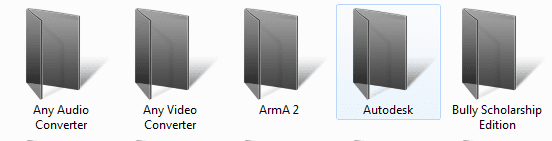
So I edited the imageres.dll file and edited some icons however the icons don't show. The folder icons only show when the layout is set to large images, but if I set it to list or details or small icons the default icons show, why? look at the images below..
My Computer
OS
Windows 7 Ultimate 32
CPU
AMD Athlon 64 X2 4400+ Brisbane 65nm Technology
Motherboard
ASUSTek Computer INC. NARRA3 (Socket AM2 )
Memory
Size 3072 MBytes
Graphics Card(s)
ATI Radeon HD 3450
Sound Card
Realtek High Definition Audio
Monitor(s) Displays
Name Generic PnP Monitor on ATI Radeon HD 3450 Current Resol
Screen Resolution
1440x900
Hard Drives
Manufacturer Seagate
Form Factor 3.5"
Interface ATA
Capacity 352GB
Real size 360,080,695,296 bytes
RAID Type None
S.M.A.R.T
S.M.A.R.T not supported
Partition 0
Partition ID Disk #0, Partition #0
Disk Letter C:
File System NTFS
Name Generic PnP Monitor on ATI Radeon HD 3450 Current Resol
Screen Resolution
1440x900
Hard Drives
Manufacturer Seagate
Form Factor 3.5"
Interface ATA
Capacity 352GB
Real size 360,080,695,296 bytes
RAID Type None
S.M.A.R.T
S.M.A.R.T not supported
Partition 0
Partition ID Disk #0, Partition #0
Disk Letter C:
File System NTFS
Name Generic PnP Monitor on ATI Radeon HD 3450 Current Resol
Screen Resolution
1440x900
Hard Drives
Manufacturer Seagate
Form Factor 3.5"
Interface ATA
Capacity 352GB
Real size 360,080,695,296 bytes
RAID Type None
S.M.A.R.T
S.M.A.R.T not supported
Partition 0
Partition ID Disk #0, Partition #0
Disk Letter C:
File System NTFS
I would say part of the problem is you didn't change the right ones for the standard folders.
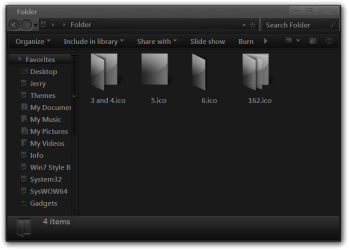
To do it right you need to change #3, 4, 5, 6, 162 icons
#3 and 4 would be the open folder like the one you used
#5 is the back #6 is the front and 162 is when you have folders within folders. In the screenshot below will show you some examples and they are all multilayered. You might be able to just change #3 and 4 but I am not sure. This tutorial may help you understand it better http://www.sevenforums.com/tutorials/144807-folder-icon-change-default-icon.html
Let me know if there's something you don't understand.
Jerry
My Computer
Computer type
Laptop
Computer Manufacturer/Model Number
Sager NP9170
OS
Win 7 Pro x64 / Win 10 Pro
CPU
Intel(R) Core(TM) i7-3630QM CPU @ 2.40GHz
Motherboard
CLEVO P170EM
Memory
12 GB
Graphics Card(s)
(1) Intel(R) HD Graphics 4000 (2) NVIDIA GeForce GTX 675M
Sound Card
(1) Realtek High Definition Audio (2) Intel(R) Display Aud
Monitor(s) Displays
17.3
Screen Resolution
1920x1080
Hard Drives
(1) Samsung 860 EVO 500GB(OS) (1) Samsung 860 EVO 500GB(Data)
Keyboard
Backlite
Antivirus
MSE, Malwarebytes Pro
Browser
Firefox
Other Info
DESKTOP: Custom-built.
OS: Win 10 Pro x64.
CASE: Rosewill R5.
CPU: Intel I5 4670K CPU @ 3.40GHz.
CPU COOLER: Cool Master Hyper 212 EVO.
MOTHERBOARD: Asus Z87-A.
MEMORY: Kingston HyperX 2x4 GB.
GPU: Nvidia Geforce 650 TI.
PSU: Corsair TX750.
DRIVES: (1) Samsung 840 120 GB SSD (2) Western Digital blue 500 GB 7200 RPM.
I think I get it, btw what theme are you using? I want it!
My Computer
OS
Windows 7 Ultimate 32
CPU
AMD Athlon 64 X2 4400+ Brisbane 65nm Technology
Motherboard
ASUSTek Computer INC. NARRA3 (Socket AM2 )
Memory
Size 3072 MBytes
Graphics Card(s)
ATI Radeon HD 3450
Sound Card
Realtek High Definition Audio
Monitor(s) Displays
Name Generic PnP Monitor on ATI Radeon HD 3450 Current Resol
Screen Resolution
1440x900
Hard Drives
Manufacturer Seagate
Form Factor 3.5"
Interface ATA
Capacity 352GB
Real size 360,080,695,296 bytes
RAID Type None
S.M.A.R.T
S.M.A.R.T not supported
Partition 0
Partition ID Disk #0, Partition #0
Disk Letter C:
File System NTFS
Here is what I started with, I have tweaked it with my navigation buttons, the close, min, max buttons from a another theme , icons folders ect.
Jerry charleston2378's deviantART gallery
My Computer
Computer type
Laptop
Computer Manufacturer/Model Number
Sager NP9170
OS
Win 7 Pro x64 / Win 10 Pro
CPU
Intel(R) Core(TM) i7-3630QM CPU @ 2.40GHz
Motherboard
CLEVO P170EM
Memory
12 GB
Graphics Card(s)
(1) Intel(R) HD Graphics 4000 (2) NVIDIA GeForce GTX 675M
Sound Card
(1) Realtek High Definition Audio (2) Intel(R) Display Aud
Monitor(s) Displays
17.3
Screen Resolution
1920x1080
Hard Drives
(1) Samsung 860 EVO 500GB(OS) (1) Samsung 860 EVO 500GB(Data)
Keyboard
Backlite
Antivirus
MSE, Malwarebytes Pro
Browser
Firefox
Other Info
DESKTOP: Custom-built.
OS: Win 10 Pro x64.
CASE: Rosewill R5.
CPU: Intel I5 4670K CPU @ 3.40GHz.
CPU COOLER: Cool Master Hyper 212 EVO.
MOTHERBOARD: Asus Z87-A.
MEMORY: Kingston HyperX 2x4 GB.
GPU: Nvidia Geforce 650 TI.
PSU: Corsair TX750.
DRIVES: (1) Samsung 840 120 GB SSD (2) Western Digital blue 500 GB 7200 RPM.