Trouble w/graphics for games that use lower resolution in FULLSCREEN

Mengistuh

New member
Local time
9:46 AM
Messages
8
When playing lower-resolution games that use full-screen mode on my Windows 7 Professional X64 will not play without serious color glitches. It flickers and the colors are all completely messed up. I have a Nvidia GeForce 9800 GTX Integrated RAMDAC video card that is updated with the latest drivers. My monitor is a Hanns-G 28" wide-screen and is up-to-date as well.

It is SO irritating to not be able to let my kids play these old games.

I have had success disabling the "explorer.exe" in the task manager, but ONLY when playing the Age of Empires 2: Conqueror's Expansion. This method has not yet worked for any other game.

My old Myst games from Cyan and a bunch of others refuse to be clear enough to play and enjoy.

Any help would be GREATLY appreciated.

Mengistuh
 

My Computer My Computer

At a glance

Windows 7 Professional X64AMD Phenom(tm) II X 4 940 Processor (4 CPUs),...4096MB RAMNVIDIA GeForce 9800 GTX/9800 GTX +
Computer Manufacturer/Model Number
Gigabyte Technology Co., Ltd. GA-MA790X-UD4P
OS
Windows 7 Professional X64
CPU
AMD Phenom(tm) II X 4 940 Processor (4 CPUs), ~3.0GHz
Motherboard
Gigabyte
Memory
4096MB RAM
Graphics Card(s)
NVIDIA GeForce 9800 GTX/9800 GTX +
Sound Card
RealTek High Definition Audio (Part of Motherboard)
Monitor(s) Displays
Hanns-G 28" Widescreen - Full HD 1080P Capability
Screen Resolution
1920 x 1200
Hard Drives
C:\ 150Gb (Main Internal)
D:\ 1Tb (Internal)
E:\ 1Tb (External)
F:\ 1TB (External)
G:\ 1Tb (External)
Case
Smilodon Raidmax Gaming Development
Cooling
Three internal fans (two "IN" and one "out")
Keyboard
Logitech Model #Y-UV90
Mouse
Dynex Model #DX-WMSE
Internet Speed
3.0 Mb/sec
Mengis,

Welcome to Sevenforums to you!

I will be providing you with links that you may click that lead to a tutorial part of this website for a how-to.

Make sure you have windows completely updated, along with every one of the games. Also, make sure your drivers are updated, especially your graphics driver. If you'd like me to find the appropriate one for you and a how-to, fill out your system specs with this tool.

Try putting your game into compatability mode: http://www.sevenforums.com/tutorials/316-compatibility-mode.html

Failing that, lower your graphics resolution and settings through your graphics control panel. If you'd like more of an explaination, please ask.

It is unusual, but some antiviruses may get in the way of the game. While I don't recommend disabling a much needed antivirus while connected to the internet, you might try it as a test. What antivirus do you use? I can offer recommendations based on how well your antivirus performs according to my experience, if you would like.

To more easily find drivers compatable with your computer, you can set windows to find them auatomatically: http://www.sevenforums.com/tutorials/316-compatibility-mode.html. Then you can check for updates and see if there are any "optional" drivers available to you.
 

My Computer My Computer

At a glance

Microsoft Windows 8.1 Pro 64-bitIntel(R) Core(TM) i3-4130 CPU @ 3.40GHz8.00 GBNone
Computer type
PC/Desktop
Computer Manufacturer/Model Number
Custom Asus Build
OS
Microsoft Windows 8.1 Pro 64-bit
CPU
Intel(R) Core(TM) i3-4130 CPU @ 3.40GHz
Motherboard
B85M-E
Memory
8.00 GB
Graphics Card(s)
None
Sound Card
Realtek High Definition Audio
Monitor(s) Displays
Asus 23.6" Monitor
Screen Resolution
1920 x 1080 x 32 bits (4294967296 colors) @ 60 Hz
Hard Drives
INTEL SSDSC2BW180A4
Samsung SSD 840 PRO Series
PSU
Seasonic S12II-380Bronze
Case
Lian Li
Cooling
Fan, Passive
Keyboard
Logitech K120
Mouse
Microsoft Touch Mouse
Internet Speed
4ms Ping, 19.0 Mbps Download, 19.0 Mbps Upload
Antivirus
Eset Endpoint
Browser
Internet Explorer, Chrome
Thank you for your reply. Everything is updated, but none of the other possible solutions you offered were successful. It is really a bummer.
 

My Computer My Computer

At a glance

Windows 7 Professional X64AMD Phenom(tm) II X 4 940 Processor (4 CPUs),...4096MB RAMNVIDIA GeForce 9800 GTX/9800 GTX +
Computer Manufacturer/Model Number
Gigabyte Technology Co., Ltd. GA-MA790X-UD4P
OS
Windows 7 Professional X64
CPU
AMD Phenom(tm) II X 4 940 Processor (4 CPUs), ~3.0GHz
Motherboard
Gigabyte
Memory
4096MB RAM
Graphics Card(s)
NVIDIA GeForce 9800 GTX/9800 GTX +
Sound Card
RealTek High Definition Audio (Part of Motherboard)
Monitor(s) Displays
Hanns-G 28" Widescreen - Full HD 1080P Capability
Screen Resolution
1920 x 1200
Hard Drives
C:\ 150Gb (Main Internal)
D:\ 1Tb (Internal)
E:\ 1Tb (External)
F:\ 1TB (External)
G:\ 1Tb (External)
Case
Smilodon Raidmax Gaming Development
Cooling
Three internal fans (two "IN" and one "out")
Keyboard
Logitech Model #Y-UV90
Mouse
Dynex Model #DX-WMSE
Internet Speed
3.0 Mb/sec
You forgot to update your system specs and you didn't let me know what antivirus you are running that may allow me to further help you out and offer opinions on how you might find a solution.
 

My Computer My Computer

At a glance

Microsoft Windows 8.1 Pro 64-bitIntel(R) Core(TM) i3-4130 CPU @ 3.40GHz8.00 GBNone
Computer type
PC/Desktop
Computer Manufacturer/Model Number
Custom Asus Build
OS
Microsoft Windows 8.1 Pro 64-bit
CPU
Intel(R) Core(TM) i3-4130 CPU @ 3.40GHz
Motherboard
B85M-E
Memory
8.00 GB
Graphics Card(s)
None
Sound Card
Realtek High Definition Audio
Monitor(s) Displays
Asus 23.6" Monitor
Screen Resolution
1920 x 1080 x 32 bits (4294967296 colors) @ 60 Hz
Hard Drives
INTEL SSDSC2BW180A4
Samsung SSD 840 PRO Series
PSU
Seasonic S12II-380Bronze
Case
Lian Li
Cooling
Fan, Passive
Keyboard
Logitech K120
Mouse
Microsoft Touch Mouse
Internet Speed
4ms Ping, 19.0 Mbps Download, 19.0 Mbps Upload
Antivirus
Eset Endpoint
Browser
Internet Explorer, Chrome
Mengistuh

I have a similar problem with a older game too but came to find they will play and do so very well in a VM. I use Oracle VM VirtualBox and have XP installed with there 3d Drivers that they call Vboxguestaddones (All one word)

And these all play with no problem at the lower res your looking for.

Another thought, It may not be the system that is causing this, your monitor may not go this low and cause it to act like this.
 

My Computer My Computer

At a glance

Windows 7 Home PreQ8200 Intell 2.333DDR3 1333 4gigAti HD4870
Computer Manufacturer/Model Number
Home Build.
OS
Windows 7 Home Pre
CPU
Q8200 Intell 2.333
Motherboard
Asus P5Q3 Delux
Memory
DDR3 1333 4gig
Graphics Card(s)
Ati HD4870
Sound Card
Onboard Soundmax. 7.1
Monitor(s) Displays
1, 20" Samsung
Screen Resolution
1600/900
PSU
Good enough
Case
Le Shark
Cooling
FAN FAN FAN FAN, Thermaltake Minitype 90 with speed fan 4.
Keyboard
Standard, Gaming Wolfking
Mouse
Cm-storm-inferno-wired-gaming-mouse
Internet Speed
Sky Crappy upto 20meg I get a whapping 5.8mbs.
HOPEFULLY you will be able to get the specs by looking at these. I couldn't just ADD a picture to this thread. My anti-virus program is BitDefender.
 
Last edited:

My Computer My Computer

At a glance

Windows 7 Professional X64AMD Phenom(tm) II X 4 940 Processor (4 CPUs),...4096MB RAMNVIDIA GeForce 9800 GTX/9800 GTX +
Computer Manufacturer/Model Number
Gigabyte Technology Co., Ltd. GA-MA790X-UD4P
OS
Windows 7 Professional X64
CPU
AMD Phenom(tm) II X 4 940 Processor (4 CPUs), ~3.0GHz
Motherboard
Gigabyte
Memory
4096MB RAM
Graphics Card(s)
NVIDIA GeForce 9800 GTX/9800 GTX +
Sound Card
RealTek High Definition Audio (Part of Motherboard)
Monitor(s) Displays
Hanns-G 28" Widescreen - Full HD 1080P Capability
Screen Resolution
1920 x 1200
Hard Drives
C:\ 150Gb (Main Internal)
D:\ 1Tb (Internal)
E:\ 1Tb (External)
F:\ 1TB (External)
G:\ 1Tb (External)
Case
Smilodon Raidmax Gaming Development
Cooling
Three internal fans (two "IN" and one "out")
Keyboard
Logitech Model #Y-UV90
Mouse
Dynex Model #DX-WMSE
Internet Speed
3.0 Mb/sec
I believe that it is in fact a monitor issue. I tried just switching the resolution to 800X600 and it does the same thing. So, now what? The monitor is updated...
 

My Computer My Computer

At a glance

Windows 7 Professional X64AMD Phenom(tm) II X 4 940 Processor (4 CPUs),...4096MB RAMNVIDIA GeForce 9800 GTX/9800 GTX +
Computer Manufacturer/Model Number
Gigabyte Technology Co., Ltd. GA-MA790X-UD4P
OS
Windows 7 Professional X64
CPU
AMD Phenom(tm) II X 4 940 Processor (4 CPUs), ~3.0GHz
Motherboard
Gigabyte
Memory
4096MB RAM
Graphics Card(s)
NVIDIA GeForce 9800 GTX/9800 GTX +
Sound Card
RealTek High Definition Audio (Part of Motherboard)
Monitor(s) Displays
Hanns-G 28" Widescreen - Full HD 1080P Capability
Screen Resolution
1920 x 1200
Hard Drives
C:\ 150Gb (Main Internal)
D:\ 1Tb (Internal)
E:\ 1Tb (External)
F:\ 1TB (External)
G:\ 1Tb (External)
Case
Smilodon Raidmax Gaming Development
Cooling
Three internal fans (two "IN" and one "out")
Keyboard
Logitech Model #Y-UV90
Mouse
Dynex Model #DX-WMSE
Internet Speed
3.0 Mb/sec
************ ************* **************** **********

HOPEFULLY you will be able to get the specs by looking at these. I couldn't just ADD a picture to this thread. My anti-virus program is BitDefender.
Now you go back and delete this post with your real name. Bad idea. Use this method to upload pictures:
http://www.sevenforums.com/tutorials/9733-screenshots-files-upload-post-seven-forums.html

Almost guarantee it isn't monitor related, and easiest way to check is trying another monitor. Its probably the program just doesn't work with Win7.

Also:
Mengis,

Welcome to Sevenforums to you!

I will be providing you with links that you may click that lead to a tutorial part of this website for a how-to.

...fill out your system specs with this tool.
You don't need to use the tool, but please update your specs....
 

My Computer My Computer

At a glance

Microsoft Windows 8.1 Pro 64-bitIntel(R) Core(TM) i3-4130 CPU @ 3.40GHz8.00 GBNone
Computer type
PC/Desktop
Computer Manufacturer/Model Number
Custom Asus Build
OS
Microsoft Windows 8.1 Pro 64-bit
CPU
Intel(R) Core(TM) i3-4130 CPU @ 3.40GHz
Motherboard
B85M-E
Memory
8.00 GB
Graphics Card(s)
None
Sound Card
Realtek High Definition Audio
Monitor(s) Displays
Asus 23.6" Monitor
Screen Resolution
1920 x 1080 x 32 bits (4294967296 colors) @ 60 Hz
Hard Drives
INTEL SSDSC2BW180A4
Samsung SSD 840 PRO Series
PSU
Seasonic S12II-380Bronze
Case
Lian Li
Cooling
Fan, Passive
Keyboard
Logitech K120
Mouse
Microsoft Touch Mouse
Internet Speed
4ms Ping, 19.0 Mbps Download, 19.0 Mbps Upload
Antivirus
Eset Endpoint
Browser
Internet Explorer, Chrome
how many mhz your running the monitor at? sometimes when your monitor does not display the screen correctly is like say your monitor supports 60mhz only at you put it at 75mhz ingame it will have graphical glitches, make sure your running it at a rate your monitor supports
 

My Computer My Computer

At a glance

Windows 10 64bitAMD Phenom II X4 925 (Deneb)(2.8GHz) OC 3.4GHzCorsair Vengeance DDR3 4GBX2 (8192MB)XFX HD 6870 1GB (OC)- 940MHz core, mem 1150MHz
Computer type
PC/Desktop
Computer Manufacturer/Model Number
custom build
OS
Windows 10 64bit
CPU
AMD Phenom II X4 925 (Deneb)(2.8GHz) OC 3.4GHz
Motherboard
M5A78L-MLX Plus
Memory
Corsair Vengeance DDR3 4GBX2 (8192MB)
Graphics Card(s)
XFX HD 6870 1GB (OC)- 940MHz core, mem 1150MHz
Monitor(s) Displays
Vizio 26' 1920x1080 / Acer 1336x768
Screen Resolution
1920x1080 60Hz /1336x768
Hard Drives
Kingston Digital 60GB SSDNow V300/500gb HDD Western Digital 7200rpm (/WD 160GB HDD 7200rpm
PSU
CORSAIR CX600 600w
Case
AZZA Orion 202 EVO
Cooling
cooler master hyper TX3 cpu cooler
Keyboard
Razer DeathStalker
Mouse
Logitech Optical Gaming Mouse G400
Antivirus
Defualt on win 10
Browser
Firefox
Other Info
cpu is overclocked in bios
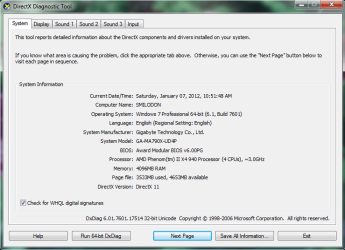
Dxdiag1.png

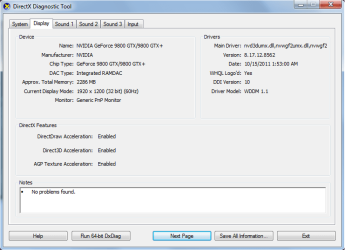
Dxdiag2.png

Thank you so much DustSailor for helping me figure that out. Awesome. :-)
 

My Computer My Computer

At a glance

Windows 7 Professional X64AMD Phenom(tm) II X 4 940 Processor (4 CPUs),...4096MB RAMNVIDIA GeForce 9800 GTX/9800 GTX +
Computer Manufacturer/Model Number
Gigabyte Technology Co., Ltd. GA-MA790X-UD4P
OS
Windows 7 Professional X64
CPU
AMD Phenom(tm) II X 4 940 Processor (4 CPUs), ~3.0GHz
Motherboard
Gigabyte
Memory
4096MB RAM
Graphics Card(s)
NVIDIA GeForce 9800 GTX/9800 GTX +
Sound Card
RealTek High Definition Audio (Part of Motherboard)
Monitor(s) Displays
Hanns-G 28" Widescreen - Full HD 1080P Capability
Screen Resolution
1920 x 1200
Hard Drives
C:\ 150Gb (Main Internal)
D:\ 1Tb (Internal)
E:\ 1Tb (External)
F:\ 1TB (External)
G:\ 1Tb (External)
Case
Smilodon Raidmax Gaming Development
Cooling
Three internal fans (two "IN" and one "out")
Keyboard
Logitech Model #Y-UV90
Mouse
Dynex Model #DX-WMSE
Internet Speed
3.0 Mb/sec
how many mhz your running the monitor at? sometimes when your monitor does not display the screen correctly is like say your monitor supports 60mhz only at you put it at 75mhz ingame it will have graphical glitches, make sure your running it at a rate your monitor supports

How do I check what mhz I'm running it at? Sorry, a real technical noob here.
 

My Computer My Computer

At a glance

Windows 7 Professional X64AMD Phenom(tm) II X 4 940 Processor (4 CPUs),...4096MB RAMNVIDIA GeForce 9800 GTX/9800 GTX +
Computer Manufacturer/Model Number
Gigabyte Technology Co., Ltd. GA-MA790X-UD4P
OS
Windows 7 Professional X64
CPU
AMD Phenom(tm) II X 4 940 Processor (4 CPUs), ~3.0GHz
Motherboard
Gigabyte
Memory
4096MB RAM
Graphics Card(s)
NVIDIA GeForce 9800 GTX/9800 GTX +
Sound Card
RealTek High Definition Audio (Part of Motherboard)
Monitor(s) Displays
Hanns-G 28" Widescreen - Full HD 1080P Capability
Screen Resolution
1920 x 1200
Hard Drives
C:\ 150Gb (Main Internal)
D:\ 1Tb (Internal)
E:\ 1Tb (External)
F:\ 1TB (External)
G:\ 1Tb (External)
Case
Smilodon Raidmax Gaming Development
Cooling
Three internal fans (two "IN" and one "out")
Keyboard
Logitech Model #Y-UV90
Mouse
Dynex Model #DX-WMSE
Internet Speed
3.0 Mb/sec
DustSailor,
Got the system specs entered. Sorry that took so long. Couldn't at first figure out how to do it....even though you had shown me....lol. Anyway....I appreciate your help. REALLY want to be able to fix this.
 
Last edited:

My Computer My Computer

At a glance

Windows 7 Professional X64AMD Phenom(tm) II X 4 940 Processor (4 CPUs),...4096MB RAMNVIDIA GeForce 9800 GTX/9800 GTX +
Computer Manufacturer/Model Number
Gigabyte Technology Co., Ltd. GA-MA790X-UD4P
OS
Windows 7 Professional X64
CPU
AMD Phenom(tm) II X 4 940 Processor (4 CPUs), ~3.0GHz
Motherboard
Gigabyte
Memory
4096MB RAM
Graphics Card(s)
NVIDIA GeForce 9800 GTX/9800 GTX +
Sound Card
RealTek High Definition Audio (Part of Motherboard)
Monitor(s) Displays
Hanns-G 28" Widescreen - Full HD 1080P Capability
Screen Resolution
1920 x 1200
Hard Drives
C:\ 150Gb (Main Internal)
D:\ 1Tb (Internal)
E:\ 1Tb (External)
F:\ 1TB (External)
G:\ 1Tb (External)
Case
Smilodon Raidmax Gaming Development
Cooling
Three internal fans (two "IN" and one "out")
Keyboard
Logitech Model #Y-UV90
Mouse
Dynex Model #DX-WMSE
Internet Speed
3.0 Mb/sec
Mengistuh,
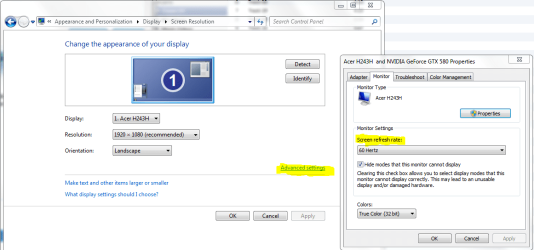
Not a problem. This is how you can view the Refresh rate of you monitor, 60 is best. But this won't solve your problem either, as older monitors could produce higher refresh rates than 60MHz whereas many LCD monitors cannot (Don't need to as much - little factoid for you):
Capture.PNG
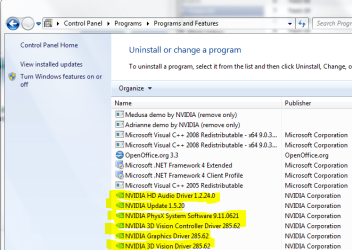
Sorry that reinstalling the Graphics software didn't work for you. Would you mind attempting again? You might consider installing a thorough uninstaller such as Revo Uninstaller Free (http://www.revouninstaller.com/start_freeware_download.html) to remove it with, but if you don't want to, once more remove them in the control panel. Remove all of Nvidia software BUT uninstall the actual graphics driver LAST. Unfortunately, it is also likely that this will not help solve your issue either, but it is a small step in the right direction. Here is a picture of the drivers to remove:
Captured.PNG

Then look here for your driver, install it and select "custom" install. Select all drivers (May leave 3D drivers out if you don't use them) and select "perform clean install": http://www.geforce.com/Drivers/Results/38916

As I've said, sadly it is likely that the program or game is just too old to work with your computer. What is it by the way? Sorry if you've already said. If compatability mode doesn't help, nor does lowering graphics settings including resolution work, then there is little else. You might try troubleshooting it. My next post will tell you how -
 

My Computer My Computer

At a glance

Microsoft Windows 8.1 Pro 64-bitIntel(R) Core(TM) i3-4130 CPU @ 3.40GHz8.00 GBNone
Computer type
PC/Desktop
Computer Manufacturer/Model Number
Custom Asus Build
OS
Microsoft Windows 8.1 Pro 64-bit
CPU
Intel(R) Core(TM) i3-4130 CPU @ 3.40GHz
Motherboard
B85M-E
Memory
8.00 GB
Graphics Card(s)
None
Sound Card
Realtek High Definition Audio
Monitor(s) Displays
Asus 23.6" Monitor
Screen Resolution
1920 x 1080 x 32 bits (4294967296 colors) @ 60 Hz
Hard Drives
INTEL SSDSC2BW180A4
Samsung SSD 840 PRO Series
PSU
Seasonic S12II-380Bronze
Case
Lian Li
Cooling
Fan, Passive
Keyboard
Logitech K120
Mouse
Microsoft Touch Mouse
Internet Speed
4ms Ping, 19.0 Mbps Download, 19.0 Mbps Upload
Antivirus
Eset Endpoint
Browser
Internet Explorer, Chrome
Run the program troubleshooter. You will have to indicate which program that isn't running well. This will put the program into compatability mode after determining what may be going on
Capture.PNG
 

My Computer My Computer

At a glance

Microsoft Windows 8.1 Pro 64-bitIntel(R) Core(TM) i3-4130 CPU @ 3.40GHz8.00 GBNone
Computer type
PC/Desktop
Computer Manufacturer/Model Number
Custom Asus Build
OS
Microsoft Windows 8.1 Pro 64-bit
CPU
Intel(R) Core(TM) i3-4130 CPU @ 3.40GHz
Motherboard
B85M-E
Memory
8.00 GB
Graphics Card(s)
None
Sound Card
Realtek High Definition Audio
Monitor(s) Displays
Asus 23.6" Monitor
Screen Resolution
1920 x 1080 x 32 bits (4294967296 colors) @ 60 Hz
Hard Drives
INTEL SSDSC2BW180A4
Samsung SSD 840 PRO Series
PSU
Seasonic S12II-380Bronze
Case
Lian Li
Cooling
Fan, Passive
Keyboard
Logitech K120
Mouse
Microsoft Touch Mouse
Internet Speed
4ms Ping, 19.0 Mbps Download, 19.0 Mbps Upload
Antivirus
Eset Endpoint
Browser
Internet Explorer, Chrome
Done. However, it isn't just this game (The Secret of Margrave Manor). If I manually try to set my monitor resolution to 800X600, I get the same effect---all of the colors are screwy and the monitor flickers.

The refresh rate can only be set at 59MHz or 60MHz. I tried it at 59 just for troubleshooting's sake and it made no difference. Didn't figure it would, but did it anyway.
 

My Computer My Computer

At a glance

Windows 7 Professional X64AMD Phenom(tm) II X 4 940 Processor (4 CPUs),...4096MB RAMNVIDIA GeForce 9800 GTX/9800 GTX +
Computer Manufacturer/Model Number
Gigabyte Technology Co., Ltd. GA-MA790X-UD4P
OS
Windows 7 Professional X64
CPU
AMD Phenom(tm) II X 4 940 Processor (4 CPUs), ~3.0GHz
Motherboard
Gigabyte
Memory
4096MB RAM
Graphics Card(s)
NVIDIA GeForce 9800 GTX/9800 GTX +
Sound Card
RealTek High Definition Audio (Part of Motherboard)
Monitor(s) Displays
Hanns-G 28" Widescreen - Full HD 1080P Capability
Screen Resolution
1920 x 1200
Hard Drives
C:\ 150Gb (Main Internal)
D:\ 1Tb (Internal)
E:\ 1Tb (External)
F:\ 1TB (External)
G:\ 1Tb (External)
Case
Smilodon Raidmax Gaming Development
Cooling
Three internal fans (two "IN" and one "out")
Keyboard
Logitech Model #Y-UV90
Mouse
Dynex Model #DX-WMSE
Internet Speed
3.0 Mb/sec
Then it is likely the game just doesn't work with windows 7, and/or your hardware.

Which is strange because apparently it works with vista.
 

My Computer My Computer

At a glance

Microsoft Windows 8.1 Pro 64-bitIntel(R) Core(TM) i3-4130 CPU @ 3.40GHz8.00 GBNone
Computer type
PC/Desktop
Computer Manufacturer/Model Number
Custom Asus Build
OS
Microsoft Windows 8.1 Pro 64-bit
CPU
Intel(R) Core(TM) i3-4130 CPU @ 3.40GHz
Motherboard
B85M-E
Memory
8.00 GB
Graphics Card(s)
None
Sound Card
Realtek High Definition Audio
Monitor(s) Displays
Asus 23.6" Monitor
Screen Resolution
1920 x 1080 x 32 bits (4294967296 colors) @ 60 Hz
Hard Drives
INTEL SSDSC2BW180A4
Samsung SSD 840 PRO Series
PSU
Seasonic S12II-380Bronze
Case
Lian Li
Cooling
Fan, Passive
Keyboard
Logitech K120
Mouse
Microsoft Touch Mouse
Internet Speed
4ms Ping, 19.0 Mbps Download, 19.0 Mbps Upload
Antivirus
Eset Endpoint
Browser
Internet Explorer, Chrome
Back
Top