Solved Explorer Search Index Not Working/ Files are not coming up

Jacano

New member
Local time
8:34 AM
Messages
20
Location
USA, FL
Hi, I was wondering if someone could help me out with my predicament. Recently my search index hasn't been working. When I type in a common word or the name for a file it tells me "no items match your search" I know the files are there even when I go to the folder it's in, when I type in the name it comes up as it's not found. I've tried fix it and can't seem to actually FIX IT. So help is appreciated :D

Also I didn't know if I should have put this in general or not so I put it in Performance & Maintenance since I need some fixing on the search index.
 

My Computer My Computer

At a glance

Windows 7 Professional 64-bit (6.1, Build 760...Intel(R) Core(TM) i5 CPU M 480 @ 2.67GHz (4 C...8192MB RAMIntel(R) HD Graphics (Core i5)
Computer Manufacturer/Model Number
Dell Inc. Inspiron N5010
OS
Windows 7 Professional 64-bit (6.1, Build 7601) Service Pack 1
CPU
Intel(R) Core(TM) i5 CPU M 480 @ 2.67GHz (4 CPUs), ~2
Memory
8192MB RAM
Graphics Card(s)
Intel(R) HD Graphics (Core i5)
Sound Card
Speakers / Headphones (IDT High Definition Audio CODEC)
Screen Resolution
1366x768
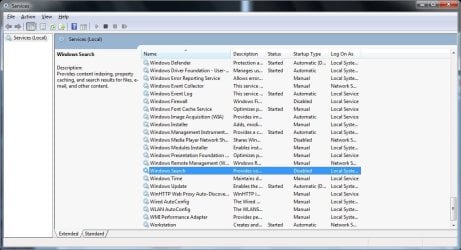
Try opening Start and typing services.msc in the search box. A box comes up with all the services on your system.

Look down the list and see if Windows Search is enabled. Highlight it and look at the top left section of the box. It says Windows Search. If it's not running there should be a link there that says "start." Click to start the service.

If the status is Disabled, right click on the Windows Search line and select Properties. In Startup Type change it in the drop down box to Automatic (delayed start). Click OK. Now the link should be visible in the top left to start the service.

If the indexer is running and it still doesn't work, open Explorer to Computer, right click on the drive where search does not work. Click Properties. There should be a check box at the bottom to enable indexing the drive.

If none of this does it post back with what you find at each step.

Services.jpg
 

My Computer My Computer

At a glance

Windows 7 32 bitAMD 5200+ dual core2 GBNVidia GeForce 6150SE 128 MB
Computer Manufacturer/Model Number
HP Media Center
OS
Windows 7 32 bit
CPU
AMD 5200+ dual core
Memory
2 GB
Graphics Card(s)
NVidia GeForce 6150SE 128 MB
Monitor(s) Displays
CRT
Screen Resolution
1280x1024
Hard Drives
500 GB Sata internal :

SIIG USB 3.0 docking stations w/WD Caviar Black 6 Gb/s drives
Keyboard
PS/2
Mouse
PS/2 Wheel Mouse
Other Info
SIIG USB 3.0 PCIexpress card.
Not displaying files in folders

Hi

I have done all the checks to enable indexing but i still can not get my results to come up in explorer.

What can i do to make it work?

Please help
 

My Computer My Computer

At a glance

Windows 7 64 bit
OS
Windows 7 64 bit
Welcome to Seven Forums Robstar1983. Try this:

Start> In search box type Troubleshooting> Enter> Click on System and Security> Under Windows, click on Search and Indexing> Click on Next> Put a check mark next to Files don't appear in search results> Next

See what it finds, if it says it couldn't identify any problems, choose to Explore additional options.

You can also try and Restore search options

http://www.sevenforums.com/tutorials/36098-search-options-change-restore.html

A Guy
 

My Computer My Computer

At a glance

Windows 10 Home x64INTEL Core i5-750 Quad-Core 3.37GHzHyperX Fury Black Series 8GB (2 x 4GB) 1866MhzEVGA GeForce GTX 750 Superclocked 1GB 128-Bit...
Computer type
PC/Desktop
OS
Windows 10 Home x64
CPU
INTEL Core i5-750 Quad-Core 3.37GHz
Motherboard
ASUS P7P55D
Memory
HyperX Fury Black Series 8GB (2 x 4GB) 1866Mhz
Graphics Card(s)
EVGA GeForce GTX 750 Superclocked 1GB 128-Bit GDDR5
Monitor(s) Displays
LG 32MA68HY 32" IPS
Screen Resolution
1920 x 1080
Hard Drives
Samsung 840 Evo 120GB, SEAGATE 500GB Barracuda® 7200.12, SATA 3 Gb/s, 7200 RPM, 16MB cache
PSU
ANTEC TruePower New TP-550, 80 PLUS, 550W
Case
ANTEC Three Hundred Illusion
Cooling
COOLER MASTER Hyper 212 Plus, 4 x 120mm 1 x 140mm Noctua's
Internet Speed
85 + Mbps
Antivirus
Avast
Browser
Vivaldi
Thanks A Guy but this did not work.
MilesAhead - Windows search is enabled and indexing is selected in the folder options but still does not work.

What the weird thing is when i disable windows search, it then works but in doing so, outlook express search does not search for contents.

On my old laptop it worked fine but on my new laptop it doesnt. They are both running windows 7.
 

My Computer My Computer

At a glance

Windows 7 64 bit
OS
Windows 7 64 bit
Sorry, "this did not work" means what? It found no problems to repair? Restoring search options had no effect? A Guy
 

My Computer My Computer

At a glance

Windows 10 Home x64INTEL Core i5-750 Quad-Core 3.37GHzHyperX Fury Black Series 8GB (2 x 4GB) 1866MhzEVGA GeForce GTX 750 Superclocked 1GB 128-Bit...
Computer type
PC/Desktop
OS
Windows 10 Home x64
CPU
INTEL Core i5-750 Quad-Core 3.37GHz
Motherboard
ASUS P7P55D
Memory
HyperX Fury Black Series 8GB (2 x 4GB) 1866Mhz
Graphics Card(s)
EVGA GeForce GTX 750 Superclocked 1GB 128-Bit GDDR5
Monitor(s) Displays
LG 32MA68HY 32" IPS
Screen Resolution
1920 x 1080
Hard Drives
Samsung 840 Evo 120GB, SEAGATE 500GB Barracuda® 7200.12, SATA 3 Gb/s, 7200 RPM, 16MB cache
PSU
ANTEC TruePower New TP-550, 80 PLUS, 550W
Case
ANTEC Three Hundred Illusion
Cooling
COOLER MASTER Hyper 212 Plus, 4 x 120mm 1 x 140mm Noctua's
Internet Speed
85 + Mbps
Antivirus
Avast
Browser
Vivaldi
sorry, "no problems to repair". Restoring had no effect.
 

My Computer My Computer

At a glance

Windows 7 64 bit
OS
Windows 7 64 bit
same issue

hello I am having the same issue, when I went into troubleshooting>system and security> search and indexing > I got an error code 0x8E5E0211. Any help would be appreciated.
 

My Computer My Computer

At a glance

windows 7x64AMD Phenom 1035t 2.68 gigATI 5450
OS
windows 7x64
CPU
AMD Phenom 1035t 2.6
Motherboard
Dell
Memory
8 gig
Graphics Card(s)
ATI 5450
Sound Card
main board
Monitor(s) Displays
Acer x203h
Hard Drives
1X Intel 32 GB ssd
1x 2 TB Hitachi
1x 1 TB hitachi
Back
Top