Solved UXtheme isn't working - all themes revert to Aero

valzi

New member
[Win 7 x64] UXtheme isn't working - all themes revert to Aero

1. I installed UxStyle Core Beta
2. I restarted.
3. I placed two themes in C:\Windows\Resources\Themes
4. I tried starting them from the personalization tab as well as by double-clicking the .theme files.
5. This causes the standard Aero theme to load.

Any idea what the problem could be?

EDIT: adding information from later posts so no one skips over them before giving advice:

I did everything the linked post says to do (UxStyle Core Beta): Enabling Custom Themes - Windows 7

These are the themes I'm trying to use:

Metro Lite Suite by ~exsess on deviantART
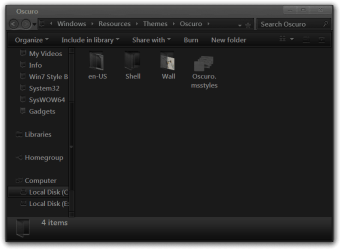
Oscuro by =kiko11 on deviantART

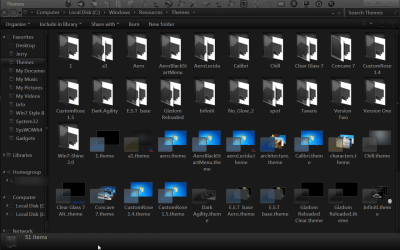
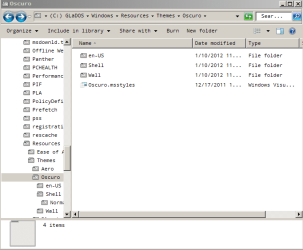
My themes folder looks like this: http://dl.dropbox.com/u/570881/themes_folder.PNG
 
Last edited:

My Computer

OS
Windows 7 Professional x64
did you used the x64bit uxtheme multi-patcher?

because on my Windows 7 SP1 PRO x64 i tried installing both the x86 (3 dll files to patch) & x64 (2 dll files to patch)
then restarted my pc..
 

My Computer

Computer Manufacturer/Model Number
HP G62-340US Notebook
OS
Win7 Pro SP1 x64
CPU
AMD K10 Athlon(tm) II P340 Dual-Core Processor ~2.2GHz
Motherboard
Hewlett-Packard 1444 69.37/AMD 785GX/BIOS F29
Memory
DDR3 4.0GB (3.74 Usable)
Graphics Card(s)
AMD M880G with ATI Mobility Radeon HD 4250 256MB Video
Sound Card
ATI RS785/RS880 - High Definition Audio Controller
Monitor(s) Displays
SAMSUNG 156AT09-H04
Screen Resolution
1366x768 - 344 x 194 mm, Pixel Clock 69.30 MHz
Hard Drives
WDC WD3200BEVT-60A23T0 320GB
Other Info
Bought on July 03, 2011
Welcome to the Seven Forums
The preferred methods here for enabling custom themes we use one of these two tutorials.
http://www.sevenforums.com/tutorials/34579-enabling-custom-themes-windows-7-a.html
Or
http://www.sevenforums.com/tutorials/28377-theme-how-apply-custom-themes.html?filter

Did you use UxStyle Core Beta or universal theme patcher?
Post a link to the themes you are trying to use.
Posts screenshot of C:\Windows\Resources\Themes window maximize (like the screenshot I have provided).
Themes.png

http://www.sevenforums.com/tutorials/9733-screenshots-files-upload-post-seven-forums.html
http://www.sevenforums.com/tutorials/9717-screenshot-paint.html
How to Use the Snipping Tool in Vista - Vista Forums

Jerry
 

My Computer

Computer type
Laptop
Computer Manufacturer/Model Number
Sager NP9170
OS
Win 7 Pro x64 / Win 10 Pro
CPU
Intel(R) Core(TM) i7-3630QM CPU @ 2.40GHz
Motherboard
CLEVO P170EM
Memory
12 GB
Graphics Card(s)
(1) Intel(R) HD Graphics 4000 (2) NVIDIA GeForce GTX 675M
Sound Card
(1) Realtek High Definition Audio (2) Intel(R) Display Aud
Monitor(s) Displays
17.3
Screen Resolution
1920x1080
Hard Drives
(1) Samsung 860 EVO 500GB(OS) (1) Samsung 860 EVO 500GB(Data)
Keyboard
Backlite
Antivirus
MSE, Malwarebytes Pro
Browser
Firefox
Other Info
DESKTOP: Custom-built.
OS: Win 10 Pro x64.
CASE: Rosewill R5.
CPU: Intel I5 4670K CPU @ 3.40GHz.
CPU COOLER: Cool Master Hyper 212 EVO.
MOTHERBOARD: Asus Z87-A.
MEMORY: Kingston HyperX 2x4 GB.
GPU: Nvidia Geforce 650 TI.
PSU: Corsair TX750.
DRIVES: (1) Samsung 840 120 GB SSD (2) Western Digital blue 500 GB 7200 RPM.
I downloaded and tried both themes and they work fine the Metro one looks almost like the default Aero theme.

I noticed in your screenshot that it is not the Aero theme.
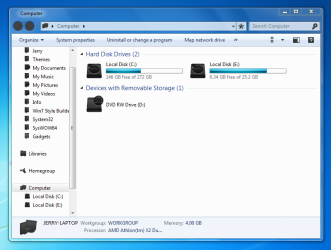
Is this what it is switching to?
themes_folder.PNG

Or is it switching to Aero?
aero.PNG
Jerry
 

My Computer

Computer type
Laptop
Computer Manufacturer/Model Number
Sager NP9170
OS
Win 7 Pro x64 / Win 10 Pro
CPU
Intel(R) Core(TM) i7-3630QM CPU @ 2.40GHz
Motherboard
CLEVO P170EM
Memory
12 GB
Graphics Card(s)
(1) Intel(R) HD Graphics 4000 (2) NVIDIA GeForce GTX 675M
Sound Card
(1) Realtek High Definition Audio (2) Intel(R) Display Aud
Monitor(s) Displays
17.3
Screen Resolution
1920x1080
Hard Drives
(1) Samsung 860 EVO 500GB(OS) (1) Samsung 860 EVO 500GB(Data)
Keyboard
Backlite
Antivirus
MSE, Malwarebytes Pro
Browser
Firefox
Other Info
DESKTOP: Custom-built.
OS: Win 10 Pro x64.
CASE: Rosewill R5.
CPU: Intel I5 4670K CPU @ 3.40GHz.
CPU COOLER: Cool Master Hyper 212 EVO.
MOTHERBOARD: Asus Z87-A.
MEMORY: Kingston HyperX 2x4 GB.
GPU: Nvidia Geforce 650 TI.
PSU: Corsair TX750.
DRIVES: (1) Samsung 840 120 GB SSD (2) Western Digital blue 500 GB 7200 RPM.
It's switching to Aero, as in your second screenshot. I'm using classic until I get a theme installed, because I prefer classic to Aero.
 

My Computer

OS
Windows 7 Professional x64
My Computer

Computer type
Laptop
Computer Manufacturer/Model Number
Sager NP9170
OS
Win 7 Pro x64 / Win 10 Pro
CPU
Intel(R) Core(TM) i7-3630QM CPU @ 2.40GHz
Motherboard
CLEVO P170EM
Memory
12 GB
Graphics Card(s)
(1) Intel(R) HD Graphics 4000 (2) NVIDIA GeForce GTX 675M
Sound Card
(1) Realtek High Definition Audio (2) Intel(R) Display Aud
Monitor(s) Displays
17.3
Screen Resolution
1920x1080
Hard Drives
(1) Samsung 860 EVO 500GB(OS) (1) Samsung 860 EVO 500GB(Data)
Keyboard
Backlite
Antivirus
MSE, Malwarebytes Pro
Browser
Firefox
Other Info
DESKTOP: Custom-built.
OS: Win 10 Pro x64.
CASE: Rosewill R5.
CPU: Intel I5 4670K CPU @ 3.40GHz.
CPU COOLER: Cool Master Hyper 212 EVO.
MOTHERBOARD: Asus Z87-A.
MEMORY: Kingston HyperX 2x4 GB.
GPU: Nvidia Geforce 650 TI.
PSU: Corsair TX750.
DRIVES: (1) Samsung 840 120 GB SSD (2) Western Digital blue 500 GB 7200 RPM.
oscuro.PNG

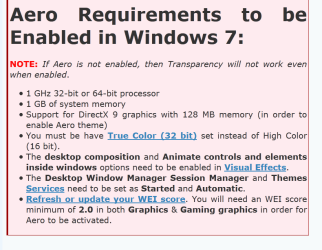
Yes, my system is well beyond the requirements for Aero.
 

My Computer

OS
Windows 7 Professional x64
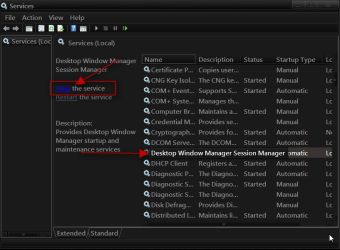
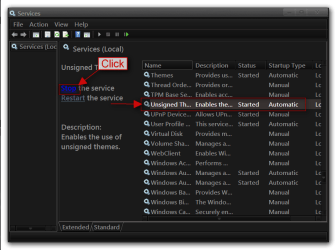
Click on the Start Button type in Services In the search box and then click on Services
1.png

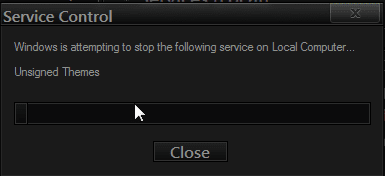
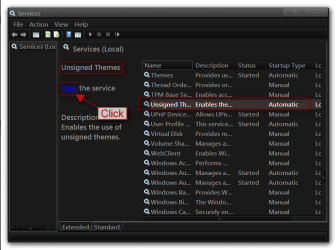
Scroll down until you see Desktop Windows Manager Sessions Manager select it in click on the Stop text and let it stop after that click on Start text and see if that works. Your screen may blink when you do this.
2.pngstop.PNG3.png

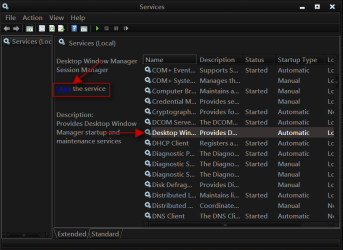
Do the same thing with unsigned themes
4.png5.png

Also try Option 2 Of this tutorial http://www.sevenforums.com/tutorials/1538-sfc-scannow-command-system-file-checker.html
It will not harm any data or programs you have installed unless you have changed any system files.
Jerry
 

My Computer

Computer type
Laptop
Computer Manufacturer/Model Number
Sager NP9170
OS
Win 7 Pro x64 / Win 10 Pro
CPU
Intel(R) Core(TM) i7-3630QM CPU @ 2.40GHz
Motherboard
CLEVO P170EM
Memory
12 GB
Graphics Card(s)
(1) Intel(R) HD Graphics 4000 (2) NVIDIA GeForce GTX 675M
Sound Card
(1) Realtek High Definition Audio (2) Intel(R) Display Aud
Monitor(s) Displays
17.3
Screen Resolution
1920x1080
Hard Drives
(1) Samsung 860 EVO 500GB(OS) (1) Samsung 860 EVO 500GB(Data)
Keyboard
Backlite
Antivirus
MSE, Malwarebytes Pro
Browser
Firefox
Other Info
DESKTOP: Custom-built.
OS: Win 10 Pro x64.
CASE: Rosewill R5.
CPU: Intel I5 4670K CPU @ 3.40GHz.
CPU COOLER: Cool Master Hyper 212 EVO.
MOTHERBOARD: Asus Z87-A.
MEMORY: Kingston HyperX 2x4 GB.
GPU: Nvidia Geforce 650 TI.
PSU: Corsair TX750.
DRIVES: (1) Samsung 840 120 GB SSD (2) Western Digital blue 500 GB 7200 RPM.
Thanks for all the help so far, Bongo!

Desktop Window Manager Sessions Manager is disabled, not running, and the option to start it is greyed out.

sfc \scannow didn't finish, so I ran it at boot using method 1 here: http://www.sevenforums.com/tutorials/139810-sfc-scannow-run-command-prompt-boot.html That gave me the error "There is a system repair pending which requires reboot to complete." I rebooted into windows and then back to the disc several times and got the error each time. My computer does not have a pending.xml file.

Another symptom that is probably related (probably the cause, I think now) is this: when I go to Control Panel\All Control Panel Items\Performance Information and Tools and click "Rate this computer", it crashes before it's done.

I think I'm going to try doing a repair install like here: http://www.sevenforums.com/tutorials/3413-repair-install.html?ltr=R

What's your opinion on any of this?

EDIT: I ran the compatibility check (by clicking "upgrade" after starting setup) on the windows 7 disk and it gave me this message: "Windows needs to be restarted so necessary changes to system files can be made before continuing."

Restarting, however, does not accomplish this. What can I do?

I started a new thread here because the issue now fits that forum category better: http://www.sevenforums.com/crashes-...ing-requires-reboot-complete.html#post1740456

Please join up at the other thread if you can still help, please, Bongo. Should I mark this current thread solved, even though it isn't?
 
Last edited:

My Computer

OS
Windows 7 Professional x64
The Desktop Window Manager Sessions Manager may have been disabled because of using the classic theme not sure.
I think the Repair Install may be a good idea. Let us know.
Jerry
 

My Computer

Computer type
Laptop
Computer Manufacturer/Model Number
Sager NP9170
OS
Win 7 Pro x64 / Win 10 Pro
CPU
Intel(R) Core(TM) i7-3630QM CPU @ 2.40GHz
Motherboard
CLEVO P170EM
Memory
12 GB
Graphics Card(s)
(1) Intel(R) HD Graphics 4000 (2) NVIDIA GeForce GTX 675M
Sound Card
(1) Realtek High Definition Audio (2) Intel(R) Display Aud
Monitor(s) Displays
17.3
Screen Resolution
1920x1080
Hard Drives
(1) Samsung 860 EVO 500GB(OS) (1) Samsung 860 EVO 500GB(Data)
Keyboard
Backlite
Antivirus
MSE, Malwarebytes Pro
Browser
Firefox
Other Info
DESKTOP: Custom-built.
OS: Win 10 Pro x64.
CASE: Rosewill R5.
CPU: Intel I5 4670K CPU @ 3.40GHz.
CPU COOLER: Cool Master Hyper 212 EVO.
MOTHERBOARD: Asus Z87-A.
MEMORY: Kingston HyperX 2x4 GB.
GPU: Nvidia Geforce 650 TI.
PSU: Corsair TX750.
DRIVES: (1) Samsung 840 120 GB SSD (2) Western Digital blue 500 GB 7200 RPM.
Jerry,

I had the default Aero theme selected and had all Aero features turned on, so that's not it.

I'll try a repair install if I can ever get Windows to let me do it.

No one who can help seems to be looking at my new thread... hopefully soon!
 

My Computer

OS
Windows 7 Professional x64
Back
Top