Solved How to set ANY new tab to open my home page in IE9

DShealey

New member
Local time
7:23 PM
Messages
10
I am really frustrated with tabbed browsing in IE 9. My home page is Google, and I want ANY new tab to open to that, no matter what site I am on at the time.

For instance, if I am in my home page, and hit a taskbar link to say eBay, find something there I want to check out further, click on the new tab, it opens to another eBay window, Not the desired Google page.

I only have one link in my home pages, that is Google. I have new tab set to "first home page".

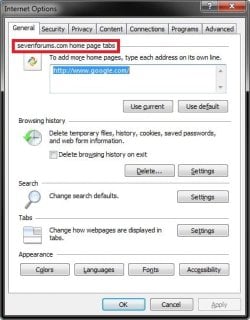
However, if I open eBay, then click on internet options nothing is in the home page window, and it says "eBay home pages"

It seems that "first home page" means the first page opened in that browsing session. NOT what I want! I want a permanent setting so that ANY new tab opens to my home page, like it was in earlier versions of IE.

If I am in my Google home page to start, then click a task bar link, it changes what the "first home page" is. Just plain sucks for me. 80% of the time I want my new tab to go to Google. The other times I just type in what I want. I rarely want to open a new page that is a duplicate of my current page!
 

My Computer My Computer

At a glance

Windows 7 Home Premium 64 bitIntel E8400 core duo4 GbAsus
OS
Windows 7 Home Premium 64 bit
CPU
Intel E8400 core duo
Motherboard
Asus P5B deluxe WiFi AP
Memory
4 Gb
Graphics Card(s)
Asus
Monitor(s) Displays
Samsung Syncmaster 245BW
Hard Drives
Two Hitachi 80 Gb in Raid 1
One Seagate 300 Gb
One External 1Tb backup.
Case
Cooler Master Elite

My Computer My Computer

At a glance

64-bit Windows 11 Pro for WorkstationsIntel i7-8700K OC'd to 5 GHz64 GB (4x16GB) G.SKILL TridentZ RGB DDR4 3600...ASUS ROG-STRIX-GTX1080TI-O11G-GAMING
Computer type
PC/Desktop
Computer Manufacturer/Model Number
Self built custom
OS
64-bit Windows 11 Pro for Workstations
CPU
Intel i7-8700K OC'd to 5 GHz
Motherboard
ASUS ROG Maximus XI Formula Z390
Memory
64 GB (4x16GB) G.SKILL TridentZ RGB DDR4 3600 MHz
Graphics Card(s)
ASUS ROG-STRIX-GTX1080TI-O11G-GAMING
Sound Card
Integrated
Monitor(s) Displays
2 x Samsung Odyssey G7 27"
Screen Resolution
2560x1440
Hard Drives
1TB Samsung 990 PRO M.2,
4TB Samsung 990 PRO PRO M.2,
TerraMaster F8 SSD Plus NAS
PSU
Seasonic Prime Titanium 850W
Case
Thermaltake Core P3
Cooling
Corsair Hydro H115i
Keyboard
Logitech wireless K800
Mouse
Logitech MX Master 4
Internet Speed
2 Gb/s Download and 100 Mb/s Upload
Antivirus
Malwarebyte Anti-Malware Premium
Browser
Google Chrome
Other Info
Logitech Z625 speaker system,
Logitech BRIO 4K Pro webcam,
HP Color LaserJet Pro MFP M477fdn,
APC SMART-UPS RT 1000 XL - SURT1000XLI,
Galaxy S23 Plus phone
Internet Explorer 9


  1. Open google.com.
  2. Click the Tools button (which looks like a gear) in the browser, then click Internet options.
  3. Click Use current.
  4. Click OK.
edit, this is just for the Home button. sorry
 

My Computer My Computer

At a glance

Microsoft Windows 7 Home Premium 64-bit 7600IIx4 amd athelon 635 processor2x2gbati radeon HD 5450
Computer Manufacturer/Model Number
Hewlett packard/p6512uk
OS
Microsoft Windows 7 Home Premium 64-bit 7600
CPU
IIx4 amd athelon 635 processor
Motherboard
FOXCONN 2AA9
Memory
2x2gb
Graphics Card(s)
ati radeon HD 5450
Sound Card
(1) Realtek High Definition Audio (2) AMD High Definition
Monitor(s) Displays
samsung lcd tv 32"
Screen Resolution
1360x 768
Hard Drives
(1) WDC WD10 01FAES-60Z2A0 SATA Disk Device (2) Maxtor OneTouch USB Device (3) ST310003 33AS USB Device (4) WD My Book 1111 USB Device
PSU
?
Cooling
air!
Keyboard
wireless hp
Mouse
wireless Hp,optical
Internet Speed
1.10mb/s
Antivirus
MSE
Browser
Firefox
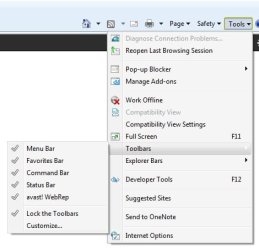
Tools > Toolbars> Menu Bar to see the classic menu bar in IE9.
1.jpg

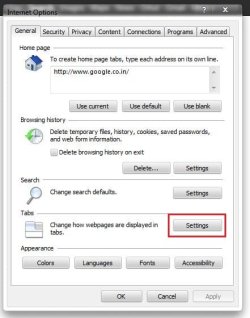
Now. Tools > Internet options to open the Internet options window. At the bottom area, there is tabs, with a settings button. Click on it .
2.JPG

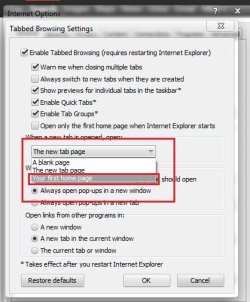
Click on the arrow at the left of the new tab page, button, and activate "your first home page" Click ok.
3.jpg

Hope it works for you.

EDIT : Brink's Tutorial explains it in a very easier way :)
 

My Computer My Computer

At a glance

Microsoft Windows 10 Pro Insider Preview 64-bitIntel(R) Core(TM) i3-4130 CPU @ 3.40GHzCorsair Vengence 4GB x2 (8.00GB Dual-Channel ...2047MB GeForce GTS 450 (ZOTAC International)
Computer type
PC/Desktop
Computer Manufacturer/Model Number
Self Assembled
OS
Microsoft Windows 10 Pro Insider Preview 64-bit
CPU
Intel(R) Core(TM) i3-4130 CPU @ 3.40GHz
Motherboard
Gigabyte Technology Co., Ltd. B85M-D3H
Memory
Corsair Vengence 4GB x2 (8.00GB Dual-Channel DDR3 @ 798MHz)
Graphics Card(s)
2047MB GeForce GTS 450 (ZOTAC International)
Sound Card
Onboard (Realtek High Definition Audio)
Monitor(s) Displays
LG Flatron E2040T
Screen Resolution
1600x900
Hard Drives
Western Digital 1 TB
Seagate 500 GB
PSU
Corsair VS550
Case
Cooler Master K380
Cooling
Cooler Master Seidon 120V Plus
Keyboard
Logitech MK260r
Mouse
Logitech MK260r
Internet Speed
PMPL Broadband
Antivirus
Windows Defender + MBAM
Browser
Firefox
Other Info
Dell Studio 15" Laptop
I have already tried all the stated options, none of them work. I did look for quite some time for an answer before posting, none of the normaly stated settings fix my issue.

Someone else try this:

1-Open IE9 to your normal home page.
2-Click on the new tab, it should open another same page.
3-Then click on a taskbar internet link to another site.
4-Now click on the new tab, if it behaves like mine it will now open another page like the one from the taskbar link, NOT the desired home page.

My example:

My home page (the only one in the home pages window in options) is Google.com
I have some links to often used sites (example: eBay) on my links area on the taskbar.

If I open IE9, I get my normal Google home page, and if I click a new tab I get that again.

BUT: If I am in my Google home page, and click eBay on my taskbar, it opens eBay, now if I click on a new tab, it opens yet another eBay page, NOT my home page.

It seems that whatever is in the url address window on the left becomes "the first home page" for any new tab thereafter. Not what I want.
 

My Computer My Computer

At a glance

Windows 7 Home Premium 64 bitIntel E8400 core duo4 GbAsus
OS
Windows 7 Home Premium 64 bit
CPU
Intel E8400 core duo
Motherboard
Asus P5B deluxe WiFi AP
Memory
4 Gb
Graphics Card(s)
Asus
Monitor(s) Displays
Samsung Syncmaster 245BW
Hard Drives
Two Hitachi 80 Gb in Raid 1
One Seagate 300 Gb
One External 1Tb backup.
Case
Cooler Master Elite
DShealey,

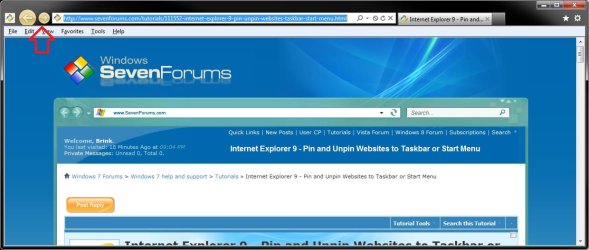
I think I know what is going on here now. By chance when you click on say the pinned eBay icon on the taskbar, is the back and forward arrow buttons a yellowish orange color like in the screenshot below?
pinned-site.jpg
If so, then see the tutorial for a more detailed explanation of this. Basically, by pinning a site, the site is at the center of the experience, not the browser. When a pinned site is launched from the taskbar, the browser frame and navigational controls integrate the site's icon and primary color, providing an experience that's tailored to the site you're viewing.

http://www.sevenforums.com/tutorial...-9-pin-unpin-websites-taskbar-start-menu.html

This would be why your Google homepage is not there when you click on the pinned eBay taskbar icon, and why new tabs will only open to say eBay when using "Your first home page" with Google set as the home page even in the pinned ebay IE. In a say pinned eBay taskbar icon when opened, Ebay is considered to be the first home page no matter what and cannot be changed. Does your Internet Options look like this for the opened pinned eBay icon with the example of the area boxed in red below?
default-home_page.jpg
To not have this issue anymore, create your internet shortcut using OPTION THREE in the tutorial below instead, then pin that icon to the taskbar. A IE shortcut using this method will open and work normally in IE like you are wanting instead. :)

http://www.sevenforums.com/tutorials/60274-internet-website-shortcut-create.html
 

My Computer My Computer

At a glance

64-bit Windows 11 Pro for WorkstationsIntel i7-8700K OC'd to 5 GHz64 GB (4x16GB) G.SKILL TridentZ RGB DDR4 3600...ASUS ROG-STRIX-GTX1080TI-O11G-GAMING
Computer type
PC/Desktop
Computer Manufacturer/Model Number
Self built custom
OS
64-bit Windows 11 Pro for Workstations
CPU
Intel i7-8700K OC'd to 5 GHz
Motherboard
ASUS ROG Maximus XI Formula Z390
Memory
64 GB (4x16GB) G.SKILL TridentZ RGB DDR4 3600 MHz
Graphics Card(s)
ASUS ROG-STRIX-GTX1080TI-O11G-GAMING
Sound Card
Integrated
Monitor(s) Displays
2 x Samsung Odyssey G7 27"
Screen Resolution
2560x1440
Hard Drives
1TB Samsung 990 PRO M.2,
4TB Samsung 990 PRO PRO M.2,
TerraMaster F8 SSD Plus NAS
PSU
Seasonic Prime Titanium 850W
Case
Thermaltake Core P3
Cooling
Corsair Hydro H115i
Keyboard
Logitech wireless K800
Mouse
Logitech MX Master 4
Internet Speed
2 Gb/s Download and 100 Mb/s Upload
Antivirus
Malwarebyte Anti-Malware Premium
Browser
Google Chrome
Other Info
Logitech Z625 speaker system,
Logitech BRIO 4K Pro webcam,
HP Color LaserJet Pro MFP M477fdn,
APC SMART-UPS RT 1000 XL - SURT1000XLI,
Galaxy S23 Plus phone
That worked!

Thanks Brink,

You grasped my explanation of what I wanted, and solved it.:thumbsup:

I was saying TaskBar in my explanation, it was really the "Quick Launch" bar on the Task Bar. my bad, but your explanation worked like a charm, but I had to right click on the newly created shortcuts to drag them to the Quick Launch bar, but now it works like I wanted it to.

Question: Why does Microsoft keep changing the way things "always" worked, without the simple option to use it like before. They could have easily added "Use Default Home Page" to the drop down for how to open new tabs, and everything would have been just fine.

:orb:"But no, we must make use of our system far more difficult for those who want to use it as before to force them to learn our "better" way." :p
 
Last edited:

My Computer My Computer

At a glance

Windows 7 Home Premium 64 bitIntel E8400 core duo4 GbAsus
OS
Windows 7 Home Premium 64 bit
CPU
Intel E8400 core duo
Motherboard
Asus P5B deluxe WiFi AP
Memory
4 Gb
Graphics Card(s)
Asus
Monitor(s) Displays
Samsung Syncmaster 245BW
Hard Drives
Two Hitachi 80 Gb in Raid 1
One Seagate 300 Gb
One External 1Tb backup.
Case
Cooler Master Elite
You're most welcome DShealey. :)

Pinned Sites is a new concept in IE9 that was designed to be able to have shortcuts to a website that opens IE in a separate process with that specific website as the pure focus instead with it's own separate Internet Options settings.

It could be a useful for it purpose, but no so much if you still wanted to use the default IE home page instead of the pinned site.
 

My Computer My Computer

At a glance

64-bit Windows 11 Pro for WorkstationsIntel i7-8700K OC'd to 5 GHz64 GB (4x16GB) G.SKILL TridentZ RGB DDR4 3600...ASUS ROG-STRIX-GTX1080TI-O11G-GAMING
Computer type
PC/Desktop
Computer Manufacturer/Model Number
Self built custom
OS
64-bit Windows 11 Pro for Workstations
CPU
Intel i7-8700K OC'd to 5 GHz
Motherboard
ASUS ROG Maximus XI Formula Z390
Memory
64 GB (4x16GB) G.SKILL TridentZ RGB DDR4 3600 MHz
Graphics Card(s)
ASUS ROG-STRIX-GTX1080TI-O11G-GAMING
Sound Card
Integrated
Monitor(s) Displays
2 x Samsung Odyssey G7 27"
Screen Resolution
2560x1440
Hard Drives
1TB Samsung 990 PRO M.2,
4TB Samsung 990 PRO PRO M.2,
TerraMaster F8 SSD Plus NAS
PSU
Seasonic Prime Titanium 850W
Case
Thermaltake Core P3
Cooling
Corsair Hydro H115i
Keyboard
Logitech wireless K800
Mouse
Logitech MX Master 4
Internet Speed
2 Gb/s Download and 100 Mb/s Upload
Antivirus
Malwarebyte Anti-Malware Premium
Browser
Google Chrome
Other Info
Logitech Z625 speaker system,
Logitech BRIO 4K Pro webcam,
HP Color LaserJet Pro MFP M477fdn,
APC SMART-UPS RT 1000 XL - SURT1000XLI,
Galaxy S23 Plus phone
Back
Top