Solved Photos from SD card in windows 7 importing too large

wegoelectro

New member
Local time
4:47 PM
Messages
4
This is my first post. I hope this is the right place. I have a problem. I can get my pictures on to the computer, but at my new job I am required to take pictures of houses and send them over email. I have zipped them, but even that took 3 minutes to get to 1% uploaded, needless to say I aborted. What am I doing wrong? Do I really have to go and re size each pic one by one? The emails usually include up to 30 photos. Any help would be greatly appreciated, thanks
 

My Computer My Computer

At a glance

windows 7
OS
windows 7
What format are the pictures in?

Take a look at these, both of the same picture. The first is .png, weighing in at 391.3KB, whereas the second is .jpg (61.2KB), a saving of 330.1KB (84.36%).

F17.PNG F17.jpg

Note that the original was .jpg and I saved a copy as .png for this example. Images saved originally as .png and then converted to .jpg may give slightly different results, but you get the idea.
 

My Computer My Computer

At a glance

Windows 8.1 Pro RTM x64Intel Core-i5-3570K 4-core @ 3.4GHz (Ivy Brid...4 x 4GB DDR3-1600 Corsair Vengeance CMZ8GX3M2...MSI GeForce GTX770 Gaming OC 2GB
Computer type
PC/Desktop
Computer Manufacturer/Model Number
Dwarf Dwf/11/2012 r09/2013
OS
Windows 8.1 Pro RTM x64
CPU
Intel Core-i5-3570K 4-core @ 3.4GHz (Ivy Bridge) (OC 4.4GHz)
Motherboard
ASRock Z77 Extreme4-M
Memory
4 x 4GB DDR3-1600 Corsair Vengeance CMZ8GX3M2A1600C9B (16GB)
Graphics Card(s)
MSI GeForce GTX770 Gaming OC 2GB
Sound Card
Realtek High Definition on board solution (ALC 898)
Monitor(s) Displays
ViewSonic VA1912w Widescreen (VGA)
Screen Resolution
1440x900
Hard Drives
OCZ Agility 3 SSD 120GB SATA III x2 (RAID 0)
Samsung HD501LJ 500GB SATA II x2
Hitachi HDS721010CLA332 1TB SATA II
Iomega 1.5TB Ext USB 2.0
WD 2.0TB Ext USB 3.0
PSU
XFX Pro Series 850W Semi-Modular
Case
Gigabyte IF233
Cooling
1 x 120mm Front Inlet 1 x 120mm Rear Exhaust
Keyboard
Microsoft Comfort Curve Keyboard 3000 (USB)
Mouse
Microsoft Comfort Mouse 3000 for Business (USB)
Internet Speed
NetGear DG834Gv3 ADSL Modem/Router (Ethernet) ~4.0 Mb/s (O2)
Antivirus
Avast! 8.0.1497
Browser
IE 11
Other Info
Optical Drive: HL-DT-ST BD-RE BH10LS30 SATA Bluray
Lexmark S305 Printer/Scanner/Copier (USB)
WEI Score: 8.1/8.1/8.5/8.5/8.25
Asus Eee PC 1011PX Netbook (Windows 7 x86 Starter)
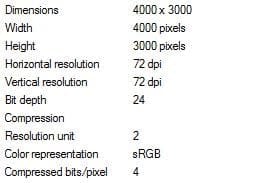
It automatically uploaded a pic I just took and tried to attach but it wouldnt let me. It uploaded as Jpeg 4.90 MB
 

My Computer My Computer

At a glance

windows 7
OS
windows 7
gggg.JPG


I snipped this, but I dont want to have to do that for every pic, I just dont know how to make it so it will upload and go into a folder at a smaller size
 

My Computer My Computer

At a glance

windows 7
OS
windows 7
Is it possible to deal with this at source? Try taking multiple images of the same scene (it doesn't matter what it is) at the different resolution/quality settings offered by your camera and compare the results.
 

My Computer My Computer

At a glance

Windows 8.1 Pro RTM x64Intel Core-i5-3570K 4-core @ 3.4GHz (Ivy Brid...4 x 4GB DDR3-1600 Corsair Vengeance CMZ8GX3M2...MSI GeForce GTX770 Gaming OC 2GB
Computer type
PC/Desktop
Computer Manufacturer/Model Number
Dwarf Dwf/11/2012 r09/2013
OS
Windows 8.1 Pro RTM x64
CPU
Intel Core-i5-3570K 4-core @ 3.4GHz (Ivy Bridge) (OC 4.4GHz)
Motherboard
ASRock Z77 Extreme4-M
Memory
4 x 4GB DDR3-1600 Corsair Vengeance CMZ8GX3M2A1600C9B (16GB)
Graphics Card(s)
MSI GeForce GTX770 Gaming OC 2GB
Sound Card
Realtek High Definition on board solution (ALC 898)
Monitor(s) Displays
ViewSonic VA1912w Widescreen (VGA)
Screen Resolution
1440x900
Hard Drives
OCZ Agility 3 SSD 120GB SATA III x2 (RAID 0)
Samsung HD501LJ 500GB SATA II x2
Hitachi HDS721010CLA332 1TB SATA II
Iomega 1.5TB Ext USB 2.0
WD 2.0TB Ext USB 3.0
PSU
XFX Pro Series 850W Semi-Modular
Case
Gigabyte IF233
Cooling
1 x 120mm Front Inlet 1 x 120mm Rear Exhaust
Keyboard
Microsoft Comfort Curve Keyboard 3000 (USB)
Mouse
Microsoft Comfort Mouse 3000 for Business (USB)
Internet Speed
NetGear DG834Gv3 ADSL Modem/Router (Ethernet) ~4.0 Mb/s (O2)
Antivirus
Avast! 8.0.1497
Browser
IE 11
Other Info
Optical Drive: HL-DT-ST BD-RE BH10LS30 SATA Bluray
Lexmark S305 Printer/Scanner/Copier (USB)
WEI Score: 8.1/8.1/8.5/8.5/8.25
Asus Eee PC 1011PX Netbook (Windows 7 x86 Starter)
once you have the pictures on your computer open them with paint then resize by percentage to say 50% and save them as a jpeg, this will reduce a picture thats 3.5mb to 700kb which is 20% of its original size ?

If you need to maintain picture quality you might have to consider using something else to resize them with and if you need to do batches you might consider something like Photoshop ?

I personally use PrishResizer that gives me a right click menu and seems to do a decent job :cool:
 

My Computer My Computer

At a glance

win7 ultimate / virtual boxIntel Core i7 3770K,1155, Ivy BridgeGSkill Ripjaws Z Series 1600 CL 9.0 16GBKFA2 GeForce GTX 670 EX OC 2048MB GDDR5 PCI-E...
Computer Manufacturer/Model Number
built my own
OS
win7 ultimate / virtual box
CPU
Intel Core i7 3770K,1155, Ivy Bridge
Motherboard
MSI Z77A-G43
Memory
GSkill Ripjaws Z Series 1600 CL 9.0 16GB
Graphics Card(s)
KFA2 GeForce GTX 670 EX OC 2048MB GDDR5 PCI-E gfx card
Sound Card
onboard Nvidia HDMI audio
Monitor(s) Displays
ASUS VK222H 22" widescreen LCD monitor
Screen Resolution
1680x1050
Hard Drives
Kingston 128gb SSD
OCZ Vertex 90gb SSD
500GB WDCaviar 16mb 5000KS
320GB WDCaviar 16mb 3200AAKS sata 2
1TB Samsung 16mb HD103SJ sata 2
PSU
Corsair HX 750W ATX2.2 Modular
Cooling
Antec 25 Kuhler H2O 620
Keyboard
logitech
Mouse
logitech MX518
Internet Speed
7mb adsl
You haven't said what camera you are using, but you should be able to to choose a picture size before you shoot your images.

Choose the smallest JPEG size for the houses images.

Failing that, download PIXresizer, which is free utility that will quickly batch resize your images before you email them.

Download PIXresizer
 

My Computer My Computer

At a glance

Windows 7 Ultimate SP1 64-BitIntel Core i7 870 @ 2.93GHz8Gb Dual-Channel DDR3 @ 664MHznVidia GeForce GTX 460 1024MB dedicated RAM
Computer Manufacturer/Model Number
HP Pavilion Elite 495UK
OS
Windows 7 Ultimate SP1 64-Bit
CPU
Intel Core i7 870 @ 2.93GHz
Motherboard
MSI 2A9C (CPU1)
Memory
8Gb Dual-Channel DDR3 @ 664MHz
Graphics Card(s)
nVidia GeForce GTX 460 1024MB dedicated RAM
Sound Card
Realtek HD Audio
Monitor(s) Displays
HP2310i
Screen Resolution
1920 x 1080
Hard Drives
1x1954GB Hitachi HDS22020ALA 330 (RAID), 1x1954GB Hitachi External for backup and storage
PSU
460W
Case
HP Elite
Cooling
Air cooled
Keyboard
Logitech K750 solar-powered keyboard
Mouse
Logitech Wireless M180 mouse
Internet Speed
2Mb
Other Info
Pure Avanti Flow Internet Radio with iPod Dock, 64Gb iPod, HP USB Speakers, Sony MDR-V500 Headphones, Sony Vaio F-Series Laptop
Is it possible to deal with this at source? Try taking multiple images of the same scene (it doesn't matter what it is) at the different resolution/quality settings offered by your camera and compare the results.

Thank you so much. I found the quality choices. This camera was a gift so I never really got to explore it. I sent a test zip file and it went much faster. Much thanks to you.
 

My Computer My Computer

At a glance

windows 7
OS
windows 7
You're welcome. Many email providers have a size limit per email of around 10MB maximum (this can vary between providers) and this includes both visual (the message itself) and non-visual content. I noticed from your earlier post that the image you uploaded was 4.9MB in size and already in the .jpg format, which, by definition, is already compressed. Two such images, plus the associated text of the message and the overheads would very likely take you over the email size limit anyway.
 

My Computer My Computer

At a glance

Windows 8.1 Pro RTM x64Intel Core-i5-3570K 4-core @ 3.4GHz (Ivy Brid...4 x 4GB DDR3-1600 Corsair Vengeance CMZ8GX3M2...MSI GeForce GTX770 Gaming OC 2GB
Computer type
PC/Desktop
Computer Manufacturer/Model Number
Dwarf Dwf/11/2012 r09/2013
OS
Windows 8.1 Pro RTM x64
CPU
Intel Core-i5-3570K 4-core @ 3.4GHz (Ivy Bridge) (OC 4.4GHz)
Motherboard
ASRock Z77 Extreme4-M
Memory
4 x 4GB DDR3-1600 Corsair Vengeance CMZ8GX3M2A1600C9B (16GB)
Graphics Card(s)
MSI GeForce GTX770 Gaming OC 2GB
Sound Card
Realtek High Definition on board solution (ALC 898)
Monitor(s) Displays
ViewSonic VA1912w Widescreen (VGA)
Screen Resolution
1440x900
Hard Drives
OCZ Agility 3 SSD 120GB SATA III x2 (RAID 0)
Samsung HD501LJ 500GB SATA II x2
Hitachi HDS721010CLA332 1TB SATA II
Iomega 1.5TB Ext USB 2.0
WD 2.0TB Ext USB 3.0
PSU
XFX Pro Series 850W Semi-Modular
Case
Gigabyte IF233
Cooling
1 x 120mm Front Inlet 1 x 120mm Rear Exhaust
Keyboard
Microsoft Comfort Curve Keyboard 3000 (USB)
Mouse
Microsoft Comfort Mouse 3000 for Business (USB)
Internet Speed
NetGear DG834Gv3 ADSL Modem/Router (Ethernet) ~4.0 Mb/s (O2)
Antivirus
Avast! 8.0.1497
Browser
IE 11
Other Info
Optical Drive: HL-DT-ST BD-RE BH10LS30 SATA Bluray
Lexmark S305 Printer/Scanner/Copier (USB)
WEI Score: 8.1/8.1/8.5/8.5/8.25
Asus Eee PC 1011PX Netbook (Windows 7 x86 Starter)
If you prefer to take the larger image for whatever reason then a batch resizer like seavixen32 suggested would be your best option. Another one is FastStone Photo Resizer - Powerful Image Converter/Resizer, it also has a portable version and can do a couple of other things than just resizing.
 

My Computer My Computer

At a glance

Windows 7 Ultimate x64Intel Pentium Dual Core E5200 2.5GHz (3.77GHz...Corsair 4GB DDR2 (4x1GB CM2X1024-6400C4)Palit GeForce GTS 250 (1024MB)
Computer Manufacturer/Model Number
Self built
OS
Windows 7 Ultimate x64
CPU
Intel Pentium Dual Core E5200 2.5GHz (3.77GHz OC)
Motherboard
Asus P5Q-E
Memory
Corsair 4GB DDR2 (4x1GB CM2X1024-6400C4)
Graphics Card(s)
Palit GeForce GTS 250 (1024MB)
Sound Card
On Board (ADI AD2000B 8ch HD)
Monitor(s) Displays
Samsung 32in LCD TV
Screen Resolution
1360x768
Hard Drives
2 x 1TB Samsung 103SJ (Raid0)
2 x External 500GB Samsung 502IJ (NexStar 3 HD Enclosures)
PSU
550W Antec Neo HE 550
Case
Antec P180
Cooling
Xigmatex Red Scorpion CPU Cooler. 3x120mm Fans
Keyboard
Logitech MX5000 Laser (Combo)
Mouse
Logitech MX5000 Laser (Combo)
Internet Speed
ADSL2+ (avg 10 Mbps Down, 0.80 Mbps up)
Other Info
Gigabyte GN-WP01GS 54g Wireless Lan Card
Back
Top