Solved Question about picture quality on ASUS VE278Q 27"

jamiedolan

New member
Member
Local time
1:07 PM
Messages
88
Location
Neenah, WI
HI;

Per someones suggestion here to a question I posted last month, I got a ASUS VE278Q Black 27" 1920x1080.

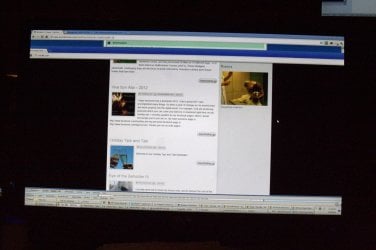
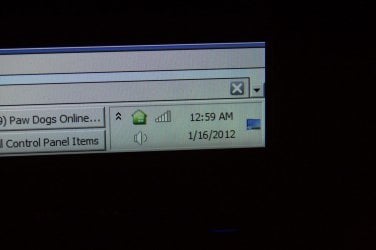
I am really happy with it over all. I have one question / concern. Since I got it, depending on the exact angle I am viewing it from, it seems a bit off at the edges, most noticeable to me every day is that it looks like there is a bit of a shadow on the task bar along the very bottom edge of the screen. This lessens if I view it very straight on, but is noticeable when I am looking down at the screen, even at a slight angle when sitting up in my chair.

The other time I have found it is very noticeable (even when looking directly at it) is if I have a black screen that runs up to the side of the monitor. I took some photos. It actually looks a bit worse in the photos than it does in real life.

Left edge of screen with a black background active on the screen.

1-IMG_7616-001.jpg

Bottom Right of task bar, notice how it appears a bit dark / shaded below along the bottom edge.
2-IMG_7617-001.jpg

Right edge with a black background active on the screen. Doesn't look this bad in real life, the camera made it look worse.

3-IMG_7618-001.jpg

Another, longer (taller) shot of the right edge.

4-IMG_7619-001.jpg

Shot of full screen.
5-IMG_7620-001.jpg

I made a very short video trying to show the issue also.


Any thoughs as to if this is a defect or if this is normal for this screen?

Thank You very much;

Jamie
 
Last edited:

My Computer My Computer

At a glance

windows 8 64i7-382032GBGTX 650
Computer type
PC/Desktop
Computer Manufacturer/Model Number
Custom Build by CPU Solutions
OS
windows 8 64
CPU
i7-3820
Motherboard
Intel® Desktop Board DX79TO
Memory
32GB
Graphics Card(s)
GTX 650
Sound Card
Built in
Monitor(s) Displays
24" and 27" Asus; with a 24" LG
Screen Resolution
1900X1080
Hard Drives
240 Intel Cherryville internal. 8 ext drives on my other computer accessed over the network.
PSU
700 watt
Case
CoolerMaster
Keyboard
Logitech Wireless
Mouse
Logitech M505
Internet Speed
24Mbps down - 3Mbps up
Browser
Chrome
Other Info
Also have a Vaio VPCCW17FX Laptop. & Dell Studio XPS 8100 with 16GB of Ram running W8.
Hello Jamie,

I'm using the exact same model monitor. I find that using Theater Mode by pressing the 1st far left button on the bottom right corner of the monitor until you see that mode looks best. You might try different view modes to see if one may look better than the default.
 

My Computer My Computer

At a glance

64-bit Windows 11 Pro for WorkstationsIntel i7-8700K OC'd to 5 GHz64 GB (4x16GB) G.SKILL TridentZ RGB DDR4 3600...ASUS ROG-STRIX-GTX1080TI-O11G-GAMING
Computer type
PC/Desktop
Computer Manufacturer/Model Number
Self built custom
OS
64-bit Windows 11 Pro for Workstations
CPU
Intel i7-8700K OC'd to 5 GHz
Motherboard
ASUS ROG Maximus XI Formula Z390
Memory
64 GB (4x16GB) G.SKILL TridentZ RGB DDR4 3600 MHz
Graphics Card(s)
ASUS ROG-STRIX-GTX1080TI-O11G-GAMING
Sound Card
Integrated
Monitor(s) Displays
2 x Samsung Odyssey G7 27"
Screen Resolution
2560x1440
Hard Drives
1TB Samsung 990 PRO M.2,
4TB Samsung 990 PRO PRO M.2,
TerraMaster F8 SSD Plus NAS
PSU
Seasonic Prime Titanium 850W
Case
Thermaltake Core P3
Cooling
Corsair Hydro H115i
Keyboard
Logitech wireless K800
Mouse
Logitech MX Master 4
Internet Speed
2 Gb/s Download and 100 Mb/s Upload
Antivirus
Malwarebyte Anti-Malware Premium
Browser
Google Chrome
Other Info
Logitech Z625 speaker system,
Logitech BRIO 4K Pro webcam,
HP Color LaserJet Pro MFP M477fdn,
APC SMART-UPS RT 1000 XL - SURT1000XLI,
Galaxy S23 Plus phone
that phenomenon is known as backlight bleed and often happens with less expensive monitors.

there's not a great deal you can do about it, except replace it. there are some tips you can find by googling, but some of them are pretty hairy, and could well damage the monitor completely if you're not careful.

of course, you shouldn't need to resort to such drastic measures with a brand-new monitor - you could try to get your display replaced if it's still under warranty.
 

My Computer My Computer

At a glance

ultimate 64 sp1i5 2500K [email protected]8 gigs GSkill Ripjaws 1600amd hd6950
Computer Manufacturer/Model Number
mickey megabyte 1234
OS
ultimate 64 sp1
CPU
i5 2500K [email protected]
Motherboard
MSI P67A-GD53
Memory
8 gigs GSkill Ripjaws 1600
Graphics Card(s)
amd hd6950
Sound Card
creative x-fi gamer
Monitor(s) Displays
samsung 24"
Screen Resolution
1920x1080
Hard Drives
ocz vertex 2e 60 gig, samsung f3 1tb, buffalo 2tb ext
PSU
antec 550
Case
antec three hundred
Cooling
i'm a cooling fan
Keyboard
saitek eclipse ii
Mouse
logitech g3
Internet Speed
about 4 Mbps
Other Info
i love win7
Hello Jamie,
I'm using the exact same model monitor. I find that using Theater Mode by pressing the 1st far left button on the bottom right corner of the monitor until you see that mode looks best. You might try different view modes to see if one may look better than the default.

Thank You for your response. I saw your message yesterday and hadn't had a chance to respond yet. I tried the different modes as you suggested but I found the shadow even worse / more visible in the Theater Mode. So I was still unsure if this was normal for the monitor or not, until I saw mickey megabyte's response:

that phenomenon is known as backlight bleed and often happens with less expensive monitors.
there's not a great deal you can do about it, except replace it. there are some tips you can find by googling, but some of them are pretty hairy, and could well damage the monitor completely if you're not careful.
of course, you shouldn't need to resort to such drastic measures with a brand-new monitor - you could try to get your display replaced if it's still under warranty.

Thank You. I looked this up and I'm quite sure that this is exactly what is wrong with this monitor.

I just saw your message a little bit ago and I went and looked at the packing slip, (I got this for Christmas) and it was ordered on the 19th from Tiger. So tomorrow is day 30. I'm hoping they will issue a RMA and allow time for it to ship back.

Thank You again for explaining what this is, it was really bugging me today as I was working. I have a web page with a black border that I maintain and the bleed was really bothering me when I was working on that site.

Thanks;
Jamie
 

My Computer My Computer

At a glance

windows 8 64i7-382032GBGTX 650
Computer type
PC/Desktop
Computer Manufacturer/Model Number
Custom Build by CPU Solutions
OS
windows 8 64
CPU
i7-3820
Motherboard
Intel® Desktop Board DX79TO
Memory
32GB
Graphics Card(s)
GTX 650
Sound Card
Built in
Monitor(s) Displays
24" and 27" Asus; with a 24" LG
Screen Resolution
1900X1080
Hard Drives
240 Intel Cherryville internal. 8 ext drives on my other computer accessed over the network.
PSU
700 watt
Case
CoolerMaster
Keyboard
Logitech Wireless
Mouse
Logitech M505
Internet Speed
24Mbps down - 3Mbps up
Browser
Chrome
Other Info
Also have a Vaio VPCCW17FX Laptop. & Dell Studio XPS 8100 with 16GB of Ram running W8.
Yeah, if the bleed through is still that bad, then there's something wrong with them. The only time I see 1/2 that much bleed through as in your screenshots on mine is right before they go into standby mode when the computer goes to sleep.
 

My Computer My Computer

At a glance

64-bit Windows 11 Pro for WorkstationsIntel i7-8700K OC'd to 5 GHz64 GB (4x16GB) G.SKILL TridentZ RGB DDR4 3600...ASUS ROG-STRIX-GTX1080TI-O11G-GAMING
Computer type
PC/Desktop
Computer Manufacturer/Model Number
Self built custom
OS
64-bit Windows 11 Pro for Workstations
CPU
Intel i7-8700K OC'd to 5 GHz
Motherboard
ASUS ROG Maximus XI Formula Z390
Memory
64 GB (4x16GB) G.SKILL TridentZ RGB DDR4 3600 MHz
Graphics Card(s)
ASUS ROG-STRIX-GTX1080TI-O11G-GAMING
Sound Card
Integrated
Monitor(s) Displays
2 x Samsung Odyssey G7 27"
Screen Resolution
2560x1440
Hard Drives
1TB Samsung 990 PRO M.2,
4TB Samsung 990 PRO PRO M.2,
TerraMaster F8 SSD Plus NAS
PSU
Seasonic Prime Titanium 850W
Case
Thermaltake Core P3
Cooling
Corsair Hydro H115i
Keyboard
Logitech wireless K800
Mouse
Logitech MX Master 4
Internet Speed
2 Gb/s Download and 100 Mb/s Upload
Antivirus
Malwarebyte Anti-Malware Premium
Browser
Google Chrome
Other Info
Logitech Z625 speaker system,
Logitech BRIO 4K Pro webcam,
HP Color LaserJet Pro MFP M477fdn,
APC SMART-UPS RT 1000 XL - SURT1000XLI,
Galaxy S23 Plus phone
...

I just saw your message a little bit ago and I went and looked at the packing slip, (I got this for Christmas) and it was ordered on the 19th from Tiger. So tomorrow is day 30. I'm hoping they will issue a RMA and allow time for it to ship back.

...

good luck with that!
 

My Computer My Computer

At a glance

ultimate 64 sp1i5 2500K [email protected]8 gigs GSkill Ripjaws 1600amd hd6950
Computer Manufacturer/Model Number
mickey megabyte 1234
OS
ultimate 64 sp1
CPU
i5 2500K [email protected]
Motherboard
MSI P67A-GD53
Memory
8 gigs GSkill Ripjaws 1600
Graphics Card(s)
amd hd6950
Sound Card
creative x-fi gamer
Monitor(s) Displays
samsung 24"
Screen Resolution
1920x1080
Hard Drives
ocz vertex 2e 60 gig, samsung f3 1tb, buffalo 2tb ext
PSU
antec 550
Case
antec three hundred
Cooling
i'm a cooling fan
Keyboard
saitek eclipse ii
Mouse
logitech g3
Internet Speed
about 4 Mbps
Other Info
i love win7
good luck with that!

Thanks! They said they shipped out a new one for me today, in advance of returning this one (which I was happy about as I didn't want to have to go without this nice large monitor now that I am used to it), so hopefully I'll have better luck with the new one.

Thanks
Jamie
 

My Computer My Computer

At a glance

windows 8 64i7-382032GBGTX 650
Computer type
PC/Desktop
Computer Manufacturer/Model Number
Custom Build by CPU Solutions
OS
windows 8 64
CPU
i7-3820
Motherboard
Intel® Desktop Board DX79TO
Memory
32GB
Graphics Card(s)
GTX 650
Sound Card
Built in
Monitor(s) Displays
24" and 27" Asus; with a 24" LG
Screen Resolution
1900X1080
Hard Drives
240 Intel Cherryville internal. 8 ext drives on my other computer accessed over the network.
PSU
700 watt
Case
CoolerMaster
Keyboard
Logitech Wireless
Mouse
Logitech M505
Internet Speed
24Mbps down - 3Mbps up
Browser
Chrome
Other Info
Also have a Vaio VPCCW17FX Laptop. & Dell Studio XPS 8100 with 16GB of Ram running W8.
Back
Top