Tosh A2OO reboots when both battery and PSU plugged in

AllOnTheBus

New member
Guru
Local time
2:31 AM
Messages
348
Hey folks.

So I am looking for second and third opinions on what may be wrong with my
old Toshiba Satellite A2OO. The problem that I have is that when I plug in the PSU with the battery in the machine wants to shut down and restart.

I have just received shipment of a new compatible battery from Hong Kong believing the old battery to be the problem. The battery is definitely compatible and yet the problem persists. In fact the computer works fine on the new battery. I can connect the PSU while the machine is not powered up and the battery will charge to full, however if the machine IS powered on battery and then the PSU connected, the battery charge indicator shows that it is charging but then stops and the machine shuts down and restarts soon after (this happens in a loop).

I have tried the following:

1) Run the laptop only on battery (machine works fine)
2) Plugged in PSU while machine is running on battery (shutdown occurs)
3) Plugged in PSU with battery in before boot (shutdown and restart occurs)
4) Charged battery using PSU with machine powered down (successful battery charge)
5) Removed battery and powered on the machine with PSU ONLY (causes shutdowns and restarts)
6) Changed all power plan settings to the same for power as the battery (saw that this worked for someone elsewhere but no change for myself) and tried resetting all plans to default settings
7) Checked that I have the latest BIOS (affirmative)

This has been a well documented issue for older Toshiba models and I also found information about not using Bluetooth and Upek fingerprint utilities due to Wireless interference and other, but this to has caused no change. I am unable to find a definitive answer to the problem as fixes, or lack thereof seem to be different in each case.

IMO from what I have explained:
1) The battery is fine (the issue occured prior to replacement battery also)
2) The power supply is OK as it will charge the battery if the machine is not powered up
3) It is not an overheating issue as I have opened the laptop and cleaned the cooling system and re-applied thermal paste (problem was occuring prior to this and the machine is reassembled correctly)

I have come to the conclusion that this is more than likely a mainboard issue
ie: power regulation (bad regulator chip?)/ faulty capcitor losing charge and dropping current to the rest of the mobo/ bad capacitor/ bad resistor/ bad diode/ bad BGA chip.

If this is in fact the case then my dear old Tosh A200 is bound for ebay in parts (guess I could get a few dollars for wireless card etc etc).

In the meantime I am going to try to get a hold of a compatible PSU to fully eliminate that as a possibility. I am wondering though if the PSU would still charge the machine when powered down but may have a slight fault (ie: wiring?) which may cause shutdown/restarts when powered on?

Any ideas and/or second opinions appreciated

Thanks in advance.

Note: Also saw that Toshiba power management software can be a cause but I dont have this installed. This machine used to have Vista Ultimate (32 bit) factory installed. I have now got it running (sort of) a dual boot Windows 7 Pro 32 bit / Vista Ultimate 32 bit. Memtest has passed as has hard drive testing. Machine has 2Gig RAM and Intel Centrino Core 2 Duo.
 

My Computer My Computer

At a glance

Windows 7 Home Premium 64 Bit OS
OS
Windows 7 Home Premium 64 Bit OS
Not sure I can really add anything useful, but... Does the power supply have an LED light on it and if so, does it go out when you connect the PS while the battery is installed? Can you boot to a Memtest cd while the battery & PS are both connected to the laptop?
 

My Computer My Computer

At a glance

Windows
OS
Windows
Hey Fred

Thanks very much for your reply. Power supply has no LED indicator on the pack itself, I have
had the machine shut down for the last couple of hours with the PSU plugged in
and the light on the lappy is orange when charging and has now turned blue - I will assume that
means that it is now fully charged.

The problem is when I boot either of the OS's with PSU connected and battery in, it is
then that in the System Tray the charging indicator works for maybe 30 seconds and then stops - as in
if the indicator says 50% then it will pause at that level and soon thereafter the system shuts down,
reboots, asks if I want to start normally and if I do it will sometimes let me get to
the login screen, sometimes it will shut down and reboot before that, and sometimes it will let
me sign in and the system will run for random lengths of time before shutting down and rebooting itself.

Both of the OS installations are fresh with minimal program and device installs. As I said, I came across info about Bluetooth and fingerprint software so I have now uninstalled the Bluetooth and disabled
the fingerprint utility (uninstalled fingerprint from Programs but for some reason it keeps the driver listed in device manager and Windows keeps asking if I want to start it???).

As for booting memtest with both battery & PSU I did that when I clean installed the OS's. For some reason,
this seems to happen usually after I have installed the missing drivers that a Windows 7 install cant find.
Usually these are Texas Instruments multi card reader, Chicony 2.0 Webcam driver and an unknown device.
The unknown device is the Bluetooth stack for Windows by Toshiba. I don't really
use the Bluetooth so it doesn't really bother me to uninstall it.

I seem to keep going around in circles in relation to this problem. I'm getting to the point where I'm thinking of yet ANOTHER hard drive format with Killdisk and ANOTHER fresh OS install after which I will not install a thing including the Multi card Reader and the Webcam etc. That way I guess I can eliminate software as a cause if I power the machine and it stays on - I will run the machine and see if the problem recurs.

I had the machine turned on and running on the battery without a problem for 20 minutes. I then plugged the PSU in and I get the shutdown again!!!

If anyone else has any ideas please do tell.

Thanks in advance.
 

My Computer My Computer

At a glance

Windows 7 Home Premium 64 Bit OS
OS
Windows 7 Home Premium 64 Bit OS
Update:

So I have tried power options again with both Bluetooth Stack and Manager + the
Upek Fingerprint utility uninstalled - no difference unfortunately.

I did try the PSU in when the battery dropped to about 90% charge and the PSU did charge the battery
to capacity but soon after the shutdown/restart occured again.
After the restart I ran the machine on the battery until the battery was nearly fully out of charge
without a problem.

So - the story seems to be that the machine will not stay operating when both the battery is in and the PSU are connected at the same time. The battery will work by itself and the power supply will charge the battery so long as the machine is not booted.

Does that really only leave the motherboard and the things I have mentioned here?:
I have come to the conclusion that this is more than likely a mainboard issue
ie: power regulation (bad regulator chip?)/ faulty capcitor losing charge and dropping current to the rest of the mobo/ bad capacitor/ bad resistor/ bad diode/ bad BGA chip.

Please guys/gals - I am after a second opinion from one of the hardware people at the forum who do this stuff day in and day out and therefore have far more experience than me. I really don't want to scrap the machine if this could be something besides the mobo.
 

My Computer My Computer

At a glance

Windows 7 Home Premium 64 Bit OS
OS
Windows 7 Home Premium 64 Bit OS
AllontheBus, it sounds like you have done quite a bit of troubleshooting. The reason I asked if you were able to run Memtest with the battery and power supply installed is because that would have completely eliminated any interference with Windows, software or drivers. You could physically Remove the hard drive and boot to a PE disc like Memtest or Prime - anything that runs in RAM (w/o the need for temp files on a HD) - and see if you still have the shut down problem. No need to reinstall Windows.

Do you have another power supply with the same voltage and amperage to use as a test?

Yes, barring the above or a short, I would lean towards your conclusion of something like the voltage regulator circuit, but I'm not an electronics or circuit board expert by any means. On the other hand, if there was a problem in the circuit, your power lights *should* indicate the problem with a sequence of flashes/trouble codes. I know I've been through similar before. Here's a link I have bookmarked if it's any help.

Also, sending the mobo out for repair as a last resort isn't a bad option. The cost isn't usually that bad if you can R&R the board.
 

My Computer My Computer

At a glance

Windows
OS
Windows
Thanks again for the response Fred

Yes - quite a bit of troubleshooting (pulls last thread of hair out of head! :D)
Will run Memtest from Hirens today with both battery and PSU plugged in and see how
it goes. Will also boot Knoppix as a secondary test. I will run with hard drives in and out - what's
a bit more time gonna matter now hey.

I should mention that the A200 has 2 x 200GB hard drives. Upon purchase, one was used as the primary drive
and the other had the recovery partition and was used for backup. As previously mentioned I have run Killdisk over both hard drives to write zeros prior to installing the OS's. So the configuration now is C:Windows7 32bit, D:Vista Ultimate 32bit (second partition on drive 1) E: 2nd drive left empty for backing up.

Can't see that there would be any problem with the above setup and the way I have gone about the
procedure but if anyone recognises this as a file system or partitioning problem please advise.

Again Fred - thanks very much and I will post back results after running the tests.
I guess if Hirens runs, Memtest passes and Knoppix runs for an extended period then it's a
driver issue which I will point the finger at Bluetooth, fingerprint, or webcam.
I should probably also mention that in the past I have had major issues getting the webcam going as the driver (latest provided by Toshiba being Vista which is recommended on a 7 install) never worked and hence, I found an older version of the driver which does install and get the camera working. Am starting to think that this could also be a very real possibility. Anyway - the plastic and glass shards aren't flying off the brick wall yet!

Details will be posted (hopefully of success - not glass shards)
 

My Computer My Computer

At a glance

Windows 7 Home Premium 64 Bit OS
OS
Windows 7 Home Premium 64 Bit OS
If you're going to do the Memtest idea, why not download the ISO. I'm 99% sure it all runs in memory with no hard drive temp files. Not sure on Hirens. My point is to look outside the box and eliminate other software, Windows, etc, all together.

Somewhat like bench testing. If you can keep the computer running at the BIOS level or via a CD, with the battery & PS both plugged in, it would lead me to think the hardware is ok. Any power settings in BIOS that might be an issue?
 

My Computer My Computer

At a glance

Windows
OS
Windows
Hey Fred

Already had Memtest on a Hirens boot disk I had made from an ISO.
Have run Memtest on the machine since the time of last post, so say 3 hours
plus booted Knoppix and let run for half an hour give or take.

Results: 0 shutdows with both battery and PSU connected.

Have not tried these same tests with the hard drives out but considering the above results
I don't think there is really a need to. If both the Hirens boot disk and Knoppix live CD run from
RAM then I guess that safely eliminates a bad mobo altogether doesn't it?

If this is in fact the case, then I can safely assume that this has been a driver issue with as mentioed
previously the prime suspects being:
1) Bluetooth Stack (not worried about Bluetooth on this machine anyway so can stay uninstalled
2) Upek figerprint software (I think I can manage to type a Windows login password instead)
3) Chicony 2.0 webcam (I'll buy a $30 external if need be)

The only thing that annoys me is not being able to get all the devices working properly
as I have seen it as a bit of a challenge. The other annoyance is when I go to devices and printers I
have a yellow exclamation mark on computer (missing driver obviously) if (unsure of which) either the Bluetooth stack or the fingerprint software is not installed. I guess if it is one of these devices causing the random shutdowns I will have to sacrifice aesthetics for functionality. At least I will know that it is one of those devices causing that pesky exclamation mark so I'll learn to ignore it. The other option may be to try installing the Vista fingerprint software and Bluetooth stack and tell Windows 7 to run them in compatability mode?

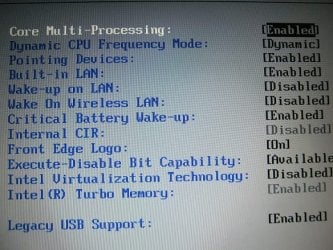
I have included an image of the advanced settings of the Phoenix BIOS - I have F9ed this
to apply setup defaults. If you know of anything in there which may cause a problem please let me know.

1.jpg

I am about to do a System Restore to the earliest point possible. There won't be many restore points as I haven't installed to much but I'll see how it goes at removing the mentioned drivers and post back the results.

Thanks again
 

My Computer My Computer

At a glance

Windows 7 Home Premium 64 Bit OS
OS
Windows 7 Home Premium 64 Bit OS
Ok, that's progress IMO. Did this computer originally come with Vista and now has 7 installed on it? If so, did it have this problem with Vista installed? I'm thinking it's an ACPI issue and wonder if there is a BIOS firmware update available for your laptop. See if Toshiba lists an update on their website.

Nothing of interest or incorrect looking in that screenshot.
 

My Computer My Computer

At a glance

Windows
OS
Windows
Hey Fred

BIOS version running is 2.50.
Upon installing the fresh installations I did go to the Toshiba Support
site and downloaded the BIOS they had listed as the latest. I ran the
download and was told via a pop up message that I was already running the latest version.

I did a quick search around to see if I may have been doing something wrong in
regard to BIOS installation but there seemed to be no real technical procedure to
follow to install as there are with many other BIOS. I simply ran the download, got
the message about already having the latest and then left it at that.

The machine did come with Vista pre-installed. As I said before, I now have Windows 7 Pro 32 bit on
a C: and a Vista Ultimate 32 bit on D: partition of the same drive.

I have a valid serial for Win 7 Pro which I was entitled to as a student and I use an
OEM Vista disk and the original key from the sticker still on the bottom of my A200 for that install.

Is a BIOS update the ONLY thing required to fix ACPI issues? Is the error I get about BIOS
standard - I presume all is still well and that V2.50 is the latest so long as Toshiba are
keeping their support website up to date. Maybe an idea to look for a Phoenix BIOS
website?? HMMMM

Thanks for the fast reply.

Edit: The machine in mention had a mobo replacement after approx 1 and 1/2 years.
It took me 8 weeks to get it back and the workmanship was shoddy - the machine came back with
no Infra Red (CIR?) so my Toshiba remote for media center was a paperweight. I was not about
to wait another 8 weeks for a working machine though so I let it go!

I have to say that the experience I am having with this machine now is very similar
to that prior to the mobo replacement under warranty. The replacement fixed the shutdown/ restarts
which is the same sort of deal as now - I just want to make sure that I am not
throwing a machine that is salvageable.

If it does turn out to be the mobo then the cost of replacement is not worth it as
the cost of diagnosing that would not be worth it.
 

My Computer My Computer

At a glance

Windows 7 Home Premium 64 Bit OS
OS
Windows 7 Home Premium 64 Bit OS
Sorry, I re-read and see that Vista came on it originally. I looked up one A200 model and Toshiba shows this link & info.

ACPI Flash BIOS version 5.20 for Satellite A200/A205 (PSAF0U, PSAFCU)(v5.20; 11-05-2007; 5.57M)

Change History

  • Version 5.20 Â Â Â 2007-11-05
    • Disabled: SD host controller core high speed function.
    • The "Phoenix USB Crisis Key Detecting" function was disabled to correct an intermittent Microsoft USB Basic Optical Mouse hang.
    • Added: WINXP and Vista OS support based on part number combinations.
    • Corrected: Power on problem with some MXIC Flash ROM modules.
    • Corrected: The master password can not be set with HGST Bronco HDDs.
    • The Phoenix BIOS code was updated to correct a Power-On Self Test (POST) hang that occurred when using a National Instruments PCIe 1427 camera link adapter.
    Version 1.90 Â Â Â 2007-08-10
    • Disabled: SB COM A, COM B, LPT, and FDD IO resource decoding to prevent GPS card resource conflicts.
    • Updated: TOSHIBA Logo.

You can look around in your BIOS setup page and it will show the version you currently have. Check that against Toshiba's site. Since this model is a few years old, it wouldn't be uncommon for Toshiba to stop providing updates.

If you received a message that the BIOS update you were trying to install wasn't needed (already up to date), then there's nothing you can do. As long as you were downloading the latest available update. You chance bricking the computer by using non-standard or beta BIOS software.

[FONT=verdana, Arial, Helvetica][FONT=verdana, Arial, Helvetica]ACPI - Advanced Configuration and Power Interface[/FONT][/FONT], is a standard for software and operating systems to work with your hardware. I'd venture a guess that the power management software is newer than the BIOS instructions in the computer. Just a theory.

You could try playing with the power management software in W7 or see if there's something you can turn off and see if it makes a difference. Does the computer shut down in Vista w/the battery & PS plugged in?
 

My Computer My Computer

At a glance

Windows
OS
Windows
I get all my driver downloads from here:
Support :: Toshiba :: Computers, Laptops/Notebooks, Tablets, Televisions, DVD and Blu-Ray Players, Camcorders, Storage, Accessories, and more

Note that the BIOS version says NEW and the version is 2.50

I have already played with the Win 7 power mgmt settings. Tried all the different plans,
tried changing sleep settings and all the stuff in advanced settings etc etc plus tried setting
all plans back to default and trying all again with no success.

The Vista with battery and PSU both in was actually going to be my next port of call.
I have booted into Vista and so far it has been charging the battery for about 10
minutes now, which is about 9 minutes and 50 seconds longer than if I
boot to Windows 7 - quite an improvement! I'm pretty sure that the same thing has happened
when booted in Vista though, it just seems to handle it a bit longer.

Although I'm not worried about the webcam, Windows 7 finds Chicony 2.0 Webcam and reports
it as functioning correctly in both device manager and through devices and printers. The problem is that
there is nowhere to open the webcam - a shortcut is placed on the desktop but if double clicked
it only opens shortcut properties. There is no Chicony Camera Assistant Software to open the webcam view
and settings - it is not listed in programs? WT?

This happens on a Win 7 install without applying any other drivers or software to the system and stands
that way now after I completed the system restore (shutdown problem still persists). That is why I uninstall that webcam
device driver configuration from device manager and then install the older version I found - then I am able to open
the webcam and it works.

Anyway - I think I will try running killdisk over the hard drive again and just installing Vista
on the next run. At least that way I will definitively be able to say that it is Windows 7 causing a problem
on older hardware. Very annoying really if that were to be the case.

Will report back - cheers
 

My Computer My Computer

At a glance

Windows 7 Home Premium 64 Bit OS
OS
Windows 7 Home Premium 64 Bit OS
Final report I feel

So I wiped the hard drive with Active Kill Disk and did a fresh install of the Vista only.
All was going well but it did a shutdown half way through an install. Started a fresh install once again
and got it finished, installed all the drivers that I have used in the past for Vista installs
on this machine and again I get shutdowns at random intervals.

Seems that Vista will run longer than the Windows 7 installs I have had on it,
so I can't figure that out, seems odd to me.

Well I've done a 360 again and am back to thinking this is a fried motherboard - bother!
Shutdowns are randomly occuring - no method in its madness so I guess something is extremely awry unfortunately.

Ahh well - looks like my trusty old A200 is bound for the great recycling factory in the sky.

I can say that along the way I have learnt how to dissassemble a laptop and put it back
together. I never would have dreamed of doing that a couple of years back so it is good
to walk away from it with the confidence to crack a lappy , clean the heatsink and apply thermal paste.

Thanks for all your help on this one Fred - much appreciated
 

My Computer My Computer

At a glance

Windows 7 Home Premium 64 Bit OS
OS
Windows 7 Home Premium 64 Bit OS
I just noticed you're in Australia and the Toshiba link I posted was for U.S. models. While I don't know the answer, I'm not convinced your motherboard is the problem.

Have you checked Event Viewer for any errors under System & Application?
Do you have SP2 and all the latest Vista updates installed?
 

My Computer My Computer

At a glance

Windows
OS
Windows
Have you tried another power supply from another laptop? I rescanned this thread but didn't see an answer. As long as the voltage and amperage are correct & it has the same diameter plug, it should work.

If you're feeling adventurous.... Have you tried any of the Linux versions, just for test purposes? There are some you can run off a bootable cd like Puppy Linux, or you could try a full install to a spare hard (or image your current install to an external drive so you can go back to it quickly). What bugs me is that you were able to keep it running with a Memtest cd.
 

My Computer My Computer

At a glance

Windows
OS
Windows
Have you checked Event Viewer for any errors under System & Application?
Do you have SP2 and all the latest Vista updates installed?

Checked Event Viewer - please read further on.
Don't have the SP'S or any other updates on. I can't see this being an issue for a fresh
install of the original OS on the hardware it came on with drivers compatible to that version.

Have you tried another power supply from another laptop? I rescanned this thread but didn't see an answer. As long as the voltage and amperage are correct & it has the same diameter plug, it should work.

Haven't tried that yet but will be contacting the local computer shop come Monday
to see if they may be able to hire out/lend me a compatible PSU to FULLY eliminate that as an issue.

If you're feeling adventurous.... Have you tried any of the Linux versions, just for test purposes? There are some you can run off a bootable cd like Puppy Linux, or you could try a full install to a spare hard (or image your current install to an external drive so you can go back to it quickly). What bugs me is that you were able to keep it running with a Memtest cd.

Have booted Knoppix and it ran no problem whatsoever. Have had a look in Event Viewer and there are HEAPS of
warnings and a few errors. I did get an error when installing the driver for ATI Mobility Radeon 2600 (display) and
know this to be the correct driver for the Vista install.

The system is now shutting down occasionally on the battery as well even if it is say 3/4's charged. Due to the
errors witnessed in Event Viewer relating to the display driver (+ other errors which I don't get why there are so many after a fresh install??) I am still sticking with the mobo as the cause. I have noticed some intermittent flicker in the display (even prior to the errors) and, along with the Event Viewer reports I am thinking now that this may be due to the onboard graphics being fried somewhat and on it's way to fully kapoot.

Why this would happen with a much greater frequency with PSU in is beyond me, why the shutdowns seemed to happen way more frequently booting into Windows 7 when I had the dual boot setup is beyond me. I have uninstalled the graphics driver now and am still having the problems, but that doesn't mean that it isn't the onboard card causing the problem (I guess it doesn't mean that it is either) but it's very hard to be 100% on that due to the fact that I can't just slot another in there as I would be able to with a desktop machine.

If trying another install of the display driver causes another error then I will try another power supply and if that doesn't
work then I feel I may be whipping a dead horse so to speak. I can only fresh install so many times to eliminate software as the issue and then basically I'm back to square one being:
1) Battery (eliminated as cause due to new battery purchase)
2) PSU (Charges the machine when powered down but causes shutdowns if system is booted - could be faulty)
3) Motherboard problem (Possibly graphics chip but could be other prob and very hard to diagnose without electronics experience)

I used to do a show at a local community radio station and there is a very cluey guy who does all the maintenance on the equipment, so thinking of electronics and experience reminded me of him. I may yet contact him and see if with the right tools and knowledge he can test my mobo for faults.

I'm gonna leave it alone for the rest of the weekend otherwise it will be firmly planted against a wall!
I am over it a bit now and thinking of a cheap machine without an OS that will handle my licensed Win 7 Pro.

Will report back with progress/ results.

PS: In the meantime my Qosmio is working a treat! :sarc:
 

My Computer My Computer

At a glance

Windows 7 Home Premium 64 Bit OS
OS
Windows 7 Home Premium 64 Bit OS
Definitely post back if you find something. This one is pretty puzzling. I'd expect to see a sequence of flashes on the battery/power LED lights on the laptop if it was a power circuit problem on the motherboard. That combined with non-Windows OSs working is why I'm reluctant to blame the mobo.
 

My Computer My Computer

At a glance

Windows
OS
Windows
OK -never surrender!!!!!!!!!!

I just came across some very interesting information here:
Toshiba Satellite A200 Random Shutdown - Page 2 - General-Laptops-Notebooks - Laptops-Notebooks

Look for the posts, links and images supplied by Notsosure.
Apparently this problem has been directly linked to NEC/TOKIN OE128 Proadlizer Capacitor
and references this particular model. If this information proves to be true, then this guy is a f*****n legend
(any mods out there i said freakin!). This may be the crucial info I have been looking for.

I have not researched how much the part is as I was to excited to get back here and report,
but I cant see it being any more than say $20 and considering I know an elctronics nut and can
dissassemble my lappy down to mobo anyway this may be a cheap fix if it is the problem.

The instructions I used to dissassemble the A200 in the first place came from here for anyone interested:
Taking apart Toshiba laptops and notebooks. DIY guides. Disassembly instructions.

Click on the "Go to Dissassembly Guides" link once there.

This site was also referenced in Notsosure's posts and for anyone requiring dissassembly info for
Toshiba lappys it is quite a treasure trove of information.

Fred - wish me luck - I'm going to find out how much that part is and make a phone call to my tronics mate. :D
 

My Computer My Computer

At a glance

Windows 7 Home Premium 64 Bit OS
OS
Windows 7 Home Premium 64 Bit OS
LOL - I might buy bulk!

Ahh yes - Toshiba forums. Like a novice (such as me) is going to find out about a tiny little
capacitor in the battery and power section. Maybe if I sat there for three or four days, read every
thread I'd get around to it but seriously, shouldn't that be listed at the top of a search for
random shutdowns on Toshiba A200 laptops - it's a well known issue - the information on how
to fix it is not well listed - ridiculous.
 

My Computer My Computer

At a glance

Windows 7 Home Premium 64 Bit OS
OS
Windows 7 Home Premium 64 Bit OS
Back
Top