
I recently installed a new SSD. I’ve been reading a lot about how having many programs installed on the SSD will decrease its life time. So I’m thinking about reconfiguring the set up. I’m not sure if I should change to mounting the drive to a HD or creating junctions is better?
I presently have all the data storage pics, music, documents stored on the HD. Is that good enough?
What would you do?
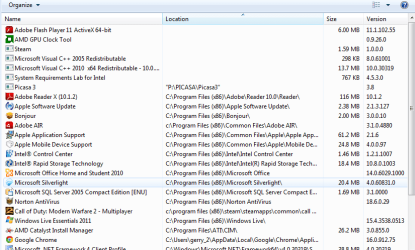
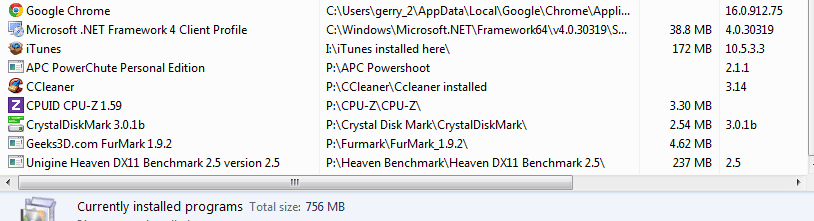
I attached a few screen shots of my installed programs which ones should I move?
Why don’t the ones on top show the folder their installed to?
Thanks all
I presently have all the data storage pics, music, documents stored on the HD. Is that good enough?
What would you do?
I attached a few screen shots of my installed programs which ones should I move?
Why don’t the ones on top show the folder their installed to?
Thanks all
My Computer
At a glance
windows 7 home premium 64 bitIntel Core i7 930Corsair 6GB DDR 3 cas 8PowerColor Radeon HD 5850 pcs+
- Computer Manufacturer/Model Number
- Home Builder
- OS
- windows 7 home premium 64 bit
- CPU
- Intel Core i7 930
- Motherboard
- Asrock x58 Extreme
- Memory
- Corsair 6GB DDR 3 cas 8
- Graphics Card(s)
- PowerColor Radeon HD 5850 pcs+
- Sound Card
- on board
- Monitor(s) Displays
- Samsung SyncMaster 906bw
- Hard Drives
- Corsair Force SATA 3 120GB - OS /
Western Digital Caviar Black 1TB -storage
- PSU
- Corsair TX 750W
- Case
- Corsair 690
- Cooling
- Corsair Hyper 212
- Keyboard
- Razer BlackWidow
- Mouse
- Logitech G9x


