Win7 lenovo ideapad "no internet access" to wifi router

Ephemeral

New member
Quick Specs-
i-ball baton 150m router
my home pc with win xp sp2
Lenovo notebook with Windows 7 ultimate

Okay.....I am simply trying to connect my Win7 notebook to the wireless router, but i JUST don't know which network settings are misconfigured and i have tried everything and anything to figure this out but i fail to do so.
The laptop connects but with a persistent messge "no internet access". I am sure i entered the right passkey and enabled the wifi on router configuration page(192.168.1.1 from pc).
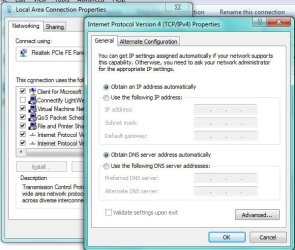
My notebook's wifi and ethernet adapter are both set on "Obtain an IP add automatically" and "obtain DNS server automatically". The lan card on pc with win xp is also configured the same way.
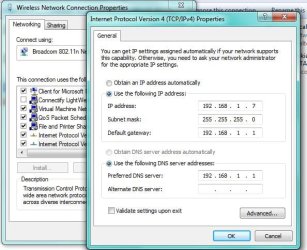
I tried declaring the ip and subnetmask explicitly on wlan adapter but it still fails to connect. I don't know...the prblm is in router's configuration or adapter settings or both could be misconfigured?
I tried several methods multiple times but i am so frustrated:cry:...none of them is working.
Please help me out....
 

My Computer

OS
Windows 7 Ultimate 32-bit
I just got a Lenovo & had a bit of an issue getting it on the net. I has to go to my ISP setup & unhide myself for the lenovo to connect. Then when I hid myself the connection at next boot was gone.

Can't remember exactly what I did but it was something to do with the ISP settings.

Will check it out now.
 

My Computer

Computer Manufacturer/Model Number
Custom
OS
Windows 7 Pro x64 -- PCLinuxOS KDE4 FullMonty 2011
CPU
i7-875k @ Turbo - 7,6,5,5 - 3.6ghz
Motherboard
Asus P7P55D-E Deluxe
Memory
Corsair CMD8GX3M4A1600C8 8gb
Graphics Card(s)
Asus EAH5850 DirectCU/2DIS/1GD5
Sound Card
On Board
Monitor(s) Displays
Samsung SyncMaster T220 - Panasonic VT30a 50"
Screen Resolution
1680x1050 -
Hard Drives
Corsair Force 3 SSD 120GB x 2 ::
WD VelociRaptor 150GB WD1500HLFS x 2
PSU
Corsair HX-850 Power Supply
Case
Coolmaster HAF 932
Cooling
Corsair H50
Keyboard
Logitech Wireless MK700
Mouse
Logitech Wireless MX620
Internet Speed
Good enough for now
Other Info
Voip. Insanely cheap phone calls.
For the life of me I can't remember what I did. I do know that it did not take much & there was no need to reconfigure things. It was just a tick here & there.

Here's a screenshot of my ISP setup. It may have even been a tick somewhere on the lenovo settings.
EDIT: It may have been something to do with the 'home network' on the lenovo.
 

Attachments

  • Capture.PNG
    Capture.PNG
    44.4 KB · Views: 243

My Computer

Computer Manufacturer/Model Number
Custom
OS
Windows 7 Pro x64 -- PCLinuxOS KDE4 FullMonty 2011
CPU
i7-875k @ Turbo - 7,6,5,5 - 3.6ghz
Motherboard
Asus P7P55D-E Deluxe
Memory
Corsair CMD8GX3M4A1600C8 8gb
Graphics Card(s)
Asus EAH5850 DirectCU/2DIS/1GD5
Sound Card
On Board
Monitor(s) Displays
Samsung SyncMaster T220 - Panasonic VT30a 50"
Screen Resolution
1680x1050 -
Hard Drives
Corsair Force 3 SSD 120GB x 2 ::
WD VelociRaptor 150GB WD1500HLFS x 2
PSU
Corsair HX-850 Power Supply
Case
Coolmaster HAF 932
Cooling
Corsair H50
Keyboard
Logitech Wireless MK700
Mouse
Logitech Wireless MX620
Internet Speed
Good enough for now
Other Info
Voip. Insanely cheap phone calls.
Try setting the IP address manually for your WI-FI card and ethernet eg.

Wireless
IP = 192.168.1.10
Subbet = 255.255.255.0
Gateway = 192.168.1.1

DNS = 192.168.1.1

Ethernet
IP = 192.168.1.11
Subbet = 255.255.255.0
Gateway = 192.168.1.1

DNS = 192.168.1.1

Example - substitute the ip to your requirements
44414d1262133412-unidentified-network-doesnt-have-valid-ip-config-static_ip.jpg
 

My Computer

Computer type
PC/Desktop
Computer Manufacturer/Model Number
Self Built
OS
Windows 7 Ultimate 64bit
CPU
AMD Phenom Quad core 9950 black edition
Motherboard
Gigabyte
Memory
16Gb
Graphics Card(s)
2x XFX Radeon 5850
Sound Card
PCI Express X-Fi Titanium / Logitech G35
Monitor(s) Displays
2x HP 2410i
Screen Resolution
1920x1080
Hard Drives
2x 500Gb Seagate
1x 300Gb Seagate
1x 1Tb Seagate
2x 1Tb Hitatchi
PSU
Jean Tech Storm 700W
Case
Cooler Master COSMOS S
Cooling
Akasa Evo Blue Pro
Keyboard
Logitech G15
Mouse
Mad Catz M.M.O. 7
Internet Speed
12mb
It's not working i think i should upload my configuration snaps...
 

My Computer

OS
Windows 7 Ultimate 32-bit
I tried the configuration you suggested over my notebook's ethernet card as well as on my desktop eth. card with win xp configuration but it didn't work....
 

My Computer

OS
Windows 7 Ultimate 32-bit
What are your settings here:

Control Panel/Network & Sharing/Change Adapter Settings/. Double click the wireless network then have a look at wireless properties.

Mine has the first & third box ticked.
 

My Computer

Computer Manufacturer/Model Number
Custom
OS
Windows 7 Pro x64 -- PCLinuxOS KDE4 FullMonty 2011
CPU
i7-875k @ Turbo - 7,6,5,5 - 3.6ghz
Motherboard
Asus P7P55D-E Deluxe
Memory
Corsair CMD8GX3M4A1600C8 8gb
Graphics Card(s)
Asus EAH5850 DirectCU/2DIS/1GD5
Sound Card
On Board
Monitor(s) Displays
Samsung SyncMaster T220 - Panasonic VT30a 50"
Screen Resolution
1680x1050 -
Hard Drives
Corsair Force 3 SSD 120GB x 2 ::
WD VelociRaptor 150GB WD1500HLFS x 2
PSU
Corsair HX-850 Power Supply
Case
Coolmaster HAF 932
Cooling
Corsair H50
Keyboard
Logitech Wireless MK700
Mouse
Logitech Wireless MX620
Internet Speed
Good enough for now
Other Info
Voip. Insanely cheap phone calls.
ok i think u need to turn on your wifi.. seems simple, it is but first install lenovo powermanagement software from their site!!
 

My Computer

OS
win7 32bit
Bios Proplem With WI-FI

Version 45CN38WW
Installation README
Updated Date 2011-11-01
This package updates the basic input/output system (BIOS) on IdeaPad Z570

BIOS, abbreviation of Basic Input£¯Output System, is integrated in ROM chip on main board, which contains the basic input/output program, system configuration information, system startup self-check and pre-setup programs. BIOS provides most basic low-level hardware operations; it is the connection between software and hardware, and interfacing window of hardware and operating system.

Note: Make note of any settings you have changed in the BIOS Configuration Utility. These settings may have to be re-entered after updating the BIOS.

Attention: Do not power off or restart your computer during the BIOS flashing process, which will cause serious damage and improper functioning of your computer.

Print this file so that you can refer to it during the installation.

Downloading the package
=======================
1. Click the file link to download the file from the web page.
2. For Windows operation system, there is an update packages available, 45CN38WW.exe. It can run both in 32-bit and 64-bit Windows.
3. When prompted, select a drive and directory in which to save the downloaded file.

Installing the package in Windows.
======================
1. Restart computer.
2. Locate the file 45CN38WW.exe that has been downloaded.
3. Double click the 45CN38WW.exe. For Windows 7, you may run it as administrator by left-clicking on the icon and selecting ¡°Run as administrator¡±.
4. Click ¡°Install¡±.
5. When a window prompt, click ¡°OK¡±.
6. Press Enter to start flashing. During the process, you are advised not to turn off the computer.
7. When the update finishes, the computer will automatically reboot for the changes to take effect.
8. Enter to BIOS menu, load default setting-> save and exit.
9. Please reboot the system again.

Updated Information:

Latest Version BIOS fixed all merged issues from previous.

Summary of changes
==================
General Information:
44CN38WW:
1 Solved BIOS failed to save boot order issue
2 Solved Intel WLAN failed to work only when CD was selected as the first boot order.

45CN36WW:
Fixed the hanging up issue when install non-OEM version Windows 7 Operating system.


Trademarks
==========
IdeaPad and IdeaCentre are registered trademarks of Lenovo.

Microsoft and Windows are trademarks of Microsoft Corporation in
the United States, other countries, or both. Other company, product,
and service names may be trademarks or service marks of others.

THIS DOCUMENT IS PROVIDED "AS IS" WITHOUT WARRANTY OF ANY KIND.
WE DISCLAIM ALL WARRANTIES, WHETHER EXPRESS OR IMPLIED,
INCLUDING WITHOUT LIMITATION, THE IMPLIED WARRANTIES OF FITNESS
FOR A PARTICULAR PURPOSE AND MERCHANTABILITY WITH RESPECT TO THE
INFORMATION IN THIS DOCUMENT. BY FURNISHING THIS DOCUMENT, WEGRANT
NO LICENSES TO ANY PATENTS OR COPYRIGHTS.

Copyright (c) Lenovo 2008, all rights reserve
 

My Computer

Computer Manufacturer/Model Number
lenovo z570
OS
Microsoft Windows 7 Professional 32-bit
CPU
Intel(R) Core(TM) i5-2430M CPU @ 2.40GHz
Motherboard
LENOVO
Memory
4.000 GB
Graphics Card(s)
Intel(R) HD Graphics Family
Sound Card
Intel(R) HD Graphics Family
Monitor(s) Displays
lcd
Hard Drives
WDC WD7500BPVT-24HXZT3 ATA Device
wireless is activated on notebook. You see the wireless SSID. Does it connect to router succesfully? Try an invalid password and see if it is refused.

Does your notebook succesfully connect to another router? (test at some neighbour/friend)
Can another notebook succesfully connect to your router?
 

My Computer

Computer type
Laptop
Computer Manufacturer/Model Number
ACER ASPIRE 5742G
OS
Microsoft Windows 7 Home Premium 64-bits 7601 Multiprocessor Free Service Pack 1
CPU
Intel(R) Core(TM) i3 CPU M 370 @ 2.40GHz
Motherboard
Acer Aspire 5742G
Memory
4,00 GB
Graphics Card(s)
ATI Mobility Radeon HD 5400 Series
Sound Card
(1) AMD High Definition Audio Device (2) Realtek High Defi
Screen Resolution
1366 x 768 x 32 bits (4294967296 colors) @ 60 Hz
Hard Drives
WDC WD5000BEVT-22ZAT0
My notebook's wifi and ethernet adapter are both set on "Obtain an IP add automatically" and "obtain DNS server automatically".

leave it automatically on wireless notebook!! After connection ... doe it have an ip-address? If so ... what ip address?
Type IPCONFIG in command prompt
 

My Computer

Computer type
Laptop
Computer Manufacturer/Model Number
ACER ASPIRE 5742G
OS
Microsoft Windows 7 Home Premium 64-bits 7601 Multiprocessor Free Service Pack 1
CPU
Intel(R) Core(TM) i3 CPU M 370 @ 2.40GHz
Motherboard
Acer Aspire 5742G
Memory
4,00 GB
Graphics Card(s)
ATI Mobility Radeon HD 5400 Series
Sound Card
(1) AMD High Definition Audio Device (2) Realtek High Defi
Screen Resolution
1366 x 768 x 32 bits (4294967296 colors) @ 60 Hz
Hard Drives
WDC WD5000BEVT-22ZAT0
Back
Top