tried a clean install of windows 7 pro and got a blinking screen

Chronos13

New member
I just bought a Samsung np700z5b so1ub (best buy 999.99 series 7 version). I tried a clean install of windows 7 pro and got a blinking screen when it was all said and done. This computer has an8g ssd and does some partitioning tricks. Do I need a special version of windows 7 professional?

Btw I wiped the system before installation.
 

My Computer

OS
Windows 7 64 bit
I assume you bought it with Windows 7 installed?

Did it come with Pro or some other version?

What is the source of the Pro disk you used for the recent clean install?
 

My Computer

Computer type
PC/Desktop
Computer Manufacturer/Model Number
Ignatz Special; 4 speed manual gearbox; factory air conditioning; one of one
OS
Windows 7 Home Premium SP1, 64-bit
CPU
Intel Skylake i5-6600K, not overclocked
Motherboard
AsRock Z170M Extreme 4, micro ATX
Memory
8 GB HyperX DDR4-2666 (2 x 4 GB)
Graphics Card(s)
none; graphics are integrated on CPU
Sound Card
onboard: Realtek ALC1150; external: USB Behringer UF0-202
Monitor(s) Displays
Dell S2340M 23 inch IPS
Screen Resolution
1600 x 900
Hard Drives
System: Crucial MX100 series SSD, 128 GB;
Data: Samsung Spinpoint 103SJ, 1 TB;
Backup: WD Caviar Green WD30EZRX-00D8PB0, 3 TB
PSU
Rosewill SilentNight 500 watt fanless, semi-modular
Case
Antec Solo II
Cooling
Noctua NH-U12S; Noctua F12 intake, Noctua S12A exhaust
Keyboard
Microsoft 200 6JH-00001 USB
Mouse
Dell or Microsoft optical wired; USB
Antivirus
Microsoft Security Essentials and Malwarebytes Premium
Browser
Pale Moon
Other Info
All fans PWM; speeds at idle: CPU circa 500 rpm; intake circa 600 rpm; exhaust circa 600 rpm; CPU temps 27 idle and 47 C load in a warm room (27 C/81 F) when running Intel Extreme Tuning Utility stress test.
As the Samsung np700z5b so1ub came with Windows 7, why are you reinstalling?

   Information
We always assume you have made your Recovery Disks using the OEM manufacturer's Recovery Media Creator app the first day you had your new PC.
& made the Startup Repair CD.
startup repair disc-create


Did you make the OEM manufacturer's Recovery Disks?

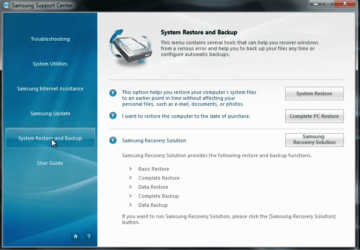
How to use Samsung Recovery, make Recovery disks:
Samsung PC Software - Samsung Support Center - YouTube

Capture Sam.PNG
 

My Computer

OS
ME/XP/Vista/Win7
Thank you for the help. I will try what you suggested. I have done this before and it worked, was thinking it was the unique samsung set up that made the difference but I will try again.
 

My Computer

OS
Windows 7 64 bit
Starting over Fresh.

Just to start over, I have got a Samsung np700z5b so1ub (best buy 999.99 series 7 version). I got a Windows 7 disk to upgrade to professional. Today when
attempting to upgrade only. I got the following warning. I attached the screen shot.

If this is the case that I cant upgrade directly. Then how would I go about doing a clean install. Before I had a difficult time doing a clean install. There was like 5 partitions, and it was rather all confusing.

I believe this process of clean install is different because there is UEFI, and EFI options, and the 8gb SSD. It looks like the old days of just formatting everything, or making windows.old and just easily clean installing/updating doesn't work for this Samsung. Which is rather frustrating.

If anybody could walk me through a clean install for this specific Samsung model, or show me a decent link. Any help would be appreciated.

 

Attachments

  • Capture.PNG
    Capture.PNG
    90.1 KB · Views: 23

My Computer

OS
Windows 7 64 bit
Was the screenshot you posted just above made before you wiped the HD to try install, or have you Factory Recovered to Home Premium? If so use the Professional Product Key you received to Anytime Upgrade instead of trying to run it from the desktop. Type Anytime in Start Search box to begin process, insert key, Pro features unlock in minutes.

If you still have the wiped HD and you're trying to clean install Pro 64 bit, you'll have to follow the steps given here: UEFI (Unified Extensible Firmware Interface) - Install Windows 7 with - Windows 7 Forums

Hopefully you made your Recovery Disks or a Win7 Backup Image so that you retain the option to boot to restore Home Premium if necessary to do the Anytime Upgrade.

I will tell you that we recently had an epic thread with a Samsung laptop where the OP wiped the small recovery partition on the HD to reinstall, then found certain feature (touchpad gestures, cam advanced controls) wouldn't work right with the software on the Samsung Downloads page. But Samsung would not support going back using a Recovery Image stored externally because she wiped the HD partition required to run it - which we found out is remedied by saving Recovery to DVD instead so you have a self-bootable Recoverr. I would not tell Samsung you wiped the HD if you contact them as their "tech support" is a parody of how not to treat customers.
 
Back
Top