Cant access 'my restore to factory settings' partition

mysticeye

New member
Hi
I have a disgusting 'svchost.exe' virus.
Its wrecked my netbook.
So I NEED to restore it to factory settings.
Its an HP Mini netbook.
I'm trying to do this, but it wont work.
one possible solution is:
''1.Right-click on "Computer" icon and select manage.
2.This will launch the Microsoft Management Console.
3.On the left side of the MMC, click on "Disk Management" and it will show you all of the partitions.
4.Right-click on the "HP Recovery" partition and select "Mark as Active Partition."
5.When the warning prompt appears, select "Yes" - Reboot the notebook and it will automatically boot into the Recovery Manager (without having to press F11).''

BUT i cant mark it as an active partition.
When I try, it says:'This request could not be perfomred becasue of an I/O device error'
please help.
If i cant restore my netbook to factory settings, its only use it in the dustbin.
thanks
 

My Computer

OS
windows 7 starter
Have you tried running Factory Recovery the correct way: HP Recover Windows 7 Operating System Using HP Recovery - HP Customer Care (United States - English)

Since it will run make your Recovery media first to have as a backup: Creating a Recovery Disk on a USB Flash Disk - HP technical support.

If this fails you'll need to order Recov disks from HP Tech Support or clean reinstall using a Win7 installer for your version, following these steps to get a perfect reinstall: Reinstalling Windows 7
 
i dont need to create a recovery disc, becasue its all built into the recovery parition

ive tried the 'correct' way
but it just wont boot up from it
 

My Computer

OS
windows 7 starter
well, its a netbook
how can i use discs?
please can you help
and if i have to runn if off of a flash drive?
HOW do i do that?
im trying to look on google
buts its just to confusing
 

My Computer

OS
windows 7 starter
i dont need to create a recovery disc, becasue its all built into the recovery parition

ive tried the 'correct' way
but it just wont boot up from it

You do need to create a set of recovery discs as greg suggests, otherwise you have no way of recovering your system if the recovery partition fails.

Have you clicked on the three links that greg gave you and read what's in them?

They give you comprehensive instructions so you'll have no need to carry out further fruitless searches on Google.
 

My Computer

Computer Manufacturer/Model Number
HP Pavilion Elite 495UK
OS
Windows 7 Ultimate SP1 64-Bit
CPU
Intel Core i7 870 @ 2.93GHz
Motherboard
MSI 2A9C (CPU1)
Memory
8Gb Dual-Channel DDR3 @ 664MHz
Graphics Card(s)
nVidia GeForce GTX 460 1024MB dedicated RAM
Sound Card
Realtek HD Audio
Monitor(s) Displays
HP2310i
Screen Resolution
1920 x 1080
Hard Drives
1x1954GB Hitachi HDS22020ALA 330 (RAID), 1x1954GB Hitachi External for backup and storage
PSU
460W
Case
HP Elite
Cooling
Air cooled
Keyboard
Logitech K750 solar-powered keyboard
Mouse
Logitech Wireless M180 mouse
Internet Speed
2Mb
Other Info
Pure Avanti Flow Internet Radio with iPod Dock, 64Gb iPod, HP USB Speakers, Sony MDR-V500 Headphones, Sony Vaio F-Series Laptop
thanks

I dont hav a drive that big tho...
so i guess i cant do it any other way.
lol.. well done HP.. sell a netbook, but it ends up needing a dvd drive anyway for it to run safely...
 

My Computer

OS
windows 7 starter
If you have a 4gb flash stick you can write the Win7 Installation DVD ISO to it to clean reinstall following these steps: Reinstalling Windows 7

This is a much leaner, superior install to the HP bloated factory preinstall.
 
i dont have a 4gb
only 1gb
I managed to install windows xp on it instead.
But i cannot get the wifi to work
ive tried to install the drivers, but no joy
can yo utell me how to do it please
im stuck
yes ive downloaded drivers from hp website
no they didnt work
 

My Computer

OS
windows 7 starter
Can you plug it in by wire to connect and see if Custom Windows Updates gives you the wireless driver.

If not google the Wireless Adapter given in your Device Manager or your Netbook Model's System SPecs for an XP driver. You may need to determine the driver from the HP Support Downloads webpage for your model.

If you did not make your Recovery media as advised before wiping out Starter then you can also order it via HP Tech Support, or clean reinstall using a Win7 Installation DVD for your model.

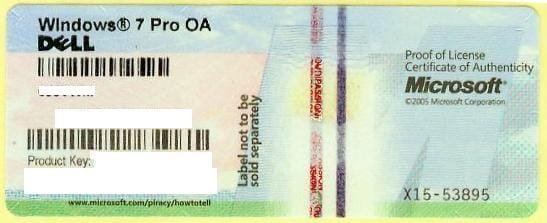
Exactly what does the licensed version given on the COA sticker say?

1270558000_86224332_1-Pictures-of--Buying-Windows-7-Prof-COA-Sticker-Only-100pcs-up-Needed.jpg

I suggest you start paying much closer attention to what we are advising you, ask questions to understand anything you don't for every single step given, so you can make some informed decisions instead of jumping into further messes which now make this harder.
 
i dont know what a coa is, is that a lebel somewhere?

I've indeed totally deleted the hp recovery now.

Its wasnt worth keeping, as it wa so stupidly hard to implement.

I managed to just google a wifi driver, it seems ok.. perhaps a little slower then before.

But I may get myself a windows 7 , and install it on here, but it doesnt seems easy unless I buy an external dvd player, or install it from a flash drive as i did this xp.

Sorry to jump about from issue to issue.
But at the end of the day, I may glad I got rid of the hp junk anyway.
This netbook is past its guarantee, so I didnt loose any 'cover' by doing it.

I guess my question now, if im still permitted to ask, would be.

What version of window 7 is best for the netbook?
Is there an 'official' netbook version? (not starter).
And is it as easy as getting it on a flash drive again, and then running it, making a parition, and sticking it on there?

Thanks again
I will wait for replies now vefore i jump into anything else!
 

My Computer

OS
windows 7 starter
Explanation of a COA (Certificate of Authenticity) here: COA and Hologram

With no recovery partition and no DVD drive you have no choice but to reinstall Windows from a USB flash drive, or buy it via HP Support or clean install, for which Greg has already told you or posted links for you to use.

Netbooks are cheap and cheap for a reason. Windows Starter, 1GB of RAM should set the alarm bells ringing.

You're better off with Windows Home Premium, install it from a USB flash drive and you should be good to go.

Most importantly, you must abide by the good advice you've been given by some very knowledgable people on here.

It isn't HP's fault you're in this position, it isn't Microsoft's. It's yours for blindly dashing off at a tangent instead of sitting down and digesting the information you've been given.

Work with us and we can get you up and running. Work against us and you're on your own. :)
 

My Computer

Computer Manufacturer/Model Number
HP Pavilion Elite 495UK
OS
Windows 7 Ultimate SP1 64-Bit
CPU
Intel Core i7 870 @ 2.93GHz
Motherboard
MSI 2A9C (CPU1)
Memory
8Gb Dual-Channel DDR3 @ 664MHz
Graphics Card(s)
nVidia GeForce GTX 460 1024MB dedicated RAM
Sound Card
Realtek HD Audio
Monitor(s) Displays
HP2310i
Screen Resolution
1920 x 1080
Hard Drives
1x1954GB Hitachi HDS22020ALA 330 (RAID), 1x1954GB Hitachi External for backup and storage
PSU
460W
Case
HP Elite
Cooling
Air cooled
Keyboard
Logitech K750 solar-powered keyboard
Mouse
Logitech Wireless M180 mouse
Internet Speed
2Mb
Other Info
Pure Avanti Flow Internet Radio with iPod Dock, 64Gb iPod, HP USB Speakers, Sony MDR-V500 Headphones, Sony Vaio F-Series Laptop
What was wrong with Starter?

Is Starter the version which came with the netbook? Is it printed on the COA sticker on bottom of netbook? Can your read the Product Key so you can reinstall it using a retail installer?

We can provide you with Starter to reinstall if you decide that's what you want to do, otherwise to use another version you will have to buy it.

Read this to understand how to do it: Reinstalling Windows 7
 
Back
Top