I've understood how to network two Windows XP computers together for a while. I understand the difference between share and NTFS permissions... but I have a few questions about some of the new sharing options in Windows 7. They are suppose to make things easier, but they just create some confusion for me since they co-exist with the more techy permissions way of doing things.
1. How exactly does Homegroup work? (I don't have another Win7 comp to play with!) Does it replace a Workgroup? What if I had two windows 7 computers, and an XP computer in my house? Could I have a homegroup between the Win 7 computers, and still have a Workgroup between all three computers?
2. Theoretical: What if I had a laptop that I used on a network at home, and also on a network at work, which is a small company. At work, the Workgroup name is: BusinessNet, and at home the name is the default WORKGROUP. Would I have to manually change the name of the Workgroup when I went between work and home? How would you take care of a scenario like this? Maybe there's something I'm missing here? My understanding of networking is very practical. I know enough to network any two windows computers together.
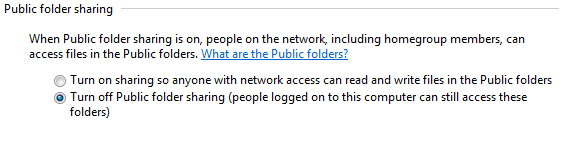
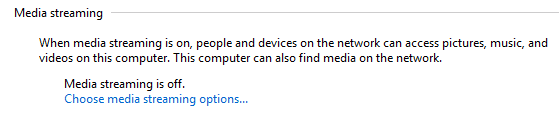
3. This relates to some of the options in "Advanced sharing settings" in Windows 7. First, the "public sharing folder" What does this do? Does it just automatically configure permissions for the "C:/users/public" folders? What if I delete those folders? Then does it just do nothing? Second "media streaming" Does this simply configure settings in Windows Media Center?
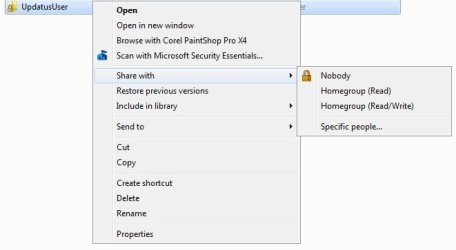
4. How does the "share with" feature work? Does it simply set the Share/NTFS settings for you?
That is all, for now. Thanks
1. How exactly does Homegroup work? (I don't have another Win7 comp to play with!) Does it replace a Workgroup? What if I had two windows 7 computers, and an XP computer in my house? Could I have a homegroup between the Win 7 computers, and still have a Workgroup between all three computers?
2. Theoretical: What if I had a laptop that I used on a network at home, and also on a network at work, which is a small company. At work, the Workgroup name is: BusinessNet, and at home the name is the default WORKGROUP. Would I have to manually change the name of the Workgroup when I went between work and home? How would you take care of a scenario like this? Maybe there's something I'm missing here? My understanding of networking is very practical. I know enough to network any two windows computers together.
3. This relates to some of the options in "Advanced sharing settings" in Windows 7. First, the "public sharing folder" What does this do? Does it just automatically configure permissions for the "C:/users/public" folders? What if I delete those folders? Then does it just do nothing? Second "media streaming" Does this simply configure settings in Windows Media Center?
4. How does the "share with" feature work? Does it simply set the Share/NTFS settings for you?
That is all, for now. Thanks
My Computer
At a glance
Windows XP Ultimate x64AMD Athlon II X2 260DDR3 1600 4GV9800 GTX+
- OS
- Windows XP Ultimate x64
- CPU
- AMD Athlon II X2 260
- Motherboard
- ASRock M3A770DE
- Memory
- DDR3 1600 4GV
- Graphics Card(s)
- 9800 GTX+
- Hard Drives
- External Cavalry 1TB USB/eSATA HD
Internal Hitachi 500GB HD
- PSU
- Antec 430W