Solved How install Win7 on netbook - no CD-ROM, no USB

STWiN

New member
Local time
10:27 PM
Messages
5
Hi everyone.

I have a problem, i've searched the web and this forum but still haven´t found a solution.

Here's the deal...

I have a Toshiba NB500 with Windows 7 Starter installed... and a lot of "trash" Toshiba programs and tools, and Office Demos... :S
The HDD is partinioned in 2, with a 3rd one hidden (about 200MB).


I want to format the partitions into only one, and then install a fresh Windows 7 Home Basic.


The thing is, the netbook doesn't have a DVD-ROM drive. Plus, the Bios bootable device only shows HDD, FDD and LAN.

(Why the hell is there a FDD option if there's any Floppy drive???)

So, there's no USB boot option.

Why can i perform a clean Win7 install with formatting partitions options, as it was an instalation from DVD?
 

My Computer My Computer

At a glance

Windows 7 Home Premium 32bitCore2Duo E66002X Corsair XMS2 TWIN2X 1GB DDR2 800ATI Sapphire Radeon HD 4890 Vapor-X
OS
Windows 7 Home Premium 32bit
CPU
Core2Duo E6600
Motherboard
Asus P5B
Memory
2X Corsair XMS2 TWIN2X 1GB DDR2 800
Graphics Card(s)
ATI Sapphire Radeon HD 4890 Vapor-X
Do you have a USB Pen Drive?

   Information
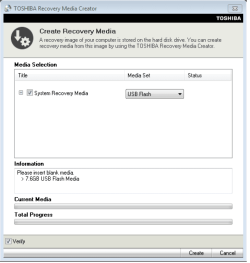
We always assume you have made your Recovery Disks using the OEM manufacturer's Recovery Media Creator app the first day you had your new PC.
& made the Startup Repair CD.
startup repair disc-create


Did you make the OEM manufacturer's Recovery Disks?

Toshiba USB.PNG

How to use Toshiba Recovery.
How to use the Toshiba HDD Recovery Utility

You can order Toshiba Recovery disks from here:
https://www.csd.toshiba.com/cgi-bin/tais/support/jsp/serviceUnitVerification.jsp
 

My Computer My Computer

At a glance

ME/XP/Vista/Win7
OS
ME/XP/Vista/Win7
Yes, i have USB pendrives.

But i don't want to restore my hard disk drive to the original factory default state.

I want to completly format the disk. I don't want any partitions; i want only one disk, one partition, and delete everything to install Win7 HB from zero.
 

My Computer My Computer

At a glance

Windows 7 Home Premium 32bitCore2Duo E66002X Corsair XMS2 TWIN2X 1GB DDR2 800ATI Sapphire Radeon HD 4890 Vapor-X
OS
Windows 7 Home Premium 32bit
CPU
Core2Duo E6600
Motherboard
Asus P5B
Memory
2X Corsair XMS2 TWIN2X 1GB DDR2 800
Graphics Card(s)
ATI Sapphire Radeon HD 4890 Vapor-X

My Computer My Computer

At a glance

ME/XP/Vista/Win7
OS
ME/XP/Vista/Win7
Hmm.. So, if i plug the Pendrive, it will appear USB option on boot options?
 

My Computer My Computer

At a glance

Windows 7 Home Premium 32bitCore2Duo E66002X Corsair XMS2 TWIN2X 1GB DDR2 800ATI Sapphire Radeon HD 4890 Vapor-X
OS
Windows 7 Home Premium 32bit
CPU
Core2Duo E6600
Motherboard
Asus P5B
Memory
2X Corsair XMS2 TWIN2X 1GB DDR2 800
Graphics Card(s)
ATI Sapphire Radeon HD 4890 Vapor-X
May be/ may be not, that is why I said check under HDD option.
 

My Computer My Computer

At a glance

ME/XP/Vista/Win7
OS
ME/XP/Vista/Win7
OK, i'll do that.

Thanx
 

My Computer My Computer

At a glance

Windows 7 Home Premium 32bitCore2Duo E66002X Corsair XMS2 TWIN2X 1GB DDR2 800ATI Sapphire Radeon HD 4890 Vapor-X
OS
Windows 7 Home Premium 32bit
CPU
Core2Duo E6600
Motherboard
Asus P5B
Memory
2X Corsair XMS2 TWIN2X 1GB DDR2 800
Graphics Card(s)
ATI Sapphire Radeon HD 4890 Vapor-X
It worked!!

I mounted the pendrive with Microsoft Windows 7 USB/DVD Tool, inserted on the USB port, and restarted.
Now, USB option was available on boot.
The rest of the process was the usual.

Thanx a lot! ;)
 

My Computer My Computer

At a glance

Windows 7 Home Premium 32bitCore2Duo E66002X Corsair XMS2 TWIN2X 1GB DDR2 800ATI Sapphire Radeon HD 4890 Vapor-X
OS
Windows 7 Home Premium 32bit
CPU
Core2Duo E6600
Motherboard
Asus P5B
Memory
2X Corsair XMS2 TWIN2X 1GB DDR2 800
Graphics Card(s)
ATI Sapphire Radeon HD 4890 Vapor-X
Well done, you are welcome. :thumbsup:
 

My Computer My Computer

At a glance

ME/XP/Vista/Win7
OS
ME/XP/Vista/Win7
Back
Top