Advice and direction on installing OS on new SSD with multiple HHD's

rtmeek

New member
Member
Local time
6:26 AM
Messages
28
Location
Ft. Myers, Florida
I need to reinstall Win7 and decided to install it on a new 120G SSD and then use an exsisting HDD for user accounts and data. After spending days reading past threads and post on the subject I am still not positive of the correct pocedure to follow. I think I read too much.

This was my plan: am I thinking right or not?

1) I have full backups and images on (including Carbonite) on external drives

2) Format an exsisting HDD that should become future drive 'D' for user acct and data

3) unplug all existing drives and install new SSD

4) install Win7 64 pro from full install MS SP 1 disk using the TUT 'Relocate user folders during win 7 installation'. I'm not sure if I should keep the boot partition. I'll have plenty of room but don't want sacrifice any speed while booting

5) Plug in other exsisting HDDs

6) install programs to C, transfer/ copy data to formatted HDD which sould now be drive 'D'

7) Done??

Looks simple enough but want to make sure I'm covering everthing and in the right order.

Please advise
Ted
 

My Computer My Computer

At a glance

windows 7 pro 64 bit SP 1intel i7-4770K 3.50 GHz32.0 GB Patriot Ltd . Ed. DDR3 1866MHzGeForce GTX 660
Computer type
PC/Desktop
Computer Manufacturer/Model Number
custom build
OS
windows 7 pro 64 bit SP 1
CPU
intel i7-4770K 3.50 GHz
Motherboard
Asus Z87 Delux
Memory
32.0 GB Patriot Ltd . Ed. DDR3 1866MHz
Graphics Card(s)
GeForce GTX 660
Sound Card
integrated Realtek
Monitor(s) Displays
3 - Dell 20"
Screen Resolution
1600 X 1200
Hard Drives
1- Samsung 840 PRO Series 512 GB SSD, 1- Intel 510 series 120 GB SSD, 2- Seagate Hybrid SSD 250G,
PSU
Corsair HX750 Watt
Case
Corsair Obsidian 550D
Cooling
8 120mm case fans, Corsair H-90 Liquid CPU coller
Keyboard
Std. Microsoft
Mouse
Logitech
Internet Speed
33 Mb/s download, 4.75 Mb/s upload
Antivirus
MalwareBytes
Browser
Chrome, Ie-10
That looks pretty good. If the SSD is new and has never had anything on it, the process is painless.

Most important is to disconnect all drives other than the SSD.

Step 2 could be done after the SSD install if you prefer.

Having a separate boot partition won't help your boot speed. A default install will use a system reserved, but it can be easily excluded. I think it is needed for BitLocker if you intend to use that. If you keep it, you have to image it along with C. I don't use it, but it's harmless and very small.
 

My Computer My Computer

At a glance

Windows 7 Home Premium SP1, 64-bitIntel Skylake i5-6600K, not overclocked8 GB HyperX DDR4-2666 (2 x 4 GB)none; graphics are integrated on CPU
Computer type
PC/Desktop
Computer Manufacturer/Model Number
Ignatz Special; 4 speed manual gearbox; factory air conditioning; one of one
OS
Windows 7 Home Premium SP1, 64-bit
CPU
Intel Skylake i5-6600K, not overclocked
Motherboard
AsRock Z170M Extreme 4, micro ATX
Memory
8 GB HyperX DDR4-2666 (2 x 4 GB)
Graphics Card(s)
none; graphics are integrated on CPU
Sound Card
onboard: Realtek ALC1150; external: USB Behringer UF0-202
Monitor(s) Displays
Dell S2340M 23 inch IPS
Screen Resolution
1600 x 900
Hard Drives
System: Crucial MX100 series SSD, 128 GB;
Data: Samsung Spinpoint 103SJ, 1 TB;
Backup: WD Caviar Green WD30EZRX-00D8PB0, 3 TB
PSU
Rosewill SilentNight 500 watt fanless, semi-modular
Case
Antec Solo II
Cooling
Noctua NH-U12S; Noctua F12 intake, Noctua S12A exhaust
Keyboard
Microsoft 200 6JH-00001 USB
Mouse
Dell or Microsoft optical wired; USB
Antivirus
Microsoft Security Essentials and Malwarebytes Premium
Browser
Pale Moon
Other Info
All fans PWM; speeds at idle: CPU circa 500 rpm; intake circa 600 rpm; exhaust circa 600 rpm; CPU temps 27 idle and 47 C load in a warm room (27 C/81 F) when running Intel Extreme Tuning Utility stress test.

My Computer My Computer

At a glance

Windows 7 Ultimate SP1 64-BitIntel Core i7 870 @ 2.93GHz8Gb Dual-Channel DDR3 @ 664MHznVidia GeForce GTX 460 1024MB dedicated RAM
Computer Manufacturer/Model Number
HP Pavilion Elite 495UK
OS
Windows 7 Ultimate SP1 64-Bit
CPU
Intel Core i7 870 @ 2.93GHz
Motherboard
MSI 2A9C (CPU1)
Memory
8Gb Dual-Channel DDR3 @ 664MHz
Graphics Card(s)
nVidia GeForce GTX 460 1024MB dedicated RAM
Sound Card
Realtek HD Audio
Monitor(s) Displays
HP2310i
Screen Resolution
1920 x 1080
Hard Drives
1x1954GB Hitachi HDS22020ALA 330 (RAID), 1x1954GB Hitachi External for backup and storage
PSU
460W
Case
HP Elite
Cooling
Air cooled
Keyboard
Logitech K750 solar-powered keyboard
Mouse
Logitech Wireless M180 mouse
Internet Speed
2Mb
Other Info
Pure Avanti Flow Internet Radio with iPod Dock, 64Gb iPod, HP USB Speakers, Sony MDR-V500 Headphones, Sony Vaio F-Series Laptop
I read the 'optimize for windows reinstallation' tutorial. Is any of it really needed for a clean install on a new SSD?
 

My Computer My Computer

At a glance

windows 7 pro 64 bit SP 1intel i7-4770K 3.50 GHz32.0 GB Patriot Ltd . Ed. DDR3 1866MHzGeForce GTX 660
Computer type
PC/Desktop
Computer Manufacturer/Model Number
custom build
OS
windows 7 pro 64 bit SP 1
CPU
intel i7-4770K 3.50 GHz
Motherboard
Asus Z87 Delux
Memory
32.0 GB Patriot Ltd . Ed. DDR3 1866MHz
Graphics Card(s)
GeForce GTX 660
Sound Card
integrated Realtek
Monitor(s) Displays
3 - Dell 20"
Screen Resolution
1600 X 1200
Hard Drives
1- Samsung 840 PRO Series 512 GB SSD, 1- Intel 510 series 120 GB SSD, 2- Seagate Hybrid SSD 250G,
PSU
Corsair HX750 Watt
Case
Corsair Obsidian 550D
Cooling
8 120mm case fans, Corsair H-90 Liquid CPU coller
Keyboard
Std. Microsoft
Mouse
Logitech
Internet Speed
33 Mb/s download, 4.75 Mb/s upload
Antivirus
MalwareBytes
Browser
Chrome, Ie-10
I read the 'optimize for windows reinstallation' tutorial. Is any of it really needed for a clean install on a new SSD?

No. You don't need to use diskpart. You can make partitions during the installation. But you should check alignment and a few other things after Windows is installed.
 

My Computer My Computer

At a glance

Windows 7 Home Premium SP1, 64-bitIntel Skylake i5-6600K, not overclocked8 GB HyperX DDR4-2666 (2 x 4 GB)none; graphics are integrated on CPU
Computer type
PC/Desktop
Computer Manufacturer/Model Number
Ignatz Special; 4 speed manual gearbox; factory air conditioning; one of one
OS
Windows 7 Home Premium SP1, 64-bit
CPU
Intel Skylake i5-6600K, not overclocked
Motherboard
AsRock Z170M Extreme 4, micro ATX
Memory
8 GB HyperX DDR4-2666 (2 x 4 GB)
Graphics Card(s)
none; graphics are integrated on CPU
Sound Card
onboard: Realtek ALC1150; external: USB Behringer UF0-202
Monitor(s) Displays
Dell S2340M 23 inch IPS
Screen Resolution
1600 x 900
Hard Drives
System: Crucial MX100 series SSD, 128 GB;
Data: Samsung Spinpoint 103SJ, 1 TB;
Backup: WD Caviar Green WD30EZRX-00D8PB0, 3 TB
PSU
Rosewill SilentNight 500 watt fanless, semi-modular
Case
Antec Solo II
Cooling
Noctua NH-U12S; Noctua F12 intake, Noctua S12A exhaust
Keyboard
Microsoft 200 6JH-00001 USB
Mouse
Dell or Microsoft optical wired; USB
Antivirus
Microsoft Security Essentials and Malwarebytes Premium
Browser
Pale Moon
Other Info
All fans PWM; speeds at idle: CPU circa 500 rpm; intake circa 600 rpm; exhaust circa 600 rpm; CPU temps 27 idle and 47 C load in a warm room (27 C/81 F) when running Intel Extreme Tuning Utility stress test.
OK, got everything installed the way I wanted. Win7 and programs on 'C' and user files on 'D'. But now some things are not what I was expecting and have raised further questions. (If I need to start another thread let me know)

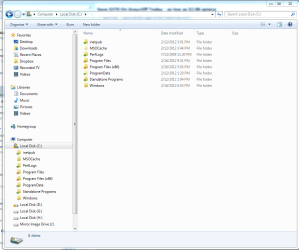
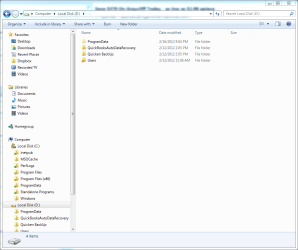
1) I no longer see the 'Documents & Settings' folders in either 'C' or 'D'. Is that normal?
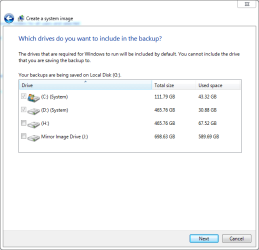
2) When I setup windows backup to make a system image it will not allow me to make an image of just 'C', the boxes are greyed out. It insists that the image must be 'C' and 'D'. My whole reason for putting windows on a separate drive was in case windows ever became corrupt and I need to reinstall, then all I would need to do is install the image and a known good copy of windows and programs would be on'C' and I would not have to worry about my data.

CaptureC.PNG

CaptureD.PNG

CaptureBackup.PNG
 
Last edited:

My Computer My Computer

At a glance

windows 7 pro 64 bit SP 1intel i7-4770K 3.50 GHz32.0 GB Patriot Ltd . Ed. DDR3 1866MHzGeForce GTX 660
Computer type
PC/Desktop
Computer Manufacturer/Model Number
custom build
OS
windows 7 pro 64 bit SP 1
CPU
intel i7-4770K 3.50 GHz
Motherboard
Asus Z87 Delux
Memory
32.0 GB Patriot Ltd . Ed. DDR3 1866MHz
Graphics Card(s)
GeForce GTX 660
Sound Card
integrated Realtek
Monitor(s) Displays
3 - Dell 20"
Screen Resolution
1600 X 1200
Hard Drives
1- Samsung 840 PRO Series 512 GB SSD, 1- Intel 510 series 120 GB SSD, 2- Seagate Hybrid SSD 250G,
PSU
Corsair HX750 Watt
Case
Corsair Obsidian 550D
Cooling
8 120mm case fans, Corsair H-90 Liquid CPU coller
Keyboard
Std. Microsoft
Mouse
Logitech
Internet Speed
33 Mb/s download, 4.75 Mb/s upload
Antivirus
MalwareBytes
Browser
Chrome, Ie-10

My Computer My Computer

At a glance

Windows 7 Professional SP1 64-bitIntel Core 2 Duo Processor E8300 @ 2.83GHz4.00 GB Dual-Channel DDR2 @ 332MHz (5-5-5-15)Intel(R) G33/G31 Express Chipset Family
Computer type
PC/Desktop
Computer Manufacturer/Model Number
Dell Inspiron 530
OS
Windows 7 Professional SP1 64-bit
CPU
Intel Core 2 Duo Processor E8300 @ 2.83GHz
Motherboard
Dell Inc. 0RY007 (Socket 775)
Memory
4.00 GB Dual-Channel DDR2 @ 332MHz (5-5-5-15)
Graphics Card(s)
Intel(R) G33/G31 Express Chipset Family
Sound Card
Integrated 7.1 Channel Audio
Monitor(s) Displays
Acer G245HQL 23.6" LED(1920x1080@60Hz)
Screen Resolution
1920 x 1080
Hard Drives
Disk 0 HITACHI 1TB OS Installed - Disk 1 HITACHI 1TB For Backups
Keyboard
Dell USB Keyboard
Mouse
Dell Optical USB Mouse
Internet Speed
DSL 10 meg
Antivirus
Symantec(SEP)
Browser
Pale Moon
2) When I setup windows backup to make a system image it will not allow me to make an image of just 'C', the boxes are greyed out. It insists that the image must be 'C' and 'D'.

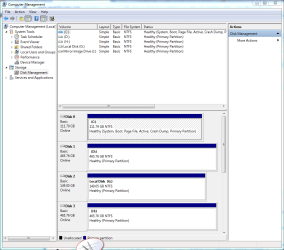
I don't use or understand Window Backup well, but I know it has its own ideas about what a "system" file is. It thinks at least some of your system files are not on C. Do you have a "System Reserved" partition (most users don't need it)?? It has some system files in it as well.

I use Macrium and no System Reserved partition. All I need to image is C.
 

My Computer My Computer

At a glance

Windows 7 Home Premium SP1, 64-bitIntel Skylake i5-6600K, not overclocked8 GB HyperX DDR4-2666 (2 x 4 GB)none; graphics are integrated on CPU
Computer type
PC/Desktop
Computer Manufacturer/Model Number
Ignatz Special; 4 speed manual gearbox; factory air conditioning; one of one
OS
Windows 7 Home Premium SP1, 64-bit
CPU
Intel Skylake i5-6600K, not overclocked
Motherboard
AsRock Z170M Extreme 4, micro ATX
Memory
8 GB HyperX DDR4-2666 (2 x 4 GB)
Graphics Card(s)
none; graphics are integrated on CPU
Sound Card
onboard: Realtek ALC1150; external: USB Behringer UF0-202
Monitor(s) Displays
Dell S2340M 23 inch IPS
Screen Resolution
1600 x 900
Hard Drives
System: Crucial MX100 series SSD, 128 GB;
Data: Samsung Spinpoint 103SJ, 1 TB;
Backup: WD Caviar Green WD30EZRX-00D8PB0, 3 TB
PSU
Rosewill SilentNight 500 watt fanless, semi-modular
Case
Antec Solo II
Cooling
Noctua NH-U12S; Noctua F12 intake, Noctua S12A exhaust
Keyboard
Microsoft 200 6JH-00001 USB
Mouse
Dell or Microsoft optical wired; USB
Antivirus
Microsoft Security Essentials and Malwarebytes Premium
Browser
Pale Moon
Other Info
All fans PWM; speeds at idle: CPU circa 500 rpm; intake circa 600 rpm; exhaust circa 600 rpm; CPU temps 27 idle and 47 C load in a warm room (27 C/81 F) when running Intel Extreme Tuning Utility stress test.

Attachments

  • Capturediskmgt.PNG
    Capturediskmgt.PNG
    89.6 KB · Views: 29

My Computer My Computer

At a glance

windows 7 pro 64 bit SP 1intel i7-4770K 3.50 GHz32.0 GB Patriot Ltd . Ed. DDR3 1866MHzGeForce GTX 660
Computer type
PC/Desktop
Computer Manufacturer/Model Number
custom build
OS
windows 7 pro 64 bit SP 1
CPU
intel i7-4770K 3.50 GHz
Motherboard
Asus Z87 Delux
Memory
32.0 GB Patriot Ltd . Ed. DDR3 1866MHz
Graphics Card(s)
GeForce GTX 660
Sound Card
integrated Realtek
Monitor(s) Displays
3 - Dell 20"
Screen Resolution
1600 X 1200
Hard Drives
1- Samsung 840 PRO Series 512 GB SSD, 1- Intel 510 series 120 GB SSD, 2- Seagate Hybrid SSD 250G,
PSU
Corsair HX750 Watt
Case
Corsair Obsidian 550D
Cooling
8 120mm case fans, Corsair H-90 Liquid CPU coller
Keyboard
Std. Microsoft
Mouse
Logitech
Internet Speed
33 Mb/s download, 4.75 Mb/s upload
Antivirus
MalwareBytes
Browser
Chrome, Ie-10
This is why all other HD's should be unplugged when installing Win7. D must have been marked Active because Win7 wrote the System boot files to it instead of C as is correct.

To change this mark C Active and D Inactive, reboot into BIOS setup to set C first HD to boot: Partition - Mark as Active
Partition - Mark as Inactive

Then reboot into DVD Repair console or System Repair Disk to run Startup Repair - Run 3 Separate Times until Win7 starts on its own and C holds the System Active boot files. If this fails you'll need to unplug D to force repairs to work.

Once D isn't the System drive try creating a Backup Image again to see if it will still require D to be included as it might since D holds System (User) folders. This is an argument for using the library method to link User folders to another HD easier and without complication: Library - Include a Folder - Windows 7 Forums.

If the prob persists and you want to keep it as it is, use Macrium to Image your system
which is a preferred method for many, or use superior Acronis premium imaging/cloning app which comes free if you have any WD or Seagate HD. WD Acronis free cloning app
Seagate Acronis cloning free util
 
OK. I believe the startup repair did what it was supposed to do.

http://js.sevenforumscdn.com/images/styles/window7/attach/png.gif

However, the problem persists on trying to make an image of C. Windows backup still insists that the image be of C & D. Is this because (1)Windows needs something in the user files located in D to "run or start" , (2) ProgramData folder located in D, (3) Or just because that's the way Windows thinks it needs to be done regardless of what I want?

The whole idea in relocating the user files to D was to be able to image a known good copy of the OS and programs in case I ever needed to reinstall.
 

Attachments

  • Capturediskmgt2.PNG
    Capturediskmgt2.PNG
    28 KB · Views: 10

My Computer My Computer

At a glance

windows 7 pro 64 bit SP 1intel i7-4770K 3.50 GHz32.0 GB Patriot Ltd . Ed. DDR3 1866MHzGeForce GTX 660
Computer type
PC/Desktop
Computer Manufacturer/Model Number
custom build
OS
windows 7 pro 64 bit SP 1
CPU
intel i7-4770K 3.50 GHz
Motherboard
Asus Z87 Delux
Memory
32.0 GB Patriot Ltd . Ed. DDR3 1866MHz
Graphics Card(s)
GeForce GTX 660
Sound Card
integrated Realtek
Monitor(s) Displays
3 - Dell 20"
Screen Resolution
1600 X 1200
Hard Drives
1- Samsung 840 PRO Series 512 GB SSD, 1- Intel 510 series 120 GB SSD, 2- Seagate Hybrid SSD 250G,
PSU
Corsair HX750 Watt
Case
Corsair Obsidian 550D
Cooling
8 120mm case fans, Corsair H-90 Liquid CPU coller
Keyboard
Std. Microsoft
Mouse
Logitech
Internet Speed
33 Mb/s download, 4.75 Mb/s upload
Antivirus
MalwareBytes
Browser
Chrome, Ie-10
As I said earlier In some cases the win7 imaging app will consider the drive with User folders part of system.

I also gave you the solution which others use.
 
I followed your directions and made an image of C with Acronis and used Windows backup to image C & D on another HHD. I guess i'm covered. Thanks.

I've got another small problem though. After I used DiskPart to mark my D drive inactive prior to repairing startup, now when I reboot I get the following screen:Windows Boot Mgr.jpgWhat could have happened to show two operating systems? The current Disk MGT is as showndiskmgt3.PNG
 

My Computer My Computer

At a glance

windows 7 pro 64 bit SP 1intel i7-4770K 3.50 GHz32.0 GB Patriot Ltd . Ed. DDR3 1866MHzGeForce GTX 660
Computer type
PC/Desktop
Computer Manufacturer/Model Number
custom build
OS
windows 7 pro 64 bit SP 1
CPU
intel i7-4770K 3.50 GHz
Motherboard
Asus Z87 Delux
Memory
32.0 GB Patriot Ltd . Ed. DDR3 1866MHz
Graphics Card(s)
GeForce GTX 660
Sound Card
integrated Realtek
Monitor(s) Displays
3 - Dell 20"
Screen Resolution
1600 X 1200
Hard Drives
1- Samsung 840 PRO Series 512 GB SSD, 1- Intel 510 series 120 GB SSD, 2- Seagate Hybrid SSD 250G,
PSU
Corsair HX750 Watt
Case
Corsair Obsidian 550D
Cooling
8 120mm case fans, Corsair H-90 Liquid CPU coller
Keyboard
Std. Microsoft
Mouse
Logitech
Internet Speed
33 Mb/s download, 4.75 Mb/s upload
Antivirus
MalwareBytes
Browser
Chrome, Ie-10
Check msconfig>boot. Is there a second OS incorrectly listed which needs deleting?

Did you have another OS on one of the HD's before?

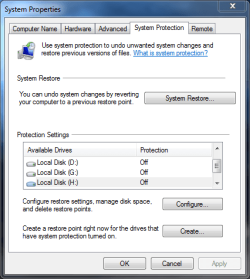
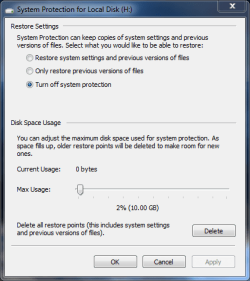
You'll also need to go to Control Panel>System>System Protection, determine which is the ghost listing, highlight it, select Configure and Delete it so that System Restore works correctly.
 
Gregrocker.

There WAS another OS on My H drive (original drive with OS, data, etc. before all changes). I deleted it on msconfig and all's well! I would have never figured that out. Thanks

Also, I went to system protection>H>configure and clicked delete. It said it was going to delete all past restore points -I clicked OK. Right? Nothing Else?


Capturesysproperties.PNG

CaptureSYSprotection.PNG


Thanks so much for your help

Ted
 

My Computer My Computer

At a glance

windows 7 pro 64 bit SP 1intel i7-4770K 3.50 GHz32.0 GB Patriot Ltd . Ed. DDR3 1866MHzGeForce GTX 660
Computer type
PC/Desktop
Computer Manufacturer/Model Number
custom build
OS
windows 7 pro 64 bit SP 1
CPU
intel i7-4770K 3.50 GHz
Motherboard
Asus Z87 Delux
Memory
32.0 GB Patriot Ltd . Ed. DDR3 1866MHz
Graphics Card(s)
GeForce GTX 660
Sound Card
integrated Realtek
Monitor(s) Displays
3 - Dell 20"
Screen Resolution
1600 X 1200
Hard Drives
1- Samsung 840 PRO Series 512 GB SSD, 1- Intel 510 series 120 GB SSD, 2- Seagate Hybrid SSD 250G,
PSU
Corsair HX750 Watt
Case
Corsair Obsidian 550D
Cooling
8 120mm case fans, Corsair H-90 Liquid CPU coller
Keyboard
Std. Microsoft
Mouse
Logitech
Internet Speed
33 Mb/s download, 4.75 Mb/s upload
Antivirus
MalwareBytes
Browser
Chrome, Ie-10
Ted -

Is System Protection turned on for C? I don't see it in the list. I always apportion 20% so more Restore points hang around longer.

Did you ever delete the OS on H? An OS partition is properly deleted in Disk Mgmt. Sometimes if it interferes it requires moving the data off to wipe the HD with Diskpart Clean Command
 
I have a question along these lines. Everywhere I read it says to set up a RAID for the SSD/SATA relationship to work with the Intel Data Storage utility. If I opt to use my SSD as the OS/boot drive is establishing a RAID necessary? I just want my SATA drives for data/game storage. Also, the SSD is 64Gig.
 

My Computer My Computer

At a glance

Windows 7 Home Premium (x64) (build 7600)2.00 gigahertz AMD Athlon 64 X2 Dual Core3328 Megabytes Usable Installed Memory 4x1024...NVIDIA GeForce 6800 GS/XT (Microsoft Corporat...
Computer Manufacturer/Model Number
home grown
OS
Windows 7 Home Premium (x64) (build 7600)
CPU
2.00 gigahertz AMD Athlon 64 X2 Dual Core
Motherboard
ASUSTeK Computer Inc. A8V Rev 1.xx FSB200 megahertz
Memory
3328 Megabytes Usable Installed Memory 4x1024 DIMM
Graphics Card(s)
NVIDIA GeForce 6800 GS/XT (Microsoft Corporation - WDDM) [Di
Sound Card
SB Audigy LS
Monitor(s) Displays
Samsung SyncMaster [Monitor] (18.5"vis, s/n H9LS521761, May
Hard Drives
1-500G IDE (C:), 2-SATA 1TB, 3-USB2 1TB
= 5501.11 Gigabytes Usable Hard Drive Capacity
Hey Dave Dude -

Can you show us some links of who is giving this advice to RAID SSD for Win7?

All we see here are problems with Win7 and RAID which seems more and more like dated technology with built-in drive imaging and SSD performance.
 
If I opt to use my SSD as the OS/boot drive is establishing a RAID necessary? I just want my SATA drives for data/game storage. Also, the SSD is 64Gig.

Hi Dave,

No, it is definately not neccessary to create a RAID drive if you install the OS to a SSD. The best possible setup is exactly what you are after:

1. Install OS to SSD (you can also install some applications to the SSD too - 64Gb is large enough)
2. Install data and other programs to HDD

Regards,
Golden
 

My Computer My Computer

At a glance

Windows 10 Pro x64 ; Xubuntu x64Intel i7 860 @ 2.80 GHz O/C'ed to 4.0GHz16GB Corsair Vengance DDR3 @ 661 MHz Dual Cha...EVGA NVidia GTX 560 1024MB
Computer type
PC/Desktop
Computer Manufacturer/Model Number
Golden Mk. I.4
OS
Windows 10 Pro x64 ; Xubuntu x64
CPU
Intel i7 860 @ 2.80 GHz O/C'ed to 4.0GHz
Motherboard
Gigabyte P55A-UD3R Rev.1. Award BIOS F13
Memory
16GB Corsair Vengance DDR3 @ 661 MHz Dual Channel (9-9-9-24)
Graphics Card(s)
EVGA NVidia GTX 560 1024MB
Sound Card
Realtek Integrated
Monitor(s) Displays
Dual Samsung SyncMaster 2494HS
Screen Resolution
1920*1080 and 1920*1080
Hard Drives
1*Samsung 840 EVO 120GB SSD;
1*OCZ Vertex 2 60GB SSD;
2*Samsung F3 SpinPoint 1TB in RAID0;
1*Samsung F1 SpinPoint 1TB;
2*Western Digital 1TB External USB 3.0
1*Western Digital 500GB External USB 3.0
1*Seagate 500GB External USB 2.0
PSU
Thermaltake ToughPower QFan 750W
Case
Thermaltake Element S VK60001W2Z
Cooling
Corsair H60 Water Cooling, 2*230mm and 2*80mm case fans
Keyboard
Logitech G110
Mouse
Logitech MX518
Gregrocker,
System protection is 'on' for C drive and I changed the % from 5% to 20% as you suggested.

In regards to the H drive, It was my main HD -C drive- before I installed my new Intel SSD using the tutorial to relocate the user folders. I marked it inactive but, for the time being, have just left it alone in case my new installs (or whatever) screwed up so I would have a 'good' drive with OS and data to fall back on; as I could't even pay a bill without my computer. Whenever I'm comfortable that all is good with the new new drive, etc. I was going to format it and use it for data, backups,etc. I could just unplug it. Whats's your advice?

Again, thanks for your help

Ted
 

My Computer My Computer

At a glance

windows 7 pro 64 bit SP 1intel i7-4770K 3.50 GHz32.0 GB Patriot Ltd . Ed. DDR3 1866MHzGeForce GTX 660
Computer type
PC/Desktop
Computer Manufacturer/Model Number
custom build
OS
windows 7 pro 64 bit SP 1
CPU
intel i7-4770K 3.50 GHz
Motherboard
Asus Z87 Delux
Memory
32.0 GB Patriot Ltd . Ed. DDR3 1866MHz
Graphics Card(s)
GeForce GTX 660
Sound Card
integrated Realtek
Monitor(s) Displays
3 - Dell 20"
Screen Resolution
1600 X 1200
Hard Drives
1- Samsung 840 PRO Series 512 GB SSD, 1- Intel 510 series 120 GB SSD, 2- Seagate Hybrid SSD 250G,
PSU
Corsair HX750 Watt
Case
Corsair Obsidian 550D
Cooling
8 120mm case fans, Corsair H-90 Liquid CPU coller
Keyboard
Std. Microsoft
Mouse
Logitech
Internet Speed
33 Mb/s download, 4.75 Mb/s upload
Antivirus
MalwareBytes
Browser
Chrome, Ie-10
Back
Top