Solved Issue with Radeon HD 5450 graphic card

darkhorse

New member
Power User
Local time
12:31 AM
Messages
514
Location
Denmark
Hi.
I have the above mentioned graphic card.

I have a VGA monitor connected to the VGA connector on the board, and that works great.
Then I wanted to have another monitor connected to the DVI port via a DVI to VGA adapter.
This doesn't work.
I'm unsure how to get the new monitor activated.

Any suggestions ?

TIA
 

My Computer My Computer

At a glance

Windows 7 UltimateE73004gNVIDIA GeForce 7300 LE
Computer type
PC/Desktop
Computer Manufacturer/Model Number
Homemade
OS
Windows 7 Ultimate
CPU
E7300
Motherboard
ASUS P5Q DeLuxe
Memory
4g
Graphics Card(s)
NVIDIA GeForce 7300 LE
Sound Card
N/A
Monitor(s) Displays
Acer
Screen Resolution
1600x1200
Hard Drives
Samsung HD503HI ATA Device
PSU
Seasonic
Case
ATX
Cooling
FAN
Keyboard
Logitech
Mouse
HP
Internet Speed
20/2
Antivirus
MSE
Browser
IE9, Chrome, Firefox
Does it work if it's the only monitor connected?
 

My Computer My Computer

At a glance

Windows 8.1 Pro RTM x64Intel Core-i5-3570K 4-core @ 3.4GHz (Ivy Brid...4 x 4GB DDR3-1600 Corsair Vengeance CMZ8GX3M2...MSI GeForce GTX770 Gaming OC 2GB
Computer type
PC/Desktop
Computer Manufacturer/Model Number
Dwarf Dwf/11/2012 r09/2013
OS
Windows 8.1 Pro RTM x64
CPU
Intel Core-i5-3570K 4-core @ 3.4GHz (Ivy Bridge) (OC 4.4GHz)
Motherboard
ASRock Z77 Extreme4-M
Memory
4 x 4GB DDR3-1600 Corsair Vengeance CMZ8GX3M2A1600C9B (16GB)
Graphics Card(s)
MSI GeForce GTX770 Gaming OC 2GB
Sound Card
Realtek High Definition on board solution (ALC 898)
Monitor(s) Displays
ViewSonic VA1912w Widescreen (VGA)
Screen Resolution
1440x900
Hard Drives
OCZ Agility 3 SSD 120GB SATA III x2 (RAID 0)
Samsung HD501LJ 500GB SATA II x2
Hitachi HDS721010CLA332 1TB SATA II
Iomega 1.5TB Ext USB 2.0
WD 2.0TB Ext USB 3.0
PSU
XFX Pro Series 850W Semi-Modular
Case
Gigabyte IF233
Cooling
1 x 120mm Front Inlet 1 x 120mm Rear Exhaust
Keyboard
Microsoft Comfort Curve Keyboard 3000 (USB)
Mouse
Microsoft Comfort Mouse 3000 for Business (USB)
Internet Speed
NetGear DG834Gv3 ADSL Modem/Router (Ethernet) ~4.0 Mb/s (O2)
Antivirus
Avast! 8.0.1497
Browser
IE 11
Other Info
Optical Drive: HL-DT-ST BD-RE BH10LS30 SATA Bluray
Lexmark S305 Printer/Scanner/Copier (USB)
WEI Score: 8.1/8.1/8.5/8.5/8.25
Asus Eee PC 1011PX Netbook (Windows 7 x86 Starter)
If you hit windows key + P and select duplicate. Does it work?
 

My Computers My Computers

  • At a glance

    Windows 11 PrereleaseCORE i5 1040016GBGTX 750Ti
    Computer type
    PC/Desktop
    Computer Manufacturer/Model Number
    MSI
    OS
    Windows 11 Prerelease
    CPU
    CORE i5 10400
    Motherboard
    MSI H510M Pro
    Memory
    16GB
    Graphics Card(s)
    GTX 750Ti
    Sound Card
    Realtek HD Integrated
    Monitor(s) Displays
    Samsung Curved 24"; Samsung TV 50"
    Screen Resolution
    1920 x 1080
    Hard Drives
    Vi-Gen NVMe 256GB
    WD 3 TB
    Seagate 2 TB
    Seagate 4TB
    PSU
    Power Striker
    Case
    VBR
    Cooling
    Conventional
    Keyboard
    Logitech Wireless
    Mouse
    Logitech Wireless
    Internet Speed
    2MBPs
  • At a glance

    BigSurCore i58 GB
    Computer type
    Laptop
    System Manufacturer/Model Number
    Apple MacBook
    OS
    BigSur
    CPU
    Core i5
    Memory
    8 GB
    Monitor(s) Displays
    13 "
    Screen Resolution
    1366 x 768
    Hard Drives
    SSD 256 GB

My Computer My Computer

At a glance

Windows 7 UltimateE73004gNVIDIA GeForce 7300 LE
Computer type
PC/Desktop
Computer Manufacturer/Model Number
Homemade
OS
Windows 7 Ultimate
CPU
E7300
Motherboard
ASUS P5Q DeLuxe
Memory
4g
Graphics Card(s)
NVIDIA GeForce 7300 LE
Sound Card
N/A
Monitor(s) Displays
Acer
Screen Resolution
1600x1200
Hard Drives
Samsung HD503HI ATA Device
PSU
Seasonic
Case
ATX
Cooling
FAN
Keyboard
Logitech
Mouse
HP
Internet Speed
20/2
Antivirus
MSE
Browser
IE9, Chrome, Firefox
If you hit windows key + P and select duplicate. Does it work?

I didn't know this option. Many thanks.

I tested it, and selected duplicate, but still not working.
I even do test with 800X600 resolution.

Attached there is a photo of the DVI to VGA adapter
 

Attachments

  • RadeonHD5450.jpg
    RadeonHD5450.jpg
    48.9 KB · Views: 37

My Computer My Computer

At a glance

Windows 7 UltimateE73004gNVIDIA GeForce 7300 LE
Computer type
PC/Desktop
Computer Manufacturer/Model Number
Homemade
OS
Windows 7 Ultimate
CPU
E7300
Motherboard
ASUS P5Q DeLuxe
Memory
4g
Graphics Card(s)
NVIDIA GeForce 7300 LE
Sound Card
N/A
Monitor(s) Displays
Acer
Screen Resolution
1600x1200
Hard Drives
Samsung HD503HI ATA Device
PSU
Seasonic
Case
ATX
Cooling
FAN
Keyboard
Logitech
Mouse
HP
Internet Speed
20/2
Antivirus
MSE
Browser
IE9, Chrome, Firefox
If the DVI to VGA adapter fit each other it should actually work. :(

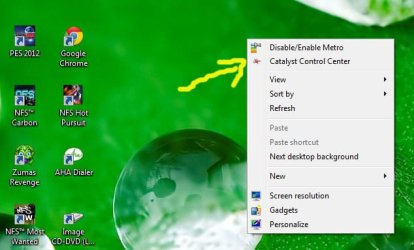
If you properly installed ATI drivers and catalyst control center, then you can try detecting it from there.
start from desktop menu option as seen here.

Menu option.jpg

I assume you already tried to swap those monitor between primary and secondary.
 

My Computers My Computers

  • At a glance

    Windows 11 PrereleaseCORE i5 1040016GBGTX 750Ti
    Computer type
    PC/Desktop
    Computer Manufacturer/Model Number
    MSI
    OS
    Windows 11 Prerelease
    CPU
    CORE i5 10400
    Motherboard
    MSI H510M Pro
    Memory
    16GB
    Graphics Card(s)
    GTX 750Ti
    Sound Card
    Realtek HD Integrated
    Monitor(s) Displays
    Samsung Curved 24"; Samsung TV 50"
    Screen Resolution
    1920 x 1080
    Hard Drives
    Vi-Gen NVMe 256GB
    WD 3 TB
    Seagate 2 TB
    Seagate 4TB
    PSU
    Power Striker
    Case
    VBR
    Cooling
    Conventional
    Keyboard
    Logitech Wireless
    Mouse
    Logitech Wireless
    Internet Speed
    2MBPs
  • At a glance

    BigSurCore i58 GB
    Computer type
    Laptop
    System Manufacturer/Model Number
    Apple MacBook
    OS
    BigSur
    CPU
    Core i5
    Memory
    8 GB
    Monitor(s) Displays
    13 "
    Screen Resolution
    1366 x 768
    Hard Drives
    SSD 256 GB
Then DVI to VGA works ok on another computer.
And yes, I swapped the monitors.

I have attached the control center I use with my GPU card.

Could I ask you to guide me through the control center to try if I have done it correct ?
 

Attachments

  • Catalyst.jpg
    Catalyst.jpg
    51.1 KB · Views: 38

My Computer My Computer

At a glance

Windows 7 UltimateE73004gNVIDIA GeForce 7300 LE
Computer type
PC/Desktop
Computer Manufacturer/Model Number
Homemade
OS
Windows 7 Ultimate
CPU
E7300
Motherboard
ASUS P5Q DeLuxe
Memory
4g
Graphics Card(s)
NVIDIA GeForce 7300 LE
Sound Card
N/A
Monitor(s) Displays
Acer
Screen Resolution
1600x1200
Hard Drives
Samsung HD503HI ATA Device
PSU
Seasonic
Case
ATX
Cooling
FAN
Keyboard
Logitech
Mouse
HP
Internet Speed
20/2
Antivirus
MSE
Browser
IE9, Chrome, Firefox
Before we go there, I might have to ask you if you were able to rule out the connection problem.
As you already mention that it didn't work though you connected the new monitor alone (replacing the older monitor) to the D-Sub (primary VGA socket). In a normal condition, it didn't give you a screen, then probably you should check out with the VGA cable first by alternating it with the old cable.

If you managed to get the screen by then. Connect both of it.

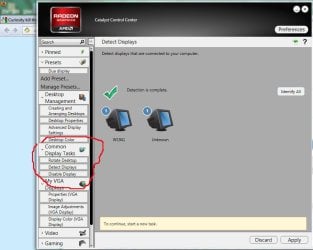
On the Catalyst start screen, you can hit the menu [Common Display Task] -> [Detect Display]
When the detection done you will see this,
Task.jpg

If it shows you both monitor there then you can click [apply]

The rest of the setting for dual display then yours. ;)

Cheers
 

My Computers My Computers

  • At a glance

    Windows 11 PrereleaseCORE i5 1040016GBGTX 750Ti
    Computer type
    PC/Desktop
    Computer Manufacturer/Model Number
    MSI
    OS
    Windows 11 Prerelease
    CPU
    CORE i5 10400
    Motherboard
    MSI H510M Pro
    Memory
    16GB
    Graphics Card(s)
    GTX 750Ti
    Sound Card
    Realtek HD Integrated
    Monitor(s) Displays
    Samsung Curved 24"; Samsung TV 50"
    Screen Resolution
    1920 x 1080
    Hard Drives
    Vi-Gen NVMe 256GB
    WD 3 TB
    Seagate 2 TB
    Seagate 4TB
    PSU
    Power Striker
    Case
    VBR
    Cooling
    Conventional
    Keyboard
    Logitech Wireless
    Mouse
    Logitech Wireless
    Internet Speed
    2MBPs
  • At a glance

    BigSurCore i58 GB
    Computer type
    Laptop
    System Manufacturer/Model Number
    Apple MacBook
    OS
    BigSur
    CPU
    Core i5
    Memory
    8 GB
    Monitor(s) Displays
    13 "
    Screen Resolution
    1366 x 768
    Hard Drives
    SSD 256 GB
@Kevin Ismail

Many thanks for your reply.

To recapitulate.

I tested both monitors via the DVI to VGA adapter. Even with low resolution, none of them worked in that set up.

Both monitors works if connected to the VGA output of the graphics card.

Via the same DVI to VGA, both monitors are working on another computer with a different graphics card than on the computer in focus.

I just tested with detection of the second monitor, but as it didn't worked with any of the monitors direct connected, it doesn't work.

I presume a defective card ?, what say ?
 

Attachments

  • detection.jpg
    detection.jpg
    60.9 KB · Views: 29

My Computer My Computer

At a glance

Windows 7 UltimateE73004gNVIDIA GeForce 7300 LE
Computer type
PC/Desktop
Computer Manufacturer/Model Number
Homemade
OS
Windows 7 Ultimate
CPU
E7300
Motherboard
ASUS P5Q DeLuxe
Memory
4g
Graphics Card(s)
NVIDIA GeForce 7300 LE
Sound Card
N/A
Monitor(s) Displays
Acer
Screen Resolution
1600x1200
Hard Drives
Samsung HD503HI ATA Device
PSU
Seasonic
Case
ATX
Cooling
FAN
Keyboard
Logitech
Mouse
HP
Internet Speed
20/2
Antivirus
MSE
Browser
IE9, Chrome, Firefox
Darkhorse.

Well, I think we better find another way around to find the problem before dismissing the card. ;)
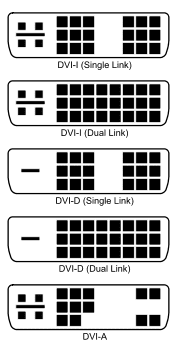
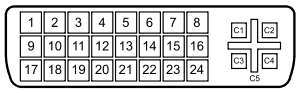
There are few more type of DVI to VGA adapter as you may see here,

181px-DVI_Connector_Types.svg.png 300px-DVI_Connector_Pinout.svg.png

There is further information about it
Digital Visual Interface - Wikipedia, the free encyclopedia
Even though I have no more clue on it, can you try to find other type of it, though the adapter in hand proven work with other VGA card.

It worth to try I think? :)
 

My Computers My Computers

  • At a glance

    Windows 11 PrereleaseCORE i5 1040016GBGTX 750Ti
    Computer type
    PC/Desktop
    Computer Manufacturer/Model Number
    MSI
    OS
    Windows 11 Prerelease
    CPU
    CORE i5 10400
    Motherboard
    MSI H510M Pro
    Memory
    16GB
    Graphics Card(s)
    GTX 750Ti
    Sound Card
    Realtek HD Integrated
    Monitor(s) Displays
    Samsung Curved 24"; Samsung TV 50"
    Screen Resolution
    1920 x 1080
    Hard Drives
    Vi-Gen NVMe 256GB
    WD 3 TB
    Seagate 2 TB
    Seagate 4TB
    PSU
    Power Striker
    Case
    VBR
    Cooling
    Conventional
    Keyboard
    Logitech Wireless
    Mouse
    Logitech Wireless
    Internet Speed
    2MBPs
  • At a glance

    BigSurCore i58 GB
    Computer type
    Laptop
    System Manufacturer/Model Number
    Apple MacBook
    OS
    BigSur
    CPU
    Core i5
    Memory
    8 GB
    Monitor(s) Displays
    13 "
    Screen Resolution
    1366 x 768
    Hard Drives
    SSD 256 GB
@Kevin Ismail

Thanks for your reply. I have the DVI-I (Dual Link) DVI to VGA adapter.

The graphics card has been sent to the retailer today.
 

My Computer My Computer

At a glance

Windows 7 UltimateE73004gNVIDIA GeForce 7300 LE
Computer type
PC/Desktop
Computer Manufacturer/Model Number
Homemade
OS
Windows 7 Ultimate
CPU
E7300
Motherboard
ASUS P5Q DeLuxe
Memory
4g
Graphics Card(s)
NVIDIA GeForce 7300 LE
Sound Card
N/A
Monitor(s) Displays
Acer
Screen Resolution
1600x1200
Hard Drives
Samsung HD503HI ATA Device
PSU
Seasonic
Case
ATX
Cooling
FAN
Keyboard
Logitech
Mouse
HP
Internet Speed
20/2
Antivirus
MSE
Browser
IE9, Chrome, Firefox
On the monitor, itself, they may be a button to select analog/digital input. Have you tried that? I know for one of my computers (using vga/dvi adapter) this was an issue.
 

My Computer My Computer

At a glance

Systems 1 and 2: Windows 7 Enterprise x64, Wi...System 1: i7 [email protected], System 2: AMD FX-41...System 1: 8GB System 2: 8GBSystem 1: ATI FirePro V4800 System 2: Radeon ...
Computer Manufacturer/Model Number
Dell and Custom
OS
Systems 1 and 2: Windows 7 Enterprise x64, Win 8 Developer
CPU
System 1: i7 [email protected], System 2: AMD FX-4100 Zambezi 3.6G
Motherboard
System 1:Dell 06NWYK System 2: ASUS M5A97 AM3+
Memory
System 1: 8GB System 2: 8GB
Graphics Card(s)
System 1: ATI FirePro V4800 System 2: Radeon HD 6850
Sound Card
System 1: onboard System 2: onboard
Monitor(s) Displays
System1: Viewsonic HDMI 24"
Screen Resolution
System 1: 1920x1080 System 2: 1920x1080
Hard Drives
System 1: Mirrored .5B drives System 2: Seagate Barracuda ST1000DM003 1TB 7200 RPM 64MB Cache SATA 6.0Gb/s
Case
System 1: Dell System 2: Cooler Master
Internet Speed
10 MBPS
@Lemur

Thanks for your input.
Unfortunately on my monitor this is not present.
 

My Computer My Computer

At a glance

Windows 7 UltimateE73004gNVIDIA GeForce 7300 LE
Computer type
PC/Desktop
Computer Manufacturer/Model Number
Homemade
OS
Windows 7 Ultimate
CPU
E7300
Motherboard
ASUS P5Q DeLuxe
Memory
4g
Graphics Card(s)
NVIDIA GeForce 7300 LE
Sound Card
N/A
Monitor(s) Displays
Acer
Screen Resolution
1600x1200
Hard Drives
Samsung HD503HI ATA Device
PSU
Seasonic
Case
ATX
Cooling
FAN
Keyboard
Logitech
Mouse
HP
Internet Speed
20/2
Antivirus
MSE
Browser
IE9, Chrome, Firefox
@Kevin Ismail

Thanks for your reply. I have the DVI-I (Dual Link) DVI to VGA adapter.

The graphics card has been sent to the retailer today.

Good. Hope it solves the problem. Post me when the replacement card do the job.;)
 

My Computers My Computers

  • At a glance

    Windows 11 PrereleaseCORE i5 1040016GBGTX 750Ti
    Computer type
    PC/Desktop
    Computer Manufacturer/Model Number
    MSI
    OS
    Windows 11 Prerelease
    CPU
    CORE i5 10400
    Motherboard
    MSI H510M Pro
    Memory
    16GB
    Graphics Card(s)
    GTX 750Ti
    Sound Card
    Realtek HD Integrated
    Monitor(s) Displays
    Samsung Curved 24"; Samsung TV 50"
    Screen Resolution
    1920 x 1080
    Hard Drives
    Vi-Gen NVMe 256GB
    WD 3 TB
    Seagate 2 TB
    Seagate 4TB
    PSU
    Power Striker
    Case
    VBR
    Cooling
    Conventional
    Keyboard
    Logitech Wireless
    Mouse
    Logitech Wireless
    Internet Speed
    2MBPs
  • At a glance

    BigSurCore i58 GB
    Computer type
    Laptop
    System Manufacturer/Model Number
    Apple MacBook
    OS
    BigSur
    CPU
    Core i5
    Memory
    8 GB
    Monitor(s) Displays
    13 "
    Screen Resolution
    1366 x 768
    Hard Drives
    SSD 256 GB
I will keep you informed :)
 

My Computer My Computer

At a glance

Windows 7 UltimateE73004gNVIDIA GeForce 7300 LE
Computer type
PC/Desktop
Computer Manufacturer/Model Number
Homemade
OS
Windows 7 Ultimate
CPU
E7300
Motherboard
ASUS P5Q DeLuxe
Memory
4g
Graphics Card(s)
NVIDIA GeForce 7300 LE
Sound Card
N/A
Monitor(s) Displays
Acer
Screen Resolution
1600x1200
Hard Drives
Samsung HD503HI ATA Device
PSU
Seasonic
Case
ATX
Cooling
FAN
Keyboard
Logitech
Mouse
HP
Internet Speed
20/2
Antivirus
MSE
Browser
IE9, Chrome, Firefox
Hi again.

The issue is, that HD 5000 and 6000 is not having analog signals in the DVI connector.
I have mailed with PowerColor in Taiwan, that produces the board.

A card from the 4000 series should be the solution.
 

My Computer My Computer

At a glance

Windows 7 UltimateE73004gNVIDIA GeForce 7300 LE
Computer type
PC/Desktop
Computer Manufacturer/Model Number
Homemade
OS
Windows 7 Ultimate
CPU
E7300
Motherboard
ASUS P5Q DeLuxe
Memory
4g
Graphics Card(s)
NVIDIA GeForce 7300 LE
Sound Card
N/A
Monitor(s) Displays
Acer
Screen Resolution
1600x1200
Hard Drives
Samsung HD503HI ATA Device
PSU
Seasonic
Case
ATX
Cooling
FAN
Keyboard
Logitech
Mouse
HP
Internet Speed
20/2
Antivirus
MSE
Browser
IE9, Chrome, Firefox
@Kevin Ismail

Hi again.

I have installed a HD4650 Graphic card now.
Now the wanted monitors are working :D

There is no analog outputs in series 4000 and 6000
Only in 4000

Thanks to all here, that has helped me.
 

My Computer My Computer

At a glance

Windows 7 UltimateE73004gNVIDIA GeForce 7300 LE
Computer type
PC/Desktop
Computer Manufacturer/Model Number
Homemade
OS
Windows 7 Ultimate
CPU
E7300
Motherboard
ASUS P5Q DeLuxe
Memory
4g
Graphics Card(s)
NVIDIA GeForce 7300 LE
Sound Card
N/A
Monitor(s) Displays
Acer
Screen Resolution
1600x1200
Hard Drives
Samsung HD503HI ATA Device
PSU
Seasonic
Case
ATX
Cooling
FAN
Keyboard
Logitech
Mouse
HP
Internet Speed
20/2
Antivirus
MSE
Browser
IE9, Chrome, Firefox
Back
Top