Unable to assign drive letter to newly installed SATA drive.

azbiker

New member
Local time
8:49 PM
Messages
7
I'm playing with a recently retired server running 32bit Windows 7 Professional. Originally it was configured as RAID 0 with 5 SATA drives. Those drives are gone but I want to install a spare 2TB SATA drive that I have. Using the RAID Management software I have created the drive and it shows the correct configured capacity. I initialized the disk with Disk Management and it lists the disk as online but it doesn't show up in the volume list with a drive letter. My intention is to use the 2TB drive as media storage. Other than combing RAID and Windows 7, what am I doing wrong? Am I better off reformatting everything and reloading Windows?
 

My Computer My Computer

At a glance

Windows 7 Professional SP1 32bit
OS
Windows 7 Professional SP1 32bit
I had the same problem this week with a drive like that. Have you tried to reformat it? Also make sure your system can handle a 2TB drive.
 

My Computer My Computer

At a glance

Mac OS X 10.9Intel i7 Ivy Bridge (2.3Ghz)8GB's DDR3 (1333 MHz)Intel 4000 (1024MB)
Computer type
PC/Desktop
Computer Manufacturer/Model Number
Apple 2012 Mac Mini
OS
Mac OS X 10.9
CPU
Intel i7 Ivy Bridge (2.3Ghz)
Motherboard
Apple
Memory
8GB's DDR3 (1333 MHz)
Graphics Card(s)
Intel 4000 (1024MB)
Monitor(s) Displays
HP 23inch LED
Screen Resolution
1920 x 1080
Hard Drives
1TB
Case
Mac Mini Case
Keyboard
Mac Logitech Solar Powered
Mouse
Magic Touch Pad
Internet Speed
About 3.00 MBps
Browser
Chrome

My Computer My Computer

At a glance

Windows 7 Ultimate SP1 64-BitIntel Core i7 870 @ 2.93GHz8Gb Dual-Channel DDR3 @ 664MHznVidia GeForce GTX 460 1024MB dedicated RAM
Computer Manufacturer/Model Number
HP Pavilion Elite 495UK
OS
Windows 7 Ultimate SP1 64-Bit
CPU
Intel Core i7 870 @ 2.93GHz
Motherboard
MSI 2A9C (CPU1)
Memory
8Gb Dual-Channel DDR3 @ 664MHz
Graphics Card(s)
nVidia GeForce GTX 460 1024MB dedicated RAM
Sound Card
Realtek HD Audio
Monitor(s) Displays
HP2310i
Screen Resolution
1920 x 1080
Hard Drives
1x1954GB Hitachi HDS22020ALA 330 (RAID), 1x1954GB Hitachi External for backup and storage
PSU
460W
Case
HP Elite
Cooling
Air cooled
Keyboard
Logitech K750 solar-powered keyboard
Mouse
Logitech Wireless M180 mouse
Internet Speed
2Mb
Other Info
Pure Avanti Flow Internet Radio with iPod Dock, 64Gb iPod, HP USB Speakers, Sony MDR-V500 Headphones, Sony Vaio F-Series Laptop
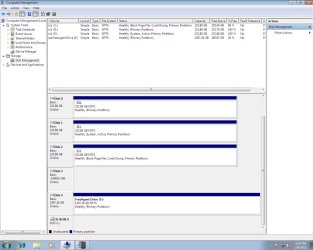
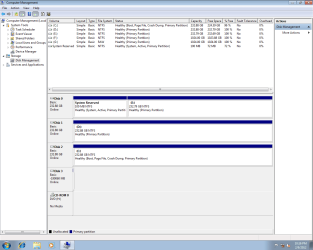
Here are some screenshots. Disk Management shows it as Disk 3: Online, but it doesn't show up on the volume list. Also, no blue line across the top of a white box next to it. I must be a newbie as I don't know what that signifies. I'm also attaching a screenshot from the RAID management software. I deleted all the old drive letters in the registry that were associated with the drives that were removed from this server and installed in the one that replaced it. If it makes a difference, the drive in question was brand new, still factory sealed. Another odd thing that I just noticed: MegaRAID thinks my OS is Vista....

disk_mamagement.jpg

raid management.jpg
 

My Computer My Computer

At a glance

Windows 7 Professional SP1 32bit
OS
Windows 7 Professional SP1 32bit
Try rightclicking on the panel where it says DISK3 to initialize the HD.

Why are your System Active boot files for C on the preceding E? Is this a Dual Boot?
 
I'm not sure why things are set up the way that they are. This is about a 1.5 year old server that has had several people working on it before it was retired. There was an OS drive failure amongst other problems. I'm just going to reload Windows.
 

My Computer My Computer

At a glance

Windows 7 Professional SP1 32bit
OS
Windows 7 Professional SP1 32bit
Read through that link a bit ago. Thoughts on deleting the drives first instead of just formatting during the install?
 

My Computer My Computer

At a glance

Windows 7 Professional SP1 32bit
OS
Windows 7 Professional SP1 32bit
Fun continues. I did a clean install of Windows. I deleted all the drives in the process and then formatted them (Step 8 of the clean install instructions). I partition the 2TB SATA drive into 2 equal drives. Once Windows was loaded I all but the C drive were listed as Raw format in Disk Management. I was able to properly format them into NTFS except for the 2nd partition of the 2TB drive. It errors out and remains Raw.
 

My Computer My Computer

At a glance

Windows 7 Professional SP1 32bit
OS
Windows 7 Professional SP1 32bit
Screenshot if it helps. I'll look into Partition Wizard.

reformatted.png
 

My Computer My Computer

At a glance

Windows 7 Professional SP1 32bit
OS
Windows 7 Professional SP1 32bit
When you delete all partitions on multiple HD's but install on DISK2 it places the System boot files into a System Reserved Partition on the first HD. This is why I suggested you unplug all other HD's.

I would move the target HD to Disk0 slot, unplug all others and clean reinstall.
 
And then do a secure erase on all those other disks because he has a real mess on his hands as it is.
 

My Computer My Computer

At a glance

W7 Pro, W7 Ult, W7 EnterpriseE1730, Q8400, Q9550, i7-Q3610M, i7-3770K, others
Computer Manufacturer/Model Number
Many. Asus, Asrock, Dell, HP, GigaByte, Jetway
OS
W7 Pro, W7 Ult, W7 Enterprise
CPU
E1730, Q8400, Q9550, i7-Q3610M, i7-3770K, others
Other Info
Untangle x64 on Asrock/Intel with Intel NICs
Partition Wizard did the trick. Thanks for the advice.
 

My Computer My Computer

At a glance

Windows 7 Professional SP1 32bit
OS
Windows 7 Professional SP1 32bit
Back
Top