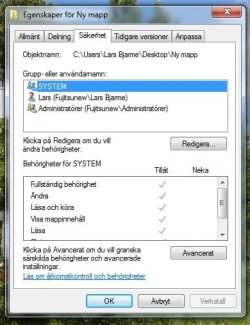
I have a problem accessing files on my D-Link DNS-320 from my desktop Windows 7 Professional, Service Pack 1, 64 bits.
My WLAN consists of two laptops with Windows XP SP 3 and a desktop with Windows 7 Professional, 64 bits. All three are members of the same work group and are visible to each other.
My XP laptops can access, add and delete files and folders on the DNS-320 without problems.
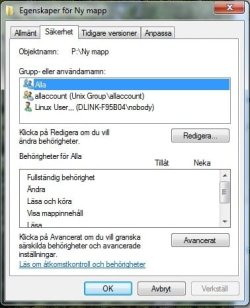
My Windows 7 desktop can see the volumes and the folders and files in the volumes, but I cannot open the files. When I try to add or delete files, like a JPEG picture, Windows Explorer often hangs and has to restart. I can, however, see the properties for files and folders, but here is the strange thing:
The group and user names are listed in the properties as:
All
Allaccount (Unix Group\ Allaccount)
Linux user…(DLINK-F95B04\nobody)
None of them has any access privileges.
I am logged in as administrator and it is possible to delete the users/group and add new ones and tick in full access, but I cannot save the settings. Access is denied and the list returns to the old list.
I do not have Unix or Linux on any of my computers. So why does the DNS-320 create these users and groups? Is it in any way pre-programmed for Linux/Unix? If so, is there any way I can work around this? The DNS-320 works well with my Windows XP laptops, so why not with my Windows 7 desktop?
My WLAN consists of two laptops with Windows XP SP 3 and a desktop with Windows 7 Professional, 64 bits. All three are members of the same work group and are visible to each other.
My XP laptops can access, add and delete files and folders on the DNS-320 without problems.
My Windows 7 desktop can see the volumes and the folders and files in the volumes, but I cannot open the files. When I try to add or delete files, like a JPEG picture, Windows Explorer often hangs and has to restart. I can, however, see the properties for files and folders, but here is the strange thing:
The group and user names are listed in the properties as:
All
Allaccount (Unix Group\ Allaccount)
Linux user…(DLINK-F95B04\nobody)
None of them has any access privileges.
I am logged in as administrator and it is possible to delete the users/group and add new ones and tick in full access, but I cannot save the settings. Access is denied and the list returns to the old list.
I do not have Unix or Linux on any of my computers. So why does the DNS-320 create these users and groups? Is it in any way pre-programmed for Linux/Unix? If so, is there any way I can work around this? The DNS-320 works well with my Windows XP laptops, so why not with my Windows 7 desktop?
My Computer
At a glance
Windows Premium Service Pack 1 64 bits
- Computer Manufacturer/Model Number
- Fujitsu ESPRIMO P2560
- OS
- Windows Premium Service Pack 1 64 bits