HP dv6-2170us will not play sound from either onboard speakers OR

Runicsepheroth

New member
^ headphones, but will through HDMI
 

My Computer

Computer Manufacturer/Model Number
Acer Apire 5810tz
OS
Windows 7 Professional 32bit
CPU
Intel U4100 @ 1.3ghz dual
Memory
4gb
Graphics Card(s)
Intel GMA 4500MHD
Screen Resolution
1366x768
Hard Drives
120gb SATA
Mouse
Swiss Gear Spyder
Internet Speed
approx. 54mbps
Other Info
Laptop
Right click the speaker icon in the lower right, then select Playback devices from the menu. When the small window pops up, see if there's a green check mark on Speakers. If not, click on Speakers then click on Set as Default. Click Apply, then OK.
 

My Computer

Computer type
PC/Desktop
Computer Manufacturer/Model Number
Built 2/11/2011
OS
Windows 7 Pro-x64
CPU
i7-2600 3.4GHz - 3.8GHz Turbo
Motherboard
Intel DH67BL-B3
Memory
8Gb - 2x4GB, Muskin 991770 PC3-1333
Graphics Card(s)
Integrated Intel HD 2000
Sound Card
Integrated Intel 10.1 HD, RealTek ALC892
Monitor(s) Displays
Asus LCD VH222H, Haier HL24XSL2a
Screen Resolution
1920x1080, 1920x1080
Hard Drives
Crucial SSD C300-128Gb,
Western Digital WD5002AALX - 500Gb,
Western Digital WD7501AALS - 750Gb
PSU
Seasonic 650W 80+ Gold Modular
Case
Rosewill Defender
Cooling
Stock CPU, Four 120mm case fans, PCH fan added
Keyboard
Logitech EX100 Y-RBH94 Wireless
Mouse
Logitech EX100 M-RCE95 Wireless
Internet Speed
3.0/1.5 Mbs
Antivirus
Microsoft Security Essentials
Browser
Microsoft Internet Explorer 11
Other Info
Antec Veris Premier-Multimedia IR Station,
Cyber Accoustics-3602 Speakers,
AFT XM-5U Card Reader,
Hauppauge TV-HVR-2250,
Sony LX300 USB Turntable
i did that and it registers as having sound coming through them and there's a green checkmark next to it, but still no sound through headphones OR onboard speakers
 

My Computer

Computer Manufacturer/Model Number
Acer Apire 5810tz
OS
Windows 7 Professional 32bit
CPU
Intel U4100 @ 1.3ghz dual
Memory
4gb
Graphics Card(s)
Intel GMA 4500MHD
Screen Resolution
1366x768
Hard Drives
120gb SATA
Mouse
Swiss Gear Spyder
Internet Speed
approx. 54mbps
Other Info
Laptop
Are your sound levels turned up?
 

My Computer

Computer type
PC/Desktop
Computer Manufacturer/Model Number
Built 2/11/2011
OS
Windows 7 Pro-x64
CPU
i7-2600 3.4GHz - 3.8GHz Turbo
Motherboard
Intel DH67BL-B3
Memory
8Gb - 2x4GB, Muskin 991770 PC3-1333
Graphics Card(s)
Integrated Intel HD 2000
Sound Card
Integrated Intel 10.1 HD, RealTek ALC892
Monitor(s) Displays
Asus LCD VH222H, Haier HL24XSL2a
Screen Resolution
1920x1080, 1920x1080
Hard Drives
Crucial SSD C300-128Gb,
Western Digital WD5002AALX - 500Gb,
Western Digital WD7501AALS - 750Gb
PSU
Seasonic 650W 80+ Gold Modular
Case
Rosewill Defender
Cooling
Stock CPU, Four 120mm case fans, PCH fan added
Keyboard
Logitech EX100 Y-RBH94 Wireless
Mouse
Logitech EX100 M-RCE95 Wireless
Internet Speed
3.0/1.5 Mbs
Antivirus
Microsoft Security Essentials
Browser
Microsoft Internet Explorer 11
Other Info
Antec Veris Premier-Multimedia IR Station,
Cyber Accoustics-3602 Speakers,
AFT XM-5U Card Reader,
Hauppauge TV-HVR-2250,
Sony LX300 USB Turntable
On the laptop check some of the FN keys to make sure that the sound is not turned off or muted. The numerical keys accross the top. I know with my laptop to adjust the volume I have to hit the FN key plus the speaker up key to increase the volume

Note: the key I like in particular is the FN+touchpad symbol. This temporally disables the touch pad so when my thumbs accidentally hit the touch pad while typing my mouse pointer doesn't go berserk and the screen doesn't shift or get deleted.
 

My Computer

Computer Manufacturer/Model Number
Custom built
OS
Windows 7 Ultimate 64 bit
CPU
AMD Phenom II X4 965 Black Edition
Motherboard
Gigabyte GA-MA790X-DS4
Memory
GSkill 4 X 2 GB PC 8500
Graphics Card(s)
XFX Radeon HD 6790 D
Sound Card
On board RealTek HD
Monitor(s) Displays
Dual monitors:Samsung SyncMaster S20B300
Screen Resolution
1600 X 900
Hard Drives
Seagate Barracuda 1TB (primary)
Seagate Barracuda 2 X 320 GB
PSU
Ultra X4 750 watt fully modular
Case
Thermaltake Overseer RX 1 full tower
Cooling
Core-Contact 92 mm CPU Cooler
Keyboard
Logitech G510
Mouse
Razor DeathAdder
Internet Speed
50/5 Mbps UL/DL
Other Info
Optical: Super Muliti DVD burner w/lightscribe, Hauppauge WinTV HVR-1800
  • Like
Reactions: JMH
the volume is maxed out and im listening to the H2 theme through a monitor plugged into via hdmi and there is no FN volume options, just a slider bar above the keyboard area
 

My Computer

Computer Manufacturer/Model Number
Acer Apire 5810tz
OS
Windows 7 Professional 32bit
CPU
Intel U4100 @ 1.3ghz dual
Memory
4gb
Graphics Card(s)
Intel GMA 4500MHD
Screen Resolution
1366x768
Hard Drives
120gb SATA
Mouse
Swiss Gear Spyder
Internet Speed
approx. 54mbps
Other Info
Laptop
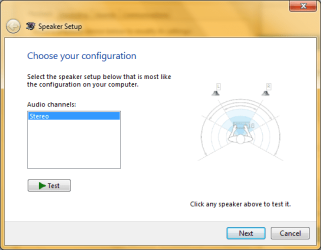
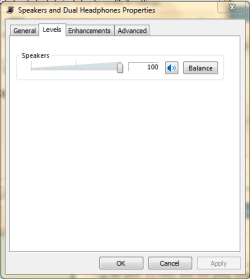
Post snips of your Speaker Properties under the Level tab and the first window under Speaker Configuration.
 

My Computer

Computer type
PC/Desktop
Computer Manufacturer/Model Number
Built 2/11/2011
OS
Windows 7 Pro-x64
CPU
i7-2600 3.4GHz - 3.8GHz Turbo
Motherboard
Intel DH67BL-B3
Memory
8Gb - 2x4GB, Muskin 991770 PC3-1333
Graphics Card(s)
Integrated Intel HD 2000
Sound Card
Integrated Intel 10.1 HD, RealTek ALC892
Monitor(s) Displays
Asus LCD VH222H, Haier HL24XSL2a
Screen Resolution
1920x1080, 1920x1080
Hard Drives
Crucial SSD C300-128Gb,
Western Digital WD5002AALX - 500Gb,
Western Digital WD7501AALS - 750Gb
PSU
Seasonic 650W 80+ Gold Modular
Case
Rosewill Defender
Cooling
Stock CPU, Four 120mm case fans, PCH fan added
Keyboard
Logitech EX100 Y-RBH94 Wireless
Mouse
Logitech EX100 M-RCE95 Wireless
Internet Speed
3.0/1.5 Mbs
Antivirus
Microsoft Security Essentials
Browser
Microsoft Internet Explorer 11
Other Info
Antec Veris Premier-Multimedia IR Station,
Cyber Accoustics-3602 Speakers,
AFT XM-5U Card Reader,
Hauppauge TV-HVR-2250,
Sony LX300 USB Turntable
All laptops have the FN key. It's generally located on the left hand side next to the windows key and Alt key. Then there are combinations with that FN Key that correspond to actions. For example...the FN+f6 key on my laptop will turn off the sound. Some of those f-keys (the top row of keys on your laptops keyboard) will have symbols on them.

If you're hearing sound from the external monitor through the HDMI cable and not through the laptop...to me that's a good indicator that the sound has been muted or turned off on the laptop. Or you are missing your sound driver. You can download all your latest drivers from HP's website.

Software & Driver Downloads HP Pavilion dv6-2170us Entertainment Notebook PC - HP Customer Care (United States - English)
 

My Computer

Computer Manufacturer/Model Number
Custom built
OS
Windows 7 Ultimate 64 bit
CPU
AMD Phenom II X4 965 Black Edition
Motherboard
Gigabyte GA-MA790X-DS4
Memory
GSkill 4 X 2 GB PC 8500
Graphics Card(s)
XFX Radeon HD 6790 D
Sound Card
On board RealTek HD
Monitor(s) Displays
Dual monitors:Samsung SyncMaster S20B300
Screen Resolution
1600 X 900
Hard Drives
Seagate Barracuda 1TB (primary)
Seagate Barracuda 2 X 320 GB
PSU
Ultra X4 750 watt fully modular
Case
Thermaltake Overseer RX 1 full tower
Cooling
Core-Contact 92 mm CPU Cooler
Keyboard
Logitech G510
Mouse
Razor DeathAdder
Internet Speed
50/5 Mbps UL/DL
Other Info
Optical: Super Muliti DVD burner w/lightscribe, Hauppauge WinTV HVR-1800
I said that the volume is not controlled by the FN key, not that i dont have one and that it is controlled by a touch button for mute and a touch slider thing for volume+-
 

My Computer

Computer Manufacturer/Model Number
Acer Apire 5810tz
OS
Windows 7 Professional 32bit
CPU
Intel U4100 @ 1.3ghz dual
Memory
4gb
Graphics Card(s)
Intel GMA 4500MHD
Screen Resolution
1366x768
Hard Drives
120gb SATA
Mouse
Swiss Gear Spyder
Internet Speed
approx. 54mbps
Other Info
Laptop
ConfigSnip.PNG
LevelSnip.PNG
 

My Computer

Computer Manufacturer/Model Number
Acer Apire 5810tz
OS
Windows 7 Professional 32bit
CPU
Intel U4100 @ 1.3ghz dual
Memory
4gb
Graphics Card(s)
Intel GMA 4500MHD
Screen Resolution
1366x768
Hard Drives
120gb SATA
Mouse
Swiss Gear Spyder
Internet Speed
approx. 54mbps
Other Info
Laptop
Back
Top