Solved Enable transparancey Box is gone

mike6623

New member
Okay, I unchecked the enable transparency box, now it is gone, and the themes are greyed out. I resarted all services stopped and ran a scan now, and trouble shooter. Nothing was found. I really do not want to do a reinstall since I will lose my software. I didn't delete or uninstall anything. As I said, when I first went to personalization, there was a box that was checked that said "enable transparency" I unchecked it. Now Everything looks kind of like XP and that box is gone, so I cannot enable transparency.

Any and all help would be awesome. this forum has been much friendlier than other microsoft forums. Really rude!
 

My Computer

Computer Manufacturer/Model Number
HP
OS
Windows 8 Pro
Memory
8gb
Monitor(s) Displays
23 inch Acer
Check whether you chose Aero Themes in Personalization window?
 

My Computer

Computer Manufacturer/Model Number
Compaq Presario CQ61
OS
Windows 7 Home Premium Service Pack 1 x64
CPU
Intel(R) Core(TM)2 Duo CPU T6400 @ 2.00GHz
Memory
3GB
Graphics Card(s)
NVIDIA GeForce G 103M; Codename: G98
Screen Resolution
1366x768
Check whether you chose Aero Themes in Personalization window?
I cannot, themes are greyed out. I didn't delete or uninstall anything, I just unchecked that box, now it is gone and my professional lools like XP
 

My Computer

Computer Manufacturer/Model Number
HP
OS
Windows 8 Pro
Memory
8gb
Monitor(s) Displays
23 inch Acer

My Computer

Computer type
PC/Desktop
Computer Manufacturer/Model Number
Self assembled
OS
Windows 10 Home 64Bit
CPU
Intel Core i5 10400 @ 2.90GHz
Motherboard
Intel Corporation DG41WV (PROCESSOR)
Memory
8.00GB Single-Channel Unknown @ 1329MHz (16-20-20-38)
Sound Card
Realtek High Definition Audio
Monitor(s) Displays
DELL E170S
Screen Resolution
1280x1024 pixels
Hard Drives
931GB TOSHIBA DT01ACA100 (SATA)
238GB TEAM TM8PS7256G (SATA SSD)
Case
Nothing Fancy
Cooling
Fans
Keyboard
A4 Tech Co LTD
Mouse
A4 Tech Co Ltd/Logitech
Internet Speed
25 Mbps
could you post a screen shot of how your desktop looks now?
 

My Computer

Computer type
PC/Desktop
Computer Manufacturer/Model Number
Self assembled
OS
Windows 10 Home 64Bit
CPU
Intel Core i5 10400 @ 2.90GHz
Motherboard
Intel Corporation DG41WV (PROCESSOR)
Memory
8.00GB Single-Channel Unknown @ 1329MHz (16-20-20-38)
Sound Card
Realtek High Definition Audio
Monitor(s) Displays
DELL E170S
Screen Resolution
1280x1024 pixels
Hard Drives
931GB TOSHIBA DT01ACA100 (SATA)
238GB TEAM TM8PS7256G (SATA SSD)
Case
Nothing Fancy
Cooling
Fans
Keyboard
A4 Tech Co LTD
Mouse
A4 Tech Co Ltd/Logitech
Internet Speed
25 Mbps
could you post a screen shot of how your desktop looks now?
Sorry, I am at work until 4pm eastern time. The task bar still peeks up, but it is greyish/white. Everything, explorer windows as well all look like XP. There is no option anywhere to enable transparency. I am dying to get this fixed, and I appreciate all the help thus far. It's amazing I am having such a hard time with this. It there a way to revert back to default settings? I do not want to have to restore the computer, I didn't delete or uninstall anything and I can't afford to lose all my software
 

My Computer

Computer Manufacturer/Model Number
HP
OS
Windows 8 Pro
Memory
8gb
Monitor(s) Displays
23 inch Acer
Is there a cheap verified service that could remote into my pc to try and show me what to do?
 

My Computer

Computer Manufacturer/Model Number
HP
OS
Windows 8 Pro
Memory
8gb
Monitor(s) Displays
23 inch Acer
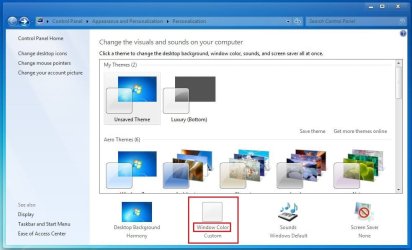
Click on the link indicated in the snip in your computer ....
Capture.JPG

And post the screenshot of the resulting window.

The screenshot will help us to understand the situation better.
 

My Computer

Computer type
PC/Desktop
Computer Manufacturer/Model Number
Self Assembled
OS
Microsoft Windows 10 Pro Insider Preview 64-bit
CPU
Intel(R) Core(TM) i3-4130 CPU @ 3.40GHz
Motherboard
Gigabyte Technology Co., Ltd. B85M-D3H
Memory
Corsair Vengence 4GB x2 (8.00GB Dual-Channel DDR3 @ 798MHz)
Graphics Card(s)
2047MB GeForce GTS 450 (ZOTAC International)
Sound Card
Onboard (Realtek High Definition Audio)
Monitor(s) Displays
LG Flatron E2040T
Screen Resolution
1600x900
Hard Drives
Western Digital 1 TB
Seagate 500 GB
PSU
Corsair VS550
Case
Cooler Master K380
Cooling
Cooler Master Seidon 120V Plus
Keyboard
Logitech MK260r
Mouse
Logitech MK260r
Internet Speed
PMPL Broadband
Antivirus
Windows Defender + MBAM
Browser
Firefox
Other Info
Dell Studio 15" Laptop
Click on the link indicated in the snip in your computer ....
View attachment 199286

And post the screenshot of the resulting window.

The screenshot will help us to understand the situation better.
I didn't have that option, it was greyed out. Will you be on here at about 430pm eastern time? Then, I could do whatever you want. I really appreciate all of the help. I also am getting a notificatio.

You know what, I do have a tiny pic on my phone that will show the task bar, give me a minute
 

My Computer

Computer Manufacturer/Model Number
HP
OS
Windows 8 Pro
Memory
8gb
Monitor(s) Displays
23 inch Acer
IMAG0301.jpg

I realize this isn't a great pic, but you can see the task bar. It was never like that and pretty much everything looks like that. Even browsers, look old XP style
 

My Computer

Computer Manufacturer/Model Number
HP
OS
Windows 8 Pro
Memory
8gb
Monitor(s) Displays
23 inch Acer
One more question ... can you do the Win+tab 3d flip ?
 

My Computer

Computer type
PC/Desktop
Computer Manufacturer/Model Number
Self Assembled
OS
Microsoft Windows 10 Pro Insider Preview 64-bit
CPU
Intel(R) Core(TM) i3-4130 CPU @ 3.40GHz
Motherboard
Gigabyte Technology Co., Ltd. B85M-D3H
Memory
Corsair Vengence 4GB x2 (8.00GB Dual-Channel DDR3 @ 798MHz)
Graphics Card(s)
2047MB GeForce GTS 450 (ZOTAC International)
Sound Card
Onboard (Realtek High Definition Audio)
Monitor(s) Displays
LG Flatron E2040T
Screen Resolution
1600x900
Hard Drives
Western Digital 1 TB
Seagate 500 GB
PSU
Corsair VS550
Case
Cooler Master K380
Cooling
Cooler Master Seidon 120V Plus
Keyboard
Logitech MK260r
Mouse
Logitech MK260r
Internet Speed
PMPL Broadband
Antivirus
Windows Defender + MBAM
Browser
Firefox
Other Info
Dell Studio 15" Laptop
Hope someone can help you with this.
Take Care
 

My Computer

Computer Manufacturer/Model Number
Compaq Presario CQ61
OS
Windows 7 Home Premium Service Pack 1 x64
CPU
Intel(R) Core(TM)2 Duo CPU T6400 @ 2.00GHz
Memory
3GB
Graphics Card(s)
NVIDIA GeForce G 103M; Codename: G98
Screen Resolution
1366x768
Not sure what that is?
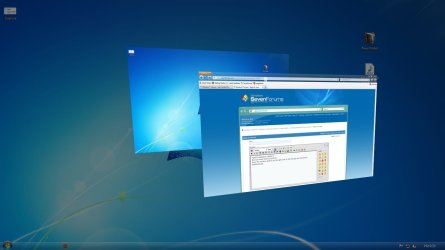
Press the windows button (at the right side of the left ctrl) and tab button simultaneously .... and see if you are getting something like this ....
Untitled.jpg

Let us know.
 

My Computer

Computer type
PC/Desktop
Computer Manufacturer/Model Number
Self Assembled
OS
Microsoft Windows 10 Pro Insider Preview 64-bit
CPU
Intel(R) Core(TM) i3-4130 CPU @ 3.40GHz
Motherboard
Gigabyte Technology Co., Ltd. B85M-D3H
Memory
Corsair Vengence 4GB x2 (8.00GB Dual-Channel DDR3 @ 798MHz)
Graphics Card(s)
2047MB GeForce GTS 450 (ZOTAC International)
Sound Card
Onboard (Realtek High Definition Audio)
Monitor(s) Displays
LG Flatron E2040T
Screen Resolution
1600x900
Hard Drives
Western Digital 1 TB
Seagate 500 GB
PSU
Corsair VS550
Case
Cooler Master K380
Cooling
Cooler Master Seidon 120V Plus
Keyboard
Logitech MK260r
Mouse
Logitech MK260r
Internet Speed
PMPL Broadband
Antivirus
Windows Defender + MBAM
Browser
Firefox
Other Info
Dell Studio 15" Laptop
One more question ... can you do the Win+tab 3d flip ?
Not sure what that is?

Using Windows Key + Tab from Keyboard, you can access Windows 7's 3D flip feature which shows all the currently active windows with a flipping 3D effect.
 
Last edited:

My Computer

Computer Manufacturer/Model Number
Compaq Presario CQ61
OS
Windows 7 Home Premium Service Pack 1 x64
CPU
Intel(R) Core(TM)2 Duo CPU T6400 @ 2.00GHz
Memory
3GB
Graphics Card(s)
NVIDIA GeForce G 103M; Codename: G98
Screen Resolution
1366x768
Using Windows Key + Tab from, you can access Windows 7's 3D flip feature which shows all the currently active windows with a flipping 3D effect.
.... and if not working .... it's a dwm related issue for sure. And we will need some higher expert to fix it .
 

My Computer

Computer type
PC/Desktop
Computer Manufacturer/Model Number
Self Assembled
OS
Microsoft Windows 10 Pro Insider Preview 64-bit
CPU
Intel(R) Core(TM) i3-4130 CPU @ 3.40GHz
Motherboard
Gigabyte Technology Co., Ltd. B85M-D3H
Memory
Corsair Vengence 4GB x2 (8.00GB Dual-Channel DDR3 @ 798MHz)
Graphics Card(s)
2047MB GeForce GTS 450 (ZOTAC International)
Sound Card
Onboard (Realtek High Definition Audio)
Monitor(s) Displays
LG Flatron E2040T
Screen Resolution
1600x900
Hard Drives
Western Digital 1 TB
Seagate 500 GB
PSU
Corsair VS550
Case
Cooler Master K380
Cooling
Cooler Master Seidon 120V Plus
Keyboard
Logitech MK260r
Mouse
Logitech MK260r
Internet Speed
PMPL Broadband
Antivirus
Windows Defender + MBAM
Browser
Firefox
Other Info
Dell Studio 15" Laptop
  • Like
Reactions: JMH
Using Windows Key + Tab from, you can access Windows 7's 3D flip feature which shows all the currently active windows with a flipping 3D effect.
.... and if not working .... it's a dwm related issue for sure. And we will need some higher expert to fix it .
Thank you, I will report back after 4. hopefully one of you is still around!! Shoud that option work no matter what, even if themes and all that jazz are diabled?

Thanks again
 

My Computer

Computer Manufacturer/Model Number
HP
OS
Windows 8 Pro
Memory
8gb
Monitor(s) Displays
23 inch Acer
Hello Mike,

Could you post a screenshot showing exactly what is grayed out please? :)
 

My Computer

Computer type
PC/Desktop
Computer Manufacturer/Model Number
Self built custom
OS
64-bit Windows 11 Pro for Workstations
CPU
Intel i7-8700K OC'd to 5 GHz
Motherboard
ASUS ROG Maximus XI Formula Z390
Memory
64 GB (4x16GB) G.SKILL TridentZ RGB DDR4 3600 MHz
Graphics Card(s)
ASUS ROG-STRIX-GTX1080TI-O11G-GAMING
Sound Card
Integrated
Monitor(s) Displays
2 x Samsung Odyssey G7 27"
Screen Resolution
2560x1440
Hard Drives
1TB Samsung 990 PRO M.2,
4TB Samsung 990 PRO PRO M.2,
TerraMaster F8 SSD Plus NAS
PSU
Seasonic Prime Titanium 850W
Case
Thermaltake Core P3
Cooling
Corsair Hydro H115i
Keyboard
Logitech wireless K800
Mouse
Logitech MX Master 4
Internet Speed
2 Gb/s Download and 100 Mb/s Upload
Antivirus
Malwarebyte Anti-Malware Premium
Browser
Google Chrome
Other Info
Logitech Z625 speaker system,
Logitech BRIO 4K Pro webcam,
HP Color LaserJet Pro MFP M477fdn,
APC SMART-UPS RT 1000 XL - SURT1000XLI,
Galaxy S23 Plus phone
Hello Mike,

Could you post a screenshot showing exactly what is grayed out please? :)
I am at work until 4pm eastern time. I will as soon as I walk in the door. I just hope the same helpful people are on here at that time!!
 

My Computer

Computer Manufacturer/Model Number
HP
OS
Windows 8 Pro
Memory
8gb
Monitor(s) Displays
23 inch Acer
Back
Top